

» Click to show Spoiler - click again to hide... «
AMD Ryzen /Threadripper OverClocking V1.1, big or small, share your results here...
AMD Ryzen /Threadripper OverClocking V1.1, big or small, share your results here...
|
|
 Jun 19 2020, 02:20 PM Jun 19 2020, 02:20 PM
Show posts by this member only | IPv6 | Post
#321
|
 
Senior Member
3,389 posts Joined: Mar 2007 From: KL  
|
I just ran another random stress test before i go back to work. » Click to show Spoiler - click again to hide... « |
|
|
|
|
|
Jun 19 2020, 03:02 PM
|
 
Elite
8,103 posts Joined: Jan 2003 From: Tanah Lot @ Dungun, Terengganu.
|
QUOTE(nrw @ Jun 19 2020, 02:17 PM) Tbh, if you buy at local stores, just check the corsair vengeance 3600 (maybe even 3200) kits. yup, tried few ven rgb & ven pro rgb, best mileage was ven pro 3466 cl16. did 4533 on b450i aorus (cl18 iirc, 1.5v) back then where agesa still not as forgiving as 1004. have yet to put my ven pro 3600 (18 19 19 rated) to sword... i read there are ver 4.32 also samsung b die but surely they are lowered binned sticks, can be found on lpx/ven pro rgb 3200 kits. The version number is visible through the backside of the sealed boxing. v4.31 would be b-dies.   p/s: ver 4.32 can be found even on 2666 rated kit  This post has been edited by ah_khoo: Jun 19 2020, 03:30 PM |
|
|
Jun 19 2020, 04:14 PM
Show posts by this member only | IPv6 | Post
#323
|

Senior Member
1,310 posts Joined: Jan 2003 
|
QUOTE(nrw @ Jun 19 2020, 01:13 PM) don't trust thaiphoon burner blindly. I've myself seen it more than once giving wrong info on dies. how can i get the true real information of my dies then?@k!nex fine kit, haven't tested stability? I have my doubts its really stable with this tRAS @21 with tCL and tRCDRD at 14 each. |
|
|
Jun 19 2020, 04:19 PM
|

Junior Member
398 posts Joined: Jul 2014
|
QUOTE(red-queen @ Jun 19 2020, 04:14 PM) how can i get the true real information of my dies then? for some manufacturers the sticker on the ram holds the information needed. as you can see with corsair and g.skill. 2 posts up you see v4.32, that's always samsung c die for example. the safest would be to look below the heatspreader/sticker, but that's not always easily possible and could also void warranty. if you have the sticks already the most convenient way you can confirm is by testing few values and voltage scaling characteristics to figure what dies are on them. but you probably know that anyways. This post has been edited by nrw: Jun 19 2020, 04:25 PM |
|
|
Jun 20 2020, 08:28 AM
|
|
Senior Member
1,310 posts Joined: Jan 2003
|
QUOTE(nrw @ Jun 19 2020, 04:19 PM) for some manufacturers the sticker on the ram holds the information needed. Thanks! Shitty dies i have for both ram and cpu. For g.skill what information should i look out for on the sticker? as you can see with corsair and g.skill. 2 posts up you see v4.32, that's always samsung c die for example. the safest would be to look below the heatspreader/sticker, but that's not always easily possible and could also void warranty. if you have the sticks already the most convenient way you can confirm is by testing few values and voltage scaling characteristics to figure what dies are on them. but you probably know that anyways. Adata D60G DDR4 3600 16GB (XPG) (8GB*2) CL14 for rm854. Hmmmm should i get it? This post has been edited by red-queen: Jun 20 2020, 08:39 AM |
|
|
Jun 20 2020, 08:46 AM
|
|
Junior Member
398 posts Joined: Jul 2014
|
QUOTE(red-queen @ Jun 20 2020, 08:28 AM) Thanks! Shitty dies i have for both ram and cpu. For g.skill what information should i look out for on the sticker? 1) G.Skill got that 042 code, most important are the 3 last digits. NNX Adata D60G DDR4 3600 16GB (XPG) (8GB*2) CL14 for rm854. Hmmmm should i get it? NN=10 = Samsung NN=21 = Hynix X=The Die 2) What's the other primaries and the voltage for the 3600 profile? To be frank... you use Zen2, just get a Micron E-Die Kit and adjusting timings yourself. U'll spend (less than) half of RM854 and will get almost same performance. This post has been edited by nrw: Jun 20 2020, 09:12 AM |
|
|
|
|
|
Jun 20 2020, 02:33 PM
Show posts by this member only | IPv6 | Post
#327
|
|
Senior Member
1,310 posts Joined: Jan 2003
|
QUOTE(nrw @ Jun 20 2020, 08:46 AM) 1) G.Skill got that 042 code, most important are the 3 last digits. NNX Thanks for the info! I tried tightening the timings on my ram again. And surprisingly i manage to get it done. This time i actually disabled xmp profile and manually set the voltages and timings according to dram calculator safe timings. NN=10 = Samsung NN=21 = Hynix X=The Die 2) What's the other primaries and the voltage for the 3600 profile? To be frank... you use Zen2, just get a Micron E-Die Kit and adjusting timings yourself. U'll spend (less than) half of RM854 and will get almost same performance. 3600mhz i manage to get 16-21-21-21-42 (aida test shows lower latency but lower throughput) 3733mhz i manage to get 18-22-22-22-42 (aida test shows higher latency but higher throughput) Which you reckon will have better gaming performance? And what rams are on micron edie? |
|
|
Jun 20 2020, 03:45 PM
|
|
Junior Member
398 posts Joined: Jul 2014
|
QUOTE(red-queen @ Jun 20 2020, 02:33 PM) Thanks for the info! I tried tightening the timings on my ram again. And surprisingly i manage to get it done. This time i actually disabled xmp profile and manually set the voltages and timings according to dram calculator safe timings. choose the one with lower voltage (3733). even though worse on paper you hardly gonna notice the difference.3600mhz i manage to get 16-21-21-21-42 (aida test shows lower latency but lower throughput) 3733mhz i manage to get 18-22-22-22-42 (aida test shows higher latency but higher throughput) Which you reckon will have better gaming performance? And what rams are on micron edie? e-dies hard to get as micron not selling the kits that are e-die exclusive in malaysia. you can get corsair sticks with them but that's a gamble. best is to order overseas. I can just add a kit to my next order if you want, just send me a pm. but seeing you managed to oc your ram, just keep it n go with that. I'll just drop some basic B-Die settings from my record here. I haven't had a kit that wouldn't run these on zen2. but actually seeing your numbers above... those might be c-dies » Click to show Spoiler - click again to hide... « This post has been edited by nrw: Jun 23 2020, 10:30 AM |
|
|
Jun 20 2020, 06:36 PM
Show posts by this member only | IPv6 | Post
#329
|

Junior Member
303 posts Joined: Sep 2006
|
Share my 3700x OC and benchmark results here for reference:
Purchased in May 2020. Sorry as I forgot to snap a photo of the manufacturing date which can be identified on the CPU heat spreader. More recent CPUs perform better in overclocking. Test setup: - Motherboard: Asus x570 ROG Strix-E Gaming - RAM: Crucial Ballistix 32GB (2x16 dual rank) at 3733MHz 16-19-16-36-58-1T - CPU cooler: Xigmatek Red Scorpion (10 year old cooler  ) )- Power supply: Thermaltake Toughpower Grand RGB 650W - Room temperature: 26.2°C 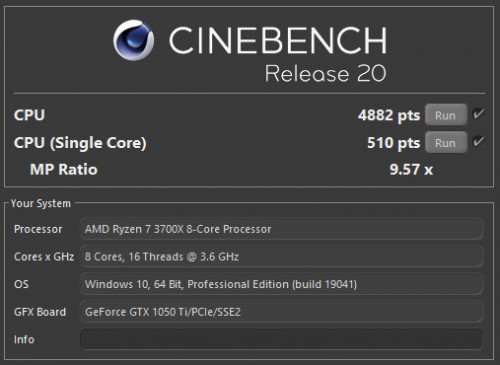 This is stock (auto) settings but CPU voltage offset at -0.0825v. Without this negative offset cinebench score usually about 4770 only. - CPU package power: 90.183w - CPU core power: 64.645w - CPU (Tctl/Tdie): 63.3°C max - Motherboard temp: 32°C - Max boost clock (all core): 4025MHz - Max boost clock (single core): 4400MHz  This is PBO + autoOC. CPU voltage also offset -0.0825v. Any further reduction in voltage will degrade performance Max all core boost: 4,175MHz Avg all core boost: 4,125MHz CPU package power: 120.160w CPU core power: 93.762w CPU (Tctl/Tdie): 71.8°C max Motherboard temp: 32°C 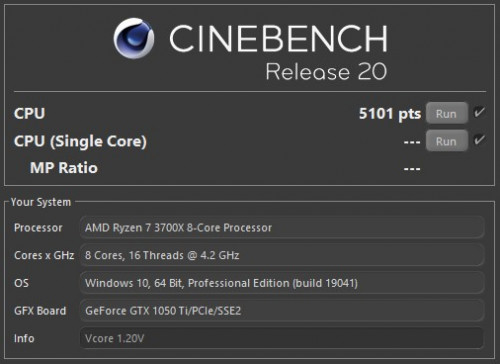 4.2GHz all core overclock. CPU voltage: 1.200V (1.16V at load) CPU package power: 91.926w CPU core power: 65.979w CPU (Tctl/Tdie): 64.0°C max Motherboard temp: 32°C OCCT tested stable (30min) This will be the most efficient clock setting because power consumption remained at 65w (core) similar like stock settings. However, single core performance will drop so I didn't even bother testing. 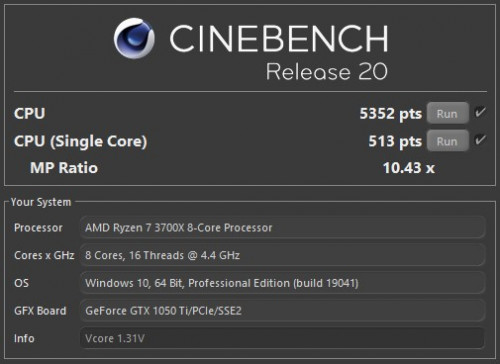 4.4 GHz all core OC. OCCT tested stable for 30min. CPU voltage: 1.31v (1.30v at load) Additional VRM settings: LLC level 4, Current capability 140%, Switching frequency 500Hz, Power phase control Extreme. CPU cooler fan speed: 1680rpm CPU package power: 121.712w CPU core power: 94.889w CPU (Tctl/Tdie): 74.9°C max Motherboard temp: 30°C (casing fans running at higher speed) As you can see, this setting has very similar power consumption figures as PBO. Therefore PBO is quite inefficient. 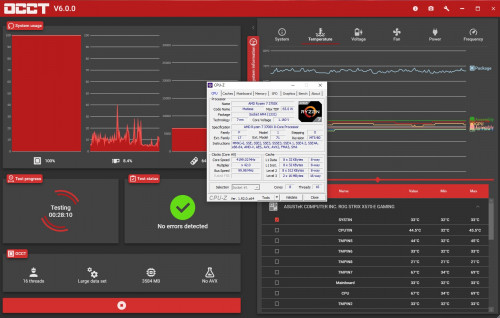 Stability testing with OCCT. I find OCCT is very sensitive in detecting instabilty. 30min of testing is equivalent to hours and hours of Prime95. |
|
|
Jun 20 2020, 06:54 PM
|
|
Junior Member
398 posts Joined: Jul 2014
|
QUOTE(steven789 @ Jun 20 2020, 06:36 PM) Stability testing with OCCT. I find OCCT is very sensitive in detecting instabilty. 30min of testing is equivalent to hours and hours of Prime95. that one is very debatable  You are being constrained by your cooler  But a nice chip, shows why they are releasing the XT series soon. Now you gotta play with voltages to get 1900 fclk working, you can't stop before that. This post has been edited by nrw: Jun 20 2020, 06:54 PM |
|
|
Jun 21 2020, 06:30 AM
|
|
Senior Member
1,310 posts Joined: Jan 2003
|
QUOTE(nrw @ Jun 20 2020, 03:45 PM) choose the one with lower voltage (3733). even though worse on paper you hardly gonna notice the difference. Thanks for sharing. Im gonna try to see if i can hit cl14 or cl15 @ 3600. If not try to hit cl16 @ 3733. But i reckon 3733 will give a slight edge due to higher infinity fabric. i think my ram are b-dies. just that its very low bin batch i suspect.e-dies hard to get as micron not selling the kits that are e-die exclusive in malaysia. you can get corsair sticks with them but that's a gamble. best is to order overseas. I can just add a kit to my next order if you want, just send me a pm. but seeing you managed to oc your ram, just keep it n go with that. I'll just drop some basic B-Die settings from my record here. I haven't had a kit that wouldn't run these on zen2. but actually seeing your numbers above... those might be c-dies B-Dies: 3733 memclk / 1866 fclk ProcODT 36.9 RTT 0/0/5 CADs 24-20-24-24 Vdimm 1.42V SOC 1.1V tCL 16 tRCDRD 17 tRCDWR 16 tRP 16 tRAS 32 tRC 38 tRRDS 4 tRRDL 6 tFAW 16 tWTRS 4 tWTRL 12 tWR 12 tRDRDSCL 3 tWRWRSCL 3 tRFC 288 tCWL 16 tRTP 10 tRDWR 10 tWRRD 4 tWRWRSC 1 tWRWRSD 7 tWRWRDD 7 tRDRDSC 1 tRDRDSD 5 tRDRDDD 5 tCKE 1 Im willing to try pushing vdimm up to 1.45v to try and achieve the above scenarios. Wish me luck! This post has been edited by red-queen: Jun 21 2020, 07:08 AM |
|
|
Jun 21 2020, 07:01 AM
|
|
Senior Member
1,310 posts Joined: Jan 2003
|
QUOTE(TerryZeroX @ Oct 11 2019, 04:36 PM) Awesome, thanks for the tip. It indeed is CJR, will try to push those timings and see. Hi Terry, how did you verify if your F4-3600C18D-16GTZN is CJR? i'm using the exact same ram as you, but thaiphoon burner shows samsung b-die. thanks. |
|
|
Jun 21 2020, 12:08 PM
|
|
Senior Member
1,310 posts Joined: Jan 2003
|
settled for 3600mhz @ 16-20-20-20-40 @ 1.4v
pc was able to boot at 3733mhz @ 17-22-22-22-42 @ 1.4v but was unstable as windows was stuttering. 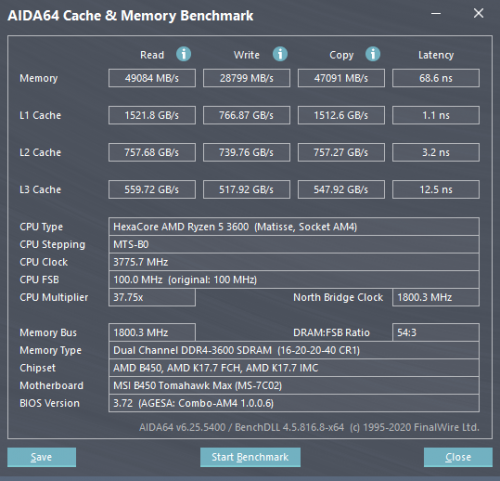 |
|
|
|
|
|
Jun 21 2020, 01:05 PM
Show posts by this member only | IPv6 | Post
#334
|
|
Senior Member
3,389 posts Joined: Mar 2007 From: KL
|
QUOTE(steven789 @ Jun 20 2020, 06:36 PM) Share my 3700x OC and benchmark results here for reference: Your 3700X is amazing. I cant even push mine on static overclock to be stable at all core 4.3Ghz at 1.35V vcore.Purchased in May 2020. Sorry as I forgot to snap a photo of the manufacturing date which can be identified on the CPU heat spreader. More recent CPUs perform better in overclocking. |
|
|
Jun 21 2020, 03:18 PM
|
|
Senior Member
1,310 posts Joined: Jan 2003
|
QUOTE(k!nex @ Jun 21 2020, 01:05 PM) Your 3700X is amazing. I cant even push mine on static overclock to be stable at all core 4.3Ghz at 1.35V vcore. Looks like he won the silicon lottery. Must be a 3700xt hehhehe |
|
|
Jun 21 2020, 03:53 PM
|

Junior Member
117 posts Joined: May 2009 From: KL,Cheras
|
Play around the RAM overclocking and i would like to ask some questions.
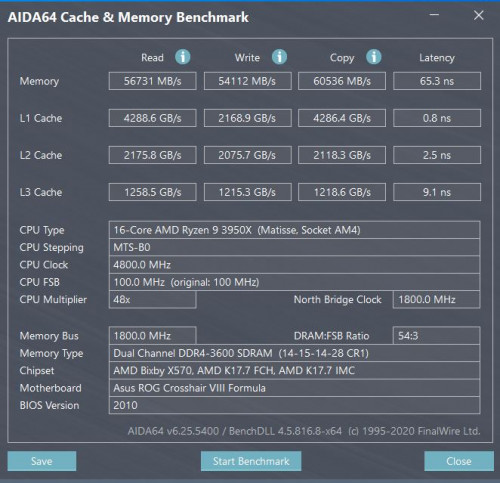 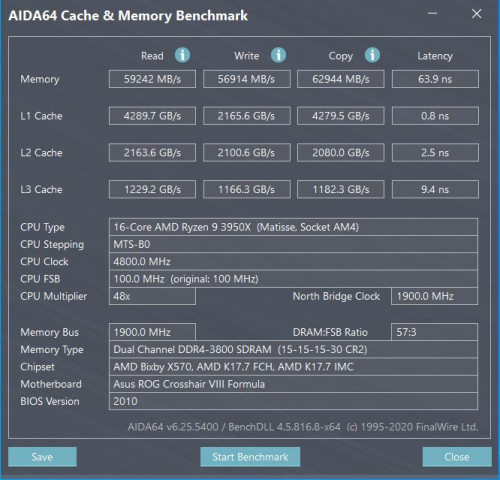 I follow calculator 1.7.3 settings for overclock 3600mhz and 3800 mhz which my ram is 4x8GB. 1. For 3600mhz i folo everything but i need to set "RTT_WR AUTO" to be able to pass memtestpro. If i set it to OFF it will not boot. 2. For 3800mhz folo everything but need to set 2T and RTT_WR AUTO to be stable. Would like to ask is the RTT_WR OFF recommend in the calculator must be folo ? I got no error from memtestpro after 1 night run with the RTT_WR AUTO. I'm curious why this off will make me can't boot into windows or error when i restart windows. Hope all sifu can help explain for me  This post has been edited by crazyfatt: Jun 21 2020, 03:54 PM |
|
|
Jun 21 2020, 04:19 PM
|
|
Junior Member
303 posts Joined: Sep 2006
|
QUOTE(red-queen @ Jun 21 2020, 03:18 PM) Looks like he won the silicon lottery. Must be a 3700xt hehhehe When I see other forum, all recent Ryzen 3000 series behave better. Some can even do it at lower voltage than mine. QUOTE(crazyfatt @ Jun 21 2020, 03:53 PM) Would like to ask is the RTT_WR OFF recommend in the calculator must be folo ? I got no error from memtestpro after 1 night run with the RTT_WR AUTO. I'm curious why this off will make me can't boot into windows or error when i restart windows. Hope all sifu can help explain for me I don't follow the calculator exactly. I have no idea what RTT_WR do but I'm sure DRAM calculator is not a Bible. You will notice each version of the calculator has different settings. |
|
|
Jun 21 2020, 04:34 PM
|
|
Junior Member
117 posts Joined: May 2009 From: KL,Cheras
|
is my OC ok ? i don't even know the aida benchmark meaning @@ base on ur experience ? is 3600 better or 3800 for gaming ?
|
|
|
Jun 21 2020, 06:27 PM
|
|
Junior Member
398 posts Joined: Jul 2014
|
QUOTE(crazyfatt @ Jun 21 2020, 03:53 PM) Play around the RAM overclocking and i would like to ask some questions. a) I follow calculator 1.7.3 settings for overclock 3600mhz and 3800 mhz which my ram is 4x8GB. 1. For 3600mhz i folo everything but i need to set "RTT_WR AUTO" to be able to pass memtestpro. If i set it to OFF it will not boot. 2. For 3800mhz folo everything but need to set 2T and RTT_WR AUTO to be stable. Would like to ask is the RTT_WR OFF recommend in the calculator must be folo ? I got no error from memtestpro after 1 night run with the RTT_WR AUTO. I'm curious why this off will make me can't boot into windows or error when i restart windows. Hope all sifu can help explain for me for 4 sticks rtt write should never be off. keep it on /3 (or 80 for those with other boards but same issue) don't blindly follow calc if you see or presume it works better otherwise. end of the day, it's just a database which spits out stuff based on your input. it doesn't exactly calculate anything specifically for your kit. b) keep running 3800MHz. If you can't get it to work on CL14 just run it on CL16 with lower voltage, GDM on, and 1T. You need to share more info (use zentimings for timings + list down used voltages, procodt, cad's, and rtt's @steven789 for a locally bought chip you got a nice one. I feel AMD keeps supplying local distributor with quite dated stock. Mostly I see 2019 production weeks in stores. My 8c does 4.325 with your voltages (I allow for more vdroop, its good to prevent undershoot after all.), so your's is quite a bit better (on manual OC at least). Especially taking cooling and temps into consideration. This post has been edited by nrw: Jun 21 2020, 06:30 PM |
|
|
Jun 21 2020, 06:44 PM
|
|
Junior Member
117 posts Joined: May 2009 From: KL,Cheras
|
QUOTE(nrw @ Jun 21 2020, 06:27 PM) a) i download ryzen timing but it can not open. Can u show me url to download ?for 4 sticks rtt write should never be off. keep it on /3 (or 80 for those with other boards but same issue) don't blindly follow calc if you see or presume it works better otherwise. end of the day, it's just a database which spits out stuff based on your input. it doesn't exactly calculate anything specifically for your kit. b) keep running 3800MHz. If you can't get it to work on CL14 just run it on CL16 with lower voltage, GDM on, and 1T. You need to share more info (use zentimings for timings + list down used voltages, procodt, cad's, and rtt's @steven789 for a locally bought chip you got a nice one. I feel AMD keeps supplying local distributor with quite dated stock. Mostly I see 2019 production weeks in stores. My 8c does 4.325 with your voltages (I allow for more vdroop, its good to prevent undershoot after all.), so your's is quite a bit better (on manual OC at least). Especially taking cooling and temps into consideration. |
| Change to: |  0.0182sec 0.0182sec
 0.62 0.62
 6 queries 6 queries
 GZIP Disabled GZIP Disabled
Time is now: 4th December 2025 - 04:18 AM |
 Quote
Quote