Welcome Guest ( Log In | Register )

30 Pages « < 13 14 15 16 17 > » Bottom

Outline · [ Standard ] · Linear+

 AMD Ryzen /Threadripper OverClocking V1.1, big or small, share your results here...

views
     
red-queen
post Jun 6 2020, 10:05 AM

Regular
******
Senior Member
1,310 posts

Joined: Jan 2003


QUOTE(nrw @ Jun 6 2020, 09:57 AM)
not necessarily. with both, EDC and all core OC you could be using too much voltage during heavy stress loads.

I personally do it like this. I test how much voltage the cpu is using on stock for small FFTs @Prime95.
For example that's 1.25V (after vdroop) for my 8 core chip. (its slightly different for every chip)

So if I set EDC to 1 I'd be getting ~1.28V and with an all core overclock I'd be seeing whatever voltage I set - vdroop (depending on LLC) which would in most instances still be higher than 1.25V.

So unless you get to know how much of a safety buffer AMD applies to their voltage protection algorithms noone can possibly tell how much additional to 1.25 in this instance is save under those max load states.
*
I tested both stock and edc 1 and the voltage during load is pretty much the same. Surprisingly all edc, tdc, and ppt parameters are well within the 65w tdp specs. Hence i dunno what kinda sorcery is this edc 1 doing. Hahahahha

I actually set my llc to the lowest setting to allow more vdroop. My multicore scores went up due to the slightly lower voltages at load.

But i do agreee with you. Whether this technique is safe or not or will cause degradation, nobody can give a definite answer. But since im already at the bottom of the silicon lottery. I couldnt care less hehehhe. Even more reason to get a new proc if anything fails.

nrw
post Jun 6 2020, 10:23 AM

Casual
***
Junior Member
398 posts

Joined: Jul 2014


QUOTE(red-queen @ Jun 6 2020, 10:05 AM)
I tested both stock and edc 1 and the voltage during load is pretty much the same. Surprisingly all edc, tdc, and ppt parameters are well within the 65w tdp specs. Hence i dunno what kinda sorcery is this edc 1 doing. Hahahahha

I actually set my llc to the lowest setting to allow more vdroop. My multicore scores went up due to the slightly lower voltages at load.

But i do agreee with you. Whether this technique is safe or not or will cause degradation, nobody can give a definite answer. But since im already at the bottom of the silicon lottery. I couldnt care less hehehhe. Even more reason to get a new proc if anything fails.
*
nod.gif
Ye for me EDC is behaving differently then on the boards I tested it with (C7H, X570 Unify) but not really much into figuring why since I am not using it.
That's why others should at least try it before, at least.

Using LLC to low(est) is very good. I think buildzoid had a pretty nice video on this (https://youtu.be/9pa9-wjKQp8)

Ye as long as you don't plan to sell the chip without mentioning that should be fine laugh.gif
After getting such a lemon u'd deserve a better one anyways thumbup.gif

This post has been edited by nrw: Jun 6 2020, 10:24 AM
TSah_khoo
post Jun 8 2020, 09:06 PM

- No Action Talk Only -
Group Icon
Elite
8,103 posts

Joined: Jan 2003
From: Tanah Lot @ Dungun, Terengganu.


QUOTE(owikh84 @ May 23 2020, 07:36 AM)
FCLK 1900 synced?
*
yup bro, it's a shame couldnt keep d chip for long enuf... sad.gif

QUOTE(nrw @ May 28 2020, 12:19 AM)
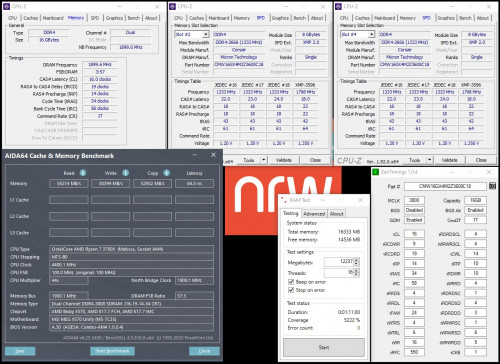
"The last dance" with Zen2 at RAM OC as I've got a 'new' 2x8GB Micron E-Die Kit.

3800Mhz | DRAM 1.40V | VSoC 1.05V | VDDG 0.975V | ProcODT 32Ω | RTT's 0-0-5

user posted image
*
very2 nice latency there sir... d stability making it even sweeter... notworthy.gif


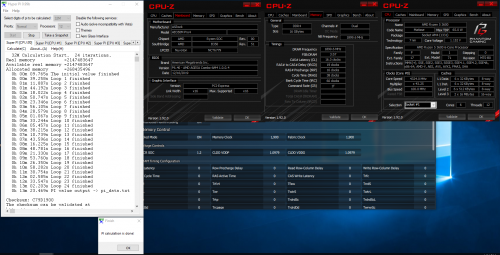
had some fun with ancient am4 board. laugh.gif

user posted image
crazyfatt
post Jun 9 2020, 01:32 AM

Getting Started
**
Junior Member
117 posts

Joined: May 2009
From: KL,Cheras


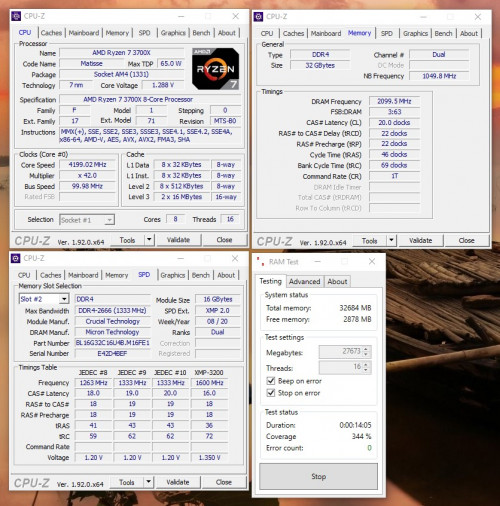
user posted image
It seems something wrong on my previous system.
I did fresh install windows and install drivers.
Power plan i choose ''Ámd Performance". The benchmark seems ok.
disable PBO. C-state AUTO. windows is latest.
SUSkevin23
post Jun 9 2020, 03:29 PM

Regular
******
Senior Member
1,803 posts

Joined: Oct 2007


Hi guys, what is the most stable overclock settings for R5 3600?

And do i just Change the settings in bios?

Thanks
XiuKeong
post Jun 10 2020, 11:55 AM

[OMG] Sweetie™
*******
Senior Member
9,436 posts

Joined: Oct 2006
From: Oz


QUOTE(kevin23 @ Jun 9 2020, 03:29 PM)
Hi guys, what is the most stable overclock settings for R5 3600?

And do i just Change the settings in bios? 

Thanks
*
Each chip is different. You need to trial and error to know what's the limit for your chip.
nrw
post Jun 10 2020, 01:53 PM

Casual
***
Junior Member
398 posts

Joined: Jul 2014


QUOTE(crazyfatt @ Jun 9 2020, 01:32 AM)
user posted image
It seems something wrong on my previous system.
I did fresh install windows and install drivers.
Power plan i choose ''Ámd Performance". The benchmark seems ok.
disable PBO. C-state AUTO. windows is latest.
*
yep, SC seems about right now.
fingers off any software that can mess with bios settings/config, or powerplans then biggrin.gif

TSah_khoo
post Jun 11 2020, 02:58 PM

- No Action Talk Only -
Group Icon
Elite
8,103 posts

Joined: Jan 2003
From: Tanah Lot @ Dungun, Terengganu.


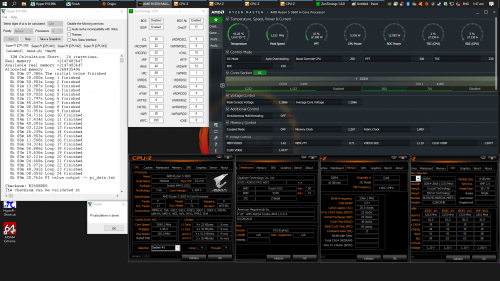
pretty much what i can squeeze outta d combo... it.s a shame loosening timing not really help with higher frequency but 1GHz oc (albeit efficiency is not there) is quite fun... tongue.gif

user posted image
nrw
post Jun 12 2020, 04:41 PM

Casual
***
Junior Member
398 posts

Joined: Jul 2014


If you told any1 that this b350 board would be able to run ram @4.6GHz during Zen or even Zen+ times they would have sent you for psychological check up tongue.gif
If you got the time try dropping SOC VDDG and VDDP. Too high can also get those sticks to run really unstable. Even at these frequencies.

This post has been edited by nrw: Jun 12 2020, 04:53 PM
TSah_khoo
post Jun 12 2020, 05:12 PM

- No Action Talk Only -
Group Icon
Elite
8,103 posts

Joined: Jan 2003
From: Tanah Lot @ Dungun, Terengganu.


QUOTE(nrw @ Jun 12 2020, 04:41 PM)
If you told any1 that this b350 board would be able to run ram @4.6GHz during Zen or even Zen+ times they would have sent you for psychological check up  tongue.gif
If you got the time try dropping SOC VDDG and VDDP. Too high can also get those sticks to run really unstable. Even at these frequencies.
*
lol, exactly... apart from d improved agesa, asrock deserved some credits of making d newer microcodes tick. there are other more high end boards with same agesa but cant oc ram for their lives. tongue.gif

will try to reduce soc vddg + d vddp. i just leave 'em to auto. vdimm @ 1.40v (max can go) + vsoc @ 1.075v. wink.gif

This post has been edited by ah_khoo: Jun 12 2020, 05:16 PM
nrw
post Jun 12 2020, 05:27 PM

Casual
***
Junior Member
398 posts

Joined: Jul 2014


it's Micron E-dies I suppose?
Then go with
VSoC 1.05-1.075V max 1.1V
VDDG 0.95-0.975V
VDDP 0.855-0.95V
TSah_khoo
post Jun 12 2020, 05:38 PM

- No Action Talk Only -
Group Icon
Elite
8,103 posts

Joined: Jan 2003
From: Tanah Lot @ Dungun, Terengganu.


QUOTE(nrw @ Jun 12 2020, 05:27 PM)
it's Micron E-dies I suppose?
Then go with
VSoC 1.05-1.075V max 1.1V
VDDG 0.95-0.975V
VDDP 0.855-0.95V
*
Tup, those are micr9n e die sticks. Thx for d tips sir. I wish there is still tiny bit of room for improvement - frequency wise. 4600 not 100% bootable all times. 4533 is more solid. smile.gif

last attempt on d e die sticks...

user posted image

This post has been edited by ah_khoo: Jun 14 2020, 01:30 PM
steven789
post Jun 16 2020, 09:05 AM

Casual
***
Junior Member
303 posts

Joined: Sep 2006


Just got my Crucial Ballistix 2x16GB 3200MHz CL16-18-18-36 (BL2K16G32C16U4B) for RM860 (great price?). Bought them from Amazon US. Love these micron E dies.

user posted image
Max frequency i can achieve is 4200MHz @1.38V. Have yet try higher voltage. blush.gif

user posted image
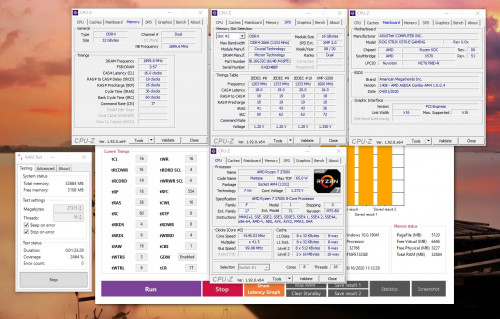
This is the timing i get for 3800MHz 1:1 fclk based on DRAM calculator. DRAM Voltage also at 1.38V, SOC voltage at 1.09V.

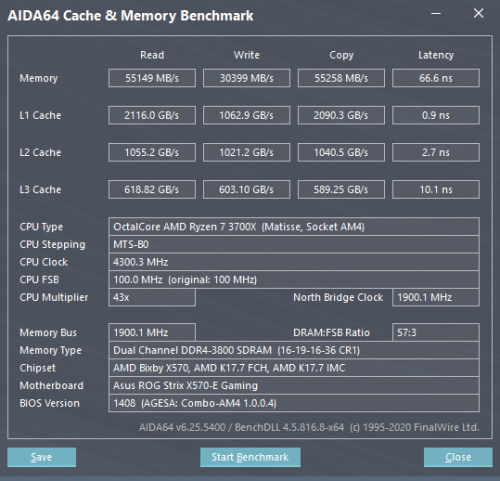
user posted image
Benchmark results with above settings and CPU at stock clock.


This post has been edited by steven789: Jun 16 2020, 11:22 AM
crazyfatt
post Jun 17 2020, 12:08 AM

Getting Started
**
Junior Member
117 posts

Joined: May 2009
From: KL,Cheras


any sifu overclock 4x8gb ? i tried the calculator safe setting but fail boot .... am i set the calculator wrong ?
steven789
post Jun 17 2020, 08:45 AM

Casual
***
Junior Member
303 posts

Joined: Sep 2006


QUOTE(crazyfatt @ Jun 17 2020, 12:08 AM)
any sifu overclock 4x8gb ? i tried the calculator safe setting but fail boot .... am i set the calculator wrong ?
*
Can give us more info like which motherboard, which RAM model, the timing and frequency you attempted?
crazyfatt
post Jun 17 2020, 11:07 PM

Getting Started
**
Junior Member
117 posts

Joined: May 2009
From: KL,Cheras


QUOTE(steven789 @ Jun 17 2020, 08:45 AM)
Can give us more info like which motherboard, which RAM model, the timing and frequency you attempted?
*
I'm using x570 asus formula
Ram is this https://www.gskill.com/product/165/326/1562...35V32GB-(4x8GB)
i using the 1.7.3 calculator and folo exactly all the setting but can't boot.
Processor no OC. PBO enable. I'm wondering what makes me can''t OC this ram bangwall.gif

Trying the "calculate safe" 3600mhz. I'm so sad now...hoep can get help from all sifu
red-queen
post Jun 17 2020, 11:23 PM

Regular
******
Senior Member
1,310 posts

Joined: Jan 2003


QUOTE(crazyfatt @ Jun 17 2020, 11:07 PM)
I'm using x570 asus formula
Ram is this https://www.gskill.com/product/165/326/1562...35V32GB-(4x8GB)
i using the 1.7.3 calculator and folo exactly all the setting but can't boot.
Processor no OC. PBO enable. I'm wondering what makes me can''t OC  this ram  bangwall.gif

Trying the "calculate safe" 3600mhz. I'm so sad now...hoep can get help from all sifu
*
Did u use thaiphoon burner to check ur ram details?
crazyfatt
post Jun 18 2020, 12:04 AM

Getting Started
**
Junior Member
117 posts

Joined: May 2009
From: KL,Cheras


QUOTE(red-queen @ Jun 17 2020, 11:23 PM)
Did u use thaiphoon burner to check ur ram details?
*
yes i did and import to calculate. I just tried with DOCP and i go change the CL, trcd, trp, tras. it’s able to boot up now...seems some numbers is wrong in calculator

Attached Image

This post has been edited by crazyfatt: Jun 18 2020, 12:05 AM
TSah_khoo
post Jun 18 2020, 12:15 AM

- No Action Talk Only -
Group Icon
Elite
8,103 posts

Joined: Jan 2003
From: Tanah Lot @ Dungun, Terengganu.


that's bdie pretty much. try 16 17 16 with below 1.4v & see how it go? runnin my bdie @ 3800 @ 16 17 16 with 1.36v w/o much issue. smile.gif
steven789
post Jun 18 2020, 12:58 AM

Casual
***
Junior Member
303 posts

Joined: Sep 2006


QUOTE(crazyfatt @ Jun 18 2020, 12:04 AM)
yes i did and import to calculate. I just tried with DOCP and i go change the CL, trcd, trp, tras. it’s able to boot up now...seems some numbers is wrong in calculator

Attached Image
*
That looks like a good b-die so congrats.
But probably tRC can still tightens up a bit to 58 or 60.

Anyway, the import function in DRAM calculator may not function correctly so I usually only specify the die, rank, chipset and the speed I want to run. Then press calculate fast and safe to compare the difference. Overclocking RAM needs a lot of patience and the DRAM calculator results are just a reference.

Also, make sure you use the latest version of DRAM calculator.

30 Pages « < 13 14 15 16 17 > » Top
 

Change to:
| Lo-Fi Version
0.0171sec    0.27    6 queries    GZIP Disabled
Time is now: 3rd December 2025 - 10:30 AM