Welcome Guest ( Log In | Register )

91 Pages « < 87 88 89 90 91 >Bottom

Outline · [ Standard ] · Linear+

 How to buy cheap ASUS RT-AC68U router, come have a look

views
     
vkashin
post Jun 1 2020, 03:16 PM

Casual
***
Junior Member
332 posts

Joined: Dec 2005


QUOTE(kk131 @ Jun 1 2020, 02:11 PM)
It has the TM Unifi IPTV settings in the setup menu so will work. If you flash Merlin's FW you can get a lot more functionality - ad-blocking, additional malware/bad host blocking (skynet), etc.
*
Cool. Thanks
Tempted to buy, awaiting seller reply on whether they're able to ship direct to Msia.
Using DIR-825+ currently, want to upgrade since it feels like it is unable to fully utilize unifi 800Mbps
One benefit is that in the future can add another unit for AiMesh function
kk131
post Jun 1 2020, 04:35 PM

On my way
****
Junior Member
566 posts

Joined: Jun 2005
From: Somewhere over the rainbow


QUOTE(vkashin @ Jun 1 2020, 03:16 PM)
Cool. Thanks
Tempted to buy, awaiting seller reply on whether they're able to ship direct to Msia.
Using DIR-825+ currently, want to upgrade since it feels like it is unable to fully utilize unifi 800Mbps
One benefit is that in the future can add another unit for AiMesh function
*
I can't read Chines but in the screenshot you posted the title lists AC86U & AC68U but the top selection boxes are all AC86U as I read. Make sure you're buying a AC86U (not an AC68U).
sHawTY
post Jun 1 2020, 04:51 PM

Frequent Reporter
********
All Stars
14,909 posts

Joined: Jul 2005

QUOTE(vkashin @ Jun 1 2020, 10:39 AM)
just wondering if this model would work with UniFi out of the box?
It will work out of the box
But not adviseable for a few reasons:
1. Warranty nightmare. ASUS Malaysia does not provide support for units bought from overseas. If you buy from China, you will have to send it back to China
2. Smaller WiFi coverage. China has set a limitation on their wireless signal to be weaker than Malaysia. This is not something that you can modify with the RT-AC86U. With the older version of RT-AC68U yes you can change the region but not on ASUS newer routers.
Dickong
post Jun 1 2020, 05:54 PM

Regular
******
Senior Member
1,689 posts

Joined: Jan 2003
Is it worthwhile to send back to china to claim my router or just buy a new one n anyone here know roughly how much is the freight fees for sending to china.tq
vkashin
post Jun 1 2020, 06:58 PM

Casual
***
Junior Member
332 posts

Joined: Dec 2005


QUOTE(kk131 @ Jun 1 2020, 04:35 PM)
I can't read Chines but in the screenshot you posted the title lists AC86U & AC68U but the top selection boxes are all AC86U as I read. Make sure you're buying a AC86U (not an AC68U).
*
alright noted. seems like the listing is for AC86U, with upgrade to AC88U antenna.

QUOTE(sHawTY @ Jun 1 2020, 04:51 PM)
It will work out of the box
But not adviseable for a few reasons:
1. Warranty nightmare. ASUS Malaysia does not provide support for units bought from overseas. If you buy from China, you will have to send it back to China
2. Smaller WiFi coverage. China has set a limitation on their wireless signal to be weaker than Malaysia. This is not something that you can modify with the RT-AC86U. With the older version of RT-AC68U yes you can change the region but not on ASUS newer routers.
*
i see. so far has there been high failure rate for AC86U? considering the savings, really tempted to just pull the trigger
also, reading the buyers' reviews, seems like this link is for US distribution set, therefore has wider signal coverage than Chinese version.

lyc1982
post Jun 4 2020, 03:30 PM

ExpectNoMercy
*******
Senior Member
2,329 posts

Joined: Jun 2015
QUOTE(sHawTY @ Jun 1 2020, 04:51 PM)
It will work out of the box
But not adviseable for a few reasons:
1. Warranty nightmare. ASUS Malaysia does not provide support for units bought from overseas. If you buy from China, you will have to send it back to China
2. Smaller WiFi coverage. China has set a limitation on their wireless signal to be weaker than Malaysia. This is not something that you can modify with the RT-AC86U. With the older version of RT-AC68U yes you can change the region but not on ASUS newer routers.
*
arghs...

didn't realize bout the smaller wifi coverage on china set....
kwai_83
post Jun 6 2020, 06:12 PM

Casual
***
Junior Member
464 posts

Joined: Dec 2004
QUOTE(vkashin @ Jun 1 2020, 06:58 PM)
alright noted. seems like the listing is for AC86U, with upgrade to AC88U antenna.
i see. so far has there been high failure rate for AC86U? considering the savings, really tempted to just pull the trigger
also, reading the buyers' reviews, seems like this link is for US distribution set, therefore has wider signal coverage than Chinese version.
*
Same my unit second time fail after RMA back from china(2019 version).yesterday suddenly no respond at the router dead .Ac adapter all is working fine..Planing change another model better wab maybe go for ax3000 buy local any body facing same problem with me?
prokiller1199
post Jun 2 2021, 03:56 AM

Hi there.
*****
Senior Member
966 posts

Joined: Apr 2016


QUOTE(junclj @ Oct 21 2018, 05:31 PM)
hi guys, I got good some good thing to share with you all guys for who bought Asus router from China.
I was found a method to switch this China router to Asia Pacific version.
I was noticed that this router only got 2 languages only. Either English or Simplfied Chinese. So I guess I need to do something tricks to change the region of this router firmware to Asia version.
**Unfortunately, the region will restore back to China region after reboot. So you need to redo this method again.

First of all, you need to login into your router and switch on telnet. Go to administration > system, then switch telnet to "Yes"
[attachmentid=10078627]

Then download and install Putty here
https://www.chiark.greenend.org.uk/~sgtatha...tty/latest.html

Start Putty, then login 192.168.1.1 as telnet mode and leave port as 23
[attachmentid=10078630]

Now login your router with your router username and admin password [your router password]. You will see the screen as below:
[attachmentid=10078641]

Now type this,
nvram set territory_code=AP/01
nvram=commit

[attachmentid=10078642]

Now login your router through browser and check for the change
Some of the proof:
as you know, China was blocked Google play.
[attachmentid=10078648]

before that, only got English and Chinese Simplified
[attachmentid=10078649]

The wifi region is no longer showing China as default region.
[attachmentid=10078650]

*
does the region revert back after reboot?
junclj
post Jun 3 2021, 12:04 AM

Look at all my stars!!
*******
Senior Member
2,348 posts

Joined: Apr 2008


QUOTE(prokiller1199 @ Jun 2 2021, 03:56 AM)
does the region revert back after reboot?
*
yes, it will revert because the region was hardware locked.
kk131
post Jun 3 2021, 10:50 AM

On my way
****
Junior Member
566 posts

Joined: Jun 2005
From: Somewhere over the rainbow


QUOTE(prokiller1199 @ Jun 2 2021, 03:56 AM)
does the region revert back after reboot?
*
You can edit your cfe here to make it region free - https://cfeditor.feng.si
hongli.11.hongli
post Jun 3 2021, 04:43 PM

Getting Started
**
Junior Member
54 posts

Joined: Sep 2017
RT-AC86U RM545 on 6.6 Lazada

This is good deal!!!!! No need to ship from China anymore.

This post has been edited by hongli.11.hongli: Jun 3 2021, 04:43 PM
prokiller1199
post Jun 3 2021, 04:50 PM

Hi there.
*****
Senior Member
966 posts

Joined: Apr 2016


QUOTE(kk131 @ Jun 3 2021, 10:50 AM)
You can edit your cfe here to make it region free - https://cfeditor.feng.si
*
86u cfe can edit there?
prokiller1199
post Jun 3 2021, 04:58 PM

Hi there.
*****
Senior Member
966 posts

Joined: Apr 2016


QUOTE(junclj @ Jun 3 2021, 12:04 AM)
yes, it will revert because the region was hardware locked.
*
Okay thanks.
kk131
post Jun 3 2021, 05:41 PM

On my way
****
Junior Member
566 posts

Joined: Jun 2005
From: Somewhere over the rainbow


QUOTE(prokiller1199 @ Jun 3 2021, 04:50 PM)
86u cfe can edit there?
*
No the AC86U CFE is encrypted.
prokiller1199
post Jun 3 2021, 05:44 PM

Hi there.
*****
Senior Member
966 posts

Joined: Apr 2016


QUOTE(kk131 @ Jun 3 2021, 05:41 PM)
No the AC86U CFE is encrypted.
*
yaya that's why
prokiller1199
post Jun 3 2021, 05:44 PM

Hi there.
*****
Senior Member
966 posts

Joined: Apr 2016


deleted

This post has been edited by prokiller1199: Jun 3 2021, 05:45 PM
sgpdsmss
post Sep 26 2021, 04:54 PM

Regular
******
Senior Member
1,704 posts

Joined: Jan 2005
hi,

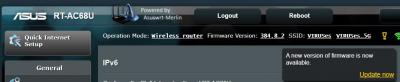
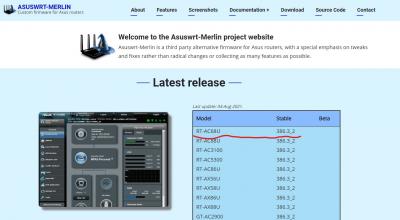
currently on 384.8_2 , i wish to update to latest version, 386.3_2
so just click router page "update now" ?
or need other ways?

does 386.3_2 support mesh?

thanks..


Attached thumbnail(s)
Attached Image Attached Image
kk131
post Sep 26 2021, 05:26 PM

On my way
****
Junior Member
566 posts

Joined: Jun 2005
From: Somewhere over the rainbow


QUOTE(sgpdsmss @ Sep 26 2021, 04:54 PM)
hi,

currently on 384.8_2 , i wish to update to latest version, 386.3_2
so just click  router page "update now" ?
or need other ways?

does 386.3_2 support mesh?

thanks..
*
Merlin FW - you have to download the zip file, unzip and flash the trx file using the web interface (make sure you download the correct FW). If it doesn't flash at first attempt, try rebooting the router and then flash again. After flashing it may take some time before you can access the web interface.
sgpdsmss
post Sep 26 2021, 08:54 PM

Regular
******
Senior Member
1,704 posts

Joined: Jan 2005
QUOTE(kk131 @ Sep 26 2021, 05:26 PM)
Merlin FW - you have to download the zip file, unzip and flash the trx file using the web interface (make sure you download the correct FW). If it doesn't flash at first attempt, try rebooting the router and then flash again. After flashing it may take some time before you can access the web interface.
*
can give like for correct fw?
any link can show step by step how to upgrade fw?

thanks ..
kk131
post Sep 27 2021, 07:22 AM

On my way
****
Junior Member
566 posts

Joined: Jun 2005
From: Somewhere over the rainbow


QUOTE(sgpdsmss @ Sep 26 2021, 08:54 PM)
can give like for correct fw?
any link can show step by step how to upgrade fw?

thanks ..
*
This gives the links https://www.snbforums.com/threads/about-asu...s-routers.7846/

The latest firmware for AC68U https://sourceforge.net/projects/asuswrt-me..._2.zip/download

Download the zip file, unzip, read 'readme - merlin.txt'. These are the flashing instructions:

CODE
Installation
------------
Simply flash it like any regular update.  You should not need to
reset to factory defaults (see note below for exceptions).
You can revert back to an original Asus firmware at any time just
by flashing a firmware downloaded from Asus's website.

If the firmware upgrade fails, try rebooting your router to free
up sufficient memory, without any USB disk plugged in,
then try flashing it again.

NOTE: resetting to factory default after flashing is
strongly recommended for the following cases:

- Updating from a firmware version that is more than 3 releases older
- Switching from a Tomato/DD-WRT/OpenWRT firmware

If you run into any issue after an upgrade and you haven't done so,
try doing a factory default reset as well.

Always read the changelog, as mandatory resets will be mentionned
there when they are necessary.

In all of these cases, do NOT load a saved copy of your settings!
This would be the same thing as NOT resetting at all, as you will
simply re-enter any invalid setting you wanted to get rid of.  Make
sure to create a new backup of your settings after reconfiguring.


The firmware file is RT-AC68U_386.3_2.trx, in your router web interface - Administration - Firmware Upgrade - Manual Firmware Update: click 'upload' and select the file.

91 Pages « < 87 88 89 90 91 >Top
 

Change to:
| Lo-Fi Version
0.0411sec    0.39    6 queries    GZIP Disabled
Time is now: 6th December 2025 - 05:43 AM