Outline ·
[ Standard ] ·
Linear+
How to buy cheap ASUS RT-AC68U router, come have a look
|
kk131
|
 Jan 15 2020, 09:53 AM Jan 15 2020, 09:53 AM
|

|
QUOTE(ben3003 @ Jan 15 2020, 07:35 AM) guys i have updated my tmobile version to ac68u merlin latest firmware, but i cant see the client connected to my router via the webpage. i can see use phone apps but all is offline, anyone know how to on this? after i flash i did do factory reset How did you do a factory reset? Try: ** Power off the router ** Hold the WPS Button ** Power on the router and keep the WPS pressed for 10-15 seconds ** Reboot and wait 5 minutes |
|
|
|
|
|
sHawTY
|
Jan 15 2020, 10:04 AM
|
|
|
QUOTE(lyc1982 @ Dec 16 2019, 11:04 AM) i can only get 300Mbps on IP 11 pro max Set the 5GHz to run at 80MHz then you will be able to get full 500Mb/s I can get 600Mb/s on my Pocophone F1 + ASUS GT-AC5300 (UniFi Turbo 800Mb/s), iPhone 11 Max should be able to do better than Poco F1 1. Set the Wireless Mode to N/AC mixed 2. Set the Channel bandwidth to 80MHz 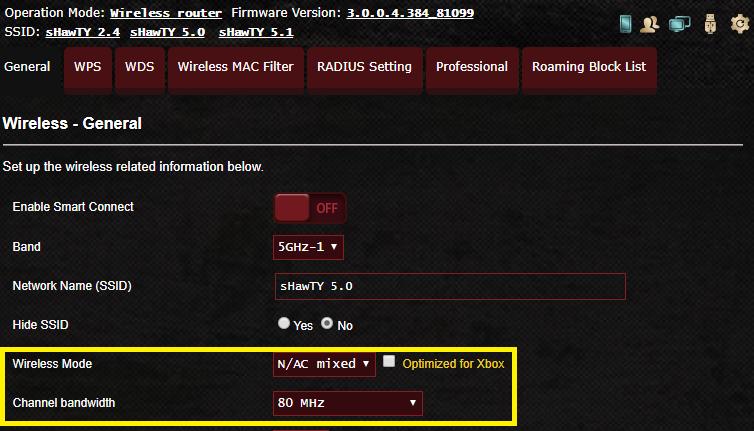 |
|
|
|
|
|
ben3003
|
Jan 15 2020, 09:19 PM
|
|
|
QUOTE(kk131 @ Jan 15 2020, 09:53 AM) How did you do a factory reset? Try: ** Power off the router ** Hold the WPS Button ** Power on the router and keep the WPS pressed for 10-15 seconds ** Reboot and wait 5 minutes Via the webpage. Ok will try when less ppl use. |
|
|
|
|
|
lyc1982
|
Jan 15 2020, 10:42 PM
|
|
|
QUOTE(sHawTY @ Jan 15 2020, 10:04 AM) Set the 5GHz to run at 80MHz then you will be able to get full 500Mb/s I can get 600Mb/s on my Pocophone F1 + ASUS GT-AC5300 (UniFi Turbo 800Mb/s), iPhone 11 Max should be able to do better than Poco F1 1. Set the Wireless Mode to N/AC mixed 2. Set the Channel bandwidth to 80MHz i already did 1 and 2 since day 1...still same result anyways...the tm technician came and did speedtest...it’s 500Mbps alright but i still baffled how come iphone 11 pro max can’t achieve 500Mbps even though minimal devices are connected to wifi (my house has remote cctv) with connection to cctv and iphone 11 pro max only.. |
|
|
|
|
|
SUSCrimsonKing
|
Jan 16 2020, 06:22 AM
|
Getting Started

|
QUOTE(lyc1982 @ Jan 15 2020, 10:42 PM) i already did 1 and 2 since day 1...still same result anyways...the tm technician came and did speedtest...it’s 500Mbps alright but i still baffled how come iphone 11 pro max can’t achieve 500Mbps even though minimal devices are connected to wifi (my house has remote cctv) with connection to cctv and iphone 11 pro max only.. Did the TM technician use your Asus RT-AC86U or his own router to test the speed? |
|
|
|
|
|
kk131
|
Jan 16 2020, 07:33 AM
|
|
|
QUOTE(ben3003 @ Jan 15 2020, 09:19 PM) Via the webpage. Ok will try when less ppl use. I'm also running a 'converted' TM-AC1900 with Merlin's latest 384.15 firmware, I don't have the problem you're describing. I did have the 'not connected' problem with 384.14, that was due to the flag in CFE (reflashing with the AiMesh enabled CFE solved the problem. |
|
|
|
|
|
ben3003
|
Jan 16 2020, 11:18 AM
|
|
|
QUOTE(kk131 @ Jan 16 2020, 07:33 AM) I'm also running a 'converted' TM-AC1900 with Merlin's latest 384.15 firmware, I don't have the problem you're describing. I did have the 'not connected' problem with 384.14, that was due to the flag in CFE (reflashing with the AiMesh enabled CFE solved the problem. wat is CFE? I tried to do factory reset, but the reset is back to the same firmware. i saw my CFE now is ASUS 1.0.2.1.. is this okay? and how come urs is 384.15.. i saw merlin website latest is 384.14 lol tried the press wps one still kenot.. now i am on 384.14_2 firmware asuswrt merlin.. This post has been edited by ben3003: Jan 16 2020, 11:31 AM |
|
|
|
|
|
kk131
|
Jan 16 2020, 12:03 PM
|
|
|
QUOTE(ben3003 @ Jan 16 2020, 11:18 AM) wat is CFE? I tried to do factory reset, but the reset is back to the same firmware. i saw my CFE now is ASUS 1.0.2.1.. is this okay? and how come urs is 384.15.. i saw merlin website latest is 384.14 lol tried the press wps one still kenot.. now i am on 384.14_2 firmware asuswrt merlin.. Factory reset clears all the settings stored in the router ready for a re-configuration, sometimes when you upgrade the firmware the settings become corrupted, it doesn't delete the firmware (otherwise yoour router wouldn't boot). Recommended CFE version is 1.0.2.0 AiMesh - here's a guide Lazymocha. CFE is similar to PC BIOS it contains information that the router reads for configuration. Seems like when you bought your router, it had already been converted to an AC68U? Merlin 384.15 alpha thread is here.This post has been edited by kk131: Jan 16 2020, 12:15 PM |
|
|
|
|
|
ben3003
|
Jan 16 2020, 12:04 PM
|
|
|
QUOTE(kk131 @ Jan 16 2020, 12:03 PM) Factory reset clears all the settings stored in the router ready for a re-configuration, sometimes when you upgrade the firmware the settings become corrupted, it doesn't delete the firmware (otherwise yoour router wouldn't boot). Recommended CFE version is 1.0.2.0 AiMesh - here's a guide Lazymocha. CFE is similar to PC BIOS it contains information that the router reads for configuration. Seems like when you bought your router, it had already been converted to an AC68U? Merline 384.15 alpha thread is here.ya when i bought mine, already converted. this one is from taobao, they preinstall merlin koolshare variant which is a chinese variant. |
|
|
|
|
|
ben3003
|
Jan 17 2020, 08:59 PM
|
|
|
guys.. after i done flashing CFE to 1.0.2.0, then the merlin firmware, i cant connect to internet.. the leasing keep renewing and leasing is expired. I check most likely is the vlan tagging problem. my VLAN for WAN is 2, should be 500. anyone know what is the work away?
|
|
|
|
|
|
kk131
|
Jan 17 2020, 09:21 PM
|
|
|
QUOTE(ben3003 @ Jan 17 2020, 08:59 PM) guys.. after i done flashing CFE to 1.0.2.0, then the merlin firmware, i cant connect to internet.. the leasing keep renewing and leasing is expired. I check most likely is the vlan tagging problem. my VLAN for WAN is 2, should be 500. anyone know what is the work away? Did you run the 'quick internet setup' and choose unifi? |
|
|
|
|
|
ben3003
|
Jan 17 2020, 10:57 PM
|
|
|
QUOTE(kk131 @ Jan 17 2020, 09:21 PM) Did you run the 'quick internet setup' and choose unifi? yeah.. did a real thorough installation and thank god i am able to online again.. i see vlan tag still 2 and leasing still expired but at least can connect now.. |
|
|
|
|
|
cskean
|
Apr 2 2020, 12:11 AM
|
|
|
Anyone care to share how to remove someone (unknown/suspicious) users from my wifi network?
So happen that I notice there are few unknown devices appear in my wifi list. But I didn't manage to find a way to remove them without changing password?
I'm using Asus GT-AC5300.
Million thanks in advance...
|
|
|
|
|
|
SUSdadah
|
Apr 2 2020, 06:06 AM
|
Getting Started
|
QUOTE(cskean @ Apr 2 2020, 12:11 AM) Anyone care to share how to remove someone (unknown/suspicious) users from my wifi network? So happen that I notice there are few unknown devices appear in my wifi list. But I didn't manage to find a way to remove them without changing password? I'm using Asus GT-AC5300. Million thanks in advance... go to devices and click on the suspicious unknown devices. From there u can block the device. U can do it from the asus app or desktop. |
|
|
|
|
|
cskean
|
Apr 2 2020, 05:26 PM
|
|
|
QUOTE(dadah @ Apr 2 2020, 06:06 AM) go to devices and click on the suspicious unknown devices. From there u can block the device. U can do it from the asus app or desktop. Care to elaborate a bit more? Cause I couldn't find the "Device" setting/option from my desktop router login... TQVM...  |
|
|
|
|
|
prokiller1199
|
Apr 2 2020, 08:33 PM
|
|
|
QUOTE(cskean @ Apr 2 2020, 05:26 PM) Care to elaborate a bit more? Cause I couldn't find the "Device" setting/option from my desktop router login... TQVM... u have to click the computer icon above the client then from right side find those u want block and turn on the switch |
|
|
|
|
|
pl95077
|
Apr 3 2020, 12:20 AM
|
Getting Started
|
QUOTE(cskean @ Apr 2 2020, 06:26 PM) Care to elaborate a bit more? Cause I couldn't find the "Device" setting/option from my desktop router login... TQVM... Follow the step below 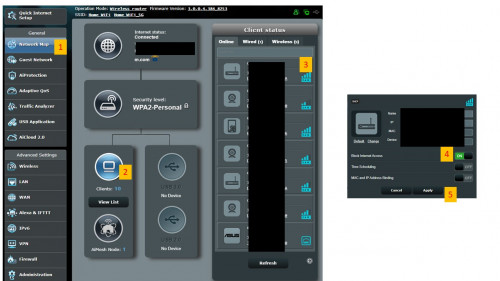 |
|
|
|
|
|
cskean
|
Apr 3 2020, 09:43 AM
|
|
|
QUOTE(pl95077 @ Apr 3 2020, 12:20 AM) Follow the step below Oh, tqvm for the guide. So helpful here..  |
|
|
|
|
|
vkashin
|
Jun 1 2020, 10:39 AM
|
|
|
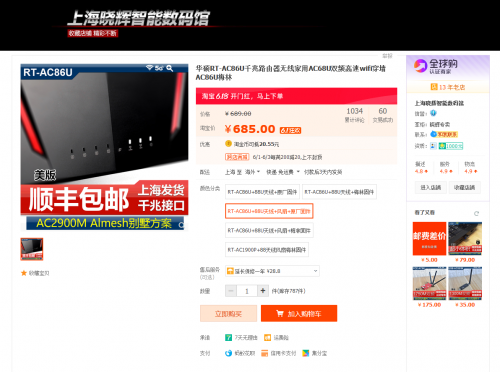 Taobao link Taobao linkhi all. sorry for reviving old thread. just wondering if this model would work with UniFi out of the box? or need to flash custom firmware? |
|
|
|
|
|
kk131
|
Jun 1 2020, 02:11 PM
|
|
|
QUOTE(vkashin @ Jun 1 2020, 10:39 AM) Taobao linkhi all. sorry for reviving old thread. just wondering if this model would work with UniFi out of the box? or need to flash custom firmware? It has the TM Unifi IPTV settings in the setup menu so will work. If you flash Merlin's FW you can get a lot more functionality - ad-blocking, additional malware/bad host blocking (skynet), etc. |
|
|
|
|



 Quote
Quote


 0.0214sec
 0.34
0.34
 6 queries
 GZIP Disabled