Welcome Guest ( Log In | Register )

91 Pages « < 85 86 87 88 89 > » Bottom

Outline · [ Standard ] · Linear+

 How to buy cheap ASUS RT-AC68U router, come have a look

views
     
kk131
post Dec 5 2019, 01:10 PM

On my way
****
Junior Member
566 posts

Joined: Jun 2005
From: Somewhere over the rainbow


QUOTE(rayth @ Dec 3 2019, 05:00 PM)
Anyone manage to setup NordVPN for AC86U router? Do i need flash to Merlin firmware? Thanks
*
I'm not using NordVPN but it's well worth flashing Merlin for the added features:

- scripts such as adblocking and ip blocking (shodan etc)
- additional features over Asus stock firmware
- DNS over TLS to stop your ISP spying
junclj
post Dec 5 2019, 04:50 PM

Look at all my stars!!
*******
Senior Member
2,348 posts

Joined: Apr 2008


Last week I was helped my father to buy a china set RT-AC86U for his home. After I received the router, I was immediately test that router and try out the aimesh for my home before I pass that router to him.

My first time to enjoy aimesh, took me around 1 hour to do research on how to switch the new router to aimesh node. So after I successfully switch that new router to aimesh node. I just need to take this router and put to near my main router, then login to my main router to add the new router into aimesh group.

I was tried it and feel not bad. So now, I am deciding to buy one more again for my house. The one China set which bought from shopee already passed to my father so I cant use aimesh anymore.

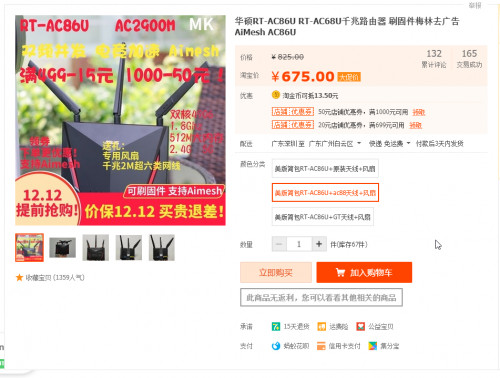
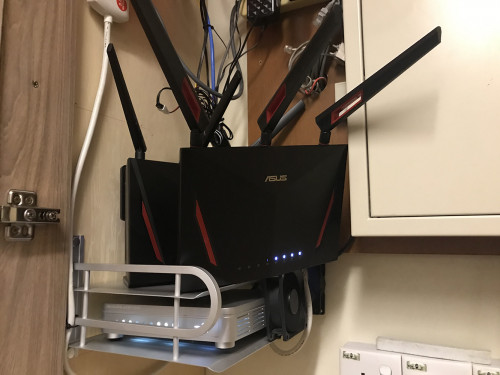
So now I go to taobao again to find the even cheaper RT-AC86U. The US version was just selling CNY660 (around RM395), with upgrade to RT-AC88U antenna and free 2 fans. This router do not ship to Malaysia, so I choose to deliver to third party forwarder warehouse. https://item.taobao.com/item.htm?spm=a1z09....&_u=53jnm3n313f

user posted image

user posted image

I will come back later after I receive this router and give some feedback about this router. Should be not a big deal because I just need this router as aimesh node only.

This post has been edited by junclj: Dec 5 2019, 04:57 PM
FaezFarhan
post Dec 5 2019, 05:01 PM

United till I die!
*******
Senior Member
3,435 posts

Joined: Oct 2008
From: Kota Bharu


QUOTE(junclj @ Dec 5 2019, 04:50 PM)
» Click to show Spoiler - click again to hide... «

*
Woah rm400+-? How long did it take to arrive?
Nando's
post Dec 5 2019, 05:04 PM

Casual
***
Junior Member
431 posts

Joined: Dec 2012
From: Kitchen
QUOTE(junclj @ Dec 5 2019, 04:50 PM)
Last week I was helped my father to buy a china set RT-AC86U for his home. After I received the router, I was immediately test that router and try out the aimesh for my home before I pass that router to him.

My first time to enjoy aimesh, took me around 1 hour to do research on how to switch the new router to aimesh node. So after I successfully switch that new router to aimesh node. I just need to take this router and put to near my main router, then login to my main router to add the new router into aimesh group. 

I was tried it and feel not bad. So now, I am deciding to buy one more again for my house. The one China set which bought from shopee already passed to my father so I cant use aimesh anymore.

So now I go to taobao again to find the even cheaper RT-AC86U. The US version was just selling CNY660 (around RM395), with upgrade to RT-AC88U antenna and free 2 fans. This router do not ship to Malaysia, so I choose to deliver to third party forwarder warehouse. https://item.taobao.com/item.htm?spm=a1z09....&_u=53jnm3n313f

user posted image

user posted image

I will come back later after I receive this router and give some feedback about this router. Should be not a big deal because I just need this router as aimesh node only.
*
Price gooding yo brows.gif

Btw, what's the difference between US version and others hmm.gif
junclj
post Dec 5 2019, 05:20 PM

Look at all my stars!!
*******
Senior Member
2,348 posts

Joined: Apr 2008


QUOTE(Nando's @ Dec 5 2019, 05:04 PM)
Price gooding yo  brows.gif

Btw, what's the difference between US version and others hmm.gif
*
Not so sure, I just buy one for aimesh purpose only. Not sure whether got region locked. But I look at the users review there, all of the China users were able to use this US version to connect into their internet too. Doesn't seems like got region locked too.
Nando's
post Dec 6 2019, 09:00 AM

Casual
***
Junior Member
431 posts

Joined: Dec 2012
From: Kitchen
QUOTE(junclj @ Dec 5 2019, 05:20 PM)
Not so sure, I just buy one for aimesh purpose only. Not sure whether got region locked. But I look at the users review there, all of the China users were able to use this US version to connect into their internet too. Doesn't seems like got region locked too.
*
I'll wait for your feedback brows.gif
heidarren
post Dec 6 2019, 01:00 PM

Getting Started
**
Junior Member
248 posts

Joined: Aug 2018
QUOTE(junclj @ Dec 5 2019, 04:50 PM)
Last week I was helped my father to buy a china set RT-AC86U for his home. After I received the router, I was immediately test that router and try out the aimesh for my home before I pass that router to him.

My first time to enjoy aimesh, took me around 1 hour to do research on how to switch the new router to aimesh node. So after I successfully switch that new router to aimesh node. I just need to take this router and put to near my main router, then login to my main router to add the new router into aimesh group. 

I was tried it and feel not bad. So now, I am deciding to buy one more again for my house. The one China set which bought from shopee already passed to my father so I cant use aimesh anymore.

So now I go to taobao again to find the even cheaper RT-AC86U. The US version was just selling CNY660 (around RM395), with upgrade to RT-AC88U antenna and free 2 fans. This router do not ship to Malaysia, so I choose to deliver to third party forwarder warehouse. https://item.taobao.com/item.htm?spm=a1z09....&_u=53jnm3n313f

user posted image

user posted image

I will come back later after I receive this router and give some feedback about this router. Should be not a big deal because I just need this router as aimesh node only.
*
Those so called “AC88U antennas” are actually fake branded antennas, they perform worst than original AC86U antennas, I bought more than 10 units from Taobao and some are this kinda “upgraded” version, but no way near the original AC86U antennas
Jjuggler
post Dec 7 2019, 12:43 AM

Narcissistic Genius
******
Senior Member
1,341 posts

Joined: Dec 2016
QUOTE(rayth @ Dec 3 2019, 05:00 PM)
Anyone manage to setup NordVPN for AC86U router? Do i need flash to Merlin firmware? Thanks
*
Follow this article from NordVPN for ASUS's stock firmware, ASUSWRT.
FaezFarhan
post Dec 7 2019, 06:17 AM

United till I die!
*******
Senior Member
3,435 posts

Joined: Oct 2008
From: Kota Bharu


What about this? Reliable?

user posted image
junclj
post Dec 13 2019, 08:53 AM

Look at all my stars!!
*******
Senior Member
2,348 posts

Joined: Apr 2008


Finally I was received the US version RT-AC86U.

So here is my short review about the US-version RT-AC86U. The most importantly, you may eager to know that will this router works in Malaysia too? Then answer is, YES!

I'm not so sure since Asus which version of firmware updates, Asus was removed the region settings in the Wireless > Professional. Last time when I bought my China set RT-AC86U from China, this router was able to set to Asia, US, Europe and Australia. Unfortunately, probably Asus new firmware updates were removed the "region" option from wireless settings. Both of my main router and this US-router does not found this setting anymore.

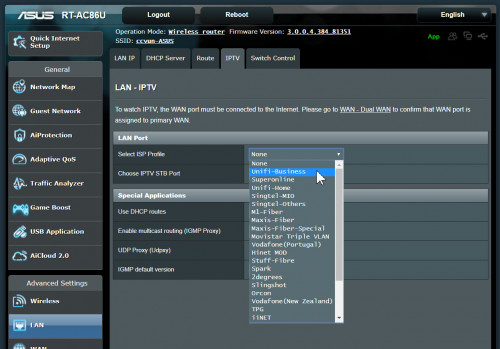
My purpose to buy this router is just for aimesh. However, since my curiosity to ask myself whether this router (US version) works for TM Unifi too?

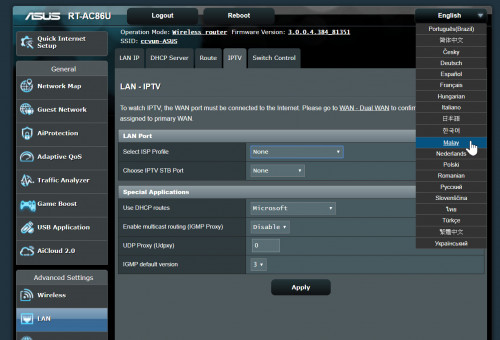
I can find out Unifi and Maxis under the IPTV option in this router (don't have TIME)
user posted image

The US version got multilanguages.
user posted image

US version get connected and working fine on TM Unifi
user posted image

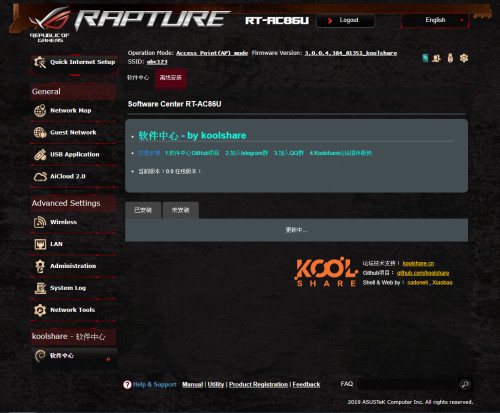
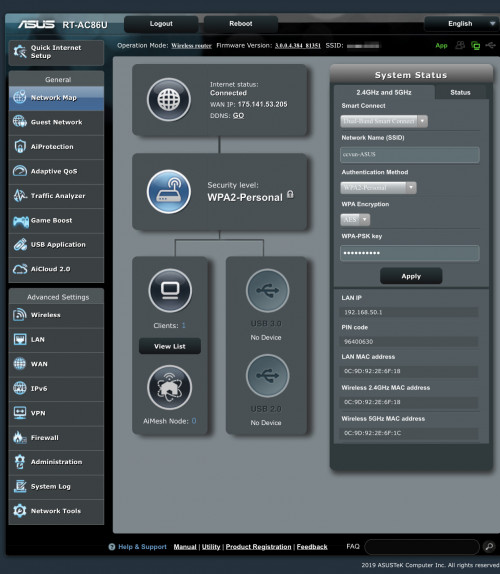
This router comes with the Chinese Koolshare Merlin 384.13_1. I can easily flash back to Asus official firmware. Everything working fine and router get connected to the internet.
user posted image

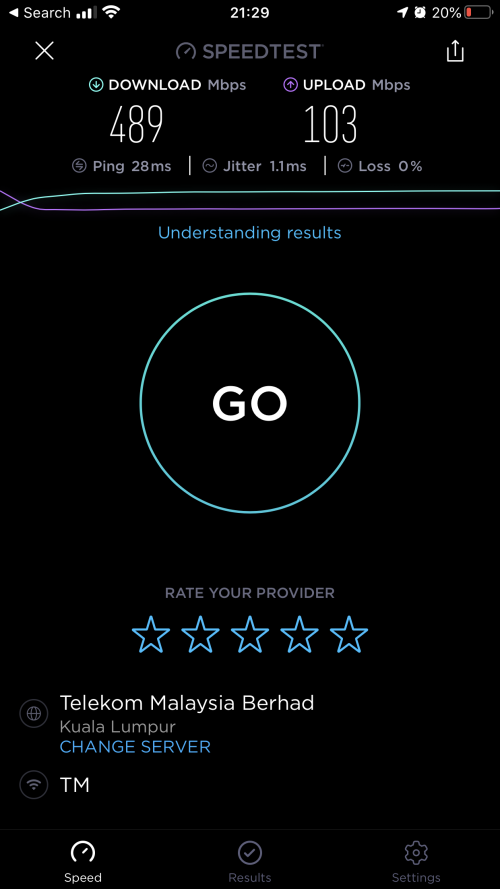
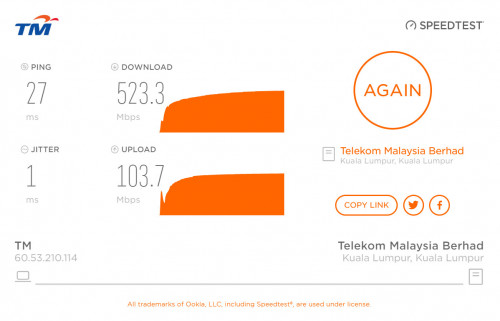
Speedtest on Wifi, not bad.
user posted image

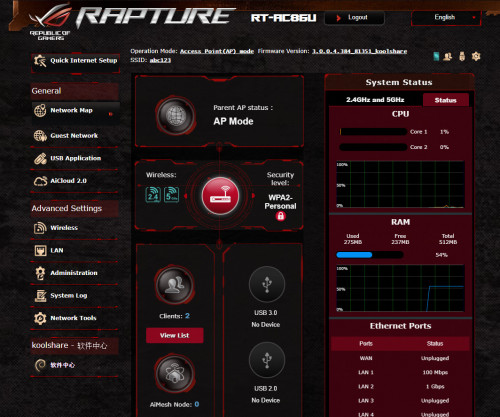
I also can flash to any third party custom firmware, either merlin or the Chinese Koolshare.
user posted image
user posted image

This post has been edited by junclj: Dec 13 2019, 11:32 AM
junclj
post Dec 13 2019, 08:54 AM

Look at all my stars!!
*******
Senior Member
2,348 posts

Joined: Apr 2008


Ok, now is time to set up this router as aimesh node.
user posted image

user posted image

I was tried to do speedtest on wifi. However, the wifi speed is not always guarantee full speed but as long as it can guarantee your wifi is working stable. Usually the wifi speed on the aimesh router is floating around 300mbps.

Here is screenshot of what maximum speed I can get
user posted image

However, if you get connected to LAN connection with PC. The speedtest may guarantee able to reach to maximum speed.
user posted image

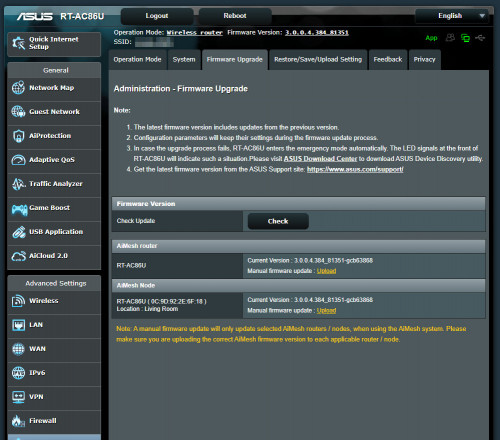
You cannot login to the aimesh node anymore since it will redirect automatic to the main router. So how do I update my aimesh node firmware? Actually I still can access to my main router to update my aimesh node firmware.
user posted image
Nando's
post Dec 13 2019, 09:41 AM

Casual
***
Junior Member
431 posts

Joined: Dec 2012
From: Kitchen
QUOTE(junclj @ Dec 13 2019, 08:53 AM)
Finally I was received the US version RT-AC86U.

So here is my short review about the US-version RT-AC86U. The most importantly, you may eager to know that will this router works in Malaysia too? Then answer is, YES!

I'm not so sure since Asus which version of firmware updates, Asus was removed the region settings in the Wireless > Professional. Last time when I bought my China set RT-AC86U from China, this router was able to set to Asia, US, Europe and Australia. Unfortunately, probably Asus new firmware updates were removed the "region" option from wireless settings. Both of my main router and this US-router does not found this setting anymore.

My purpose to buy this router is just for aimesh. However, since my curiosity to ask myself whether this router (US version) works for TM Unifi too?

I can find out Unifi and Maxis under the IPTV option in this router (don't have TIME)
user posted image

The US version got multilanguages.
user posted image

US version get connected and working fine on TM Unifi
user posted image

This router comes with the Chinese Koolshare Merlin 384.13_1. I can easily flash back to Asus official firmware. Everything working fine and internet get connected to the internet.
user posted image

Speedtest on Wifi, not bad.
user posted image

I also can flash to any third party custom firmware, either merlin or the Chinese Koolshare.
user posted image
user posted image
*
Thanks for sharing notworthy.gif

Imma get one as well brows.gif

pluginbaby
post Dec 13 2019, 04:49 PM

Look at all my stars!!
*******
Senior Member
2,661 posts

Joined: Apr 2007


I still can't find a way to change the region settings on aimesh node for China 86u. So if I were to change main mesh router to Region Singapore for an example, the node will remain at China region.

The only reason I wanna change the region is due to the channels for non China region are better. Rest, all functions are similar. It is fine for those with 500mbps Unifi but for 800mbps, sticking to all on non China bands would be better for performance on all nodes.
lyc1982
post Dec 16 2019, 10:47 AM

ExpectNoMercy
*******
Senior Member
2,329 posts

Joined: Jun 2015
sifu sekalian

my setup: 500Mbps unifi with ac86u router

if i use iphone 11 pro max to speedtest, what speed should i be getting ?
pluginbaby
post Dec 16 2019, 10:54 AM

Look at all my stars!!
*******
Senior Member
2,661 posts

Joined: Apr 2007


QUOTE(lyc1982 @ Dec 16 2019, 10:47 AM)
sifu sekalian

my setup: 500Mbps unifi with ac86u router

if i use iphone 11 pro max to speedtest, what speed should i be getting ?
*
If right beside router, on wifi AC should be 500mbps+-
lyc1982
post Dec 16 2019, 11:04 AM

ExpectNoMercy
*******
Senior Member
2,329 posts

Joined: Jun 2015
QUOTE(pluginbaby @ Dec 16 2019, 10:54 AM)
If right beside router, on wifi AC should be 500mbps+-
*
ok, this confirmed my suspicion

my 500Mbps all these while never been full speed

i can only get 300Mbps on IP 11 pro max
junclj
post Dec 16 2019, 11:04 AM

Look at all my stars!!
*******
Senior Member
2,348 posts

Joined: Apr 2008


QUOTE(lyc1982 @ Dec 16 2019, 10:47 AM)
sifu sekalian

my setup: 500Mbps unifi with ac86u router

if i use iphone 11 pro max to speedtest, what speed should i be getting ?
*
around 300~400mbps+
lyc1982
post Dec 16 2019, 11:19 AM

ExpectNoMercy
*******
Senior Member
2,329 posts

Joined: Jun 2015
QUOTE(junclj @ Dec 16 2019, 11:04 AM)
around 300~400mbps+
*
i can hardly hit 300Mbps
junclj
post Dec 16 2019, 11:43 AM

Look at all my stars!!
*******
Senior Member
2,348 posts

Joined: Apr 2008


QUOTE(lyc1982 @ Dec 16 2019, 11:19 AM)
i can hardly hit 300Mbps
*
yes, sometimes if line not so good. I can only get 200mbps+. You may need to tweak the channels bandwidth and channels until you get the best optimize speed. If you are using android phones, you may download an app name - Wifi Analyzer. Check your neighborhood for their wifi channels. So you can pick the best channel for least interference in order to get the maximum wifi speed.

for the channel bandwidth, its really depends. Sometimes you set to 40mhz but can't get full speed, sometimes set to 20/40/80mhz also can't get full speed. So my RT-AC86U was set to 80Mhz only then finally can optimize my wifi speed to 300~400mbps. Which already the best wifi speed I can get so far. If I switch to 20/40/80mhz will go down to 200mbps++. Another router was my access point router, I set to 80mbps but get very slow. Then I switch back to 20/40/80mhz to get full speed. It is quite depends on the router itself.

This post has been edited by junclj: Dec 16 2019, 12:43 PM
ben3003
post Jan 15 2020, 07:35 AM

10k Club
********
All Stars
10,859 posts

Joined: Jan 2003
From: Sarawak


guys i have updated my tmobile version to ac68u merlin latest firmware, but i cant see the client connected to my router via the webpage. i can see use phone apps but all is offline, anyone know how to on this? after i flash i did do factory reset

91 Pages « < 85 86 87 88 89 > » Top
 

Change to:
| Lo-Fi Version
0.0198sec    0.25    6 queries    GZIP Disabled
Time is now: 7th December 2025 - 11:23 AM