

https://www.lowyat.net/2019/199003/astro-ul...x-free-upgrade/
it's official
Astro Version 13A, All about Astro Malaysia offerings
Astro Version 13A, All about Astro Malaysia offerings
|
|
 Nov 13 2019, 04:17 PM Nov 13 2019, 04:17 PM
Return to original view | IPv6 | Post
#61
|
 
Senior Member
2,517 posts Joined: Mar 2016 
|
|
|
|
|
|
|
Nov 15 2019, 04:42 PM
Return to original view | IPv6 | Post
#62
|
|
Senior Member
2,517 posts Joined: Mar 2016
|
QUOTE(nonny.mouse @ Nov 15 2019, 03:54 PM) Many years ago I do AV installs, before HDMI and HD, lot of RGB + analog audio! But also did some custom satellite. The Astro ultra box got only 1 tuner From these google searches, this is how the cost would break down "DcSS LNB" - RM100 "Astro Satellite Dish" - RM90 "Dual Tuner Satellite Reciever" - RM200 - Assume Ultra is multi tuner, plug in hdd, otherwise dcSS is waste "Bluetooth voice remote control" - RM50 - has voice button "15m satellite coaxial cable" - RM50 That is RM490, so RM10 for the install, that is not too bad? Just like buying a phone, they can be expensive but if commit to contract, you get cheaper? I have just signed up for ultra, install next week :-)  Dual tuner is no longer necassary on the UHD box as it used cloud recoding, recording is handled by Astro sever, cabling and satellite dish remain the same, they only change the LNB to the DCSS type and the UHD box don't have HDD |
|
|
Nov 15 2019, 04:43 PM
Return to original view | IPv6 | Post
#63
|
|
Senior Member
2,517 posts Joined: Mar 2016
|
QUOTE(skitZo` @ Nov 15 2019, 03:09 PM) Tying up for another 24 months contract for Astro Ultra not worth it. Read from Soya Cincau website for existing customers who doesn't want to be tied up for contract can pay RM499 for the Ultra Box. Quite steep IMO. The new UI would come to existing HD PVR box eventually as they've beta test it with beta v1.1SoyaCincau https://www.astro.com.my/beta-program/new-interface This post has been edited by yongtjunkit: Nov 15 2019, 04:44 PM |
|
|
Nov 28 2019, 09:17 PM
Return to original view | IPv6 | Post
#64
|
|
Senior Member
2,517 posts Joined: Mar 2016
|
QUOTE(JollyRogers @ Nov 28 2019, 08:10 PM) Now imdun like the Ultra box Watching movie ..... cant rewind ! Cant pause ! And since everything is onscreen ,big menu etc , cant scroll thru to other channels info without blocking out the show which im watching QUOTE(MegaThroned @ Nov 28 2019, 08:42 PM) Agreed. If want to rewind or pause must play from start, then u will realize the pic quality reduce a bit. Upgrade box but downgrade the main function of pvr. Kinda stupid. QUOTE(Qash-M @ Nov 28 2019, 08:47 PM) buy old PVR remote. The new Astro ultra box don’t have built in HDD, so means it can’t temporarily store the recording for you to rewind, pause,etc during a live show (this function is known as time shift). This may change in the future when Astro allows user to plug in their own HDD into the ultra box |
|
|
Nov 28 2019, 10:46 PM
Return to original view | IPv6 | Post
#65
|
|
Senior Member
2,517 posts Joined: Mar 2016
|
QUOTE(joshhd @ Nov 28 2019, 09:54 PM) You mean this 3 big thumbnails?: Wah, the thumbnail is bigger than the channel logo on the left hand corner, they can probably squeeze all that thumbnail into the same size as the EPG software on the Astro beyond box, don’t need giant thumbnail, and definitely the channel logo should be bigger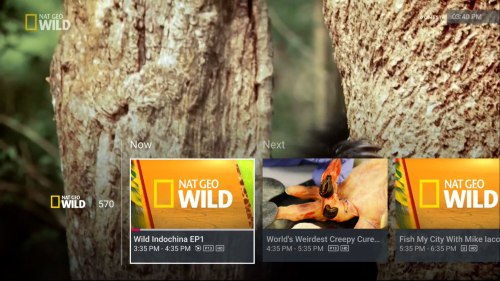 I complained this to them many months ago, saying that I don't like that 3 big thumbnails blocking half of the the screen like this. Until now still same. Same. I've highlighted to them since I joined beta programme many months ago, until now still don't have setting to change it. It seems to me that Astro just want to respect the software and layout designer's decision instead. Meaning, whatever the designer had designed the software and layout, it shall remain as it is no matter how much the customer make noise to them. It also seems to me that whatever that has been designed, they don't wanna redesign it again cuz it'll take a lot of their time. So now they rather let customer have this kind of software experience? Why I say so? Because since some of us here had joined beta programme back between May and August, including me, until today I did not see any significant changes on the user interface at all ever since beta programme started, except the TV Guide where now it has the "labels" on the bottom of the screen, telling you what buttons can be pressed to navigate around the EPG. That is the most most obvious and relevant changes I've seen so far. 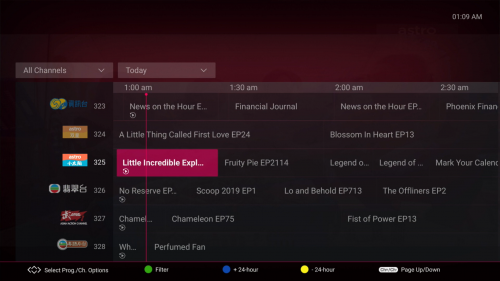 Other than this TV Guide (screenshot above), to be honest, nothing else, yet some issues still remain there. On so many issues, they keep saying they're working on it, working on it, and then tell customers to be patient.  and then "we apologise for the inconvenience" and then "we apologise for the inconvenience"When ask roughly when will the changes/feature made available to customers again, they don't seem confident to say even an estimated date. And that seems to me, they are implying that customers are simply just impatient to wait them for many many months to do changes. This shows the attitude on the way they handle this issue. To me, even with the beta programme or not, the beta tester nor the customer are not in the position to suggest to the engineering team to make significant changes as such. Even if they appoint someone to contact the beta tester, they are also not in the position to comment further nor making decision. What are the difficulties they're facing? They're not obligated to tell customers, even to beta testers? So they'll just gotta let beta testers and early Ultra Box users to suffer? So what do you think on the way they handle things? Let you guys be the judge. |
|
|
Nov 30 2019, 07:56 AM
Return to original view | IPv6 | Post
#66
|
|
Senior Member
2,517 posts Joined: Mar 2016
|
QUOTE(Qash-M @ Nov 29 2019, 05:58 PM) Future HD channels for next year maybe be launched in HEVC (Ultra Box compatible) as Astro already starting test HD channels in HEVC 1080p(5.5 Mbps). If this is real then it's too fast(by making the previous-gen decoder - DMT 5v2 and older HD decoder obsolete  ) and Astro forcing its user to upgrade to UHD box just to watch HD? ) and Astro forcing its user to upgrade to UHD box just to watch HD?This post has been edited by yongtjunkit: Nov 30 2019, 10:15 AM |
|
|
|
|
|
Nov 30 2019, 07:56 PM
Return to original view | IPv6 | Post
#67
|
|
Senior Member
2,517 posts Joined: Mar 2016
|
QUOTE(Marilynlai513 @ Nov 30 2019, 07:18 PM) OK.. Just wondering with 4k available from astro, for boxes unrooted without HDCP, and perhaps maybe astro might intro updated astro go, will it require HDCP compliant boxes.. Astro go is designed for primarily using it on smartphones, tablets/iPads, PC and not for Android tv boxes/android TV It’s possible that output from the device to a TV screen/monitor requires HDCP If screen record/ screenshot on iPhone, the content(live TV feed/VOD content) would be blacked out in the screenshot 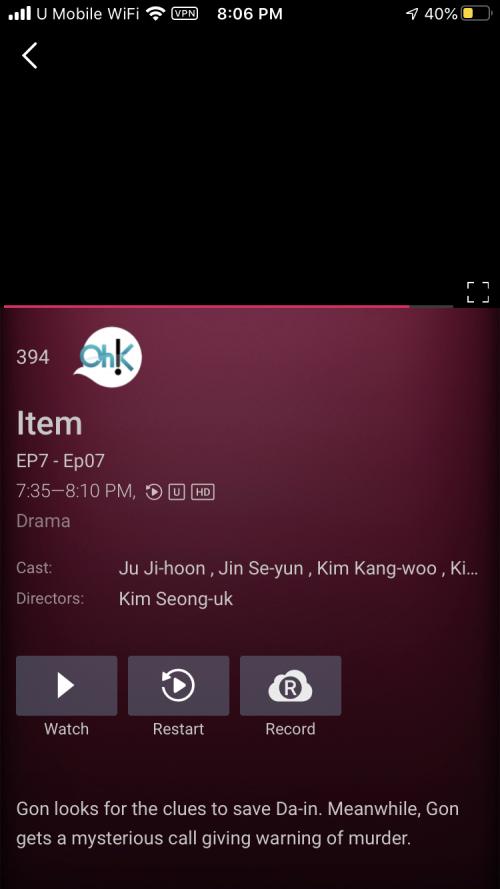 This post has been edited by yongtjunkit: Nov 30 2019, 08:07 PM |
|
|
Nov 30 2019, 10:51 PM
Return to original view | Post
#68
|
|
Senior Member
2,517 posts Joined: Mar 2016
|
QUOTE(Marilynlai513 @ Nov 30 2019, 10:32 PM) So I supposed we should not discount it'll probably require even proper DRM hdcp certification then Well I can’t exactly confirm to you that it would require HDCP to view it on external display/ on TV but chances are it would require it. Btw Astro go only got SD and HD channels only, UHD channels aren’t available yet... |
|
|
Dec 2 2019, 09:53 AM
Return to original view | IPv6 | Post
#69
|
|
Senior Member
2,517 posts Joined: Mar 2016
|
QUOTE(JollyRogers @ Dec 2 2019, 12:53 AM) Too all who are downgrading to the Ultra Box, SAVE YOUR PVR REMOTE !!! Much better than the “sleek “ blank remote that comes with the Ultra !!!!! !! See how many !!!!!!! I put !!!!! PVR remote doesn’t fix the pause issue.... it’s a limitation of the Ultra box at the moment, the ultra box don’t have the time shift function that the current PVR box have.Also why need to have thumbnail when im scrolling thru channels. Just give me the name , current time left and what time next movie starts. Now to see all that in Ultra ..... you have to pause it .... owai ! Cant pause %*%*£%* QUOTE(joshhd @ Nov 28 2019, 09:45 PM) Can't rewind live TV is one of the common complaint by Ultra Box users. This post has been edited by yongtjunkit: Dec 2 2019, 09:56 AMIt is believed that Astro is working on it, to make it possible to straight away pause and rewind live TV, even without hard disk. Will see how it goes on their next upcoming software update, maybe around December. |
|
|
Dec 3 2019, 07:57 AM
Return to original view | IPv6 | Post
#70
|
|
Senior Member
2,517 posts Joined: Mar 2016
|
Deleted
This post has been edited by yongtjunkit: Dec 3 2019, 08:13 AM |
|
|
Dec 10 2019, 07:48 AM
Return to original view | IPv6 | Post
#71
|
|
Senior Member
2,517 posts Joined: Mar 2016
|
QUOTE(pakji @ Dec 10 2019, 02:07 AM) my old PVR got problem yesterday fine today my library lost and say PVR functionality not available Sounds like the HDD in your PVR box has died i already send fb complaint with screenshot VOD also cannot access i think astro trying force upgrade ultra box ??? i don't want ultra box due bad quality HD that i prefer old PVR  Try going to home>settings> stb diagnostic and look at the HDD status This post has been edited by yongtjunkit: Dec 10 2019, 07:52 AM |
|
|
Dec 14 2019, 12:40 PM
Return to original view | IPv6 | Post
#72
|
|
Senior Member
2,517 posts Joined: Mar 2016
|
QUOTE(joshhd @ Dec 13 2019, 05:59 PM) Dear Astro broadcast engineer team or whoever is from the higher level people in Astro, if you're reading this, pls don't think your customers are stupid. This is seriously getting worse.... And yet they have the money to invest in a useless bot that isn’t helpful at all when inquiring  Now Astro have reduced the video bitrate of all 3 UHD channels, from 15Mbps to as low as 12.8Mbps! 12.8Mbps for CH 780 13.2Mbps for CH 498 and CH 499 Based on the data I got, it seems to me that Astro UHD channels uses Constant Bit Rate (CBR) instead of Variable Bit Rate (VBR), such as using the Constant Rate Factor (CRF) method like what they use on SD and HD channels. So Astro broadcast engineer team assume that Ultra Box customers won't realise any picture quality difference because it's barely just 3Mbps difference....  12316MHz 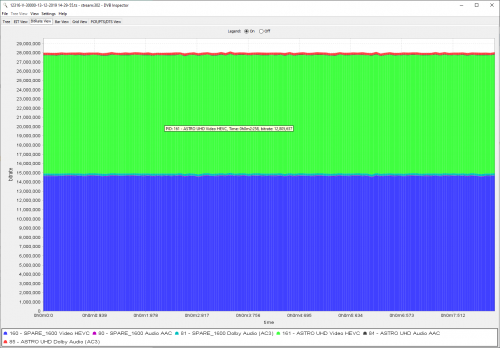 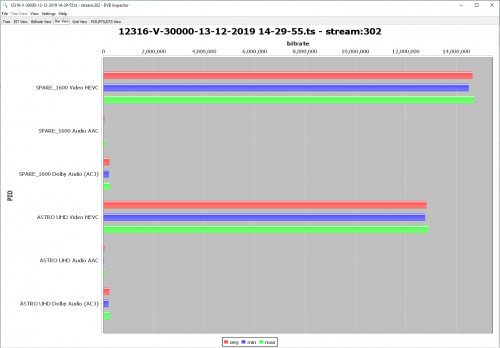 12436MHz 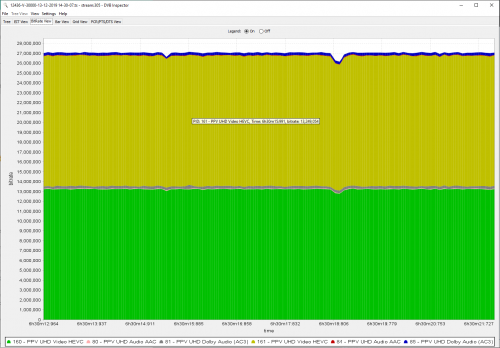 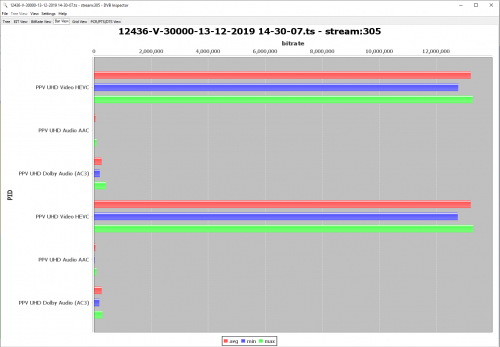 *Only video and audio tracks are shown for easier viewing. Others such as ECM, EIT, DVB subtitle tracks has been filtered. "3Mbps very little difference only", is it? Come, story telling time: 1) So now 13Mbps per UHD channel. Following weeks, 10Mbps per UHD channel. Then Jan 2020 onwards, 7Mbps per UHD channel?? Then Feb 2020 onwards, 4Mbps per UHD channel??? 2) When customer complain how come picture quality look so bad, your customer service agents from technical department would say, "it's my satellite signal or the satellite dish problem"? 3) Later arrange a technician visit to customer premise, and charge RM65 technical service fee? 4) Eventually you'll be kind and waive the technical charges (case to case basis) because technician couldn't find out what's the problem, and then try replace brand new set of Ultra Box, and then restart 24 months contract? Oh, Astro is very kind already lo... "We change a brand new Ultra Box for you, at no additional charges somemore." 5) After some time, customer realises, picture quality problem still the same after changing new Ultra Box. 6) Contact Astro again, the customer service agent say, since issue still persists, then it must be your TV problem, and come out with funny funny excuses like "Your TV does not fully support Astro services properly". "It's customer's problem, not our problem. So, relax." Problem solved, close case. "Ok, don't explain any further. We got many customers calling in, and we're very busy, customers are waiting too long." Like that? 7) Not happy? Report to MCMC. And then eventually close case. 8) Feeling frustrated? Want to terminate Astro? "Go ahead." After all, Astro has 5.7 million customers now, if 1 customer leaves Astro, the numbers still remains 5.7 million and growing. So what's the big deal anyway? Wahhh, where you learn that marketing strategy from? Confirm profit. Very smart  4K UHD picture quality on Netflix's is so much better than your crappy service. You might well don't introduce such Ultra Box to customers if saving cost and bandwidth is what you're thinking about. Or you're just doing these Ultra Box nonsense is for the sake of pleasing your stakeholders? You want me to reveal the actual video bitrates used on your SD and HD channels now? I have solid evidence that you have been reducing video bitrate on almost all channels (which I am super disappointed), so don't be in denial as what you always love to do. You better set a cap your variable bit rate to not go way lower than already is now, and increase back to 5-6Mbps per HD channels in the next coming months like we all used to have since for many years. Or else I'll reveal all your lousy bitrate data that I've collected to this forum topic.   And yes, I am very well aware that you are phasing out legacy Astro boxes, so better stick to the 31 Jan 2020 date as scheduled. I will continue monitor all bitrates used on all transponders from now onwards (in fact I been doing this since a while ago, but now I'll monitor it more aggressively), to see what kinds of funny tricks you're trying to do. Customer pay you money, you go and reduce the picture quality. What's your problem? Oh, testing? It's just temporary? You better convince me that. You want to save cost? You might as well shut down entire Astro company. Confirm save cost. And where is that almost forgotten mr_j? Are you being pressured by some higher level parties to not engaging such discussions in public forum like this? If it’s for record then it’s fine but what happens if the person misunderstood the message and straight away make changes to the account and also what about new customers? 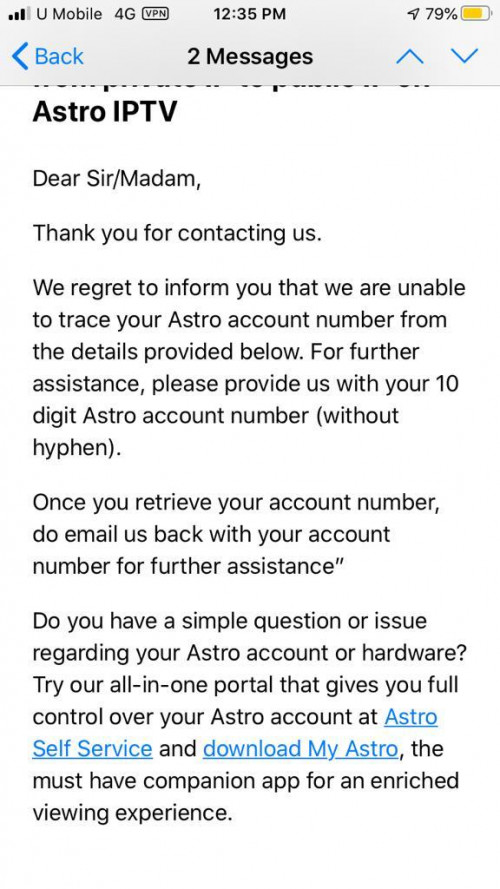  This post has been edited by yongtjunkit: Dec 14 2019, 12:42 PM |
|
|
Dec 16 2019, 02:40 PM
Return to original view | IPv6 | Post
#73
|
|
Senior Member
2,517 posts Joined: Mar 2016
|
QUOTE(joshhd @ Dec 16 2019, 12:19 PM) Moments ago, I've received this SMS from Astro: They should do it on the HD box as wellOriginal PDF file from link above, for archive purposes: [attachmentid=10373728] Oooh... Ultra Box users have no more chance to access the SD simulcast version of corresponding HD channels from tomorrow onwards. Pretty much similar like Astro IPTV users now. For those who already "get used to pressing SD channel numbers", you'll need to take note oh... If not mistaken, still can access SD channel on IPTV This post has been edited by yongtjunkit: Dec 16 2019, 04:04 PM |
|
|
|
|
|
Dec 16 2019, 05:19 PM
Return to original view | IPv6 | Post
#74
|
|
Senior Member
2,517 posts Joined: Mar 2016
|
QUOTE(AMstrong @ Dec 16 2019, 04:53 PM) I've terminate astro 2 years back. Just want to see the uhd channel my TV, so I take my dad 2nd astro 4k decoder with the satellite transponder( the installer didn't replace my dad old transponder as It work with the new decoder) The ultra box only supports DCSS and SatCR LNB, no more support for Universal LNB already. Make sure that you are using the correct LNB type and match it with the decoder installation settingsWhen in install at my home, there is no satellite signal detected, replaced the transponder to my existing dish also the same. I did follow the user guide provided in the box to scan the satellite also no signal Does astro right now able to locked the 2nd decoder based on IP or they locked by need to be connected to the same satellite transponder for both 1st for 2nd decoder |
|
|
Dec 16 2019, 06:43 PM
Return to original view | IPv6 | Post
#75
|
|
Senior Member
2,517 posts Joined: Mar 2016
|
QUOTE(joshhd @ Dec 16 2019, 06:09 PM) Astro IPTV customers no longer able to access SD simulcast channels. It doesn't appear on their channel list anymore, and it's has been quite some time. 🤔 Weird, still can receive it on my house decoder(Astro IPTV) (CH311)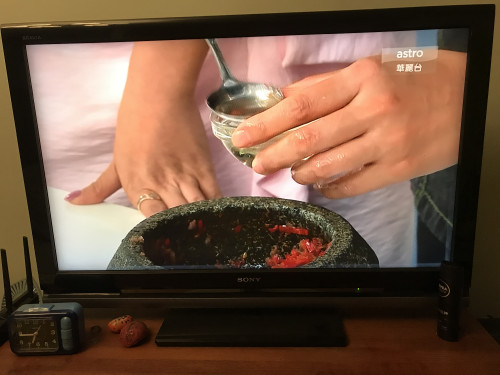 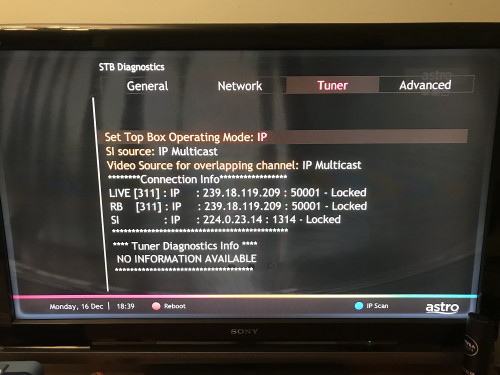 This post has been edited by yongtjunkit: Dec 16 2019, 06:45 PM |
|
|
Dec 16 2019, 07:40 PM
Return to original view | IPv6 | Post
#76
|
|
Senior Member
2,517 posts Joined: Mar 2016
|
QUOTE(joshhd @ Dec 16 2019, 07:07 PM) Eh? They didn't update the list... Ch391 doesn’t exist anymore....https://www.astro.com.my/iptv/enhance_your_...xperience_in_hd The Astro's "forgot to update its website" habit occurs as usual. Or, they shifted their focus to Astro & Broadband, so they leave Astro IPTV behind. But how about other simulcast channels? Is it still on your channel list? Your Astro IPTV is powered under TM HSBB (eventually Maxis Fibre), or Maxis own network or TIME Fibre? Powered by maxis fiber network( not TM ) |
|
|
Dec 16 2019, 08:10 PM
Return to original view | IPv6 | Post
#77
|
|
Senior Member
2,517 posts Joined: Mar 2016
|
QUOTE(joshhd @ Dec 16 2019, 07:54 PM) Can you double check your satellite dish again, make sure it's using the Astro dCSS LNB like this? Yup, 100% IP mode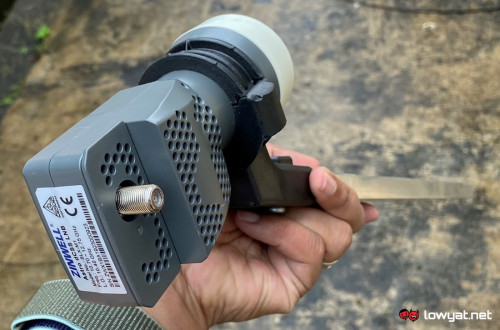 Credit and source: https://www.lowyat.net/2019/198955/astro-ul...nds-on-preview/ Since you install that LNB yourself, you need to make sure the LNB skew is correctly adjusted. For Klang Valley and nearby areas: On the satellite dish, with the Astro logo on the dish facing your face, the cable coming out from the dCSS LNB should be facing around 3 to 4 'o clock direction. That means your Astro IPTV is 100% IP mode then? Hmm okay. If like that then I'm not sure... I'm not using Astro IPTV. |
|
|
Dec 22 2019, 05:33 PM
Return to original view | IPv6 | Post
#78
|
|
Senior Member
2,517 posts Joined: Mar 2016
|
My grandma house PVR box HDD decided to die by itself
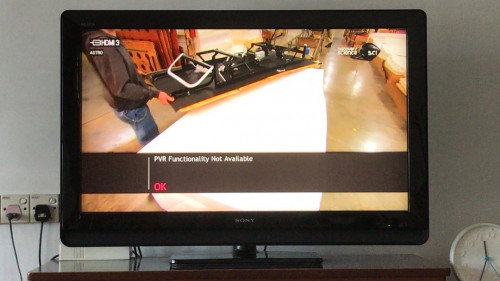 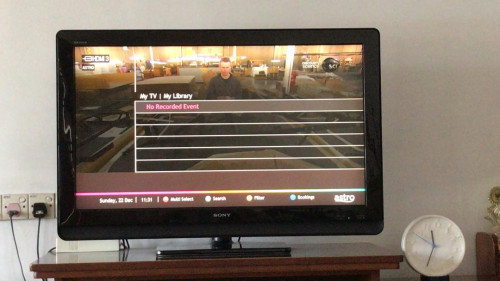 Is it actually bad to leave the PVR box on 24/7 ? Complained to Astro and they asked for the following information 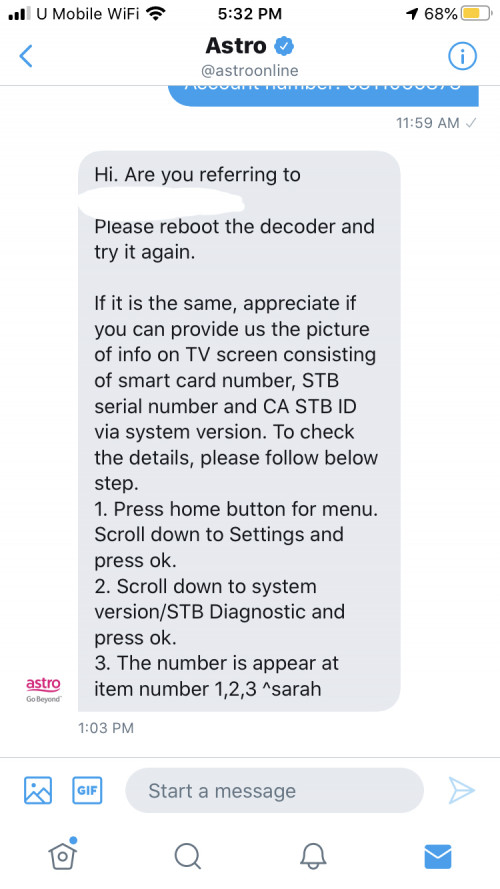 Don’t they actually have the information about the decoder in their record? This post has been edited by yongtjunkit: Dec 22 2019, 05:51 PM |
|
|
Dec 23 2019, 07:30 AM
Return to original view | IPv6 | Post
#79
|
|
Senior Member
2,517 posts Joined: Mar 2016
|
QUOTE(joshhd @ Dec 22 2019, 08:32 PM) If you put into standby mode whenever you're not watching, then it shouldn't be a big problem. Cuz if you've been using PVR box for few years, the hard disk fail rate also increases as years goes by. Hard disk failure rate is common, even on hard disks used in computers, external HDD and so on. Especially if your PVR box is powered on 24/7, then it's likely due to hard disk failure lo... Was able to get through without providing the picture requested, instead I’ve told them the decoder model DMT5v2Another reason is the PVR box didn't have proper enough ventilation space, as this can make it hot in the long run, hence making the HDD overheat for quite some time. They need to get information from the user, to do further diagnosis. But if the HDD inside the PVR box has died like this, then you got to be mentally prepared that it's very likely that your PVR box needs to be replaced, hence all your previous recordings on your PVR box will not be retrievable. Also, once replaced, then contract restart 24 months. Apparently, they have a special deal, 6 months contract, free replacement decoder* + rm65 waiver for the technician fees(as long as don’t terminate during the contract period) Is the smart card number necessary to process the replacement? *as long as it’s not physically damaged This post has been edited by yongtjunkit: Dec 23 2019, 07:31 AM |
|
|
Dec 23 2019, 07:54 AM
Return to original view | IPv6 | Post
#80
|
|
Senior Member
2,517 posts Joined: Mar 2016
|
QUOTE(joshhd @ Dec 23 2019, 07:39 AM) "Replacement"? Sounds like refurbished to me. 😂😂😂 I’ve told them that the HDD in the PVR box died/corrupted Smart card number, yea... They wanna double confirm or verify your Astro box before proceed. What reason did you tell them? You insist on getting PVR box instead of Ultra Box, or how? I’ve told them that I can’t provide them a picture of the tv screen showing the smart card number,STB serial number, CA STB ID as I won’t be around for the next few days When they asked for HDD status, I said that it’s connected because I’ve checked it(before contacting Astro) and also reboot the decoder to make sure the HDD is dead ( didn’t provide them screenshot as well) At the same time, I’ve requested for PVR box because there’s no internet at my grandma’s house This post has been edited by yongtjunkit: Dec 23 2019, 07:55 AM |
| Change to: |  0.0483sec 0.0483sec
 1.10 1.10
 7 queries 7 queries
 GZIP Disabled GZIP Disabled
Time is now: 19th December 2025 - 09:40 AM |
 Quote
Quote