Welcome Guest ( Log In | Register )

28 Pages < 1 2 3 4 5 > » Bottom

Outline · [ Standard ] · Linear+

 Astro Version 13A, All about Astro Malaysia offerings

views
     
yongtjunkit
post Sep 2 2019, 07:51 AM

Look at all my stars!!
*******
Senior Member
2,517 posts

Joined: Mar 2016
QUOTE(AhBoy~~ @ Sep 2 2019, 01:50 AM)
I used to have a single cable in my wall for the "old astro" then later switched to Astro IPTV, the installer didn't setup the dish for me.

Does this means new decoder can use back the single old cable without need to hacking the wall for 2nd cable?
*
Astro IPTV customers currently aren’t eligible for this beta program.

It appears that you are in IP mode( no satellite backup) that’s why your satellite dish isn’t connected. Chances are it would still use IP multicast instead( connects via Ethernet cable )


If they were to set up satellite again assuming what you meant by “old Astro” is the SD decoder, they will need to replace the satellite dish, possibly cable( they did for my house- coming from the philips decoder( black one) to DMTv4( Astro beyond paco box with no PVR)), and ofc the decoder

This post has been edited by yongtjunkit: Sep 2 2019, 07:56 AM
yongtjunkit
post Sep 2 2019, 09:18 PM

Look at all my stars!!
*******
Senior Member
2,517 posts

Joined: Mar 2016
By any chance, is it possible to connect Astro IPTV( IP mode) to satellite ?

Or must use Ethernet ?

Wanted to get rid of the maxis router from my house WiFi setup and keep the maxis router in the store room, replacing it with an ASUS router

This post has been edited by yongtjunkit: Sep 2 2019, 09:19 PM
yongtjunkit
post Sep 3 2019, 07:28 AM

Look at all my stars!!
*******
Senior Member
2,517 posts

Joined: Mar 2016
QUOTE(joshhd @ Sep 3 2019, 02:04 AM)
If you're trying to replacing to your own third party router (e.g. Asus), you're still able to watch/receive Astro IPTV service with your Asus router.
Not necessary only Maxis routers can watch/receive Astro IPTV service one. Just make sure your router's VLAN (a.k.a VLAN Tagging) settings is configured to Astro IPTV's VLAN settings for the particular LAN port that you're about to connect to your Astro box. But usually, it has been pre-configured by default (provided you bought the router in Malaysia).

By standard installation, Astro's IPTV function will only work via Ethernet LAN cable connection, similar like Unifi TV on TM Unifi Fibre network.
Astro's IPTV won't work via WiFi connection directly from Astro box to your router. (Accessing to VOD content not counted la). 
Why? Did you face any trouble connecting your Astro box to your router?

If your house/area is under TM HSBB network, you can switch from IP mode to Satellite mode whenever the Astro box detects that "network is down" and unable to receive any channels via IP mode.
They call it Hybrid mode.

But if your house/area is under Maxis NGBB (Maxis's own fibre network, not share with TM) or TIME Fibre network, then bye bye.
Your Astro box is solely dependant on network (IP mode) and you cannot switch to Satellite mode even if you connect your Astro box to the satellite dish. Basically, Hybrid mode is disabled for you.
*
The only issue is, with the ASUS router VOD functionality is not available.

Using DMT 5V2, don’t see any WiFi option available

The ASUS router doesn’t have the Vlan tagging built in apparently, brought it in Malaysia

I’m on maxis own fiber network, no way to enable hybrid mode ? My house have satellite dish (HD only - 1 tunner)

This post has been edited by yongtjunkit: Sep 3 2019, 07:55 AM
yongtjunkit
post Sep 7 2019, 05:57 PM

Look at all my stars!!
*******
Senior Member
2,517 posts

Joined: Mar 2016
QUOTE(joshhd @ Sep 7 2019, 05:28 PM)
Err I'm kinda confused..

Are you using IPTV, or just the normal HD box? If it's HD box, both WiFi and IPTV function will not be available.
Only PVR box can be used for Astro IPTV. And usually if you're using Astro IPTV, it is connected via LAN cable, therefore WiFi may be disabled by the software.

If your subscription has HD-PVR service, either by adding RM26.50/month or subscribed to either Value Pack/Super Pack/Super Pack Plus or Family Starter, you are eligible to HD-PVR service.
You can upgrade to PVR box without any additional monthly fee. But a one time installation fee may be imposed depending on any ongoing promotions or subscription. Double confirm with Astro if you want to know more. And once you change to PVR box, 24 months contract will restart.

Can you share with us the Asus router model number, so that can check whether your router can support VLAN configurations or not. Cuz usually router nowadays can support VLAN.

If you're confident that your area is under Maxis network (not TM), then hybrid mode are not available for you.
*
Astro IPTV, PVR decoder model DMT 5V2 - made by Samsung

Router model ASUS RT-AC 68U

Yup, My house area is under maxis network

This post has been edited by yongtjunkit: Sep 7 2019, 06:09 PM
yongtjunkit
post Sep 11 2019, 12:03 PM

Look at all my stars!!
*******
Senior Member
2,517 posts

Joined: Mar 2016
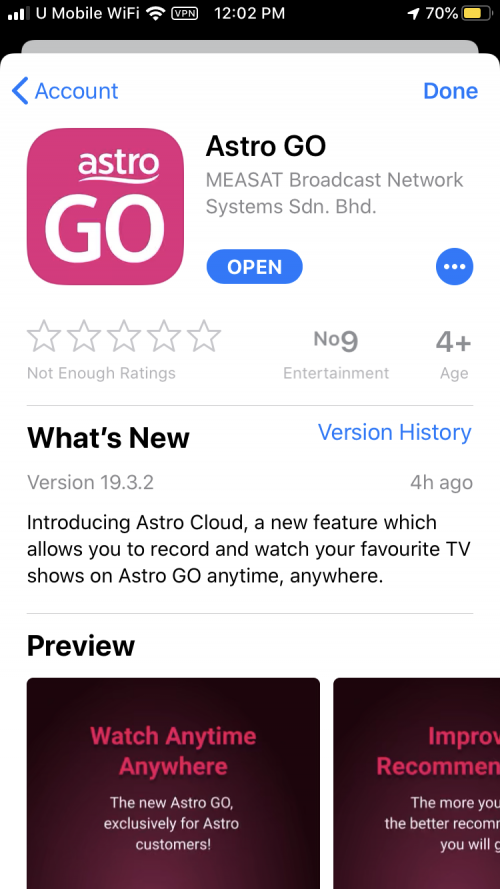
Astro go new update

user posted image
yongtjunkit
post Sep 13 2019, 06:15 PM

Look at all my stars!!
*******
Senior Member
2,517 posts

Joined: Mar 2016
user posted image

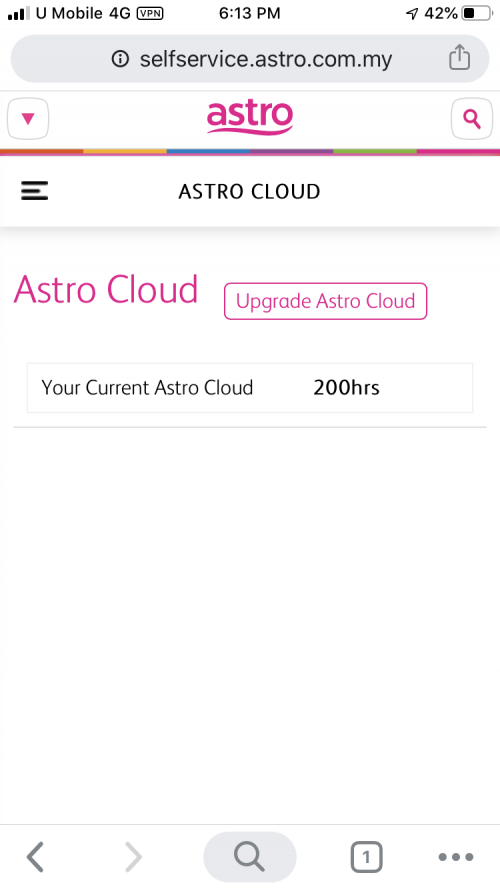
Looks like non UHD box user also get Astro cloud, but how do we even use it ?
yongtjunkit
post Sep 14 2019, 10:38 AM

Look at all my stars!!
*******
Senior Member
2,517 posts

Joined: Mar 2016
QUOTE(Qash-M @ Sep 13 2019, 08:48 PM)
the "Cloud record" on Go app one. brows.gif
*
Oh wow, I see that you can record from the Astro go app now

Does it sync up with the Astro UHD box ?

This post has been edited by yongtjunkit: Sep 14 2019, 10:38 AM
yongtjunkit
post Sep 14 2019, 12:48 PM

Look at all my stars!!
*******
Senior Member
2,517 posts

Joined: Mar 2016
QUOTE(Matchy @ Sep 14 2019, 12:04 PM)
"Upgrade Astro Cloud"... sound like they'll charge for storage. hmm.gif

How many of you that use the recording function? For me, I rarely/never use it before...
*
Well, they’ve added 200hrs of Astro cloud storage

They’ll charge if you upgrade the Astro cloud storage, but the implementation is weird, Astro go cloud recording?
yongtjunkit
post Oct 1 2019, 05:55 AM

Look at all my stars!!
*******
Senior Member
2,517 posts

Joined: Mar 2016
QUOTE(Qash-M @ Oct 1 2019, 01:59 AM)
because astro refuse to code those channels in MPEG4, instead still stuck on MPEG2.
*
For SD channels on DTV compared to astro ?

So means DTV SD looks better than Astro SD?

This post has been edited by yongtjunkit: Oct 1 2019, 07:41 AM
yongtjunkit
post Oct 1 2019, 07:43 AM

Look at all my stars!!
*******
Senior Member
2,517 posts

Joined: Mar 2016
QUOTE(linkinstreet @ Oct 1 2019, 07:10 AM)
Depends on the provider. Likely when showing F1 it will show Fox Sports logo. In any case, they just bundle every 4K broadcast under the Astro UHD banner
DTV is encoded straight from the source by the broadcasters themselves, be it RTM or Media Prima. For SD on Astro meanwhile, they usually take the broadcast, and re-encode them with a lower bitrate and resolution. IIRC astro's SD channel are slightly above 360p only in terms of resolution, which is why it looks so shitty compared to DTV which are usually 480p
*
Wow, thanks for your explanation, didn’t realize that DTV have better video quality than Astro

Feels like astro is ripping us off with this, paid Astro, get lower than FTA DTV quality

This post has been edited by yongtjunkit: Oct 1 2019, 08:01 AM
yongtjunkit
post Oct 1 2019, 04:18 PM

Look at all my stars!!
*******
Senior Member
2,517 posts

Joined: Mar 2016
QUOTE(joshhd @ Oct 1 2019, 02:48 PM)
Astro has removed the letterbox on almost all of its SD channels for quite some time already. The SD channels itself is technically still in 4:3, but they make it fit to screen so that letterbox won't be shown.
And yes, Astro still uses MPEG2 4:3 for its SD channels so that legacy Astro boxes can still be used, which supports only the older DVB-S standard and MPEG2 video codec. Previously there are complaints from some legacy STB users whereby if the SD channel video itself is in native 16:9 aspect ratio, it will display only a black screen and audio only. Presumably is due to compatibility issue on the legacy boxes as it "doesn't recognise" or "don't support" 16:9 video. So they got to transmit it in 4:3 from their side, but remove the letterbox so that no black bars will be shown.

Meanwhile, there are still a handful SD channels on Astro that still did not remove the letterbox, such as TVB Entertainment (ch313), all Astro AOD (SD) channels, Asian Action Channel (ch327) and TVB Classic Movies (ch328), CNN (ch511), and others.

However, all Astro AOD (SD) channels, Asian Action Channel (ch327) and TVB Classic Movies (ch328) are found to be the only SD channels on Astro that uses MPEG4 video codec with HE-AAC audio codec. These channels does not appear on the channel list for legacy Astro boxes.
*
What about those HD channels? Those channels are transmitted in mpeg 4? And compared to DTV FTA HD, DTV FTA still better?
yongtjunkit
post Oct 10 2019, 04:41 PM

Look at all my stars!!
*******
Senior Member
2,517 posts

Joined: Mar 2016
QUOTE(joshhd @ Oct 10 2019, 11:47 AM)
For now, any cloud recordings made on Astro Go app are only viewable in Astro Go, and you're not able to watch it on your PVR box.

» Click to show Spoiler - click again to hide... «

*
Wow, imagine a firmware update for existing user allows them to do cloud recording and also to select where they want to store the rectoding( HDD/cloud) that would be nice
yongtjunkit
post Oct 15 2019, 01:58 PM

Look at all my stars!!
*******
Senior Member
2,517 posts

Joined: Mar 2016
QUOTE(nexona88 @ Oct 15 2019, 01:29 PM)
only those subcribe to HD services can view them.
astro not doing social services but business entities  dry.gif
*
Astro should include HD service in their standard package... 10 years already ... And now got 4K TV in the market already, no point charging/ making HD optional..... HD is more like a must in 2019
yongtjunkit
post Oct 18 2019, 07:21 PM

Look at all my stars!!
*******
Senior Member
2,517 posts

Joined: Mar 2016
QUOTE(joshhd @ Oct 18 2019, 02:12 PM)
They've been planning to migrate all legacy box users to newer platform since many years ago. But they're simply not aggressive enough to convince or force legacy box users to use the new box. Even if the customer are being stubborn and reluctant to swap to the newer box, Astro should just discontinue it by force, transmit all SD channels in MPEG4 and in DVB-S2, and legacy box users won't be able to receive any signals anymore, making it no choice but to swap to the HD box to continue watching Astro.

It's been years that HD service fee (RM25) is no longer compulsory to subscribe if swap to the HD box. Although Astro sales agent will convince you to subscribe, that doesn't mean you have to subscribe mah... Their monthly subscription can still be remain the same as now if they aren't interested in HD. So why they're reluctant to upgrade? I don't get it leh...

There are some package offerings that is only available on B.yond platform, such as Korean Pack, Sports Focus pack, and others. And also some HD-only channels like Boo, tvN Movies, BeIn Sports, and more. This is also to encourage users to use HD box as well.

Seriously it's time for them to move on, and decommission the use of all legacy box models for good.
*
Astro should do like ASO, then people would probably upgrade

This post has been edited by yongtjunkit: Oct 18 2019, 07:22 PM
yongtjunkit
post Nov 6 2019, 06:30 PM

Look at all my stars!!
*******
Senior Member
2,517 posts

Joined: Mar 2016
QUOTE(Fubar20 @ Nov 6 2019, 04:54 PM)
Does this mean that the new PVR UI is coming to existing decoder as well (DMT 5/DMT 5v2)?
yongtjunkit
post Nov 8 2019, 08:16 AM

Look at all my stars!!
*******
Senior Member
2,517 posts

Joined: Mar 2016
QUOTE(joshhd @ Nov 7 2019, 11:18 PM)
...and only landed houses for now.
Even for those who stay in MDUs (high rise buildings), doesn't matter using own individual dish or centralised dish, also cannot.

Do take note of these:
1) You should/must tell them that you're using a UHD TV, or else they won't give you access to "Astro UHD" channel on CH780.
Meaning if you go to that channel, it'll show "Subscription Required" even you're using Ultrabox. And nope, they're not gonna let you watch the downscale version of UHD quality channels to 1080p for you.
2) Must be connected to an Internet connection of 10Mbps and above to access to cloud recording feature and access to On Demand library.
There's no hard disk included in the Ultra box. They don't plan to allow users to connect external hard disk to do recordings, for now (cuz Ultra Box has one USB 3.0 port).

As for satellite dish, the LNB will change to DCSS type.

And here's the installation fee charges, which I've confirmed with Astro:
Monthly subscription rate Installation Fee 24 months contract
>RM100 (excl. SST) Free Yes
<RM99.99 (excl. SST) RM199 Yes
Doesn't matter RM499 No contract

Cancel within contract period? RM1600 penalty charge.
*The monthly subscription rate shown above is apply as per primary subscription.
For instance, if you pay RM100 and above (excluding the RM50 per Multiroom subscription), then you're eligible for free installation.
*
This means that any older Astro box user on landed property can upgrade to the new UHD box already?

Let's say now I'm using 1080P TV and in the future I upgrade to 4K TV, can request UHD channel access for free?

This post has been edited by yongtjunkit: Nov 8 2019, 08:18 AM
yongtjunkit
post Nov 8 2019, 09:44 AM

Look at all my stars!!
*******
Senior Member
2,517 posts

Joined: Mar 2016
QUOTE(joshhd @ Nov 8 2019, 09:11 AM)
Err basically yes. Contact Astro to fix an appointment date for the installation. Although they haven't publicly launch yet, but they seems to accept upgrade applications now.

Hmm, I'm not sure about this. But better just let them know that you're already using 4K UHD TV so that you'll guarantee able to have access to UHD channels (provided the particular channel is not pay per view or require additional separate subscription). Yeah, lie to them 😈 Muahahaha...

But of cos, if watch UHD channels on a Full HD TV, later don't say "I don't see any difference compared to HD and UHD channels". I think that's the reason why Astro want to make sure of that. They wanna make sure only customers with UHD TV can access to UHD quality channels.

And tell them in advance that you have Internet of 10Mbps and above at home cuz they'll always remind you this.
*
Using Astro IPTV so internet is definitely not an issue.... no idea if they allow upgrade for Astro IPTV customers or only satellite TV customers only at the moment

Btw, all Hd/SD channel can record already?

This post has been edited by yongtjunkit: Nov 8 2019, 09:48 AM
yongtjunkit
post Nov 8 2019, 10:34 AM

Look at all my stars!!
*******
Senior Member
2,517 posts

Joined: Mar 2016
QUOTE(joshhd @ Nov 8 2019, 10:02 AM)
For Astro IPTV I'm not sure... Need to check with Astro.
Maybe it's available to upgrade for Astro DTH customers only for now.

What I know is, almost all can record now, including RTM and Media Prima channels. Except Astro UHD channel 780, where Record button doesn't appear on that channel.
*
No expiry date for the recording or some channel got expiry date ? Like the current HD PVR system
yongtjunkit
post Nov 13 2019, 08:09 AM

Look at all my stars!!
*******
Senior Member
2,517 posts

Joined: Mar 2016
QUOTE(joshhd @ Nov 12 2019, 11:12 PM)
Try power off then power on the Ultra Box again.
If you're very sure that it can't be connected even with the correct password, try connecting to other WiFi network. Example if your router is dual band type (2.4GHz and 5GHz), try connect any one of it.
If still can't, try temporarily turn on WiFi hotspot on your phone for your Astro Ultra Box to connect it, see if it can connect successfully or not, then you'll know where the problem comes from.

Oh? HDCP 2.2? Hmmm... Okay then.
At least Astro can no longer use the same tactic as what they've been doing for the past 10 years; additional monthly HD service fee like +RM20-25/month.
They can't just convince all customers to buy new UHD TV  whistling.gif
*
Wow, so means Astro UHD have no extra charge to HD/PVR subscriber ?
yongtjunkit
post Nov 13 2019, 01:51 PM

Look at all my stars!!
*******
Senior Member
2,517 posts

Joined: Mar 2016
https://www.astro.com.my/4kuhd

The Astro 4K page disappeared

28 Pages < 1 2 3 4 5 > » Top
 

Change to:
| Lo-Fi Version
0.0394sec    0.73    7 queries    GZIP Disabled
Time is now: 18th December 2025 - 04:11 PM