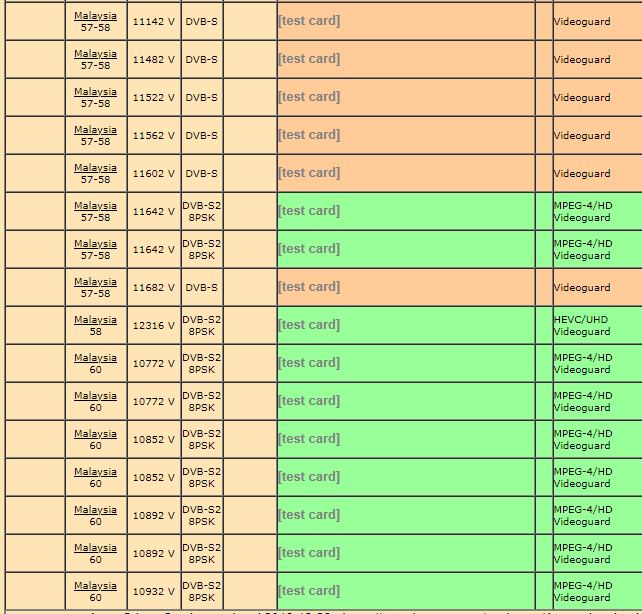
Astro has refused to change ultra box for my sub line! Knnbccb! This is the result of monopolization! We are at thier mercy!
Astro Version 13A, All about Astro Malaysia offerings
Astro Version 13A, All about Astro Malaysia offerings
|
|
 Dec 24 2019, 09:01 AM Dec 24 2019, 09:01 AM
|
 
Senior Member
1,682 posts Joined: Oct 2012 
|
Astro has refused to change ultra box for my sub line! Knnbccb! This is the result of monopolization! We are at thier mercy!
|
|
|
|
|
|
Dec 24 2019, 09:26 AM
Show posts by this member only | IPv6 | Post
#2722
|
|
Senior Member
7,801 posts Joined: Dec 2014 From: Malaysia 
|
QUOTE(19 Degree South @ Dec 24 2019, 09:01 AM) Astro has refused to change ultra box for my sub line! Knnbccb! This is the result of monopolization! We are at thier mercy! What's the reason they rejected you? There must be a reason.... |
|
|
Dec 24 2019, 09:36 AM
Show posts by this member only | IPv6 | Post
#2723
|

Senior Member
2,856 posts Joined: Mar 2012
|
QUOTE(19 Degree South @ Dec 24 2019, 09:01 AM) Astro has refused to change ultra box for my sub line! Knnbccb! This is the result of monopolization! We are at thier mercy! I upgraded both of my decoder.No issue. Definitely there is some problem at your part. |
|
|
Dec 24 2019, 09:45 AM
|

Senior Member
1,304 posts Joined: Mar 2010
|
QUOTE(19 Degree South @ Dec 24 2019, 09:01 AM) Astro has refused to change ultra box for my sub line! Knnbccb! This is the result of monopolization! We are at thier mercy! they don't have enough ultrabox stocks kot.. |
|
|
Dec 24 2019, 10:10 AM
|

All Stars
48,561 posts Joined: Sep 2014 From: REality
|
QUOTE(19 Degree South @ Dec 24 2019, 09:01 AM) Astro has refused to change ultra box for my sub line! Knnbccb! This is the result of monopolization! We are at thier mercy! Simply they won't refuse..Must be something wrong... Others change easily only... They love more people changed than be at the old box.. |
|
|
Dec 24 2019, 12:15 PM
Show posts by this member only | IPv6 | Post
#2726
|
|
Senior Member
1,682 posts Joined: Oct 2012
|
To all, they gave me the ultra box for my main line and told me to sign another two years but under the T&C, the ultra box applied only to the main line! Is this correct?
|
|
|
|
|
|
Dec 24 2019, 01:21 PM
Show posts by this member only | IPv6 | Post
#2727
|
|
Senior Member
7,801 posts Joined: Dec 2014 From: Malaysia
|
QUOTE(19 Degree South @ Dec 24 2019, 12:15 PM) To all, they gave me the ultra box for my main line and told me to sign another two years but under the T&C, the ultra box applied only to the main line! Is this correct? As long you change to Ultra Box, your 24 months contract will restart no matter what. If you have Multiroom, contract will apply to those Ultra Boxes too. Didn't they tell you before you proceed to upgrade? They're told to inform customers that 24 months contract applies upon successful upgrade to Ultra Box. |
|
|
Dec 24 2019, 05:12 PM
|
|
Senior Member
2,517 posts Joined: Mar 2016
|
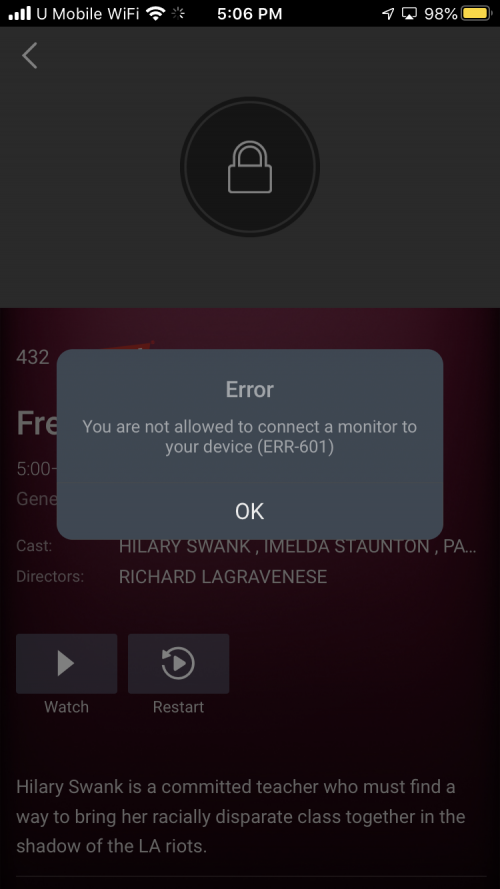
Astro go doesn’t let user to project to any TV
 |
|
|
Dec 24 2019, 05:45 PM
Show posts by this member only | IPv6 | Post
#2729
|
|
Senior Member
7,801 posts Joined: Dec 2014 From: Malaysia
|
QUOTE(yongtjunkit @ Dec 24 2019, 05:12 PM) Astro go doesn’t let user to project to any TV For now, yes. Tbh to me, Astro faces so many other technical problems. Features like cast to TV isn't their priority for now also. Even offline download feature, suddenly "went missing". For now the alternative method to watch Astro Go on TV is use laptop/computer, launch either Firefox or Chrome, then login to Astro Go. Connect HDMI cable from laptop to TV, and then watch from there. Although it's not as easy as "cast to TV" from phone, but so far this is the very straightforward method you can do now. Or if you're using a smart TV, you can consider launch your TV's browser app, then login to Astro Go, see if you can watch your shows as usual. Of cos, Astro Go wasn't designed to let viewers watch using this method, so you might experience some glitches here and there. This post has been edited by joshhd: Dec 24 2019, 05:46 PM |
|
|
Dec 25 2019, 01:57 AM
|
|
Senior Member
1,386 posts Joined: Nov 2012
|
QUOTE(yongtjunkit @ Dec 22 2019, 05:33 PM) My grandma house PVR box HDD decided to die by itself same problem for me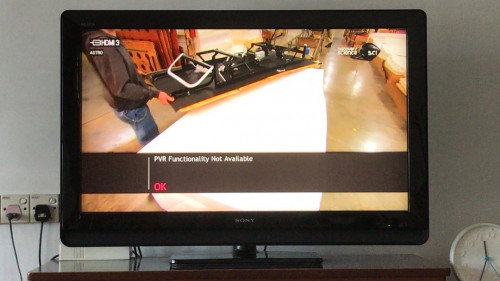 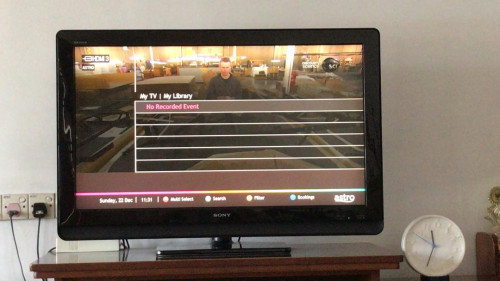 Is it actually bad to leave the PVR box on 24/7 ? Complained to Astro and they asked for the following information 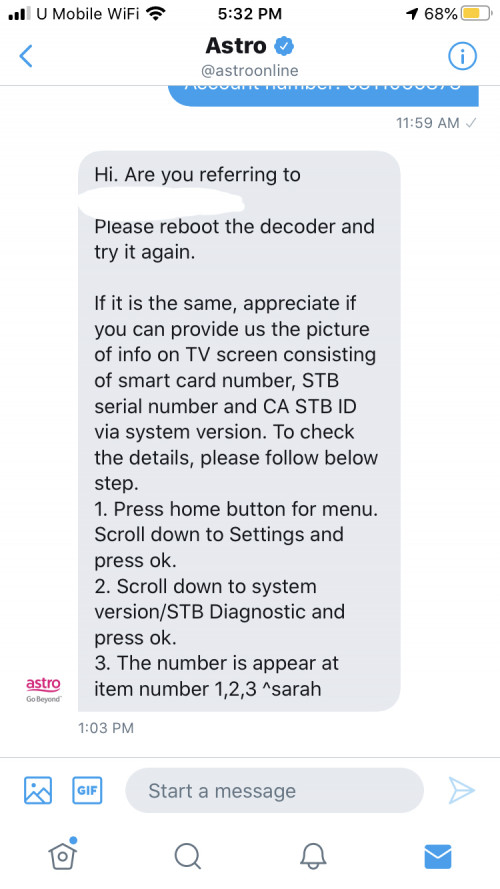 Don’t they actually have the information about the decoder in their record? my old PVR got problem yesterday fine today my library lost and say PVR functionality not available  i already send fb complaint with screenshot VOD also cannot access i think astro trying force upgrade ultra box ??? i don't want ultra box due bad quality HD that i prefer old PVR  checked stb diagnostic HDD Status Connected  i already ask astro he said Astro technician to house but i haven't response because i still scared lah my house we have videocond2h indian channel decoder |
|
|
Dec 25 2019, 02:02 AM
Show posts by this member only | IPv6 | Post
#2731
|
|
Senior Member
7,801 posts Joined: Dec 2014 From: Malaysia
|
QUOTE(pakji @ Dec 25 2019, 01:57 AM) same problem for me Like I said earlier, find ways to hide your Videocon d2h then can already. What's stopping you from dismantling the cables? Have you tried it first? my old PVR got problem yesterday fine today my library lost and say PVR functionality not available i already send fb complaint with screenshot VOD also cannot access i think astro trying force upgrade ultra box ??? i don't want ultra box due bad quality HD that i prefer old PVR checked stb diagnostic HDD Status Connected i already ask astro he said Astro technician to house but i haven't response because i still scared lah my house we have videocond2h indian channel decoder |
|
|
Dec 25 2019, 07:24 AM
Show posts by this member only | IPv6 | Post
#2732
|
|
Senior Member
2,517 posts Joined: Mar 2016
|
QUOTE(pakji @ Dec 25 2019, 01:57 AM) same problem for me The HD quality issue is the bitrate that Astro set nothing to do with the box, Astro can increase the bitrate then become clear my old PVR got problem yesterday fine today my library lost and say PVR functionality not available i already send fb complaint with screenshot VOD also cannot access i think astro trying force upgrade ultra box ??? i don't want ultra box due bad quality HD that i prefer old PVR checked stb diagnostic HDD Status Connected i already ask astro he said Astro technician to house but i haven't response because i still scared lah my house we have videocond2h indian channel decoder I’ve requested PVR box from them..... and I told them that’s there’s no WiFi there so ultra box isn’t suitable For videocond2h, you got to hide it, like what joshHD said... if you don’t know try to look on how to disconnect it.. or covering the decoder in a black garbage bag would be a good idea? This post has been edited by yongtjunkit: Dec 25 2019, 11:10 AM |
|
|
Dec 25 2019, 04:52 PM
Show posts by this member only | IPv6 | Post
#2733
|
|
Senior Member
7,801 posts Joined: Dec 2014 From: Malaysia
|
Merry Christmas everyone...
How is Astro's journey to 100 HD channels by Jan 2020? Let's see. Here's the current updated channel list of all HD channels on Astro: » Click to show Spoiler - click again to hide... « As of 25 Dec 201993 permanent HD channels in total +3 Astro PPV Movie HD (495, 496, 497) +1 temporary HD channel (K-Mania) = Grand total 97 HD channels On 1 Jan 2020 From 93 permanent HD channels -2 HD channels (DIVA & E!) that is scheduled to be ceased. +1 HD channel (Comedy Central) as one and only replacement available = Total 92 permanent HD channels +3 Astro PPV Movie HD (495, 496, 497) +1 temporary HD channel (K-Mania) = Grand total 96 HD channels From 2 Jan 2020 onwards -1 temporary HD channel (K-Mania) Still 92 permanent HD channels +3 Astro PPV Movie HD (495, 496, 497) = Grand total 95 HD channels ---------- So no matter how Astro is playing with numbers-of-HD-channels game, also still "struggling" to reach 100 HD channels mark by Jan 2020 regardless?  Q: Does Astro has the satellite capacity to add about another 5-6 HD channels now? Maybe their satellite bandwidth on Measat 3, 3a and 3b already full? A: They actually reserve some amount of SD and HD channels in case of any temporary events/channels. But how many "spares" they need actually? You click/tap and see more. » Click to show Spoiler - click again to hide... « Q: What are the SD channels that Astro can consider offer in HD? A: Here are the list of channels that is originally available in HD by channel provider, but Astro offer to its customers in SD only (except local FTA stations like RTM and Media Prima): » Click to show Spoiler - click again to hide... « Q: How about Astro's in-house SD channels that they can consider upgrade to HD (except PPV movie channels)?A: Here you go: » Click to show Spoiler - click again to hide... « Q: Which channels that is only in SD from channel provider, so Astro are out of luck to provide that channel in HD to customers?A: Here you go: » Click to show Spoiler - click again to hide... « Q: How about Astro Go exclusive channels? A: Here you go: » Click to show Spoiler - click again to hide... « Q: Eh, like that not so correct. How about the 3 UHD channels? CH780, CH498 and CH499. Those are also considered "high definition" channels, but it's "ultra" 😑 A: If you want to count that way, then... 92 HD + 3 PPV HD movies = 95 HD channels now + 1 Astro UHD (CH780) + 2 Astro Best UHD CH498 & CH499 = 98 channels including all HD and UHD channels, literally. In conclusion? It still didn't reach that exact, but barely near 100 channels even if they want to "cheat" the numbers game to include those PPV movie channels (Astro First/Best). In fact, to me, it is considered as cheating to include PPV channels as part of Astro channel lineup, and then Astro brag to everyone (including and especially its stakeholders) that they has "100" HD channels. How could those be part of usual TV channels offering? It's a pay per view channel/content.  So does that mean, Astro has 92 HD channels at the end of the day? Few days left before 2020. Let's see how.  |
|
|
|
|
|
Dec 25 2019, 06:21 PM
|
|
Senior Member
3,147 posts Joined: Dec 2009
|
my guess many In House Rojak channels will be converted to 'fake' HD.
|
|
|
Dec 25 2019, 06:21 PM
|
|
Senior Member
3,147 posts Joined: Dec 2009
|
deleted
This post has been edited by smileguy: Dec 26 2019, 08:46 AM |
|
|
Dec 25 2019, 09:42 PM
Show posts by this member only | IPv6 | Post
#2736
|
|
Senior Member
7,801 posts Joined: Dec 2014 From: Malaysia
|
Earlier on Astro Tutor TV SPM...
 Oh, so now Astro Tutor TV SPM join the Go Shop bandwagon? Target those SPM students also?   |
|
|
Dec 26 2019, 10:15 AM
|
|
All Stars
48,561 posts Joined: Sep 2014 From: REality
|
QUOTE(joshhd @ Dec 25 2019, 09:42 PM) Earlier on Astro Tutor TV SPM... Lolz..Oh, so now Astro Tutor TV SPM join the Go Shop bandwagon? Target those SPM students also? Astro oh Astro... Even SPM students also they don't want leave alone.. Must sell something to them... |
|
|
Dec 26 2019, 02:08 PM
|
|
Senior Member
1,328 posts Joined: Jun 2019 
|
Just curious, can Astro detect our location? Because recently I bring my decoder back to my kampung, but can't get any signal. But no problem when viewing in kl.
|
|
|
Dec 26 2019, 02:26 PM
Show posts by this member only | IPv6 | Post
#2739
|
|
Senior Member
7,801 posts Joined: Dec 2014 From: Malaysia
|
QUOTE(Matchy @ Dec 26 2019, 02:08 PM) Just curious, can Astro detect our location? Because recently I bring my decoder back to my kampung, but can't get any signal. But no problem when viewing in kl. No they can't detect your location. What's your Astro box type? HD box or PVR box? You need to make sure the LNB type either your satellite dishes at your home or Kampung is the same, and the Input Source setting matches the setting You go to Settings>Installation Settings>Satellite Settings What's the Input Source option you've chosen? Universal, SatCR or DCSS? |
|
|
Dec 26 2019, 03:07 PM
|
|
Senior Member
1,328 posts Joined: Jun 2019
|
QUOTE(joshhd @ Dec 26 2019, 02:26 PM) No they can't detect your location. What's your Astro box type? HD box or PVR box? Pvr type... Maybe the cable loose or something. Before this, no problem. Only few months back got this problem. I thought .after the UI update they blocked multi location access.You need to make sure the LNB type either your satellite dishes at your home or Kampung is the same, and the Input Source setting matches the setting You go to Settings>Installation Settings>Satellite Settings What's the Input Source option you've chosen? Universal, SatCR or DCSS? |
| Change to: |  0.0192sec 0.0192sec
 0.85 0.85
 6 queries 6 queries
 GZIP Disabled GZIP Disabled
Time is now: 19th December 2025 - 03:06 PM |
 Quote
Quote