Welcome Guest ( Log In | Register )

28 Pages « < 8 9 10 11 12 > » Bottom

Outline · [ Standard ] · Linear+

 Astro Version 13A, All about Astro Malaysia offerings

views
     
yongtjunkit
post Feb 27 2020, 02:51 PM

Look at all my stars!!
*******
Senior Member
2,517 posts

Joined: Mar 2016
QUOTE(joshhd @ Feb 27 2020, 01:42 PM)
That "WhatsApp Astro", the answers you can type during a bot chat conversation, are predefined.
Like the one you typed "Astro IPTV" is actually wrong... For that question, the chat bot won't accept answers other than numbers shown.
For example "Type 5 for Ultra Box", then you should only enter "5" then hit Send.
If you answer something that is not in the option, you'll get error message...
*
🤔, If this the case how to get tech support for Astro& broadband,Astro iptv, general Astro services or it's not a thing yet?
yongtjunkit
post Feb 28 2020, 07:14 AM

Look at all my stars!!
*******
Senior Member
2,517 posts

Joined: Mar 2016
QUOTE(joshhd @ Feb 27 2020, 11:30 PM)
There's an option for you to have a live chat. You'll have to hunt for that option, and be patient to wait for a live agent to attend to you, and even mentally prepared of no agent being attend to you after a long wait.

Yes, Astro has many ways to get contacted, such as from call (03-9543 3838, or 03-9543 1543 for Astro IPTV & Astro Broadband), email (wecare@astro.com.my), submit feedback form & self-troubleshooting (http://support.astro.com.my/), social media (Facebook and Twitter).... So what? Even with all this:

- call customer service: you got to wait for long time for an agent to talk to you
- self-troubleshooting: provides very basic and surface level diagnosis, and will eventually direct you to submit a feedback form if issue doesn't solve, which all goes back to square one
- email, submitting feedback form, contact via social media: they have the rights to ghost you (after auto-send an auto generated message, you won't receive the reply as you would have expected and most probably just "we've sent your feedback to the person in charge" then case closed

It's pretty f**k up actually.
Honestly, if you face any issues with Astro services that requires their attention, and yet you (the user) aren't tech savvy to solve the issue, be prepared to have your own solution to deal with it.
Yea, it could be Astro's "lack of manpower", too busy or whatsoever. If people aren't that knowledgeable to fix technical stuff, these things will go on, and sometimes, till the extent that money can't necessarily solve the issue.
*
What happens if you are tech savvy but need astro to do something like replacing the decoder when the current one dies ?

Even when I contacted Astro via twitter regarding about Astro IPTV, they asked me to call the Astro IPTV line instead but on their website it shows twitter as an option

This post has been edited by yongtjunkit: Feb 28 2020, 07:15 AM
yongtjunkit
post Feb 28 2020, 04:00 PM

Look at all my stars!!
*******
Senior Member
2,517 posts

Joined: Mar 2016
QUOTE(joshhd @ Feb 28 2020, 11:29 AM)
That is the only last resort. I'm not saying that we can solve everything by ourselves. Things that are account related (e.g. Account reactivation, billing,...) and certain technical assistance (e.g. needs to replace STB), those have no choice but to contact Astro. If they don't feel like layan you, or doesn't give you a good after sales support, then too bad for you then.
*
🤔, If let's say the PVR box HDD dies, can we replace it ourselves?

-------------------------------------------------------------------------------
https://www.lowyat.net/2020/203385/astro-ul...orthy-features/
Too nice, but no support for Astro IPTV bangwall.gif

This post has been edited by yongtjunkit: Feb 28 2020, 04:30 PM
yongtjunkit
post Feb 28 2020, 05:44 PM

Look at all my stars!!
*******
Senior Member
2,517 posts

Joined: Mar 2016
QUOTE(joshhd @ Feb 28 2020, 05:05 PM)

See whether you dare to try or not.

With that, you could try to replace to hard disks up to 2TB in theory, cuz according to the user's comment, Astro PVR box uses FAT32 file system on its hard disk, so the max capacity size is 2TB.

As long you make sure to put back the original hard disk to PVR box if Astro technician would come for whatever reasons.
*
🤔, I wonder if anyone did the following before?

Did anyone swap the HDD(working one) in the decoder with a broken/ dead HDD and give it to Astro? devil.gif

This post has been edited by yongtjunkit: Feb 28 2020, 08:47 PM
yongtjunkit
post Feb 28 2020, 08:52 PM

Look at all my stars!!
*******
Senior Member
2,517 posts

Joined: Mar 2016
QUOTE(Zot @ Feb 28 2020, 08:46 PM)
I think you can do yourself. Actually if your HDD is bad, you can buy from Astro. The price is even cheaper than buying outside last time when my brother had faulty HDD.
*
Wow, Astro do allow users to open their decoder and also sell DIY replacement kit 🤔?

If a customer ask Astro about “PVR functionality not available” and they’ve completed all the troubleshooting steps, Astro usually sends their technician to replace the decoder and not repair it
yongtjunkit
post Feb 28 2020, 10:58 PM

Look at all my stars!!
*******
Senior Member
2,517 posts

Joined: Mar 2016
QUOTE(Zot @ Feb 28 2020, 10:55 PM)
My bad. The story was not like that.

Last time there was Astro box that can use external HDD to record program. My brother wanted to buy the HDD and ask Astro. Since Astro is using own format for the recording, it cannot be played using PC. So, end up never purchase

Looks like my brain creating story  blush.gif   sad.gif
*
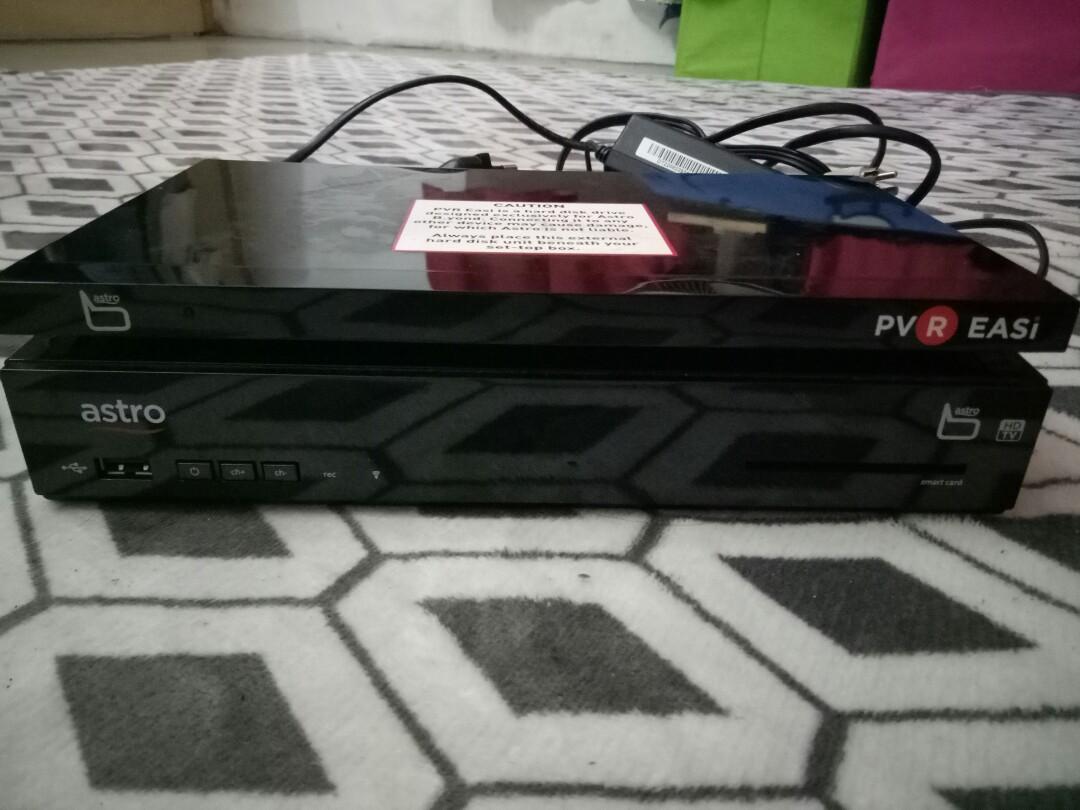
Oh, I think it’s called PVR easi, it’s for the DMT 4 HD box if not mistaken and has 320GB of storage, lesser than PVR box and apparently the PVR box may be using fat32 as the filesystem with Encrypted files that self destruct when is plugged into the PC with an attempt to open the file(at least according to the comment) ?

QUOTE(joshhd @ Feb 28 2020, 05:05 PM)

See whether you dare to try or not.

With that, you could try to replace to hard disks up to 2TB in theory, cuz according to the user's comment, Astro PVR box uses FAT32 file system on its hard disk, so the max capacity size is 2TB.

As long you make sure to put back the original hard disk to PVR box if Astro technician would come for whatever reasons.
*
This post has been edited by yongtjunkit: Feb 28 2020, 11:01 PM
yongtjunkit
post Feb 29 2020, 07:18 AM

Look at all my stars!!
*******
Senior Member
2,517 posts

Joined: Mar 2016
QUOTE(Zot @ Feb 29 2020, 05:29 AM)
I see no point to change to SSD since normal HDD is adequate to play video. Nothing to do with GUI  laugh.gif

I think the video format is encrypted and not able to play with any apps since it is proprietary format.
*
And if not mistaken it’s tied to the smart card, so it won’t work on another PVR box, and the HDD is adequate to play already, I think they are using surveillance drive for the PVR box

This post has been edited by yongtjunkit: Feb 29 2020, 07:19 AM
yongtjunkit
post Feb 29 2020, 10:23 AM

Look at all my stars!!
*******
Senior Member
2,517 posts

Joined: Mar 2016
QUOTE(joshhd @ Feb 29 2020, 01:21 AM)
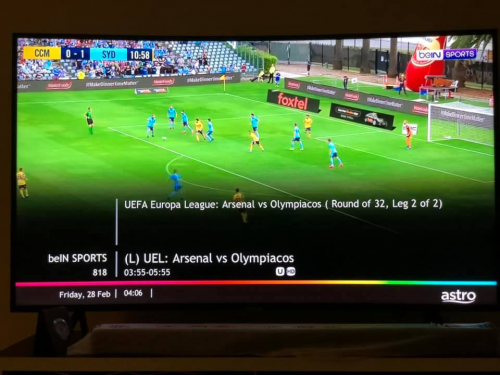
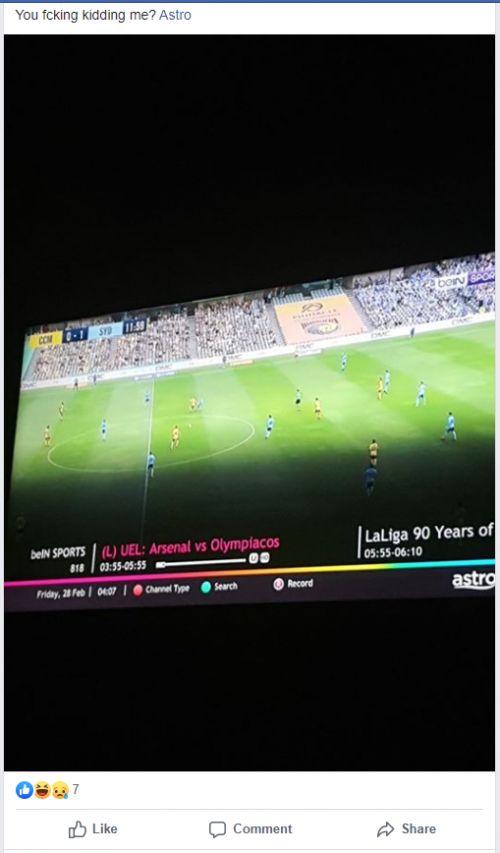
Apparently, last night BeIn Sports (ch818) was suppose to air UEFA Europa League Arsenal vs Olympiacos football match, yet it shows A-League: Central Coast Mariners v Sydney FC match?
user posted image

Big mistake indeed  shakehead.gif
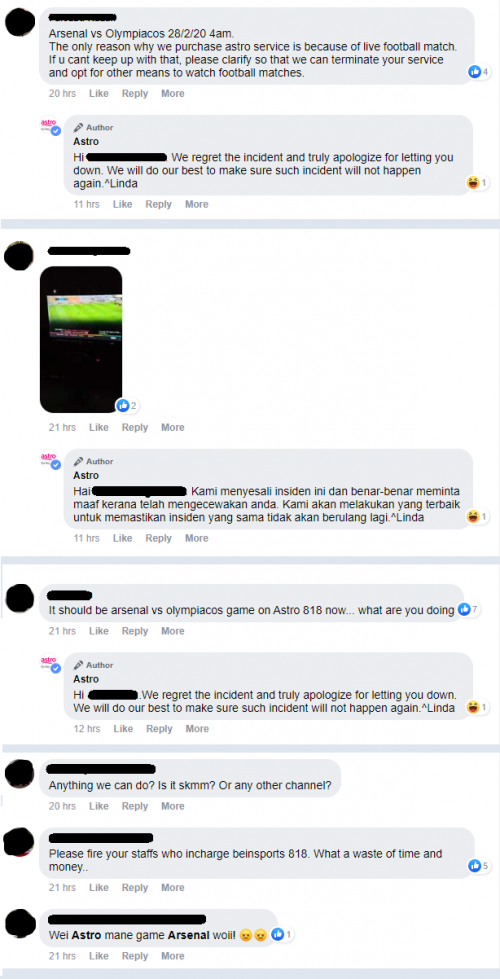
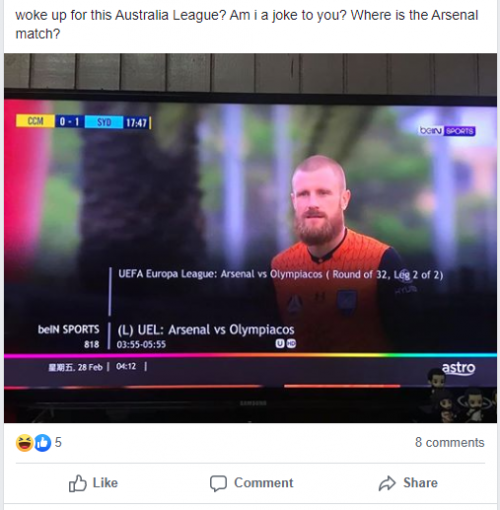
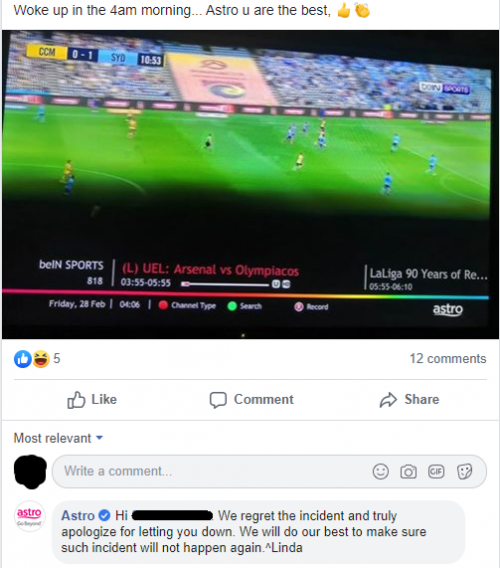
Despite lots of customers complained and posted similar screenshots on their Facebook page, apologising to customers is the most they can do.

user posted image     user posted image

user posted image     user posted image

user posted image

I wonder what went wrong  hmm.gif Anyhow, Arsenal lost that match though...
*
Astro Keyed in wrong info in the TV guide? Or maybe a repeat of another match? Does Astro even have the ability to tamper with the content by 3rd party channels such as HBO, FOX,etc?

This post has been edited by yongtjunkit: Feb 29 2020, 02:26 PM
yongtjunkit
post Feb 29 2020, 08:15 PM

Look at all my stars!!
*******
Senior Member
2,517 posts

Joined: Mar 2016
QUOTE(westlife @ Feb 29 2020, 07:49 PM)
So jialat. The old PVR can keep technically forever unless the channel u recorded is no longer live.
*
not exactly forever.... the PVR box kaput or HDD spoil then no more already

If the ultra box allows user to use their own storage media( eg: own HDD)... that should technically remove certain limitation of the ultra box currently has, the ultra box has a micro sd slot, usb 3.0 port for HDD but they were disabled by Astro at the moment.... maybe astro would introduce PVR easi v2.0 for ultra box in the future
user posted image

This post has been edited by yongtjunkit: Feb 29 2020, 08:16 PM
yongtjunkit
post Feb 29 2020, 09:29 PM

Look at all my stars!!
*******
Senior Member
2,517 posts

Joined: Mar 2016
QUOTE(westlife @ Feb 29 2020, 09:19 PM)
My PVR box I had used for 5 years++. Sometimes there is some glitch here and there during recorder. (Likely to be due to probably bad sectors on the Hard disk but overall still very ok.

It is super super unlikely they will allow users to do so.

Last time I heard that the PVR supports a specific model of WD Hard disk for external storage but eventually it is no also.
*
yup, a specific model but eventually got replaced by DMT 4 HD PVR box in 2010

my PVR box( dmt 5v2 - around 3-4 years old) just decided to hang it was recording at that time, the clock still shows the correct time though.... pressing the home button on the decoder itself shows the home screen on the TV screen, the background is black/blank bangwall.gif vmad.gif Futhermore using astro IPTV and the ultra box doesn't even support astro IPTV as of now( maybe they don't want our money? devil.gif ) + Astro stopped making PVR box already, now only give out refub PVR box
This post has been edited by yongtjunkit: Feb 29 2020, 10:55 PM
yongtjunkit
post Mar 1 2020, 01:04 PM

Look at all my stars!!
*******
Senior Member
2,517 posts

Joined: Mar 2016
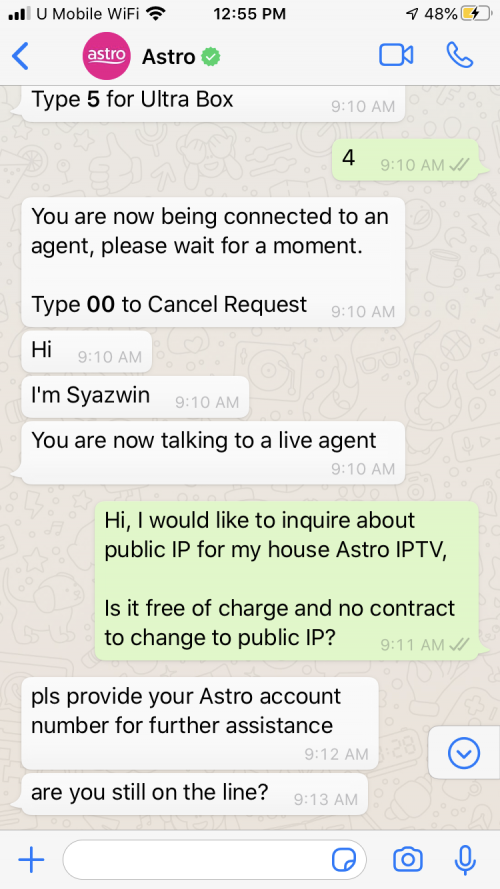
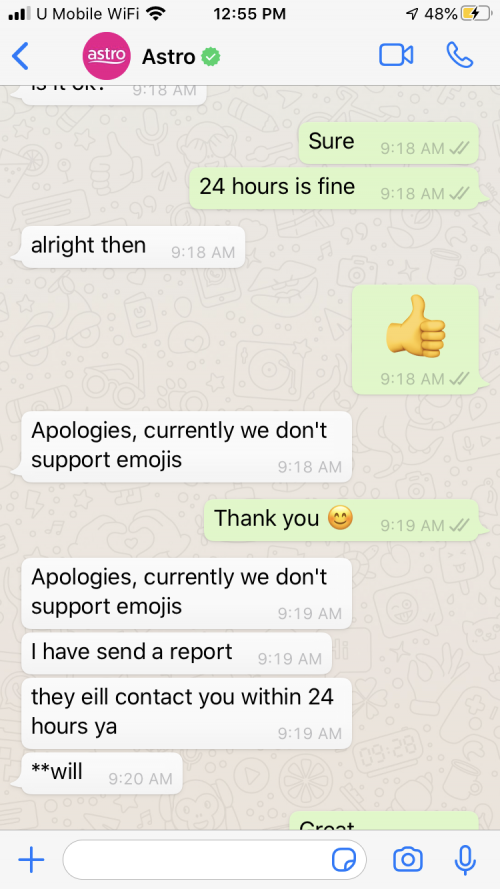
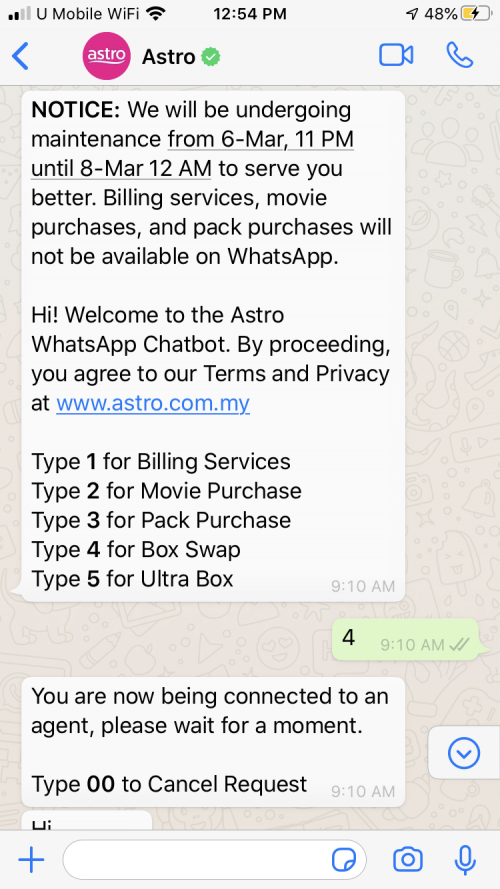
Finally found the option to contact tech support via Whatsapp but something is fishy

user posted image
user posted image
user posted image
It even doesn't support emoji dry.gif rclxub.gif

I've requested to for public IP but in the Astro Portal, it shows up differently, even the contact number that I've requested them to use isn't there
user posted image

Just called their IPTV hotline and turns out it's for a callback doh.gif

This time told them the entire thing again and they said within 24 hours the router should update with public IP.... hopefully this is for real ( so far the ticket info I saw now is the same on Astro web portal before I called in to check)

QUOTE(yongtjunkit @ Feb 24 2020, 10:34 AM)
wah now can also bring PVR box also as I guess the most common setup nowadays is still Universal LNB, especially the NJOI satellite dish  thumbup.gif just need a splitter and it's going to work just fine
I think the PVR box needs to have 2 tuners on universal for it to work properly? Last time when my house Astro IPTV( IP mode only) down, they said to connect to satellite dish ( universal LNB- set up for HD box) via sat in 1 but some channel cannot watch like ch394
*
this "temporary" solution is in July 2018 based on the support ticket history

This post has been edited by yongtjunkit: Mar 1 2020, 04:54 PM
yongtjunkit
post Mar 1 2020, 07:48 PM

Look at all my stars!!
*******
Senior Member
2,517 posts

Joined: Mar 2016
QUOTE(joshhd @ Mar 1 2020, 07:10 PM)
It's great to see that a live chat agent would attend to you.  biggrin.gif  biggrin.gif
At Astro, waiting for an CS agent to attend to you is something rare, and you should be grateful for that. Not even to mention, requesting a callback.

---

If that's the case, try live chat again, tell them your case number, then update them accordingly on any inaccurate information you see on Astro Self Service online portal.
If you have any doubt, do ask them "You know what's public IP, right?".
From there, you can make sure that the CS agent is not acting professional by "pretending to know what you're talking about".  tongue.gif

As for the emoji part, I also dunno why their system isn't support emoji.
Instead, you may use text-based emoticons, such as  :-) instead of 😁
I believe their "whatever system" are able to display that without issues.
*
I actually directly contact Astro IPTV CS to verify and change the ticket info.... and roughly around 2-3 hours later, they've remote into the router and change the settings to public IP(today- from start to finish) rclxms.gif
I guess something that can be resolved on a Sunday is very rare at Astro?
Also on Astro IPTV support page, the Astro IPTV CS phone number isn't there anymore for some reason

I actually feel fishy about the experience being so seamless based on my experience of replacing a decoder.... also the person on WhatsApp didn't give me a ticket number, I had to check on the Astro portal for the ticket number

This post has been edited by yongtjunkit: Mar 1 2020, 07:51 PM
yongtjunkit
post Mar 1 2020, 07:53 PM

Look at all my stars!!
*******
Senior Member
2,517 posts

Joined: Mar 2016
QUOTE(Zot @ Mar 1 2020, 07:51 PM)
Yes unlike last time you cannot just bring your smart card and plug in on any other box. It will not work
*
Now need to carry the entire decoder instead of a smartcard, as long as it's using satelite... Astro can't trace the location of the decoder via satellite if not mistaken
yongtjunkit
post Mar 1 2020, 09:47 PM

Look at all my stars!!
*******
Senior Member
2,517 posts

Joined: Mar 2016
QUOTE(joshhd @ Mar 1 2020, 09:34 PM)
But however, if you enable WiFi connection on your PVR box and Ultra box, then there is a possibility that Astro are able to check, such as your IP address and estimated location (WiFi location tracking) but it won't be as accurate as GPS. But I'm not sure if Astro practices this or not, cuz in my opinion, even if they have the information, what you expect them to do anyway?
*
To flag that there’s something not right about the information, or the location to disable the decoder till it’s at approximately the correct location?
yongtjunkit
post Mar 2 2020, 09:30 AM

Look at all my stars!!
*******
Senior Member
2,517 posts

Joined: Mar 2016
QUOTE(Zot @ Mar 2 2020, 08:43 AM)
When activated, they just need to register the box MAC address and the smart card number. This will prevent the card being used on other box. This was not how the legacy box worked. That is why you can bring the card  anywhere and whichever box you plugged the card in will be able to receive all the channel that particular card was subscribed to.

Yes, satellite is one way communication for Astro box. It will only receive. Thus, no way Astro can trace your location through satellite, but it is possible if you are connected to Internet. Your IP address will let them trace to exact house address with help from Internet service provider, but I doubt Astro will do that since you still pay the service. Why bother as long the money is in  biggrin.gif

Even when they offered additional box and same available channel at 50% less additional fee, they know that some customers will put the other box at kampung or somewhere else and share the monthly fee, they are not into catching those practice. More subscriptions, business expands and share holders are happy  laugh.gif

Their main problem is now people buying the Android box with ability to view all the channels including AOD. Last time there was like RM30 per month, but now they sell the box like RM300 and you can watch all channel and no monthly fee  whistling.gif
*
And the activation isn't instant, but on the legacy decoder, I guess the installer just carry over the smart card to the new decoder?

If the smart card is paired to the decoder(HD box), why not just embed it into the decoder(not removable)?
yongtjunkit
post Mar 2 2020, 09:44 AM

Look at all my stars!!
*******
Senior Member
2,517 posts

Joined: Mar 2016
QUOTE(Zot @ Mar 2 2020, 09:39 AM)
Unlike 1st practice, the box belongs to Astro. The customer is link to the card. If box faulty, then Astro need to change everything not just change the box S/N.

If customer canceled an account. The customer data would be still in database. This is normal ISO requirement for reference in future. Therefore, if the box is issued to new customer (I believe Astro will recycle), then card or box S/N will conflict in database.

These probably the reason I think.
*
So now the Ultra box and Astro HD/PVR box still belongs to Astro(yet I think we paid for it with contract)?
yongtjunkit
post Mar 2 2020, 10:15 AM

Look at all my stars!!
*******
Senior Member
2,517 posts

Joined: Mar 2016
QUOTE(Zot @ Mar 2 2020, 09:52 AM)
Now all equipment belongs to Astro. They don't want people modified the box again like last time and use for free. Of course the contract will ensure they get the money back for equipment. The good thing is, if anything is faulty the replacement is free including remote if not mistaken.
*
But that’s for under contract? If out of contract need to pay them to replace right? Especially the RM65 technician fees

And if this the case, we can’t open it and replace the HDD ourselves?

This post has been edited by yongtjunkit: Mar 2 2020, 10:16 AM
yongtjunkit
post Mar 2 2020, 10:46 AM

Look at all my stars!!
*******
Senior Member
2,517 posts

Joined: Mar 2016
QUOTE(Zot @ Mar 2 2020, 10:23 AM)
I think warranty is for parts only and for as long as you subscribed to Astro. Labor is different thing.
*
oh, so means that I can contact astro about a broken original remote control and get a replacement for free
yongtjunkit
post Mar 2 2020, 11:05 AM

Look at all my stars!!
*******
Senior Member
2,517 posts

Joined: Mar 2016
QUOTE(Zot @ Mar 2 2020, 10:51 AM)
I remembered was told like that.
*
Sounds interesting, maybe I should call Astro about a broken remote and see if it’s a free replacement

Or can anyone here confirm that it’s free?

This post has been edited by yongtjunkit: Mar 2 2020, 11:05 AM
yongtjunkit
post Mar 2 2020, 02:05 PM

Look at all my stars!!
*******
Senior Member
2,517 posts

Joined: Mar 2016
QUOTE(Zot @ Mar 2 2020, 11:15 AM)
Never had problem but that was what I was told when they installed the PVR for me last time. Just call and ask customer service if you manage to get hold on someone  laugh.gif
*
🤔, their remote breaks really fast and I don't even have a functioning original Astro remote ( the white byond remote) maybe I've already trashed the remote in the bin

28 Pages « < 8 9 10 11 12 > » Top
 

Change to:
| Lo-Fi Version
0.0385sec    1.02    7 queries    GZIP Disabled
Time is now: 20th December 2025 - 01:24 AM