Yes, technically you can.
Last time when you experience "some channels can't watch like ch394", are you using cable splitter back then? If yes, then I know why.
» Click to show Spoiler - click again to hide... «
Oh!K (ch394) since last time until today is on low Ku band frequency.
Those days when your Tuner 1 is receiving channels from high Ku band freqency where some HD channels are being transmitted from Measat 3a satellite.
Because for Universal LNB mode, in each Tuner, once STB is receiving signal from high Ku band frequency, then the low Ku band frequency will become no signal.
Basically means, you can't receive both low and high Ku band frequency at the same time on a single Universal LNB because of the "22KHz ON/OFF" thing.
It will seamless turns on and off itself whenever you change channels from low to high Ku band frequency, and vice versa.
Not really understand? Nvm. It's already a thing of the past anyway.
No need to headache about this, cuz all SD and HD channels are already on low Ku band frequency, so you won't experience such issues anymore.
Yeah. It is programmed by them to work that way.
Universal LNB: What if you insist to connect only SAT 1 port and left SAT 2 port unconnected, or vice versa (no splitter used)?You need to know how to trick your PVR box to use either SAT 1 or SAT 2 port to receive signal, cuz the PVR box won't "smart switch" like:
Let say your PVR box is currently receiving signal from Tuner 1, but Tuner 1 no signal while Tuner 2 has signal (you connected to SAT 2 port, left SAT 1 port unconnected), it won't "smart switch" to Tuner 2 just because it has signal... It will still continue showing "Services currently not available".
Here's a way to circumvent this:
1) Let say now your PVR box is on AXN HD (721) channel, and it shows "Services currently not available".
Open TV Guide / EPG, then scroll to any other channels.
2) Let say you selected TLC HD (ch728), then you press "Record" button to trick the PVR box to use another Tuner to record that channel/programme (With or without Series Link doesn't matter).
3) Now tune to that channel (e.g. TLC HD ch728), you shall be able to watch it as per usual. Now you can stop and delete the recording.
4) From now onwards, any channels you tuned to, shall be no issue.
>If once you power off and on the PVR box, and/or whenever you see "Services currently not available" again, repeat all the steps above again.
Beware:
Do take note if you have any scheduled recordings or Series Link. Once that SD/HD channel is being recorded (either by request or scheduled), means that Tuner is occupied (e.g. Tuner 1 is occupied, hence you won't be able to receive signal from any other channels when your Tuner 2 is unconnected).
Situation: Today, let say now you're already recording AXN HD (Tuner 1), while your Tuner 2 is left unconnected.
Result: You can only watch (while record) AXN HD channel. You are allowed to tune to any other channels, but you'll only see "Services currently not available" (it uses Tuner 2). But still, when you do that, your recording on AXN HD still goes on as usual and unaffected. Of course, you may watch your previously recorded programmes or download/stream shows from Video on Demand in the meantime. Those will still work as usual.
Solution: Stop the recording on AXN HD, or wait till the recording stop itself as the programme ends, then only you can continue to tune to other channels as usual.
Conclusion: Well, that's how troublesome it is if you don't use a cable splitter
 "So complicated to understand..."?
 Still prefer using only 1 cable for PVR box? Use SatCR or DCSS LNB. Done. All these problems mentioned above, all gone.

Otherwise, use cable splitter.
It was a temporary/ "complimentary set up so that you won't feel bored" set up from Astro while waiting for them to come and fix the fiber issue.... no splitter is used as I was using HD box before IPTV.... They are too slow that I ended up buying a fiber cable to see if it fixes the issue. Maybe next time when it happens now I know that I can just go to a hardware store and buy a splitter and 2 cables to make it work properly
I kinda remember that Astro said that this temporary setting would vanish after a reboot and after a reboot, the decoder went to the 1st time setup page


 Feb 20 2020, 12:56 PM


 Quote
Quote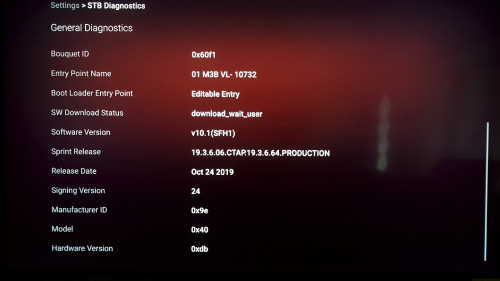

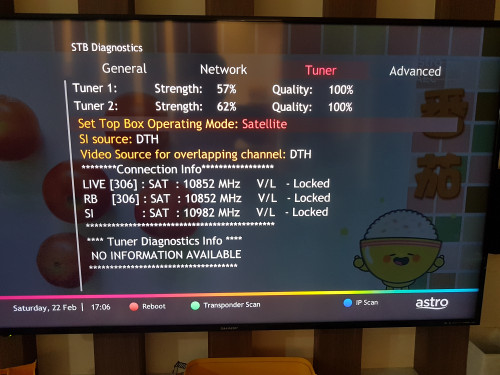


 just need a splitter and it's going to work just fine
 So, have to select each one independently.





 0.0385sec
 0.82
0.82
 7 queries
 GZIP Disabled