Welcome Guest ( Log In | Register )

7 Pages « < 4 5 6 7 >Bottom

Outline · [ Standard ] · Linear+

 Aztech FG7008GR(AC) AC2400 MU-MIMO WiFi Router, Awesome router but for the firmware...

views
     
neooren
post Sep 25 2018, 10:41 AM

Getting Started
**
Junior Member
237 posts

Joined: Sep 2009


Manage to get this working both internet and iptv using aztech malaysia config (fw 007)

Speedtest 2.4g can get 58mbps on 72mbps link (Mi A1)
So good😁

This post has been edited by neooren: Sep 25 2018, 10:42 AM
miloaisdino
post Sep 26 2018, 02:56 PM

Regular
******
Senior Member
1,418 posts

Joined: Jul 2015
QUOTE(neooren @ Sep 25 2018, 10:41 AM)
Manage to get this working both internet and iptv using aztech malaysia config (fw 007)

Speedtest 2.4g can get 58mbps on 72mbps link (Mi A1)
So good😁
*
Nice!
lol0919
post Sep 27 2018, 04:28 PM

Getting Started
**
Junior Member
168 posts

Joined: Sep 2018
So firmware .007 confirm compatible with unifi right?
It works only when using Aztech Malaysia config?
or which setting should i tick or chose?
previously using .007 but it can't connect unifi, but then using same settings in .003 and it works...so if i change back to .007, how to do the setting for unifi?
miloaisdino
post Sep 27 2018, 04:36 PM

Regular
******
Senior Member
1,418 posts

Joined: Jul 2015
QUOTE(lol0919 @ Sep 27 2018, 04:28 PM)
So firmware .007 confirm compatible with unifi right?
It works only when using Aztech Malaysia config?
or which setting should i tick or chose?
previously using .007 but it can't connect unifi, but then using same settings in .003 and it works...so if i change back to .007, how to do the setting for unifi?
*
Factory reset the device then upload the aztech malaysia config. Then should be ok
lol0919
post Sep 27 2018, 08:04 PM

Getting Started
**
Junior Member
168 posts

Joined: Sep 2018
QUOTE(miloaisdino @ Sep 27 2018, 04:36 PM)
Factory reset the device then upload the aztech malaysia config. Then should be ok
*
ok, thanks
heidarren
post Sep 27 2018, 08:45 PM

Getting Started
**
Junior Member
248 posts

Joined: Aug 2018
I've found a very interesting tips, when u try to make any changes for 5GHz WiFi, do it in basic tab, don't make any changes in advance tab, as it will cause the 5GHz to 20MHz bandwidth mode, the only change to make in advance tab is change country code, others please do it in basic tab
miloaisdino
post Sep 27 2018, 08:51 PM

Regular
******
Senior Member
1,418 posts

Joined: Jul 2015
QUOTE(heidarren @ Sep 27 2018, 08:45 PM)
I've found a very interesting tips, when u try to make any changes for 5GHz WiFi, do it in basic tab, don't make any changes in advance tab, as it will cause the 5GHz to 20MHz bandwidth mode, the only change to make in advance tab is change country code, others please do it in basic tab
*
Yeah its a long standing bug. If u accidentally do it tho luckily theres a fix:

telnet 192.168.1.254 port 48599 or 23 (see which works)
Username admin, password is yr webui password (if login fail then try changing the webui admin pwd and try again)
type sh, press enter
paste call_qcsapi_sockrpc --host 1.1.1.2 set_bw wifi0 80
Done.

This post has been edited by miloaisdino: Sep 28 2018, 03:06 PM
lol0919
post Sep 27 2018, 11:31 PM

Getting Started
**
Junior Member
168 posts

Joined: Sep 2018
Anyone here using .007 with Aztech config with unifi?
I'm still can't make it work, after loading the config file, I'm just insert my unifi account and password without modify anything else, but still no internet. Is it really working??
lol0919
post Sep 27 2018, 11:31 PM

Getting Started
**
Junior Member
168 posts

Joined: Sep 2018
Anyone here using .007 with Aztech config with unifi?
I'm still can't make it work, after loading the config file, I'm just insert my unifi account and password without modify anything else, but still no internet. Is it really working??
heidarren
post Sep 27 2018, 11:37 PM

Getting Started
**
Junior Member
248 posts

Joined: Aug 2018
QUOTE(lol0919 @ Sep 27 2018, 11:31 PM)
Anyone here using .007 with Aztech config with unifi?
I'm still can't make it work, after loading the config file, I'm just insert my unifi account and password without modify anything else, but still no internet. Is it really working??
*
Me too, solved with firmware .003
lol0919
post Sep 27 2018, 11:47 PM

Getting Started
**
Junior Member
168 posts

Joined: Sep 2018
QUOTE(heidarren @ Sep 27 2018, 11:37 PM)
Me too, solved with firmware .003
*
I tot it can works...
No choice, my experiment on .007 ends here, my mum want kill me already...

This post has been edited by lol0919: Sep 27 2018, 11:50 PM
miloaisdino
post Sep 28 2018, 01:23 PM

Regular
******
Senior Member
1,418 posts

Joined: Jul 2015
QUOTE(lol0919 @ Sep 27 2018, 11:47 PM)
I tot it can works...
No choice, my experiment on .007 ends here, my mum want kill me already...
*
Bummer
lol0919
post Sep 28 2018, 02:03 PM

Getting Started
**
Junior Member
168 posts

Joined: Sep 2018
QUOTE(miloaisdino @ Sep 28 2018, 01:23 PM)
Bummer
*
Lol
After flashed the firmware to .003, the problem to access 5ghz configuration page appear again. (Did flash to .007, perform hard reset and load default settings before use back .003)
miloaisdino
post Sep 28 2018, 03:06 PM

Regular
******
Senior Member
1,418 posts

Joined: Jul 2015
QUOTE(miloaisdino @ Sep 27 2018, 08:51 PM)
Yeah its a long standing bug. If u accidentally do it tho luckily theres a fix:

telnet 192.168.1.254 port 48599 or 23 (see which works)
Username admin, password is yr webui password (if login fail then try changing the webui admin pwd and try again)
type sh, press enter
paste call_qcsapi_sockrpc --host 1.1.1.2 set_bw wifi0 80
Done.
*
Follow this can alr

QUOTE(lol0919 @ Sep 28 2018, 02:03 PM)
Lol
After flashed  the firmware to .003, the problem to access 5ghz configuration page appear again. (Did flash to .007, perform hard reset and  load default settings before use back .003)
*
This post has been edited by miloaisdino: Sep 28 2018, 03:07 PM
miloaisdino
post Oct 1 2018, 05:55 PM

Regular
******
Senior Member
1,418 posts

Joined: Jul 2015
Me:
I would appreciate if u could disclose or provide me with the GPL source code for fg7008gr as u had did previously for HW550 (https://www.aztech.com/support/custom/product/GPL/hw550-gpl-sourcecode.htm) due to the bcm63139.
Thanks
Max

Aztech:
Dear Max,


Good day! Please check the link for the firmware of the FG7008GR(AC), https://www.aztech.com/aztech-support/produ...com/fg7008gr-ac. Thanks!

Regards,
Aztech Technical Support Team

Me:
Hi I wish to clarify that i am looking for the GPL source code, not the precompiled firmware for the router. As per GPL licensing requirement, router manufacturer is obliged to provide source code for all derivative works of the software distributed under GPL licensing terms, for example Broadcom sources.

You provide a software product, "FG7008GR(ac) firmware release" (hereafter - "the Product"), available via publicly accessible World-Wide Web URL https://www.aztech.com/aztech-support/produ...com/fg7008gr-ac , licensed under the terms of GNU General Public License.

Under the GPL, you are obliged to release the source of the binary or binaries you distribute.

As I understand from your provided link, you are distributing a binary built from your source, but not making the source of the binary available. That is a GPL violation. Hence I request for the source code of your firmware and all binaries included under the same license.

I obtained the Product in a legal way by the URL provided above, and found that it contains some binary-only components (see listing below). By the right given to me by GNU General Public License, version 3, I would like to request You to provide complete source code for the Product. Please kindly choose the same sources delivery method as you did for the Product - namely, providing them for download via publicly accessible URL. This will ensure your continued compliance with the license.

Thanks
Max

lol0919
post Oct 7 2018, 05:22 PM

Getting Started
**
Junior Member
168 posts

Joined: Sep 2018
QUOTE(miloaisdino @ Sep 28 2018, 03:06 PM)
Follow this can alr
*
Hi, do you know why am i getting this error?
it doesn't work, always timeout error

Attached Image

This post has been edited by lol0919: Oct 7 2018, 05:23 PM
miloaisdino
post Oct 7 2018, 07:27 PM

Regular
******
Senior Member
1,418 posts

Joined: Jul 2015
QUOTE(lol0919 @ Oct 7 2018, 05:22 PM)
Hi, do you know why am i getting this error?
it doesn't work, always timeout error

Attached Image
*
Ok. U need to disable the 1.1.1.1/32 static route given by @soonwai before u can execute the commands
iphone4-16gb
post Oct 11 2018, 10:33 PM

New Member
*
Junior Member
23 posts

Joined: May 2011


Hi, im using this router for 2 years, however when connecting to 5GHz on iPhone 6s and 7, after quite sometime the internet might not working, but using 2.4GHz it works fine, is anyone of you having this problem? MBP 2013 using 5GHz doesnt have this problem

This post has been edited by iphone4-16gb: Oct 11 2018, 10:34 PM
TSsoonwai
post Oct 15 2018, 04:40 PM


********
All Stars
11,455 posts

Joined: Oct 2007
From: KL


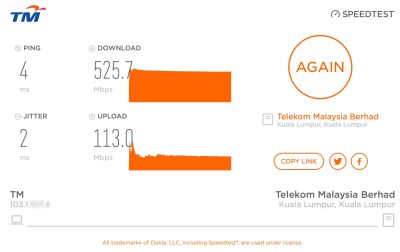
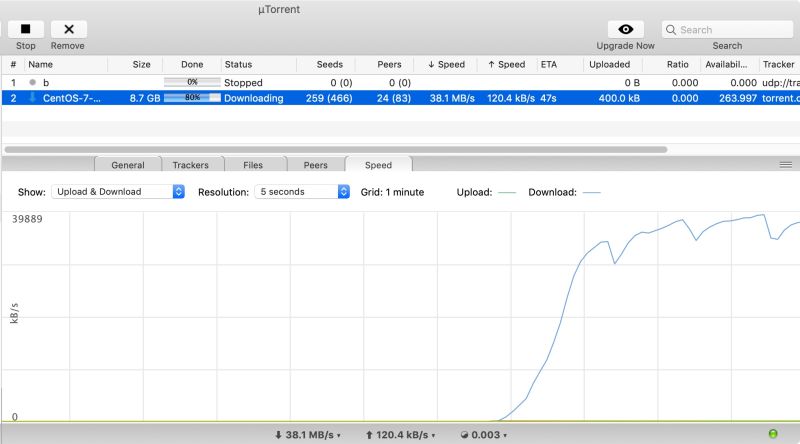
Did a couple of tests on the FG7008GR as router. Firmware: 322.6s.3-003. All tests on ethernet.

user posted image
speedtest.tm.com.my

user posted image
Torrent. Can't seem to go higher than 38MBps.

This post has been edited by soonwai: Oct 16 2018, 03:04 PM
miloaisdino
post Oct 16 2018, 02:36 PM

Regular
******
Senior Member
1,418 posts

Joined: Jul 2015
QUOTE(soonwai @ Oct 15 2018, 04:40 PM)
Did a couple of test on the FG7008GR. Firmware: 322.6s.3-003

user posted image
speedtest.tm.com.my

user posted image
Torrent. Can't seem to go higher than 38MBps.
*
Im amazed how some peoples hard drives are so fast... doh.gif

7 Pages « < 4 5 6 7 >Top
 

Change to:
| Lo-Fi Version
0.0222sec    0.68    6 queries    GZIP Disabled
Time is now: 1st December 2025 - 08:50 PM