

Err wanted to buy it..but AP set. is it have any problem of GPS for AP set?
Nokia [Nokia(tm) N95 Official V2 Thread], It's what computers have become
Nokia [Nokia(tm) N95 Official V2 Thread], It's what computers have become
|
|
 Apr 19 2007, 02:31 AM Apr 19 2007, 02:31 AM
|
 
Senior Member
699 posts Joined: Oct 2004  
|
Err wanted to buy it..but AP set. is it have any problem of GPS for AP set?
|
|
|
|
|
|
Apr 19 2007, 07:19 AM
|

Senior Member
2,911 posts Joined: Jun 2005 From: KL 
|
Im using Shure E2C . Sounds as good as my Ipod Playing . lolx hehe .
|
|
|
Apr 19 2007, 09:23 AM
|

Senior Member
769 posts Joined: Sep 2006 From: Hotel California
|
Am also using R35 black with my N95. Sounds better than when I used it with my 838Pro. If you want it to sound better, pair the R35 using the provided N95 headset.
|
|
|
Apr 19 2007, 09:54 AM
|

Senior Member
2,116 posts Joined: Nov 2004 From: KL, Malaysia
|
QUOTE(MattJ @ Apr 19 2007, 09:23 AM) Am also using R35 black with my N95. Sounds better than when I used it with my 838Pro. If you want it to sound better, pair the R35 using the provided N95 headset. what do u mean by pair it with the headset provided? |
|
|
Apr 19 2007, 10:15 AM
|
|
Junior Member
93 posts Joined: Dec 2006
|
Guys, I'm still having problem with HSDPA on my N95.
Maxis can support HSDPA too right? Have anyone tested it out. Might change to Maxis if it works (I'm currently on Celcom Powertools). I'm going to Nokia Care Centre again after work to service my phone. Hopefully, there's a solution to the HSDPA thing. And hopefully it's celcom's fault (As claimed by Nokia) so I can still connect to HSDPA on Maxis. |
|
|
Apr 19 2007, 10:35 AM
|
|
Senior Member
1,645 posts Joined: Oct 2005 From: London
|
QUOTE(animegod @ Apr 19 2007, 10:15 AM) Guys, I'm still having problem with HSDPA on my N95. How do I tell if the HSDPA is working?Maxis can support HSDPA too right? Have anyone tested it out. Might change to Maxis if it works (I'm currently on Celcom Powertools). I'm going to Nokia Care Centre again after work to service my phone. Hopefully, there's a solution to the HSDPA thing. And hopefully it's celcom's fault (As claimed by Nokia) so I can still connect to HSDPA on Maxis. all I know is I see a 3G there. not 3.5G LOL |
|
|
|
|
|
Apr 19 2007, 10:52 AM
|
|
Junior Member
93 posts Joined: Dec 2006
|
QUOTE(schizophrenic @ Apr 19 2007, 10:35 AM) How do I tell if the HSDPA is working? After connecting to the Internet with your N95, check your bandwidth here : Click Hereall I know is I see a 3G there. not 3.5G LOL If you get above 384kbps in average (have to test few times for accurate result), then you're on HSDPA. Mine can reach 1MBPS but after a while will stuck (No gateway reply). This post has been edited by animegod: Apr 19 2007, 03:20 PM |
|
|
Apr 19 2007, 10:57 AM
|
|
Senior Member
2,116 posts Joined: Nov 2004 From: KL, Malaysia
|
Top Nokia N95 tips
 The N95 has lots to recommend it, from the 5 megapixel stills camera and VGA video capture at 30fps to the built-in GPS, stereo speakers and standard 3.5mm audio out. There's also the very latest Symbian OS and Series 60 versions, with multimedia functionality thrown in by the bucketload. 1. Ignore those 'Exit' buttons? Err... not necessarily! Unlike some other previous S60 smartphones (e.g. the N70), the N95's RAM is rather more limited (does the error message 'Memory full' ring any bells? Yep, thought it would). Starting with 20MB free, you'll usually be running with just over 10MB free, even in optimal conditions. You can still have many of your Series 60 apps running at the same time, which means no delays while applications are launched/switched to, with the usual trick being to ignore those 'Exit' buttons. When you need to switch to a different application, press the Menu ('Applications') button and select it from there, leaving the current app running. However: don't do this for Camera, Gallery, Web, Java games or the built-in Maps, any of which can hog RAM and cause your other main programs to close down. For each of these, DO use 'Exit' for these programs, after use, to make sure RAM is freed up. In particular, make sure to manually 'Exit' Camera after using it every single time, if you want to avoid problems.  2. Downgrade that camera Now, this is going to seem like heresy, but do you actually need a 5 megapixel camera? Each image will take up well over a megabyte on your memory card. For most purposes, perhaps printing photos at 7" by 5" or viewing on a TV, 3 megapixel images are absolutely fine - why waste precious space if you don't have to? You can lower the camera resolution by opening the camera and using its 'Settings'.  3. Preserving battery life You'll have gathered by now that the Nokia N95's battery is a little on the slim side, considering the amount of high-tech goodies it's got to power. Here are a few tips to last longer on your daily charge: * Firstly, make damn sure you do charge the N95 each night, so at least it's starting the day on 'full' * The Camera is the single biggest power drain. While waiting to take shots or shoot a video clip, don't keep the camera with a 'live' viewfinder - better to close it down and then open it again just before you actually need to take the shot/clip. And if you're going to an event where you know you'll be using the camera/camcorder a lot, consider taking along a spare battery or portable charger * Keep WLAN scanning off, you can always scan manually if needed, or turn it back on * Unless you know you're going to be staying in an area with good 3G signal and you know you have a 3G SIM card, go into 'Tools | Settings | Phone | Network' and change 'Network mode' to 'GSM' - this will stop the N95 hunting for 3G signals, expending large amounts of power switching cells and holding on to weak mast locks. * Watch what applications you leave running in the background - some games and Java applications are especially processor hungry, even when paused! * When using the N95 as a navigator in car, with display and GPS both active, do yourself a favour and buy a $10 12V adapter/charger, so that instead of draining the battery at a rate of knots you're actually gaining extra charge. 4. Camcorder tips The VGA video capture is one of the unique selling points of the N95, so make sure you make the most of it. * Make sure you use a top-spec, high performance microSD card. At 28MB/min you're going to need it. A SanDisk Ultra II is ideal. Don't buy a cheap copy off eBay, get one from a genuine vendor. * Don't use digital zoom - you're simply throwing away quality. If you need to get closer to your subject then get closer! * Don't try and film too close to the N95, as there's no auto-focus in video mode. Stick to subjects more than a metre away. * As with still photos, film only in good light; you'll be very disappointed by anything shot in dim conditions. * Don't pan around a scene too fast. Despite the spec of shooting at 30fps, the N95's video will appear slightly jerky. 5. Making DVDs and videos Nokia bundle a version of Adobe Premiere Elements 2.0 with the N95 - ignore it, unless you happen to have a twin-processor monster of a PC. As usual, Adobe's software is incredibly inefficient and you'll struggle on a normal computer. In addition, it doesn't seem to like the N95's VGA video files very much and I had lots of problems. Ditto with the simplistic Apple Quicktime Pro. Instead, head over to ulead.com and get the full version of VideoStudio 10 Plus, which, when patched to the latest service pack, does an excellent job of handling N95 video files and rendering them to DVD or other video formats.  6. The ones you love the most (1) With the Nokia N95, there's S60's usual 'active' standby screen. Don't just take the shortcuts given, I'm sure you have ideas of your own as to your most used applications. You can change any of the six shortcuts in the rather-hidden-away 'Tools | Settings | General | Personalisation | Standby mode | Active standby apps' (Phew, you really have to get to know the settings hierarchy on these devices!) 7. A cleaner, clearer standby screen You can do a lot to make your active standby screen brighter, cleaner and more useful. See my tutorial over on AllAboutSymbian (though note that some of the Settings menu paths are slightly different - don't worry, you'll work it out). 8. Calendar shortcuts In Calendar, '#' moves you immediately to the current day, while '*' toggles between the different views. And if you need to start a new 'meeting' entry at any point, just start entering text... 9. The latest and best (1) Make sure you keep up to date with PC Suite. Yes, there's a version on the CD that came with your smartphone, but Nokia are fixing bugs and adding bits and pieces all the time. Most useful is the way you can explore your smartphone's folders (including your text Inbox) from within Windows Explorer. Very cool. Keep an eye on the PC Suite Homepage and stay current! 10. The latest and best (2) It's also vital to stay up to date in terms of N95 firmware, i.e. the software inside the smartphone. Now, this isn't trivial, as it involves (at best) backing up your N95, running the Nokia Software Updater and having the internal disk of the device completely wiped and relaid, followed by restoring your data, but with the N95 being quite cutting edge you should take advantage of all the bug fixes you possibly can!  11. Quick music Never mind the pretty but very slow 'multimedia menu' - you can go straight to music player by pressing and holding the multimedia key. 12. Pump up the brightness Consider increasing the screen from the default brightness to its maximum. Yes, there's a hit on the time between battery recharges, but in the meantime you'll see some glorious colours. Go to 'Tools | Settings | General | Personalisation | Display | Light sensor' and adjust away. At night-time, if you're actually reading from the screen, you can use the same setting to turn the brightness right down to save being dazzled. 13. Hangup = Exit Don't keep switching back to the Standby screen using the Hangup button. This was OK on old versions of S60, but in almost every instance it closes the current application on the N95 - in other words, it acts as 'Exit'. If you want to keep the current program running in the background, press Menu/Apps instead, twice if you want to get to Standby screen. 14. What's running? The one utility every computer user needs is a system task manager (i.e. what's running). Luckily, the basics are built-in. Just press and hold the 'Menu/Applications' button. For more control, grab the trial version of Best TaskMan. 15. The ones you love the most (2) If you get fed up scrolling down the Menu screen lookng for your favourite applications again, why not shuffle things round so that the apps you use the most are clustered right at the top? Highlight an icon and use 'Move', and you'll find you can re-insert it anywhere in the list. If you have lots of favourites, make the most of the folder system (e.g. 'Games') and then put these folders near the top of the list, for speedy access. 16. Switching to landscape Perhaps an obvious tip, perhaps not, but you can run any application in 'landscape mode' by simply opening the music slide - this can be quite handy for apps like Web and Gallery, although of course use is somewhat limited by the way the main keypad is not accessible in this mode. 17. Quicker removal In the previous tip, you'll have noticed that App Mgr is a very slow application - don't use it to remove applications from your N95. A much quicker way is simply to highlight the program you want to zap and press the 'C' key. Cool, eh? 18. Open up your device By default, the N95 may (depending on your operator) come 'locked down' in terms of the applications it'll accept, installing only those that have large companies behind them, able to afford the expensive 'signing' process. But there are hundreds of other great applications, many of them free, that are 'unsigned' (although under S60 3rd Edition, totally unsigned applications are heavily restricted in what they can do). Don't worry about this (see my malware article to put your mind at rest). Just go to 'Tools | App manager | Options | Settings' and set 'Software installation' to "All". and 'Online certif check' to "Off". You can now install any compatible program without being blocked by spurious security warnings! 19. Softer photos This tip doesn't currently work, due to a bug in the first N95 firmware! Watch this space... The default camera settings in the N95 are designed to make everything look extra crisp, extra 'sharp'. When you zoom in closely, you'll see the (possible) problem, there's a large dose of artificial edge enhancement. Although you can adjust this in 'Sharpness' in the camera main toolbar, the setting is lost when you exit the Camera application. Instead, if you'd rather keep 'Sharpness' set to 'Soft', go into 'User defined' mode and alter 'Sharpness' there instead. Now the single switch to 'User defined' each time is enough to bring up the lower edge enhancement, as well as any other preferences you've set for this personal/custom mode. here This post has been edited by smashpOp: Apr 19 2007, 10:58 AM |
|
|
Apr 19 2007, 11:02 AM
|

Senior Member
6,339 posts Joined: Jan 2003 From: Ipoh Mali !
|
QUOTE(bearbear @ Apr 18 2007, 10:23 PM) personal reason u rather pay Rm200 extra?May i know what's the personal reason?i'm very menyibuk tarak ~ working life mah ~ call customer la ~ kekekekek no gf yet ~ lucky lah ~ if not sure gone to RM 500 per month QUOTE(goliath @ Apr 18 2007, 10:25 PM) That's great. I've been trying to configure for the whole day but still couldn't connect at all already head to maxis liao ~ those guy also blur blur ~ say dun know why ~ i wan to hentam them Same situation like you. I've the chance to buy it cheaper but those jokers wanna charge me 3% more if I pay with credit card. Well according to the support centre, they have users with 64K. That's why, head straight to Maxis centre like me  |
|
|
Apr 19 2007, 11:47 AM
|
|
Senior Member
1,645 posts Joined: Oct 2005 From: London
|
Is it better for me to format the microSD for FAT or leave it Raw?
thanx |
|
|
Apr 19 2007, 11:56 AM
|

Senior Member
2,915 posts Joined: Jan 2005
|
QUOTE(smashpOp @ Apr 19 2007, 01:41 AM) ok i have tried playi8ng music using thre bluetooth headset itech R35. wah!...the sound still clear and strong... very smooth and very loud. i putthe n95 under the pillow in my bed and i walk out and stand outside the door. and the music was still loud and clear  thats really great...  |
|
|
Apr 19 2007, 01:28 PM
|
|
Senior Member
3,786 posts Joined: Aug 2005
|
QUOTE(smashpOp @ Apr 19 2007, 01:41 AM) ok i have tried playi8ng music using thre bluetooth headset itech R35. Thanks for the comments !!!very smooth and very loud. i putthe n95 under the pillow in my bed and i walk out and stand outside the door. and the music was still loud and clear |
|
|
Apr 19 2007, 01:41 PM
|
|
Senior Member
3,786 posts Joined: Aug 2005
|
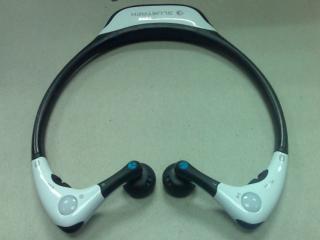
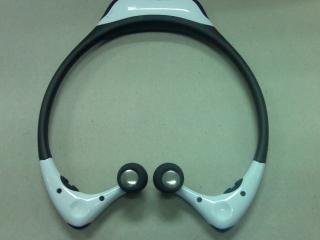
QUOTE(aruja_69 @ Apr 19 2007, 01:28 PM) Thanks for the comments !!! By the way, I got BLUETREK ST 1 yesterday and I like the design and look like Nike Headset..hehehe!! Sound quality is great and the design seem suitable for those have thin neck because it so a bit small for big size guys like me. Cost about RM 290.00 and not sure it is out in the market yet. Enclosed are some picture of the set taken with N80. Hehehe !!Attached thumbnail(s) 

|
|
|
|
|
|
Apr 19 2007, 02:37 PM
|
|
Senior Member
2,116 posts Joined: Nov 2004 From: KL, Malaysia
|
wow looks goood.
but too mab i already got my itech ahah |
|
|
Apr 19 2007, 03:36 PM
|

Senior Member
1,925 posts Joined: Feb 2006 From: Petaling Jaya
|
Wah damn expensive....too bad can't afford one....if I were to buy a N95
|
|
|
Apr 19 2007, 03:38 PM
|
|
Validating
33 posts Joined: Jan 2003
|
any one manage to make the N95 AP GPS work ??
|
|
|
Apr 19 2007, 04:02 PM
|
|
Junior Member
93 posts Joined: Dec 2006
|
The GPS is working fine. Just make sure you're outdoor.
Press Menu, then open the GPS application. You'll notice a msg "waiting/connecting to GPS", not sure the msg coz my phone not with me right now. Then just wait. In my place, it takes 15 minutes till the GPS can locate my location. Then save your location. After this, the GPS will locate you much faster. The first time is always slower. |
|
|
Apr 19 2007, 04:54 PM
|
|
Senior Member
6,866 posts Joined: Feb 2005
|
Can a pair of SE's DSC970 bluetooth headset be pair with this phone?
|
|
|
Apr 19 2007, 05:12 PM
|

Senior Member
566 posts Joined: Sep 2005 From: Compulsive Disorder Land
|
currently using asia maps because got map inside.
If I use 'map', where can I download the map from? Is it free? |
|
|
Apr 19 2007, 05:15 PM
|
|
Senior Member
2,116 posts Joined: Nov 2004 From: KL, Malaysia
|
QUOTE(X-Zen @ Apr 19 2007, 05:12 PM) currently using asia maps because got map inside. please read page 1If I use 'map', where can I download the map from? Is it free? already got instructions on how to get the maps from your pc to your n95 |
|
Topic ClosedOptions
|
| Change to: |  0.0182sec 0.0182sec
 0.30 0.30
 6 queries 6 queries
 GZIP Disabled GZIP Disabled
Time is now: 7th December 2025 - 06:39 AM |
 Quote
Quote