Welcome Guest ( Log In | Register )

68 Pages « < 21 22 23 24 25 > » Bottom

Outline · [ Standard ] · Linear+

 Official TP-Link C1200 V1(EU) Firmware is out, Hidden WDS functionality works!, Page 29

views
     
XPS
post Apr 30 2018, 11:32 PM

Casual
***
Junior Member
322 posts

Joined: Jan 2008
QUOTE(Alex9182 @ Apr 30 2018, 11:14 PM)
Did a search on topic "router security" and first page will find: -

PCworld.com
"Avoid using routers supplied by ISPs".

tomsguide.com
"If your router is given to you by your internet service provider [ISP], you don't want to use"

routersecurity.org
"Many people use the device given them by their Internet Service Provider (ISP) which I think is a bad idea"

See attached, I can confirm that, before i update Archer C1200 firmware to Aus version, it has back door and on my Network Location, there are many unknown PC. after update, all gone.

now i will not use TM router as main router again, use it as AP or bridge is ok. smile.gif
*
You believe the stuff written at PCWorld? blink.gif

There are other places that tend to be more balanced views as the folks there actually know what they are talking about.

TM stock router in the early days DIR-615 (orange and white) is amazing. Only issue was single band and weak wifi which is easily solved by disabling its wifi and bridging with a good dual band AP (yes dual band was expensive as TPLink, Dlink, ASUS those days were not selling dual bands yet). Runs for months (usually reboot result of TNB power failure) without need for reboot unlike the routers from TM these days which are crappy so it seems.
Alex9182
post May 1 2018, 01:11 AM

On my way
****
Senior Member
669 posts

Joined: Sep 2015
QUOTE(XPS @ Apr 30 2018, 11:32 PM)
You believe the stuff written at PCWorld?  blink.gif
*
Many others are saying not to use router provided by ISP, is there any reason for that?
smile.gif
XPS
post May 1 2018, 01:38 AM

Casual
***
Junior Member
322 posts

Joined: Jan 2008
QUOTE(Alex9182 @ May 1 2018, 01:11 AM)
Many others are saying not to use router provided by ISP, is there any reason for that?
smile.gif
*
It all depends on the ISP. Generally, ISP modems are cheap and does the basic job. The DIR-615 is an exception by TM who got a good deal and DLink wrote a custom firmware for the launch of Unifi.

Streamyx days when most people were using single band 2.4GHz routers? You can hear the endless complaints around low speedtest, lagging, etc. Did not had problems with TM supplied adsl modem bridged with dual band router, running 5GHz mostly and getting rated speeds for years.

There is no clear cut good or bad with ISP supplied gear. You need to understand what it is designed for and its limitations. Work around its limitations and if you expect more, its fine to look elsewhere.
Alex9182
post May 1 2018, 01:08 PM

On my way
****
Senior Member
669 posts

Joined: Sep 2015
@XPS
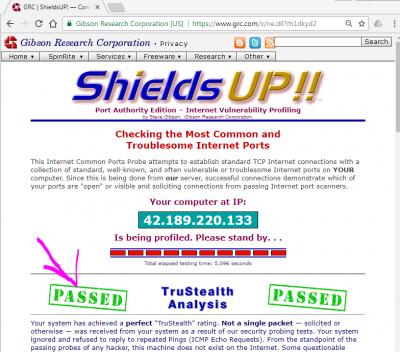
Test your router security here click here to see if your ISP provided router pass security test. or Failed brows.gif

This post has been edited by Alex9182: May 1 2018, 01:16 PM


Attached thumbnail(s)
Attached Image Attached Image
voncrane
post May 1 2018, 01:29 PM

Noir et fier!
*******
Senior Member
7,120 posts

Joined: Oct 2011
From: Wakanda


QUOTE(Alex9182 @ May 1 2018, 01:08 PM)
@XPS
Test your router security here click here to see if your ISP provided router pass security test.  or Failed brows.gif
*
Ran the tests and mine's secure. So once again, this router works for me.. thumbup.gif
biloxee
post May 1 2018, 02:06 PM

On my way
****
Senior Member
561 posts

Joined: Jul 2015
QUOTE(Alex9182 @ May 1 2018, 01:08 PM)
@XPS
Test your router security here click here to see if your ISP provided router pass security test.  or Failed brows.gif
*
C1200 passed but I don't think it its any real indication of security...

Attached Image
Alex9182
post May 1 2018, 04:41 PM

On my way
****
Senior Member
669 posts

Joined: Sep 2015
My Asus Ac68u pass but tp-link archer c7 failed.
Pls help me how to setting make it pass.
SilentVampire
post May 1 2018, 06:15 PM

Networking Enthusiast
*******
Senior Member
5,714 posts

Joined: Mar 2007


QUOTE(Alex9182 @ May 1 2018, 04:41 PM)
My Asus Ac68u pass but tp-link archer c7 failed.
Pls help me how to setting make it pass.
*
That’s just checking which port is open/responds to a ping from the website. You need to disable WAN ping and then, check which port is open on your router. See here: https://www.whatismyip.com/port-scanner/

Select the Web package for the list of common ports.
Alex9182
post May 1 2018, 06:27 PM

On my way
****
Senior Member
669 posts

Joined: Sep 2015
Check all 4 package, all closed.

I also use ping.pe to ping my self, again AC68U all red but Archer C7 green.


This post has been edited by Alex9182: May 1 2018, 06:31 PM
SilentVampire
post May 1 2018, 06:55 PM

Networking Enthusiast
*******
Senior Member
5,714 posts

Joined: Mar 2007


QUOTE(Alex9182 @ May 1 2018, 06:27 PM)
Check all 4 package, all closed.

I also use ping.pe to ping my self, again AC68U all red but Archer C7 green.
*
What error message does it display?
XPS
post May 1 2018, 10:10 PM

Casual
***
Junior Member
322 posts

Joined: Jan 2008
QUOTE(Alex9182 @ May 1 2018, 01:08 PM)
@XPS
Test your router security here click here to see if your ISP provided router pass security test.  or Failed brows.gif
*
Appreciate the link. Been using grc for a long time now, cannot remember must be Jaring days and most likely pre-streamyx biggrin.gif

DIR-615 passed it the first day it was installed. And checked from time to time especially considering the D-Link firmware was basically not updated being custom TM.

Network is always double protected at firewall and individual client level. Now with the advent of mobile devices and IoT, an Intrusion and Protection System is in place (which was the main factor in getting the new router recently). Plus both DIR-615 and AirPorts are rather aged and as a matter of practice, networking gear are usually due for replacement 7 to 10 years of age even if they work fine.
XPS
post May 1 2018, 10:11 PM

Casual
***
Junior Member
322 posts

Joined: Jan 2008
QUOTE(biloxee @ May 1 2018, 02:06 PM)
C1200 passed but I don't think it its any real indication of security...
*
Its a test that your firewall is properly configured.

Use dslreports.com for bufferbloats and more definitive speed test.

This post has been edited by XPS: May 1 2018, 10:12 PM
XPS
post May 1 2018, 10:16 PM

Casual
***
Junior Member
322 posts

Joined: Jan 2008
QUOTE(Alex9182 @ May 1 2018, 04:41 PM)
My Asus Ac68u pass but tp-link archer c7 failed.
Pls help me how to setting make it pass.
*
Check your firewall settings. By right out of the box routers should not have ports opened. Did you setup the Archer yourself?

The old posts in this forum, circa 2012/2013 had some recommendations for DIR-615 by the couple of gurus who are no longer posting. Stuff like turning off TR-021 in addition to firewall setups. Try a search.

Please note those firewall recommendations will apply to all routers in general. DLink is mentioned as that is your search key.

This post has been edited by XPS: May 1 2018, 10:21 PM
Alex9182
post May 1 2018, 11:08 PM

On my way
****
Senior Member
669 posts

Joined: Sep 2015
QUOTE(XPS @ May 1 2018, 10:16 PM)
Check your firewall settings. By right out of the box routers should not have ports opened.  Did you setup the Archer yourself?

The old posts in this forum, circa 2012/2013 had some recommendations for DIR-615 by the couple of gurus who are no longer posting.  Stuff like turning off TR-021 in addition to firewall setups.  Try a search.

Please note those firewall recommendations will apply to all routers in general.  DLink is mentioned as that is your search key.
*
yes i setup my self, but nearly everything default, firewall sure is default setting. dont know why fail the test.

Alex9182
post May 1 2018, 11:09 PM

On my way
****
Senior Member
669 posts

Joined: Sep 2015
QUOTE(SilentVampire @ May 1 2018, 06:55 PM)
What error message does it display?
*
no error message, green mean it response to ping from outside, red mean it ignore.


Attached thumbnail(s)
Attached Image
XPS
post May 1 2018, 11:15 PM

Casual
***
Junior Member
322 posts

Joined: Jan 2008
QUOTE(Alex9182 @ May 1 2018, 11:09 PM)
no error message, green mean it response to ping from outside, red mean it ignore.
*
Check if something like "Respond Ping Request from WAN in Firewall - General" is enabled. It should not be meaning your router will be in stealth mode.
Alex9182
post May 1 2018, 11:31 PM

On my way
****
Senior Member
669 posts

Joined: Sep 2015
QUOTE(XPS @ May 1 2018, 11:15 PM)
Check if something like "Respond Ping Request from WAN in Firewall - General" is enabled.  It should not be meaning your router will be in stealth mode.
*
Tq Bro, after enable that one, now pass all d. icon_rolleyes.gif

Are there any other site that can test our router more better?
hitz666
post May 3 2018, 08:43 AM

New Member
*
Newbie
9 posts

Joined: Jul 2007


QUOTE(voncrane @ Apr 30 2018, 05:21 PM)
Yeah, it's possible. I'm running an Australian fw and I recommend flashing the latest from them too. Bare in mind, you would have to manually setup the firmware to match Malaysian ISP. If you do flash the Aussie fw, the iptv ports are reversed (I.e 4 is 1 and 1 is 4). If you are uncomfortable and or just want peace or mind. Then check current firmware matches the latest Malaysian version. Update manually if it isn't.
*
Finally solved netflix login issues by updating latest firmware for tm unifi, thanks for your help guys
chengsiong
post May 6 2018, 01:37 AM

Getting Started
**
Junior Member
168 posts

Joined: Nov 2010
From: KL


QUOTE(JohnLai @ Mar 14 2018, 09:23 AM)
console.gif

As I feared. Root access is really mandatory.
TP-Link webui will accept config.bin with modified <country>MY</country> settings after sending the command below:

uci set wireless.eth2.country=MY
uci set wireless.eth3.country=MY
uci set wireless.eth2.channel=auto
uci commit wireless; wifi


and restarting the uci/uhttp server :

/etc/init.d/uhttpd restart

Only then a modified config.bin can be uploaded successfully through TP-Link webui.
EDIT:
Consider gaining root access?  laugh.gif
Ubuntu live usb?
*
Hello, sorry for late post. Would like to ask whether can you still perform this in the newest firmware? I can't seems to get through the login part. Thanks
TSJohnLai
post May 6 2018, 07:44 PM

Skeptical Cat
*******
Senior Member
3,669 posts

Joined: Apr 2006
QUOTE(chengsiong @ May 6 2018, 01:37 AM)
Hello, sorry for late post. Would like to ask whether can you still perform this in the newest firmware? I can't seems to get through the login part. Thanks
*
Yes. Why? Which login?

68 Pages « < 21 22 23 24 25 > » Top
 

Change to:
| Lo-Fi Version
0.0298sec    0.49    6 queries    GZIP Disabled
Time is now: 8th December 2025 - 12:56 PM