

xps owner reporting in. got it november last year. no problems so far...touchwood
Dell XPS M1210 Support Thread #1, COD4? No problem...
Dell XPS M1210 Support Thread #1, COD4? No problem...
|
|
 Apr 30 2007, 10:22 AM Apr 30 2007, 10:22 AM
|
 
Senior Member
1,237 posts Joined: Nov 2006 From: 3rd Rock From The Sun   
|
xps owner reporting in. got it november last year. no problems so far...touchwood
|
|
|
|
|
|
Apr 30 2007, 10:52 AM
|

Senior Member
3,074 posts Joined: Jul 2006
|
QUOTE(zad78 @ Apr 30 2007, 10:22 AM) xps owner reporting in. got it november last year. no problems so far...touchwood Old batch all very good le, but new batch i read alot alot negative feedback   |
|
|
Apr 30 2007, 11:12 AM
|

Senior Member
2,915 posts Joined: Jan 2005
|
QUOTE(eyen @ Apr 30 2007, 02:40 AM) Anyone of u using Intel Thermal Analysis to measure the temperature? i'm using Notebook Hardware Control... I'm getting the same (most of the time) temperature for both CPU 0 and CPU 1. For my old xps, the temperature of those two CPU will always be different and it fluctuates a lot. So I'm wondering if there's something wrong with this unit? (or the old one?) Good new is, the temperature is usually at 47 or 48 (old one around 50+)  how's the Intel Thermal Analysis looks like?...mind to share?  wah!...with that temperature...your's seems to be good...mine around 49C or 50C...  QUOTE(zad78 @ Apr 30 2007, 10:22 AM) xps owner reporting in. got it november last year. no problems so far...touchwood congrats...congrats...  welcome to the club...another proud owner of XPS...  mind to share your specs with us...  QUOTE(V3000 @ Apr 30 2007, 10:52 AM) Old batch all very good le, but new batch i read alot alot negative feedback  |
|
|
Apr 30 2007, 11:21 AM
|
|
Senior Member
3,074 posts Joined: Jul 2006
|
QUOTE(unknowndevices @ Apr 30 2007, 11:12 AM) i'm using Notebook Hardware Control... Bro, here u go how's the Intel Thermal Analysis looks like?...mind to share? Download link here : http://forum.lowyat.net/index.php?showtopic=440101 This post has been edited by V3000: Apr 30 2007, 11:22 AM |
|
|
Apr 30 2007, 11:24 AM
|
|
Senior Member
2,915 posts Joined: Jan 2005
|
QUOTE(V3000 @ Apr 30 2007, 11:21 AM) ooo...thanks...think seen it before... what's the different between CPU 0 and CPU 1?is that reading for ram?  |
|
|
Apr 30 2007, 11:26 AM
|
|
Senior Member
3,074 posts Joined: Jul 2006
|
QUOTE(unknowndevices @ Apr 30 2007, 11:24 AM) ooo...thanks...think seen it before... Dont know le but im sure not ram bah.. I tot duo core got 2 cpu in 1? what's the different between CPU 0 and CPU 1?is that reading for ram? Need pro answer this liao This post has been edited by V3000: Apr 30 2007, 11:27 AM |
|
|
|
|
|
Apr 30 2007, 12:01 PM
|

Senior Member
819 posts Joined: Jan 2003 From: Buzzcut Union
|
QUOTE(V3000 @ Apr 30 2007, 11:26 AM) Dont know le but im sure not ram bah.. I tot duo core got 2 cpu in 1? First core and second core most probably.Need pro answer this liao |
|
|
Apr 30 2007, 12:35 PM
|
|
Senior Member
1,237 posts Joined: Nov 2006 From: 3rd Rock From The Sun
|
QUOTE(unknowndevices @ Apr 30 2007, 11:12 AM) i'm using Notebook Hardware Control... well...mine is a modest spec...nothing much....2 GHz C2D T7200, GeforceGo 7400, 2G of rams, 9 cell battery and windows XP...(Got my vista upgrade cds last week...but not installing it....wanna wait 1 or 2 or 3 years until vista stabilize.....i hope sooo) how's the Intel Thermal Analysis looks like?...mind to share? wah!...with that temperature...your's seems to be good...mine around 49C or 50C... congrats...congrats... welcome to the club...another proud owner of XPS... mind to share your specs with us... |
|
|
Apr 30 2007, 01:59 PM
|
|
Senior Member
3,074 posts Joined: Jul 2006
|
QUOTE(Guardian @ Apr 30 2007, 12:01 PM) First core and second core most probably. Yeah, i also think so QUOTE(zad78 @ Apr 30 2007, 12:35 PM) well...mine is a modest spec...nothing much....2 GHz C2D T7200, GeforceGo 7400, 2G of rams, 9 cell battery and windows XP...(Got my vista upgrade cds last week...but not installing it....wanna wait 1 or 2 or 3 years until vista stabilize.....i hope sooo) Hehe wait for 3 years! New OS coming out le |
|
|
Apr 30 2007, 02:01 PM
|

Junior Member
461 posts Joined: Jan 2003
|
QUOTE(unknowndevices @ Apr 30 2007, 11:12 AM) i'm using Notebook Hardware Control... how's the Intel Thermal Analysis looks like?...mind to share? wah!...with that temperature...your's seems to be good...mine around 49C or 50C... 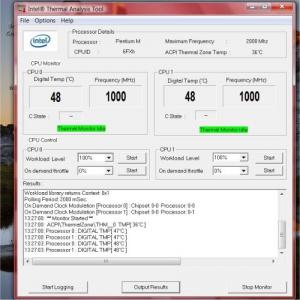
NHC is not compatible with vista I think. |
|
|
Apr 30 2007, 07:16 PM
|

Junior Member
320 posts Joined: Feb 2007
|
QUOTE(zad78 @ Apr 30 2007, 12:35 PM) well...mine is a modest spec...nothing much....2 GHz C2D T7200, GeforceGo 7400, 2G of rams, 9 cell battery and windows XP...(Got my vista upgrade cds last week...but not installing it....wanna wait 1 or 2 or 3 years until vista stabilize.....i hope sooo) Haha.. i also just recieved the dvd for vista upgrade.. plan to upgrade it this weekend! cant wait lar... ITS VISTA!!! |
|
|
Apr 30 2007, 09:46 PM
|
|
Senior Member
2,915 posts Joined: Jan 2005
|
QUOTE(zad78 @ Apr 30 2007, 12:35 PM) well...mine is a modest spec...nothing much....2 GHz C2D T7200, GeforceGo 7400, 2G of rams, 9 cell battery and windows XP...(Got my vista upgrade cds last week...but not installing it....wanna wait 1 or 2 or 3 years until vista stabilize.....i hope sooo) wah!...you bought your XPS last November?sure with that kind of specs...price would be like "boom"... anyway...you got nice specs... QUOTE(eyen @ Apr 30 2007, 02:01 PM)
NHC is not compatible with vista I think. anyway...thanks for the photo... how's your XPS?after so many replacement?working perfectly?  QUOTE(jiahuilee @ Apr 30 2007, 07:16 PM) Haha.. i also just recieved the dvd for vista upgrade.. plan to upgrade it this weekend! cant wait lar... ITS VISTA!!! erksss...you planning to change to Vista?...  |
|
|
May 1 2007, 12:53 PM
|

Senior Member
909 posts Joined: Jan 2003 From: London
|
xps user here....mine says shipped from factory on 25th april..hope to get it soon..
|
|
|
|
|
|
May 1 2007, 03:22 PM
|
|
Junior Member
320 posts Joined: Feb 2007
|
QUOTE(unknowndevices @ Apr 30 2007, 09:46 PM) wah!...you bought your XPS last November?sure with that kind of specs...price would be like "boom"... Yeap! anyway...you got nice specs... ooo...NHC not compatible with Vista...didn't know that... anyway...thanks for the photo... how's your XPS?after so many replacement?working perfectly? erksss...you planning to change to Vista?...  QUOTE(n20nine @ May 1 2007, 12:53 PM) xps user here....mine says shipped from factory on 25th april..hope to get it soon.. Welcome To XPS CLUB! Owh and 1 more thing, i was just wondering, since xps has this S-video plug out, has anyone here tried plugging it to a tv? and will this work like a comp with 2 screen ( 1 the laptop monitor another is the tv) where i can like pull my mouse over to the tv screen and place something there? or maybe play a show on the tv??? can any1 enlighten me with this? |
|
|
May 1 2007, 04:39 PM
|

Senior Member
704 posts Joined: Apr 2007 
|
How come soo many negative feedback from XPS user de ah?
is it worth to buy ? |
|
|
May 1 2007, 07:44 PM
|

Senior Member
7,037 posts Joined: Apr 2006
|
QUOTE(n20nine @ May 1 2007, 12:53 PM) xps user here....mine says shipped from factory on 25th april..hope to get it soon.. Added to userlist! Welcome... QUOTE(lelong2007 @ May 1 2007, 04:39 PM) How come soo many negative feedback from XPS user de ah? It's well worth the money, even more so with the 3Yrs CompleteCover... But if you don't care so much about the warranty (ie. you can really take care of your laptop), don't care about the small size (some people can't stand 12 inch lappies) and need more bang for the buck, then get a NEC P8210 (RM5000++) or a BenQ S73G (RM3500++)... is it worth to buy ? I was considering both lappies before getting the XPS... In the end the 3Yrs CompleteCover sealed the deal for me, as I'm quite clumsy and drop things all the time... The XPS itself is no slouch, and is actually very well equipped for a 12 inch laptop... Even though I do regret not getting the NEC from time to time, especially when I'm forced to play Rainbow Six Vegas at ultra low settings (NEC's ATI x1600 VS XPS's GF7400go = x1600 wins by a long shot)... But in the end, weather or not it's worth getting the XPS depends on your luck actually... If you get a good unit, then it's well worth it... But if you get a "lemon" (ultra cursed XPS + lotsa problems), then at least you can ask for a replacement from Dell in the first 14 days... Personally, I love my XPS... It hasn't really given me much problems yet, and carrying a 2++kg 12 incher around looking for good WiFi reception is a wonderful experiance, when compared to lugging around my previous 3.6kg Fujitsu...  This post has been edited by Eiraku: May 1 2007, 07:44 PM |
|
|
May 1 2007, 08:01 PM
|
|
Junior Member
320 posts Joined: Feb 2007
|
QUOTE(Eiraku @ May 1 2007, 07:44 PM) Added to userlist! Welcome... Haha, I couldnt agree more. For a small laptop like xps, it is really Solid, carrying around is not at all a problem with this size and weight, and furthermore showing it off to your mates haha! I just love my xps! It's well worth the money, even more so with the 3Yrs CompleteCover... But if you don't care so much about the warranty (ie. you can really take care of your laptop), don't care about the small size (some people can't stand 12 inch lappies) and need more bang for the buck, then get a NEC P8210 (RM5000++) or a BenQ S73G (RM3500++)... I was considering both lappies before getting the XPS... In the end the 3Yrs CompleteCover sealed the deal for me, as I'm quite clumsy and drop things all the time... The XPS itself is no slouch, and is actually very well equipped for a 12 inch laptop... Even though I do regret not getting the NEC from time to time, especially when I'm forced to play Rainbow Six Vegas at ultra low settings (NEC's ATI x1600 VS XPS's GF7400go = x1600 wins by a long shot)... But in the end, weather or not it's worth getting the XPS depends on your luck actually... If you get a good unit, then it's well worth it... But if you get a "lemon" (ultra cursed XPS + lotsa problems), then at least you can ask for a replacement from Dell in the first 14 days... Personally, I love my XPS... It hasn't really given me much problems yet, and carrying a 2++kg 12 incher around looking for good WiFi reception is a wonderful experiance, when compared to lugging around my previous 3.6kg Fujitsu... i still wondering, since xps has this S-video plug out, has anyone here tried plugging it to a tv? and will this work like a comp with 2 screen ( 1 the laptop monitor another is the tv) where i can like pull my mouse over to the tv screen and place something there? or maybe play a show on the tv??? can any1 enlighten me with this? |
|
|
May 1 2007, 08:30 PM
|

Senior Member
2,366 posts Joined: Jun 2005 From: Not Here Not There...
|
Eiraku, u shouldnt be sad..u r comparing xps with another notebook with different category...kindda not fair larr....
u c, xps come with 12inch size notebok, those nec/benq r mostly 14/15inch notebook size (with x1600)...12inch r meant for mobility dude! while 14/15inch notebook for multimedia purpose.... now now....let c...try compare ur xps with other notebook with same category/hv same 12inch size.... now now...when u do dat, u will realise urs come with the most powerfull gcard ever....mostly all 12inch notebook come with integrated gcard only...so, pls be thankfull with ur notbook...n be proud of it! hehehe  @jiahuilee should not hv any probs...s-video plug r meant to plug it with tv set....n yes, u will hv dual screen mode after that...u can surf the net n at the same time use another screen to watch movies....hehehe This post has been edited by death_nite: May 1 2007, 08:34 PM |
|
|
May 2 2007, 01:58 AM
|
|
Senior Member
7,037 posts Joined: Apr 2006
|
QUOTE(death_nite @ May 1 2007, 08:30 PM) Eiraku, u shouldnt be sad..u r comparing xps with another notebook with different category...kindda not fair larr.... I'm proud of the XPS actually, dun worry bout that... Like you said, no other 12 incher comes with a 7400go (and most other laptops, of any sizes, don't offer a max RAM capacity of 4GBs... Even Sonys top it off at 2GB for most of the models available... Although a grand is a bit for the XPSs 4GB = u c, xps come with 12inch size notebok, those nec/benq r mostly 14/15inch notebook size (with x1600)...12inch r meant for mobility dude! while 14/15inch notebook for multimedia purpose.... now now....let c...try compare ur xps with other notebook with same category/hv same 12inch size.... now now...when u do dat, u will realise urs come with the most powerfull gcard ever....mostly all 12inch notebook come with integrated gcard only...so, pls be thankfull with ur notbook...n be proud of it! hehehe @jiahuilee should not hv any probs...s-video plug r meant to plug it with tv set....n yes, u will hv dual screen mode after that...u can surf the net n at the same time use another screen to watch movies....hehehe  )... )... And I'm not trading my XPS for anything else... for now... About the SVideo thing, try pressing FN+F8 after you've plugged it in? Maybe I'll try it myself after I get home... This post has been edited by Eiraku: May 2 2007, 01:59 AM |
|
|
May 2 2007, 02:27 AM
|
|
Junior Member
461 posts Joined: Jan 2003
|
I read one of the reviews of the xps and the author posted this image http://www.notebookreview.com/assets/16495.jpg (the nvidia window).
Mine doesn't have all those info, (refer to the pic attached). When I click on the nvidia control panel, there's only two feature there, 3D setting and display. Is it because I'm running Window Vista? Or something to do with the drivers? 
|
| Change to: |  0.0169sec 0.0169sec
 0.40 0.40
 6 queries 6 queries
 GZIP Disabled GZIP Disabled
Time is now: 11th December 2025 - 04:07 PM |
 Quote
Quote