

Another interesting article on HDMI cable.
Spend more on Cables?
This post has been edited by attap: Dec 12 2008, 04:15 PM
Home Theatre HDMI CABLE, Cheap & expensive same quality?
Home Theatre HDMI CABLE, Cheap & expensive same quality?
|
|
 Dec 12 2008, 04:15 PM Dec 12 2008, 04:15 PM
|
 
Junior Member
199 posts Joined: Sep 2005 
|
Another interesting article on HDMI cable.
Spend more on Cables? This post has been edited by attap: Dec 12 2008, 04:15 PM |
|
|
|
|
|
Dec 12 2008, 05:55 PM
|

Senior Member
9,206 posts Joined: Jun 2006
|
QUOTE(myqd @ Dec 11 2008, 06:55 PM) if what most sifus here are correct,it wont be any diff esp at 2m.....better prepare some kind shields b4 kena tembak,hehehe it's very simple, to proof it one and for all, just take photo of the image of of the TV screen.. like they do when comparing projector A and projector B image quality.  cos for video quality , no need the "golden eyes" to see the diff, photo shots with the same room conditions and camera settings and pause at certain scenes can already proof if there is difference or not. (unlike those mythical golden ears elites when comparing Subwoofer/amp/speaker/CD player) so far I still haven't come across any professional website/magazine who review the HDMI cables this way (they seem to only review it with the digital signal analyzer for signal integrity) which is surprising cos they do so this way (image capture) with different projectors to analyze the whole image quality down until sub pixel level quality (like those out of aligment subpixels and even screen door effect).. so why is that? |
|
|
Dec 12 2008, 08:13 PM
|

Senior Member
2,684 posts Joined: Mar 2005 From: Central Region 
|
QUOTE(attap @ Dec 12 2008, 04:15 PM) so not worth spending on cables? |
|
|
Dec 12 2008, 08:20 PM
|

Senior Member
2,013 posts Joined: Aug 2007 From: USJ
|
QUOTE(attap @ Dec 12 2008, 04:15 PM) Yep, first time I read about those HDMI details. |
|
|
Dec 12 2008, 08:53 PM
|
|
Junior Member
199 posts Joined: Sep 2005
|
QUOTE(iman_210 @ Dec 12 2008, 08:13 PM) so not worth spending on cables? Depends on your hardware and budget  I just got a China brand HDMI 1.3b cable for my NMT. Comparing with the free HDMI cable came along with my pioneer dvd player, the picture is now slightly brighter then before.  This post has been edited by attap: Dec 12 2008, 08:54 PM |
|
|
Dec 12 2008, 09:35 PM
|
|
Senior Member
9,206 posts Joined: Jun 2006
|
QUOTE(attap @ Dec 12 2008, 08:53 PM) Depends on your hardware and budget if china HDMI1.3b vs Monster cable, I wonder if it's even more "clear" I just got a China brand HDMI 1.3b cable for my NMT. Comparing with the free HDMI cable came along with my pioneer dvd player, the picture is now slightly brighter then before.  This post has been edited by ar188: Dec 12 2008, 10:10 PM |
|
|
|
|
|
Dec 12 2008, 10:17 PM
|
|
Junior Member
199 posts Joined: Sep 2005
|
QUOTE(ar188 @ Dec 12 2008, 09:35 PM) if china HDMI1.3b vs Monster cable, I wonder if it's even more "clear" Not too sure about that Seriously I am now seeing more of the "rainbow" effect on 720p movies which is not seen before. However with 1080p movies there is no "rainbow" effect  |
|
|
Dec 12 2008, 10:56 PM
|
|
Senior Member
9,206 posts Joined: Jun 2006
|
wah..rainbow.. you using DLP ar?
|
|
|
Dec 12 2008, 11:11 PM
|

Senior Member
14,193 posts Joined: May 2005 From: Sbn / KL 
|
DLP with low speed color wheel kua
|
|
|
Dec 12 2008, 11:50 PM
|
|
Junior Member
199 posts Joined: Sep 2005
|
QUOTE(ar188 @ Dec 12 2008, 10:56 PM) wah..rainbow.. you using DLP ar? Dunno the technical terms for it but it is those rainbow like vertical lines due to compression lost. |
|
|
Dec 13 2008, 12:52 PM
|

Senior Member
2,316 posts Joined: Jul 2007
|
Just saw at Carrefour Kepong a 2m HDMI cable for only RM23.50.
 |
|
|
Dec 13 2008, 01:29 PM
|

Senior Member
2,247 posts Joined: Feb 2005
|
ok,below are 2 screenshot taken using 2 different HDMI cables,one "MP Acoustic( RM35 )" and the other " Panasonic RP-CDHG15 ( RM170,maybe kena potong:P)".Both picture taken with same camera/setting/time/place/scene,original pic without processing,reduce size in CS3 for posting.
1) 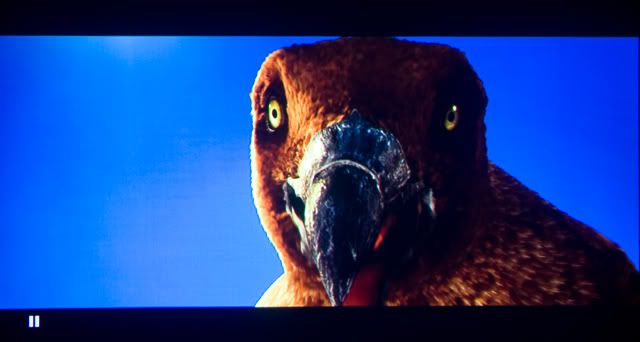 2) 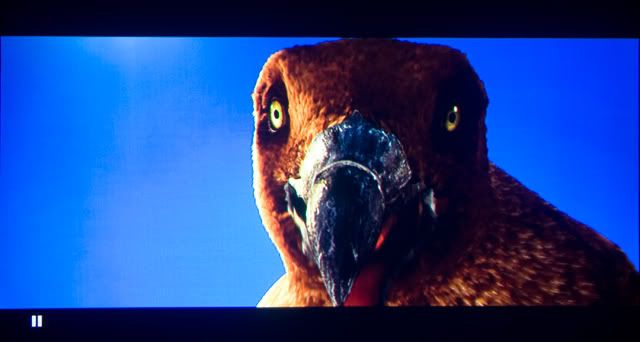 i'm sure there're some kind of compression and lost in quality during the process of "reduce size,web hosting" but both using excactly same methob for above action,no a proper serious comparison,just corious to know the result,guess which one by which cable? Or no different at all? |
|
|
Dec 13 2008, 02:00 PM
|
|
Senior Member
9,206 posts Joined: Jun 2006
|
QUOTE(myqd @ Dec 13 2008, 01:29 PM) ok,below are 2 screenshot taken using 2 different HDMI cables,one "MP Acoustic( RM35 )" and the other " Panasonic RP-CDHG15 ( RM170,maybe kena potong:P)".Both picture taken with same camera/setting/time/place/scene,original pic without processing,reduce size in CS3 for posting. looks like exposure levels/lighting conditions from camera's each shot are different... (did you use the SOP** i.e. "graycard" and manual white balance, shot in RAW)1) 2) i'm sure there're some kind of compression and lost in quality during the process of "reduce size,web hosting" but both using excactly same methob for above action,no a proper serious comparison,just corious to know the result,guess which one by which cable? Or no different at all? could say that the top one is more white balanced (bottom photo, lefthand blue screen side looks white washed).. but then again the the bottom one can see more details near the right side, on the darker feathers.. so how? maybe a rm1k HDMI cable would have best from both images? "The single WhiBal card is light Gray, certified to recommended Luminance level of L* = ~75, which is optimum for use in all RAW converters. Having a "GrayCard" reference is the best assurance that the digital pictures that you capture will have the ability to be properly White Balanced. Only with a proper White Balance can you be ensured of proper and accurate color, regardless of lighting conditions. Unlike your eyes, a digital camera does not automatically see whites as white. It sees the color of the light reflected from it, hence blue-ish in Daylight and Orange-ish in incandescent lighting. By photographing a Gray Card reference for each lighting situation that you are in, you are assured of being able to achieve a proper White Balance for all of your pictures.The Gray Card reference picture can be used with today's software to balance the color casts that various lighting conditions produce with all digital cameras. The best method to properly White Balance your digital pictures is by using a Gray Card properly and shooting RAW. RAW Conversion Software such as Adobe Camera Raw and RawShooter can then perfectly adjust all the captures that were shot under the same lighting conditions." |
|
|
|
|
|
Dec 13 2008, 05:02 PM
|
|
Senior Member
2,247 posts Joined: Feb 2005
|
thanks ar188,i'm using the same AE900 like urs
Both pics taken without grey card but with 40D,mount on tripod,shoot in RAW at iso100,F4.5,speed < 1sec and AWB.Tripod was not move at same location and lighting condition everything same.I din adjust the WB when open in CS3,just cropped and resize.I found both pics the white part wash out.One thing i found quite hard is when u try to pause the scene(maybe only in PS3?),the still image is not "sharp" compare to the when the playback the movie.That lost a lot of details from the original pics. For me,the difference in both pics is on the 2nd pic,the brightness looks a bit high,can see more details on the black portion and the contrast is good.The advantage is even the brightness is higher,the black portion still doesnt looks too "grey",almost same compare to 1st pic.The wash out on the "white" portion maybe becos of the contrast was setting a bit too high.( i'm using "cinema 3",contrast at +10 and brightness at -8 ). Bro arr188,mind to share which mode u normally use and what's the setting? U got Happy Feet US version too? However,the different only can be seen after taking the pics and do comparison like above.When in movie playback i cant really tell the different.Hopefully can pinjam someone 1k HDMI cable? below is another pic taken with Pana HDMI,i adjust WB a bit with the RAW pic 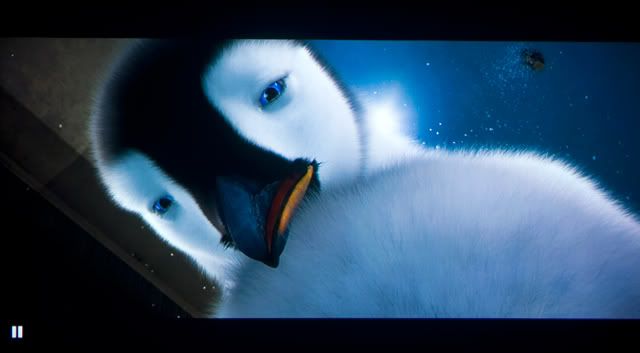 This post has been edited by myqd: Dec 13 2008, 05:09 PM |
|
|
Dec 13 2008, 06:02 PM
|
|
Senior Member
9,206 posts Joined: Jun 2006
|
myqd.. off topic, our AE900 can accomodate any firmware updates ar? hehe!
|
|
|
Dec 14 2008, 12:12 PM
|
|
Senior Member
2,247 posts Joined: Feb 2005
|
QUOTE(ar188 @ Dec 13 2008, 06:02 PM) myqd.. off topic, our AE900 can accomodate any firmware updates ar? hehe! hehe,our panny like old men oledi,still can makan,but never can take too spicy 1080p's food U can try to hack the firmware to enable pure 1080p (not downscale to 720p),make sure u let me know only,otherwise panny jepun tau sure they are at ur door step tomolo |
|
|
Dec 14 2008, 07:34 PM
|
|
Senior Member
2,684 posts Joined: Mar 2005 From: Central Region
|
QUOTE(ar188 @ Dec 13 2008, 02:00 PM) looks like exposure levels/lighting conditions from camera's each shot are different... (did you use the SOP** i.e. "graycard" and manual white balance, shot in RAW) i can c that the contrast bit too strong on top part and below pic looks more natural. same length for both HDMI cables?could say that the top one is more white balanced (bottom photo, lefthand blue screen side looks white washed).. but then again the the bottom one can see more details near the right side, on the darker feathers.. so how? maybe a rm1k HDMI cable would have best from both images? "The single WhiBal card is light Gray, certified to recommended Luminance level of L* = ~75, which is optimum for use in all RAW converters. Having a "GrayCard" reference is the best assurance that the digital pictures that you capture will have the ability to be properly White Balanced. Only with a proper White Balance can you be ensured of proper and accurate color, regardless of lighting conditions. Unlike your eyes, a digital camera does not automatically see whites as white. It sees the color of the light reflected from it, hence blue-ish in Daylight and Orange-ish in incandescent lighting. By photographing a Gray Card reference for each lighting situation that you are in, you are assured of being able to achieve a proper White Balance for all of your pictures.The Gray Card reference picture can be used with today's software to balance the color casts that various lighting conditions produce with all digital cameras. The best method to properly White Balance your digital pictures is by using a Gray Card properly and shooting RAW. RAW Conversion Software such as Adobe Camera Raw and RawShooter can then perfectly adjust all the captures that were shot under the same lighting conditions." |
|
|
Dec 14 2008, 08:03 PM
|

Senior Member
1,182 posts Joined: Jan 2003 From: Key Ell, Blkg 
|
In terms of signal i believe there's not much difference right?..i mean..it's digital signal '101010101'..but if we're talking about the built...then probably got difference..
|
|
|
Dec 14 2008, 10:25 PM
|
|
Junior Member
199 posts Joined: Sep 2005
|
QUOTE(jep @ Dec 14 2008, 08:03 PM) In terms of signal i believe there's not much difference right?..i mean..it's digital signal '101010101'..but if we're talking about the built...then probably got difference.. Simple way of looking at it, the newer version of HDMI cable (v1.3a & b) is all about faster transfer speed plus other stuff. |
|
|
Dec 14 2008, 10:39 PM
|
|
Senior Member
14,193 posts Joined: May 2005 From: Sbn / KL
|
not forgetting to support deep colour too.
|
| Change to: |  0.0278sec 0.0278sec
 0.42 0.42
 6 queries 6 queries
 GZIP Disabled GZIP Disabled
Time is now: 15th December 2025 - 10:56 PM |
 Quote
Quote