

the diff is in the bandwidth capability.. if you are not maxing it out.. then should not have any issues
Home Theatre HDMI CABLE, Cheap & expensive same quality?
Home Theatre HDMI CABLE, Cheap & expensive same quality?
|
|
 Jan 14 2008, 02:17 PM Jan 14 2008, 02:17 PM
Return to original view | Post
#1
|
 
Senior Member
9,206 posts Joined: Jun 2006 
|
the diff is in the bandwidth capability.. if you are not maxing it out.. then should not have any issues
|
|
|
|
|
|
Dec 2 2008, 02:15 PM
Return to original view | Post
#2
|
|
Senior Member
9,206 posts Joined: Jun 2006
|
eh? how come digital cables like HDMI, wah! got people experience improved color brighter, sharper etc? all analog "audiophile type" symptoms
 for HDMI cables under 3-5Meters most of all cheapo and expensive ones produced same pass results for 1080p at 12bit color i.e. to pass digital "Eye pattern" tests using tektronix digital analyzer... from the earlier posted article below. http://www.audioholics.com/education/cable...tion-conclusion digital artifacts are as such = (described for a super long 65ft HDMI double jointed cable) "What was occurring was real-time video, but with frequent, rapid-fire areas of snow on the picture which made the movie pretty much unwatchable. Periodically, the entire picture would turn to snow or flicker off for a moment before it came back and attempted to render itself to the best of the double cable's potential." |
|
|
Dec 6 2008, 09:15 AM
Return to original view | Post
#3
|
|
Senior Member
9,206 posts Joined: Jun 2006
|
QUOTE(ronaldjoe @ Dec 2 2008, 05:37 PM) My FOC cable and M1000 yield different results what kind of results to be more specific? and what length cable between this 2 (FOC vs M1000) ? |
|
|
Dec 7 2008, 10:47 AM
Return to original view | Post
#4
|
|
Senior Member
9,206 posts Joined: Jun 2006
|
QUOTE(myqd @ Dec 6 2008, 01:31 PM) so conclusion is if u need longer HDMI cable like 10m,it's better to choose GOOD HDMI then normal non-brand HDMI cable? The thing is a GOOD hdmi count on length so 10m easily cost u arround RM800-RM1000,so mind to share what's the 10m hdmi cable u guys using now ? yes that's a good conclusion based on length required.. and if the HDMI cable does show problems, they show DIGITAL artifacts like "image snow" or Purple video, video flashing white frames etc. HDMI DIGITAL cables doesn't give you improved color, improved visual definition, improved Y/C definition etc. those are S-video/component/composite analog cable attributes. I'm gonna laugh to death if another HDMI cable seller start claiming these beneifits for their digital cables.. |
|
|
Dec 7 2008, 02:03 PM
Return to original view | Post
#5
|
|
Senior Member
9,206 posts Joined: Jun 2006
|
QUOTE(myqd @ Dec 7 2008, 11:54 AM) ok,just to confirm,the conclusion is even HDMI cable at longer length,say 10m or more,as long as it doesnt show problem like image snow or purple video, video flashing, white frames etc,the cable consider PERFECT ? If yes,that means even u change to better quality cable which cost 5-10 times more,it wont improve the PQ,not even in brightness,contrast..... ? if the cheapo 10meter cable that you have, doesn't show any problems listed then it's fine to use it.. you won't get better results using something that costs 10x more.. LOL... it's not a video processor to "Add/subtract" or "improve/degrade" any analog video elements into the digital signal.. "If yes,that means even u change to better quality cable which cost 5-10 times more,it wont improve the PQ,not even in brightness,contrast..... ?" by asking this question, means you don't understand the difference between digital and analog. no point to go further until we understand what is digital and analog signal concept..  cheers! cheers! |
|
|
Dec 7 2008, 02:19 PM
Return to original view | Post
#6
|
|
Senior Member
9,206 posts Joined: Jun 2006
|
QUOTE(aerobowl @ Dec 7 2008, 01:46 PM) however HDMI does have different specifications and i think what in the HDMI market now is either 1.3 or NONE 1.3 1. no need to have expensive cables to know there is no difference. it's digital. from http://en.wikipedia.org/wiki/High-Definiti...media_Interface it does mention something about Deep Color for 1.3 therefore for people who claim they see the difference between cheap and expensive HDMI cable maybe is due to one of the following: 1) it is true, PQ is different (i dont own expensive cable so i cant say anything) 2) one is 1.3 version cable and the other is not 3) using different HDMI ports to test (each port has its own PQ settings) 4) using different equipments to test it's like your digital USB2.0 cable or SATA.. you have a file say 10MB size which you copied from hard disk A to harddisk B , suddenly you notice the file size of the file has grown 5% to 10.5MB after the transfer .. or suddenly your Word document which contains 1000words suddenly have extra 10words after transfering to another HDD this is what these people are saying in relation to improved video quality and different priced HDMI 1.3 cables.... as though the digital signal can "improve" or "degrade" the analog video source, in the traditional manner (i..e improved/degrade analog attributes like contrast, Y/C , etc) used to compare analog video cables. This post has been edited by ar188: Dec 7 2008, 02:28 PM |
|
|
|
|
|
Dec 7 2008, 06:52 PM
Return to original view | Post
#7
|
|
Senior Member
9,206 posts Joined: Jun 2006
|
ever heard the saying: fools and their money soon depart. Hahaha.
Anyway for normal length 2-3mtr branded hdmi cable between the same brand low end and high end also cant see difference how to justify the diff in price? If want better visuals better spend more on the screen. I..e. tv/proj. This post has been edited by ar188: Dec 7 2008, 07:03 PM |
|
|
Dec 8 2008, 12:14 AM
Return to original view | Post
#8
|
|
Senior Member
9,206 posts Joined: Jun 2006
|
QUOTE(kepco @ Dec 7 2008, 10:38 PM) ar188 quoting good example, the different between USB 2.0 vs e-SATA is the transfer speed, but the "digital" content, a.k.a. "file" is the same after transferring.  as for corrupted HDMI video signal, won't suddenly be less sharp or slightly blur or lower contrast/brightness.. it'll will be very drastic like flashing white frames, sparklies, purple image, snowing etc.. you will know it's something wrong when you see it. |
|
|
Dec 8 2008, 11:45 AM
Return to original view | Post
#9
|
|
Senior Member
9,206 posts Joined: Jun 2006
|
QUOTE(kepco @ Dec 8 2008, 09:04 AM) lol..some time a man just have to made themselves happy...just like woman buying shoes. haha liddat also can wan ar? |
|
|
Dec 8 2008, 03:28 PM
Return to original view | Post
#10
|
|
Senior Member
9,206 posts Joined: Jun 2006
|
ask megatron to give u his spare 525 msport key. Hehehe.
|
|
|
Dec 8 2008, 11:08 PM
Return to original view | Post
#11
|
|
Senior Member
9,206 posts Joined: Jun 2006
|
QUOTE(justone @ Dec 8 2008, 03:50 PM) thickness does it meant hav additional sheilding? does it necessary for hdmi? i tot its only useful for power cables yeah sometimes the thickness has to do with the external sheath and shielding, and not the wire cores it self..regarding bmw, unless d bmw is fully paid then they deserve d  , if still under hp... remember to pay on time, later kena finance tow back d bmw , if still under hp... remember to pay on time, later kena finance tow back d bmw  as for the BMW... it's between the finance company and the owner whether they pay or not pay or kena tow.. anyone talking like this, sounds like having a big case of inferiority complex... sorry, just my 2 cents.. |
|
|
Dec 10 2008, 06:35 PM
Return to original view | Post
#12
|
|
Senior Member
9,206 posts Joined: Jun 2006
|
QUOTE(kamen rider #1 @ Dec 9 2008, 06:36 PM) Question guys... I did discuss with with mpyw (another big time bluray fan and previously Sony TV supporter) When I watch Spiderman 3 BD, There's noise at black part... why aaa ?... i watch with ps3, HD ready, 100hz 32"... Does the problem come with cheap HDMI ?... I dont have any other BD to test );  this movie and a few other BD got lots of "digital grain or specks" showing thro their sony 1080p TVs at the sony store demos, I also dunno why.. maybe the sharpness is dialed maximum?? I really donno this weird phenomena.. |
|
|
Dec 10 2008, 07:42 PM
Return to original view | Post
#13
|
|
Senior Member
9,206 posts Joined: Jun 2006
|
QUOTE(htkaki @ Dec 10 2008, 06:47 PM) Bro, is it like those grain that we see on our tv during heavy rain during old days or those that we see when the channel is not properly tuned in (RF)? yeah something like that.. during certain dark scenes very distracting.. |
|
|
|
|
|
Dec 10 2008, 08:07 PM
Return to original view | Post
#14
|
|
Senior Member
9,206 posts Joined: Jun 2006
|
QUOTE(myqd @ Dec 10 2008, 07:45 PM) wow,that's quite bad actually,so is that becos of the cables? Maybe should try with other cables like componet or composite then only know... yeah it pretty bad, but I don't think it's the HDMI cable.. maybe the settings in the TV.. but strange the sony shop people can't notice these artifacts wan.. what;'s the use of selling 20k Full HD TVs.. |
|
|
Dec 12 2008, 05:55 PM
Return to original view | Post
#15
|
|
Senior Member
9,206 posts Joined: Jun 2006
|
QUOTE(myqd @ Dec 11 2008, 06:55 PM) if what most sifus here are correct,it wont be any diff esp at 2m.....better prepare some kind shields b4 kena tembak,hehehe it's very simple, to proof it one and for all, just take photo of the image of of the TV screen.. like they do when comparing projector A and projector B image quality. cos for video quality , no need the "golden eyes" to see the diff, photo shots with the same room conditions and camera settings and pause at certain scenes can already proof if there is difference or not. (unlike those mythical golden ears elites when comparing Subwoofer/amp/speaker/CD player) so far I still haven't come across any professional website/magazine who review the HDMI cables this way (they seem to only review it with the digital signal analyzer for signal integrity) which is surprising cos they do so this way (image capture) with different projectors to analyze the whole image quality down until sub pixel level quality (like those out of aligment subpixels and even screen door effect).. so why is that? |
|
|
Dec 12 2008, 09:35 PM
Return to original view | Post
#16
|
|
Senior Member
9,206 posts Joined: Jun 2006
|
QUOTE(attap @ Dec 12 2008, 08:53 PM) Depends on your hardware and budget if china HDMI1.3b vs Monster cable, I wonder if it's even more "clear" I just got a China brand HDMI 1.3b cable for my NMT. Comparing with the free HDMI cable came along with my pioneer dvd player, the picture is now slightly brighter then before. This post has been edited by ar188: Dec 12 2008, 10:10 PM |
|
|
Dec 12 2008, 10:56 PM
Return to original view | Post
#17
|
|
Senior Member
9,206 posts Joined: Jun 2006
|
wah..rainbow.. you using DLP ar?
|
|
|
Dec 13 2008, 02:00 PM
Return to original view | Post
#18
|
|
Senior Member
9,206 posts Joined: Jun 2006
|
QUOTE(myqd @ Dec 13 2008, 01:29 PM) ok,below are 2 screenshot taken using 2 different HDMI cables,one "MP Acoustic( RM35 )" and the other " Panasonic RP-CDHG15 ( RM170,maybe kena potong:P)".Both picture taken with same camera/setting/time/place/scene,original pic without processing,reduce size in CS3 for posting. looks like exposure levels/lighting conditions from camera's each shot are different... (did you use the SOP** i.e. "graycard" and manual white balance, shot in RAW)1) 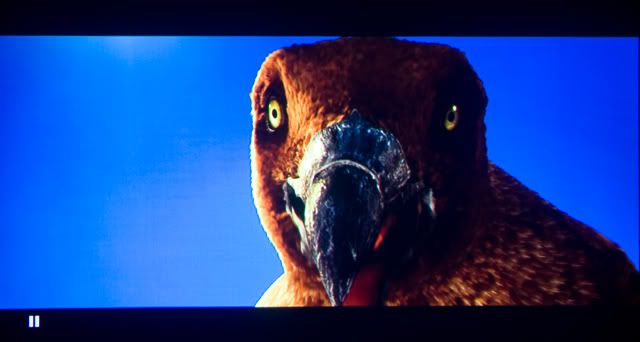 2) 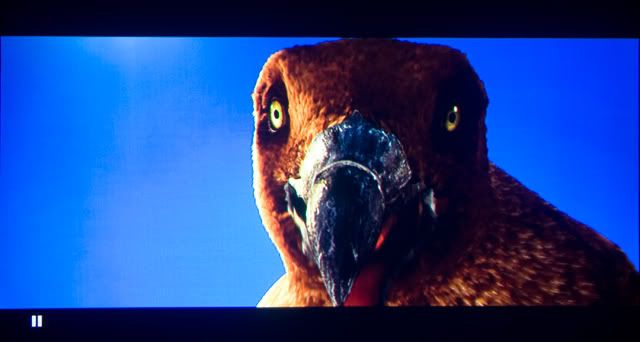 i'm sure there're some kind of compression and lost in quality during the process of "reduce size,web hosting" but both using excactly same methob for above action,no a proper serious comparison,just corious to know the result,guess which one by which cable? Or no different at all? could say that the top one is more white balanced (bottom photo, lefthand blue screen side looks white washed).. but then again the the bottom one can see more details near the right side, on the darker feathers.. so how? maybe a rm1k HDMI cable would have best from both images? "The single WhiBal card is light Gray, certified to recommended Luminance level of L* = ~75, which is optimum for use in all RAW converters. Having a "GrayCard" reference is the best assurance that the digital pictures that you capture will have the ability to be properly White Balanced. Only with a proper White Balance can you be ensured of proper and accurate color, regardless of lighting conditions. Unlike your eyes, a digital camera does not automatically see whites as white. It sees the color of the light reflected from it, hence blue-ish in Daylight and Orange-ish in incandescent lighting. By photographing a Gray Card reference for each lighting situation that you are in, you are assured of being able to achieve a proper White Balance for all of your pictures.The Gray Card reference picture can be used with today's software to balance the color casts that various lighting conditions produce with all digital cameras. The best method to properly White Balance your digital pictures is by using a Gray Card properly and shooting RAW. RAW Conversion Software such as Adobe Camera Raw and RawShooter can then perfectly adjust all the captures that were shot under the same lighting conditions." |
|
|
Dec 13 2008, 06:02 PM
Return to original view | Post
#19
|
|
Senior Member
9,206 posts Joined: Jun 2006
|
myqd.. off topic, our AE900 can accomodate any firmware updates ar? hehe!
|
|
|
Dec 14 2008, 11:42 PM
Return to original view | Post
#20
|
|
Senior Member
9,206 posts Joined: Jun 2006
|
QUOTE(Matrix @ Dec 14 2008, 11:32 PM) I can't say whether an expensive HDMI cable will be better....but a better display is more important than expensive cables!!! |
| Change to: |  0.0286sec 0.0286sec
 0.82 0.82
 7 queries 7 queries
 GZIP Disabled GZIP Disabled
Time is now: 11th December 2025 - 10:52 AM |
 Quote
Quote