

This post has been edited by idoblu: Mar 13 2018, 09:52 AM
Attached thumbnail(s)

Guide Review & Setup - Xiaomi DaFang IP Cam
|
|
 Mar 13 2018, 09:27 AM Mar 13 2018, 09:27 AM
Show posts by this member only | IPv6 | Post
#181
|
 
All Stars
11,308 posts Joined: Feb 2008 
|
those looking to ceiling mount their dafang can take a look at this -
This post has been edited by idoblu: Mar 13 2018, 09:52 AM Attached thumbnail(s)
|
|
|
|
|
|
Mar 13 2018, 09:31 AM
Show posts by this member only | IPv6 | Post
#182
|
|
All Stars
11,308 posts Joined: Feb 2008
|
btw anyone able to take a photo or video with their Dafang?
Mine says "Please open the photo album" and thats it  |
|
|
Mar 13 2018, 10:02 AM
Show posts by this member only | IPv6 | Post
#183
|

Junior Member
87 posts Joined: Oct 2016 
|
QUOTE(idoblu @ Mar 13 2018, 09:31 AM) btw anyone able to take a photo or video with their Dafang? Mine says "Please open the photo album" and thats it  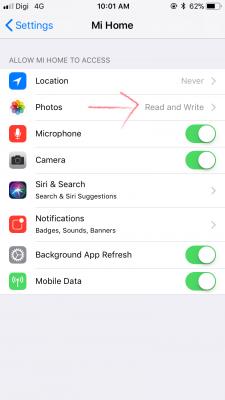
Check in your settings. |
|
|
Mar 13 2018, 10:05 AM
Show posts by this member only | IPv6 | Post
#184
|
|
All Stars
11,308 posts Joined: Feb 2008
|
QUOTE(YAMiDAMi @ Mar 13 2018, 10:02 AM)
Check in your settings.  |
|
|
Mar 13 2018, 01:41 PM
Show posts by this member only | IPv6 | Post
#185
|

Senior Member
2,251 posts Joined: Jan 2003 From: on da move with 3G technology  
|
QUOTE(jctasoga @ Mar 12 2018, 08:34 AM) this is plenty strange. i havent encounter this before. mostly when i have really teething problems that i will need to uninstall the mihome app then key in again all the login details. I finally managed to get it.. without any firmware update etc. you'd probably be better posting it in the official channel for assistance. apologies i can't help any further. Cheers.  and sounds really stupid..sorry quite banana (dunno what ching chong the dafang talking about) 1. Install t mihome 2. login and select mainland china 3. click add device and selected the Dafang 4. press the setup button at the bottom of camera till got some voice 5. press the button I hear the voice n proceed. 6. scan the qr code and got voice (dunno say what) 7. this part important... when u hear voice, dun click u hear the voice succesful... wait for 2 mins then click that green button (I saw this on one of the YouTube comments) 8. success! what was my error is I pressed that 'hear voice successful' immediately after I scan the qr code and the voice comes out. then it will run, at 67% something says successful..then 80% become 'password error voice' |
|
|
Mar 14 2018, 09:39 AM
|

Junior Member
179 posts Joined: Dec 2008 From: BP, JH 
|
@hamtster9 glad that you got it working.
|
|
|
|
|
|
Mar 16 2018, 01:06 AM
|
|
Junior Member
821 posts Joined: Apr 2012
|
Anybody knows where can I get a reliable seller with decent price?
Plan to get six units with memory cards as well. |
|
|
Mar 16 2018, 02:21 PM
|

Senior Member
707 posts Joined: Feb 2005
|
lazada/11st/shopee can get rm95 or less delivered to you. 32gb sandisk class 10 A is just above rm40 each
|
|
|
Mar 16 2018, 02:31 PM
|

Junior Member
317 posts Joined: Jul 2006 From: KK
|
I just bought this. But how do i access the content in my memory card? I mean view the video captured. I tried searching in the album, but there’s none.
|
|
|
Mar 22 2018, 08:29 AM
|

Senior Member
1,460 posts Joined: Jul 2009
|
QUOTE(valeron009 @ Mar 16 2018, 02:31 PM) I just bought this. But how do i access the content in my memory card? I mean view the video captured. I tried searching in the album, but there’s none. under playback... all your video are recorded there...by they way, can we install external hardisk on the usb port side?? Install a 1TB hardisk and let it record 24 hours |
|
|
Mar 22 2018, 09:02 AM
|
|
Junior Member
179 posts Joined: Dec 2008 From: BP, JH
|
QUOTE(t3n @ Mar 22 2018, 08:29 AM) under playback... all your video are recorded there... u can certainly try. but as i know, its max is 32gb for the sd card. for usb drives, i max tried 16gb only.by they way, can we install external hardisk on the usb port side?? Install a 1TB hardisk and let it record 24 hours https://www.passiongadgets.com/xiaomi-dafan...080p-hd-camera/ |
|
|
Mar 22 2018, 09:19 AM
|
|
Senior Member
1,460 posts Joined: Jul 2009
|
QUOTE(jctasoga @ Mar 22 2018, 09:02 AM) u can certainly try. but as i know, its max is 32gb for the sd card. for usb drives, i max tried 16gb only. I am using 64gb SD Card now.. no problem at all https://www.passiongadgets.com/xiaomi-dafan...080p-hd-camera/  Havent try external hardisk.. |
|
|
Mar 22 2018, 01:28 PM
|
|
Junior Member
179 posts Joined: Dec 2008 From: BP, JH
|
QUOTE(t3n @ Mar 22 2018, 09:19 AM) I am using 64gb SD Card now.. no problem at all how many days recording can you do on the 64gb card? Havent try external hardisk.. |
|
|
|
|
|
Mar 22 2018, 08:40 PM
|
|
Senior Member
1,460 posts Joined: Jul 2009
|
QUOTE(jctasoga @ Mar 22 2018, 01:28 PM) how many days recording can you do on the 64gb card? Just started using it yesterday haha... I will update you..By the way, why i cant download/view the "video record" aka motion detect video.. i try to view it keep saying "fail to download" in chinese.. |
|
|
Mar 23 2018, 02:26 PM
|

Junior Member
357 posts Joined: Aug 2012
|
nice review there brah.. hehe
|
|
|
Mar 23 2018, 04:32 PM
|
|
Newbie
1 posts Joined: Mar 2018
|
[quote=idoblu,Mar 13 2018, 02:27 AM]those looking to ceiling mount their dafang can take a look at this -
[/quote This is the link to the gearbest mount that is pictured, that could possibly be used as a ceiling mount.Gearbest Ceiling Mount? https://www.gearbest.com/action-cameras-spo.../pp_230786.html? This post has been edited by rok263: Mar 23 2018, 04:42 PM |
|
|
Mar 23 2018, 07:12 PM
|
|
Newbie
1 posts Joined: Mar 2018
|
I bought several Xiaomi Dafang.
2 questions: * Does anybody know how to see more then one cam at the same time? (in the MIIhome App or other?) This for surveilliance. * A lot of other users seems to have problem playing "motion detections" movies. Download stuck at 0%. Any solutions? thanks! |
|
|
Mar 23 2018, 07:51 PM
|
|
Senior Member
707 posts Joined: Feb 2005
|
QUOTE(pvkerc @ Mar 23 2018, 07:12 PM) I bought several Xiaomi Dafang. I am looking for the same solution and in addition to monitoring on a PC as well. Pity they don't make a NVR to group multiple cams. I have now 20 Dafangs2 questions: * Does anybody know how to see more then one cam at the same time? (in the MIIhome App or other?) This for surveilliance. * A lot of other users seems to have problem playing "motion detections" movies. Download stuck at 0%. Any solutions? thanks! |
|
|
Mar 25 2018, 11:34 AM
|

Senior Member
1,065 posts Joined: Sep 2005
|
Can this dafang upload video to local ftp servers?
|
|
|
Mar 25 2018, 11:35 AM
|
|
Senior Member
1,065 posts Joined: Sep 2005
|
Can this dafang upload video to local ftp servers?
|
| Change to: |  0.0241sec 0.0241sec
 1.15 1.15
 6 queries 6 queries
 GZIP Disabled GZIP Disabled
Time is now: 24th December 2025 - 03:51 PM |
 Quote
Quote