Welcome Guest ( Log In | Register )

45 Pages « < 39 40 41 42 43 > » Bottom

Outline · [ Standard ] · Linear+

Streamyx streamyx 8mbps club V2

views
     
Maxieos
post Aug 24 2019, 10:31 PM

Look at all my stars!!
*******
Senior Member
3,758 posts

Joined: May 2008
QUOTE(KopiChia @ Aug 24 2019, 10:26 AM)
No idea I haven't check in years. Atm I don't have laptop access to check.
*
So how you able to set up your stremyx last time without a computer ? all using phone ?
Which router and modem you are using ? normally smyx will give out all the modem+router together.

This post has been edited by Maxieos: Aug 24 2019, 10:32 PM
KopiChia
post Aug 24 2019, 11:18 PM

Regular
******
Senior Member
1,779 posts

Joined: Jan 2019
QUOTE(Maxieos @ Aug 24 2019, 10:31 PM)
So how you able to set up your stremyx last time without a computer ? all using phone ?
Which router and modem you are using ? normally smyx will give out all the modem+router together.
*
Had a pc it died couple years ago. Then recently my family member accidentally spill water onto my laptop. My setup is old setup I had a pure router WiFi link to dlink wired modem.
AjkR06
post Aug 25 2019, 09:08 AM

that's me
******
Senior Member
1,549 posts

Joined: Oct 2006
From: ugly kingdom


QUOTE(Maxieos @ Aug 24 2019, 05:47 AM)
Will it need to wait for this , approval and etc and that takes few month to upgrade ? Anyone successfully upgrade ?
*
Err... for my case, I got upgraded within few hours only after I request for upgrade and submit my thumbprint at the local Tmpoint.

This post has been edited by AjkR06: Aug 25 2019, 09:08 AM
Maxieos
post Aug 26 2019, 02:06 AM

Look at all my stars!!
*******
Senior Member
3,758 posts

Joined: May 2008
QUOTE(KopiChia @ Aug 24 2019, 11:18 PM)
Had a pc it died couple years ago. Then recently my family member accidentally spill water onto my laptop. My setup is old setup I had a pure router WiFi link to dlink wired modem.
*
Oh , but didn't tm give a modem+router to you when you subscribe 4MB ?

QUOTE(AjkR06 @ Aug 25 2019, 09:08 AM)
Err... for my case, I got upgraded within few hours only after I request for upgrade and submit my thumbprint at the local Tmpoint.
*
That was fast , i though they will delay few months only allow upgrade , so your next bill will be rm160 or 69 ?
KopiChia
post Aug 26 2019, 02:07 AM

Regular
******
Senior Member
1,779 posts

Joined: Jan 2019
QUOTE(Maxieos @ Aug 26 2019, 02:06 AM)
Oh , but didn't tm give a modem+router to you when you subscribe 4MB ?
That was fast , i though they will delay few months only allow upgrade ,  so your next bill will be rm160 or 69 ?
*
Bro that was years ago. Besides I had option of getting wired or wireless I took wired anyway that modem sux. It was given away years ago.
Maxieos
post Aug 26 2019, 10:58 PM

Look at all my stars!!
*******
Senior Member
3,758 posts

Joined: May 2008
QUOTE(KopiChia @ Aug 26 2019, 02:07 AM)
Bro that was years ago. Besides I had option of getting wired or wireless I took wired anyway that modem sux. It was given away years ago.
*
Oh, didn't know there is an option to select wire.
Anyway do let me know the snr and attu since I also plan to ask whether I can get upgrade or not.Some said , must upgrade within this week if not will stuck forever 1mb at the price of 69.
KopiChia
post Aug 26 2019, 11:51 PM

Regular
******
Senior Member
1,779 posts

Joined: Jan 2019
QUOTE(Maxieos @ Aug 26 2019, 10:58 PM)
Oh, didn't know there is an option to select wire.
Anyway do let me know the snr and attu since I also plan to ask whether I can get upgrade or not.Some said , must upgrade within this week if not will stuck forever 1mb at the price of 69.
*
I don't have access to working laptop or desktop atm (only dead ones 😔) to check sorry. But I do remember my snr from years ago showed good reading at 4mb cap technically possible seems I kept losing sync when it's re cap at 8mb. Issue is they could have given me 6mb cap I had 6mb cap stable overnight but technician won't allowed it. Its 4 or 8.
misspinky
post Aug 28 2019, 09:52 AM

Casual
***
Junior Member
309 posts

Joined: Jul 2012


QUOTE(nite_eif @ Aug 21 2019, 04:46 PM)
the rm69 will be eligible to all irregardless of location is it?
thru tmpoint, from the green box to house wall maybe nearing 30-40 meter..or i can try different contractor as 2nd opinion before confirming the installation?
*
I see, look similar case like my neighbour..so, now you still proceed the application? you need to raise the issue to your tmpoint places, you don't want any charges for installation. you want standard installation. Just mention you want other installer because first installer said simply charges without clearly told what kind installation they want to setup its. From what i got some information from my neighbour, some of them got charge like you, some are not charged anything even though the fibre wire setup quite long. While others, charged from inside house only because they located the btu the upstairs or downstairs, location of btu quite far. Just raise why you upgrade at the first place. If not just called their supervisor. just get win-win situation.
JuneResources
post Aug 28 2019, 11:35 AM

ONE Stop Resources
*******
Senior Member
4,168 posts

Joined: Mar 2012
From: Kuala Lumpur


QUOTE(misspinky @ Aug 28 2019, 09:52 AM)
I see, look similar case like my neighbour..so, now you still proceed the application? you need to raise the issue to your tmpoint places, you don't want any charges for installation. you want standard installation. Just mention you want other installer because first installer said simply charges without clearly told what kind installation they want to setup its. From what i got some information from my neighbour, some of them got charge like you, some are not charged anything even though the fibre wire setup quite long. While others, charged from inside house only because they located the btu the upstairs or downstairs, location of btu quite far. Just raise why you upgrade at the first place. If not just called their supervisor. just get win-win situation.
*
Same as my previous case. At first, it charge me RM60 for installation. shocking.gif
It should be free standard installation and my house not big like football field oh.. sweat.gif

After nego, still charge me installation. But reduce 10 buck..
Damn.. bangwall.gif I don't want to argue so much anymore since I send report to mcmc almost 6 months, then only settle the problem by providing extra port delivery to my home..

If create report again for dispute installation, again raise to mcmc and then wait another 6 months? shakehead.gif
Haizz.. tired of this shit case. doh.gif

misspinky
post Aug 28 2019, 01:03 PM

Casual
***
Junior Member
309 posts

Joined: Jul 2012


QUOTE(JuneResources @ Aug 28 2019, 12:35 PM)
Same as my previous case. At first, it charge me RM60 for installation. shocking.gif
It should be free standard installation and my house not big like football field oh.. sweat.gif

After nego, still charge me installation. But reduce 10 buck..
Damn.. bangwall.gif I don't want to argue so much anymore since I send report to mcmc almost 6 months, then only settle the problem by providing  extra port delivery to my home..

If create report again for dispute installation, again raise to mcmc and then wait another 6 months? shakehead.gif
Haizz.. tired of this shit case. doh.gif
*
that is how so "professional" of skmm doing their work, big issue of time frame to settle down the case even simply cases. Last time i have report on courier services, report first, they called courier company first without i noticed they called that company. next 2 days later, courier company called me about the issue and they know i report through skmm and command me to remove it later when the issue settle. Lolz.

skmm need to improve their time frame on working issue. even kpdnkk in different category, they settle the case in 1 month and work more greater than skmm.

so, rm50 quite cheap for extra charges. normally i found they charge RM70-RM80.

This post has been edited by misspinky: Aug 28 2019, 01:04 PM

Maxieos
post Aug 31 2019, 08:46 PM

Look at all my stars!!
*******
Senior Member
3,758 posts

Joined: May 2008
What is the stable 8mb snr ?
below 10 or snr 6 stable ?
blacktubiskylinelover
the modem only show snr 19/6 don't know which is up or down.
juzmafia
post Aug 31 2019, 09:39 PM

On my way
****
Junior Member
562 posts

Joined: Oct 2012
From: Out of the world...

QUOTE(Maxieos @ Aug 31 2019, 08:46 PM)
What is the stable 8mb snr ?
below 10 or snr 6 stable ?
blacktubiskylinelover
the modem only show snr 19/6 don't know which is up or down.
*
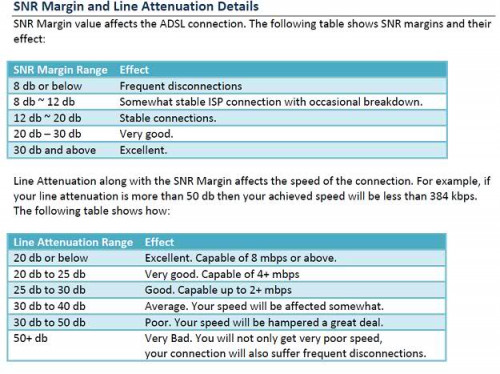
Need both SNR(higher) and Line Attenuation(lowest) in good value. Refer here:-
user posted image

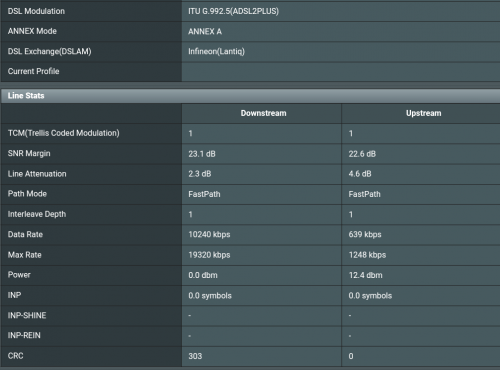
Here is my 8mb DSL status..
user posted image
Maxieos
post Aug 31 2019, 11:00 PM

Look at all my stars!!
*******
Senior Member
3,758 posts

Joined: May 2008
QUOTE(Maxieos @ Aug 31 2019, 08:46 PM)
What is the stable 8mb snr ?
below 10 or snr 6 stable ?
blacktubiskylinelover
the modem only show snr 19/6 don't know which is up or down.
*
QUOTE(juzmafia @ Aug 31 2019, 09:39 PM)
Need both SNR(higher) and Line Attenuation(lowest) in good value. Refer here:-
user posted image

Here is my 8mb DSL status..
user posted image
*
I don't know how it show , but why you are so different ? 4 vs 40 ?


Attached thumbnail(s)
Attached Image
juzmafia
post Aug 31 2019, 11:44 PM

On my way
****
Junior Member
562 posts

Joined: Oct 2012
From: Out of the world...

QUOTE(Maxieos @ Aug 31 2019, 11:00 PM)
I don't know how it show , but why you are so different ? 4 vs 40 ?
*
Ur DSL status:-
D/L U/L
SNR 19 db 6 db
Line Attenuation 25 db 42 db

Ur L/A is not suitable for 8MB.

Mine is lower(2.3db) due to the distance between DSLAM to my house is less then 500m and the tm cable is still less than 4 y/o.
Maxieos
post Sep 1 2019, 01:23 AM

Look at all my stars!!
*******
Senior Member
3,758 posts

Joined: May 2008
QUOTE(juzmafia @ Aug 31 2019, 11:44 PM)
Ur DSL status:-
  D/L U/L
SNR 19 db 6 db
Line Attenuation 25 db 42 db

Ur L/A is not suitable for 8MB.

Mine is lower(2.3db) due to the distance between DSLAM to my house is less then 500m and the tm cable is still less than 4 y/o.
*
As you expect , what are the distant which is so far apart 42 vs yours 4.6db ? If yours are less than 500m means 42db is 4-5KM ?
Cable have any affect ?

Anyway to make to make the SNR higher or Attenuation lower ? Need to buy a new modem cable ?
juzmafia
post Sep 1 2019, 01:37 PM

On my way
****
Junior Member
562 posts

Joined: Oct 2012
From: Out of the world...

QUOTE(Maxieos @ Sep 1 2019, 01:23 AM)
As you expect,
what are the distant which is so far apart 42 vs yours 4.6db ?
If yours are less than 500m means 42db is 4-5KM ?
Cable have any affect ?

Anyway to make to make the SNR higher or Attenuation lower ?
Need to buy a new modem cable  ?
*
As you expect, what are the distant which is so far apart 42 vs yours 4.6db ?
>> First of all, i'm not an expert and 42db is for ur upload meanwhile 25db is for ur d/load which you should focus on.

If yours are less than 500m means 42db is 4-5KM ?
>> Maybe ur distance is more than 2km based on ur d/load value.
Cable have any affect ?
>> Yes, cable quality will degrade & it will affect the performance.

Anyway to make to make the SNR higher or Attenuation lower ?
>> Cable connection between TM pole to your house cable must not exposed and properly secured. (Some TM tech will just leave it exposed and this will affect both SNR & Line attenuation value)
>> If cable is too old then replace it. (Both inside and outside cable)
>> Upgrade or add another DSLAM nearer to ur house.
>> This is all under TM's scope except ur in-house telco cable
>> Report to TM if no action then report to MCMC, maybe they will prioritise for fiber installation


Need to buy a new modem cable ?
>> U can try but i doubt it will improve anything unless ur cable is too old or bent too much.
>> Also if u r using splitter then try direct connection and check the DSL staus again


Maxieos
post Sep 2 2019, 10:14 PM

Look at all my stars!!
*******
Senior Member
3,758 posts

Joined: May 2008
QUOTE(juzmafia @ Sep 1 2019, 01:37 PM)
As you expect, what are the distant which is so far apart 42 vs yours 4.6db ?
>> First of all, i'm not an expert and 42db is for ur upload meanwhile 25db is for ur d/load which you should focus on.

If yours are less than 500m means 42db is 4-5KM ?
>> Maybe ur distance is more than 2km based on ur d/load value.
Cable have any affect ?
>> Yes, cable quality will degrade & it will affect the performance.

Anyway to make to make the SNR higher or Attenuation lower ?
>> Cable connection between TM pole to your house cable must not exposed and properly secured. (Some TM tech will just leave it exposed and this will affect both SNR & Line attenuation value)
>> If cable is too old then replace it. (Both inside and outside cable)
>> Upgrade or add another DSLAM nearer to ur house.
>> This is all under TM's scope except ur in-house telco cable
>> Report to TM if no action then report to MCMC, maybe they will prioritise for fiber installation


Need to buy a new modem cable  ?
>> U can try but i doubt it will improve anything unless ur cable is too old or bent too much.
>> Also if u r using splitter then try direct connection and check the DSL staus again

*
i think every question need to ask tm staff at tmpoint.

What do you mean by Cable exposed ?
How long is consider a cable old for replacement ?
Can we request to reallocate DSLAM ?

frontierzone
post Sep 5 2019, 10:55 AM

Enthusiast
*****
Senior Member
735 posts

Joined: May 2010
I tried using one Dlink modem and one innatech modem on 8mbps, but the dlink always maxed at at speeds of 6.5mbps on speedtest while the innatech reaches 8.7mbps.
On the Dlink is set ADSL2+ Annex L and Annex M enabled, wifi uses Wireless N at Auto Bandwidth speed .

What could be the reason Dlink cant achieve the speed of 8mbps?

The test consistently shows Dlink only can achieve 6.4-6.6mbps while Innatech can reach 8.7mbps.
cT.!Kee!
post Sep 6 2019, 12:46 AM

Getting Started
**
Junior Member
62 posts

Joined: Aug 2013
From: KEDAH
QUOTE(frontierzone @ Sep 5 2019, 10:55 AM)
I tried using one Dlink modem and one innatech modem on 8mbps, but the dlink always maxed at at speeds of 6.5mbps on speedtest while the innatech reaches 8.7mbps.
On the Dlink is set ADSL2+ Annex L and Annex M enabled, wifi uses Wireless N at Auto Bandwidth speed .

What could be the reason Dlink cant achieve the speed of 8mbps?

The test consistently shows Dlink only can achieve 6.4-6.6mbps while Innatech can reach 8.7mbps.
*
What model ?
frontierzone
post Sep 6 2019, 08:44 AM

Enthusiast
*****
Senior Member
735 posts

Joined: May 2010
QUOTE(cT.!Kee! @ Sep 6 2019, 12:46 AM)
What model ?
*
I managed to fixed it. after reset the modem it can get 8 mbps.

45 Pages « < 39 40 41 42 43 > » Top
 

Change to:
| Lo-Fi Version
0.0285sec    0.57    6 queries    GZIP Disabled
Time is now: 9th December 2025 - 03:04 AM