QUOTE(SilentVampire @ Dec 14 2018, 06:57 PM)
Yes, it is enough.

Thanks. Anyone know what latest firmware for this router.D-Link Malaysia Official Thread
|
|
 Dec 14 2018, 07:21 PM Dec 14 2018, 07:21 PM
|
 
Senior Member
612 posts Joined: Jul 2009 From: Kuantan 
|
QUOTE(SilentVampire @ Dec 14 2018, 06:57 PM) Yes, it is enough. Thanks. Anyone know what latest firmware for this router. |
|
|
|
|
|
Dec 15 2018, 07:53 AM
|

Senior Member
5,714 posts Joined: Mar 2007  
|
QUOTE(kayroll @ Dec 14 2018, 07:21 PM) Thanks. Anyone know what latest firmware for this router. See here: https://www.dlink.com.my/dir-882/#firmware |
|
|
Dec 15 2018, 12:22 PM
|
|
Senior Member
612 posts Joined: Jul 2009 From: Kuantan
|
QUOTE(SilentVampire @ Dec 15 2018, 07:53 AM) Thank you bos. Just received my parcel. Gonna try how this router perform.
This post has been edited by kayroll: Dec 15 2018, 12:28 PM |
|
|
Dec 15 2018, 12:50 PM
Show posts by this member only | IPv6 | Post
#264
|
|
Senior Member
5,714 posts Joined: Mar 2007
|
QUOTE(kayroll @ Dec 15 2018, 12:22 PM) Thank you bos. Just received my parcel. Gonna try how this router perform. Just check and see if you are on the latest firmware.
|
|
|
Dec 15 2018, 01:47 PM
Show posts by this member only | IPv6 | Post
#265
|
|
Senior Member
612 posts Joined: Jul 2009 From: Kuantan
|
QUOTE(SilentVampire @ Dec 15 2018, 12:50 PM) Just check and see if you are on the latest firmware. Sticker on box v1.1. |
|
|
Dec 15 2018, 03:27 PM
|
|
Senior Member
5,714 posts Joined: Mar 2007
|
QUOTE(kayroll @ Dec 15 2018, 01:47 PM) Sticker on box v1.1. I meant firmware which you can see on the router GUI page. That is hardware version bro, but sounds like you have the latest hardware version. |
|
|
|
|
|
Dec 15 2018, 06:21 PM
|
|
Senior Member
612 posts Joined: Jul 2009 From: Kuantan
|
QUOTE(SilentVampire @ Dec 15 2018, 03:27 PM) I meant firmware which you can see on the router GUI page. That is hardware version bro, but sounds like you have the latest hardware version. Right now didn't have pppoe password, tomorrow will setup bro. Scared tm reset my pppoe then no live football match tonight  |
|
|
Dec 15 2018, 06:23 PM
|
|
Senior Member
5,714 posts Joined: Mar 2007
|
QUOTE(kayroll @ Dec 15 2018, 06:21 PM) Right now didn't have pppoe password, tomorrow will setup bro. Scared tm reset my pppoe then no live football match tonight Lol take your time then and enjoy the match. |
|
|
Dec 15 2018, 08:07 PM
|

Junior Member
375 posts Joined: Mar 2008 From: Selangor
|
QUOTE(SilentVampire @ Dec 15 2018, 03:27 PM) I meant firmware which you can see on the router GUI page. That is hardware version bro, but sounds like you have the latest hardware version. Do you mean latest firmware or hardware? If hardware means 882 have many specs? |
|
|
Dec 15 2018, 09:06 PM
|
|
Senior Member
5,714 posts Joined: Mar 2007
|
QUOTE(yed @ Dec 15 2018, 08:07 PM) Do you mean latest firmware or hardware? If hardware means 882 have many specs? I meant latest hardware. It doesn’t have many specs, but I think it is the newest one. |
|
|
Dec 16 2018, 02:57 AM
Show posts by this member only | IPv6 | Post
#271
|

Senior Member
1,140 posts Joined: Oct 2011
|
Hello guys eversince i switch router to D-Link DIR-867 ive had intermittent disconnection (doesnt matter while playing game or just normal browsing). Even more weird sometimes on app like discord (its like skype but made for gamer) my friends can hear me when i speak but i cant hear them in return, but i know they are talking cause the app will highlight anyones name when they speak is just that i cant hear them but they can still hear me.
Im on UNIFI 300MBPS(turboed) previous router Innatech RG4332, connected through LAN cable this is my motherboard https://www.gigabyte.com/Motherboard/Z370-A...ing-5-rev-10#kf Router firmware latest. I've tried powering down the router/modem, even switch 2 different cat5e cable its still happening. Somehow i think theres no disconnection inside games and on desktop use when i connect the cable to the port 2 of the router yet, but the discord app thingy situation above still occurs.(possible of port 1 being faulty?) things i havent tried yet -ask tm to reset my port -perform a factory reset on my router(if i do this i have to do the settings again, and be able to use my pppoe password again right?) -try cat6 cable from ugreen on port 1(this cable still havent arrived)  edit: forgot to mention one time i disconnected in game, i notice in network adapter speed it capped my speed to 10mbps(where previously it was 1.0Gbps, i reconnected the lan cable then it go back to 1.0Gbps. All these intermittent disconnection aboved will reconnect itselfs after 5-8sec) This post has been edited by soR: Dec 16 2018, 03:13 AM |
|
|
Dec 16 2018, 07:43 AM
|
|
Senior Member
5,714 posts Joined: Mar 2007
|
QUOTE(soR @ Dec 16 2018, 02:57 AM) Hello guys eversince i switch router to D-Link DIR-867 ive had intermittent disconnection (doesnt matter while playing game or just normal browsing). Even more weird sometimes on app like discord (its like skype but made for gamer) my friends can hear me when i speak but i cant hear them in return, but i know they are talking cause the app will highlight anyones name when they speak is just that i cant hear them but they can still hear me. Disable IPv6.Im on UNIFI 300MBPS(turboed) previous router Innatech RG4332, connected through LAN cable this is my motherboard https://www.gigabyte.com/Motherboard/Z370-A...ing-5-rev-10#kf Router firmware latest. I've tried powering down the router/modem, even switch 2 different cat5e cable its still happening. Somehow i think theres no disconnection inside games and on desktop use when i connect the cable to the port 2 of the router yet, but the discord app thingy situation above still occurs.(possible of port 1 being faulty?) things i havent tried yet -ask tm to reset my port -perform a factory reset on my router(if i do this i have to do the settings again, and be able to use my pppoe password again right?) -try cat6 cable from ugreen on port 1(this cable still havent arrived) edit: forgot to mention one time i disconnected in game, i notice in network adapter speed it capped my speed to 10mbps(where previously it was 1.0Gbps, i reconnected the lan cable then it go back to 1.0Gbps. All these intermittent disconnection aboved will reconnect itselfs after 5-8sec) |
|
|
Dec 16 2018, 05:16 PM
Show posts by this member only | IPv6 | Post
#273
|
|
Senior Member
1,140 posts Joined: Oct 2011
|
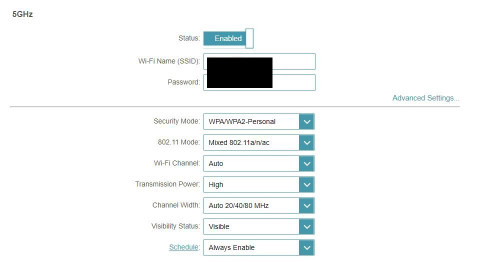
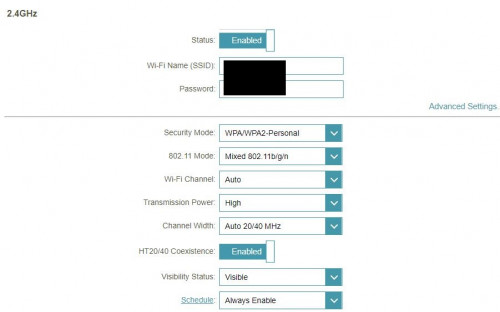
QUOTE(SilentVampire @ Dec 16 2018, 07:43 AM) Disable IPv6. how do i do that? also may i know why did you suggest disabling IPv6 what does it cause? just want to know the in n out off this stuffs. thanks!also timer was 10 hours before, now i checked its 6 hours? it reset on its own? now on my phone i can only see 2.4ghz wifi, my 5ghz missing.. 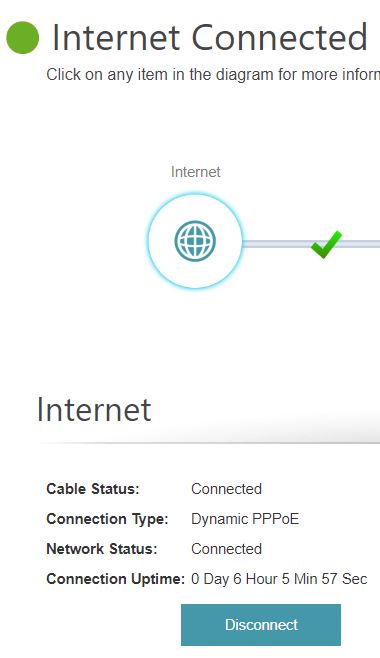 This post has been edited by soR: Dec 16 2018, 08:17 PM |
|
|
|
|
|
Dec 16 2018, 09:19 PM
|

Junior Member
174 posts Joined: Nov 2005
|
Hi, Recently bought a DIR-842.
Setup the VLANs as per D-LINK guide, PPPOE connection seems ok but wifi has no internet connection. Same with wired, can get DHCP IP but no internet. 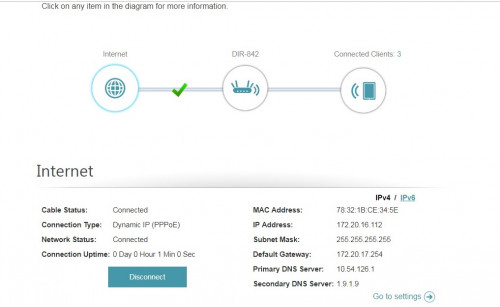 Traceroute from old router 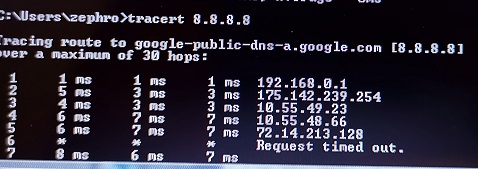 Traceroute from DIR-842 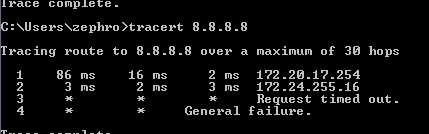 Seems like gateway issue? Can't seem to set it on the router though. Already disabled IPV6 and updated firmware to latest. Hardware version is C1. Any idea on the issue? |
|
|
Dec 16 2018, 09:42 PM
|
|
Senior Member
5,714 posts Joined: Mar 2007
|
QUOTE(soR @ Dec 16 2018, 05:16 PM) how do i do that? also may i know why did you suggest disabling IPv6 what does it cause? just want to know the in n out off this stuffs. thanks! IPv6 is not optimized for use here. 5GHz N or AC? Does your phone support AC? also timer was 10 hours before, now i checked its 6 hours? it reset on its own? now on my phone i can only see 2.4ghz wifi, my 5ghz missing.. QUOTE(Zephro @ Dec 16 2018, 09:19 PM) Hi, Recently bought a DIR-842. Gateway issue. You have been assigned a private IP for some reason, so of course you won’t get Internet connection.Setup the VLANs as per D-LINK guide, PPPOE connection seems ok but wifi has no internet connection. Same with wired, can get DHCP IP but no internet. Traceroute from old router Traceroute from DIR-842 Seems like gateway issue? Can't seem to set it on the router though. Already disabled IPV6 and updated firmware to latest. Hardware version is C1. Any idea on the issue? |
|
|
Dec 16 2018, 09:53 PM
Show posts by this member only | IPv6 | Post
#276
|
|
Junior Member
174 posts Joined: Nov 2005
|
QUOTE(SilentVampire @ Dec 16 2018, 09:42 PM) Gateway issue. You have been assigned a private IP for some reason, so of course you won’t get Internet connection. Oh yeah, 172 is private IP range. Weird. Could the BTU need replacing? I don't think it's changed for 5 years. I get a public IP when I use the old router though. EDIT: OK, after some testing I found out that the new dlink 842 connected to the PPPOE, even after using an invalid login. This gave it a private IP. So is the router or BTU at fault here? This post has been edited by Zephro: Dec 16 2018, 10:12 PM |
|
|
Dec 16 2018, 09:54 PM
Show posts by this member only | IPv6 | Post
#277
|
|
Senior Member
1,140 posts Joined: Oct 2011
|
QUOTE(SilentVampire @ Dec 16 2018, 09:42 PM) IPv6 is not optimized for use here. 5GHz N or AC? Does your phone support AC? How do i disable IPV6? on the computer or on the router? For the WiFi at first when i finish setting the router and got connected to the internet, i straight connected to the wifi on Smart Connect(Dlink) enabled, ive read some wifi configurations that 5ghz offer faster speed so i disable the smart connect the option of enabling 2.4G and 5G popped out so i just renamed them and setup the password and didnt change a thing on the advanced settings. Connected on 5G line no problem and both wifi has full signal. Today i got back my phone auto connect to 2.4G and 5G missing. WiFi settings for 2.4G/5G (default) » Click to show Spoiler - click again to hide... « This post has been edited by soR: Dec 16 2018, 10:02 PM |
|
|
Dec 16 2018, 10:14 PM
Show posts by this member only | IPv6 | Post
#278
|
|
Junior Member
174 posts Joined: Nov 2005
|
QUOTE(soR @ Dec 16 2018, 09:54 PM) How do i disable IPV6? on the computer or on the router? You can disable on router. Settings > Internet > ipv6 > my Internet connection > local connectivity only |
|
|
Dec 16 2018, 10:54 PM
|
|
Senior Member
5,714 posts Joined: Mar 2007
|
QUOTE(Zephro @ Dec 16 2018, 09:53 PM) Oh yeah, 172 is private IP range. Weird. Try to reset the router and enter all your details again, and see if that makes a difference.Could the BTU need replacing? I don't think it's changed for 5 years. I get a public IP when I use the old router though. EDIT: OK, after some testing I found out that the new dlink 842 connected to the PPPOE, even after using an invalid login. This gave it a private IP. So is the router or BTU at fault here? QUOTE(soR @ Dec 16 2018, 09:54 PM) How do i disable IPV6? on the computer or on the router? Router. Set 5GHz to Wi-Fi Channel 36, 802.11 Mode - n/ac, Channel width 40Mhz. Set 2.4GHz, 802.12 Mode - n only, Channel width 20Mhz only.For the WiFi at first when i finish setting the router and got connected to the internet, i straight connected to the wifi on Smart Connect(Dlink) enabled, ive read some wifi configurations that 5ghz offer faster speed so i disable the smart connect the option of enabling 2.4G and 5G popped out so i just renamed them and setup the password and didnt change a thing on the advanced settings. Connected on 5G line no problem and both wifi has full signal. Today i got back my phone auto connect to 2.4G and 5G missing. WiFi settings for 2.4G/5G (default) » Click to show Spoiler - click again to hide... « |
|
|
Dec 16 2018, 11:10 PM
Show posts by this member only | IPv6 | Post
#280
|
|
Junior Member
174 posts Joined: Nov 2005
|
QUOTE(SilentVampire @ Dec 16 2018, 10:54 PM) Try to reset the router and enter all your details again, and see if that makes a difference. Still the same, getting private ip. BTU is alcatel lucent I240G so should be okay. Maybe I'll exchange the router instead. |
| Change to: |  0.0218sec 0.0218sec
 0.29 0.29
 6 queries 6 queries
 GZIP Disabled GZIP Disabled
Time is now: 15th December 2025 - 02:22 AM |
 Quote
Quote