Outline ·
[ Standard ] ·
Linear+
D-Link Malaysia Official Thread
|
Zephro
|
 Dec 16 2018, 09:19 PM Dec 16 2018, 09:19 PM
|
Getting Started


|
Hi, Recently bought a DIR-842. Setup the VLANs as per D-LINK guide, PPPOE connection seems ok but wifi has no internet connection. Same with wired, can get DHCP IP but no internet. 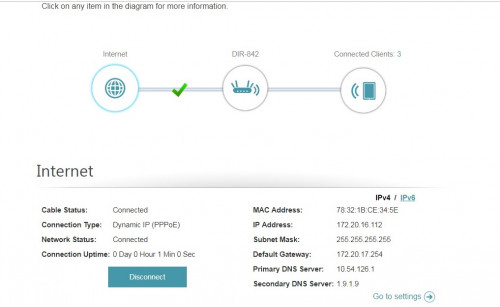 Traceroute from old router 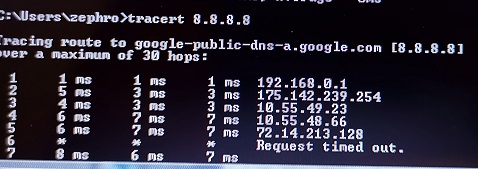 Traceroute from DIR-842 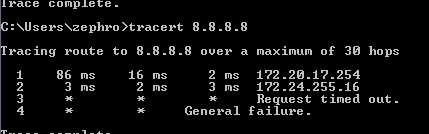 Seems like gateway issue? Can't seem to set it on the router though. Already disabled IPV6 and updated firmware to latest. Hardware version is C1. Any idea on the issue? |
|
|
|
|
|
Zephro
|
Dec 16 2018, 09:53 PM
|
Getting Started
|
QUOTE(SilentVampire @ Dec 16 2018, 09:42 PM) Gateway issue. You have been assigned a private IP for some reason, so of course you won’t get Internet connection. Oh yeah, 172 is private IP range. Weird. Could the BTU need replacing? I don't think it's changed for 5 years. I get a public IP when I use the old router though. EDIT: OK, after some testing I found out that the new dlink 842 connected to the PPPOE, even after using an invalid login. This gave it a private IP. So is the router or BTU at fault here? This post has been edited by Zephro: Dec 16 2018, 10:12 PM |
|
|
|
|
|
Zephro
|
Dec 16 2018, 10:14 PM
|
Getting Started
|
QUOTE(soR @ Dec 16 2018, 09:54 PM) How do i disable IPV6? on the computer or on the router? You can disable on router. Settings > Internet > ipv6 > my Internet connection > local connectivity only |
|
|
|
|
|
Zephro
|
Dec 16 2018, 11:10 PM
|
Getting Started
|
QUOTE(SilentVampire @ Dec 16 2018, 10:54 PM) Try to reset the router and enter all your details again, and see if that makes a difference. Still the same, getting private ip. BTU is alcatel lucent I240G so should be okay. Maybe I'll exchange the router instead. |
|
|
|
|
|
Zephro
|
Dec 17 2018, 09:21 AM
|
Getting Started
|
QUOTE(SilentVampire @ Dec 17 2018, 07:50 AM) Try with another router and see if that still happened. If it does, then possibly your account is tied to the old router. Hi bro, think you're right. It's probably tied to the old router. Weird. Usually unifi accounts aren't tied to router? I gave up and used a static IP for the new router, connected over wired to the old router and I'm getting 100 mbps anyway over wireless so I'll leave it at that. My line is 100mbps anyway. Haha. |
|
|
|
|



 Quote
Quote

 0.0195sec
 0.34
0.34
 7 queries
 GZIP Disabled