Welcome Guest ( Log In | Register )

Outline · [ Standard ] · Linear+

 D-Link Malaysia Official Thread

views
     
soR
post Dec 16 2018, 02:57 AM

Regular
******
Senior Member
1,140 posts

Joined: Oct 2011
Hello guys eversince i switch router to D-Link DIR-867 ive had intermittent disconnection (doesnt matter while playing game or just normal browsing). Even more weird sometimes on app like discord (its like skype but made for gamer) my friends can hear me when i speak but i cant hear them in return, but i know they are talking cause the app will highlight anyones name when they speak is just that i cant hear them but they can still hear me.

Im on UNIFI 300MBPS(turboed) previous router Innatech RG4332, connected through LAN cable this is my motherboard https://www.gigabyte.com/Motherboard/Z370-A...ing-5-rev-10#kf
Router firmware latest.

I've tried powering down the router/modem, even switch 2 different cat5e cable its still happening. Somehow i think theres no disconnection inside games and on desktop use when i connect the cable to the port 2 of the router yet, but the discord app thingy situation above still occurs.(possible of port 1 being faulty?)

things i havent tried yet
-ask tm to reset my port
-perform a factory reset on my router(if i do this i have to do the settings again, and be able to use my pppoe password again right?)
-try cat6 cable from ugreen on port 1(this cable still havent arrived)

rclxub.gif rclxub.gif rclxub.gif

edit: forgot to mention one time i disconnected in game, i notice in network adapter speed it capped my speed to 10mbps(where previously it was 1.0Gbps, i reconnected the lan cable then it go back to 1.0Gbps.
All these intermittent disconnection aboved will reconnect itselfs after 5-8sec)

This post has been edited by soR: Dec 16 2018, 03:13 AM
soR
post Dec 16 2018, 05:16 PM

Regular
******
Senior Member
1,140 posts

Joined: Oct 2011
QUOTE(SilentVampire @ Dec 16 2018, 07:43 AM)
Disable IPv6.
*
how do i do that? also may i know why did you suggest disabling IPv6 what does it cause? just want to know the in n out off this stuffs. thanks!

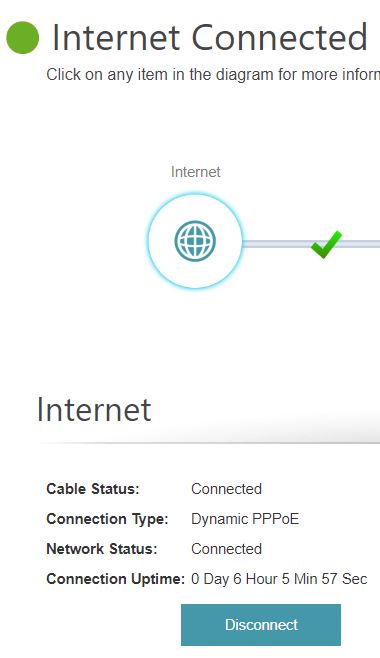
also timer was 10 hours before, now i checked its 6 hours? it reset on its own? now on my phone i can only see 2.4ghz wifi, my 5ghz missing..
user posted image


This post has been edited by soR: Dec 16 2018, 08:17 PM
soR
post Dec 16 2018, 09:54 PM

Regular
******
Senior Member
1,140 posts

Joined: Oct 2011
QUOTE(SilentVampire @ Dec 16 2018, 09:42 PM)
IPv6 is not optimized for use here. 5GHz N or AC? Does your phone support AC?
*
How do i disable IPV6? on the computer or on the router?

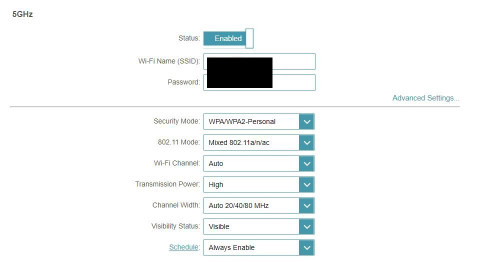
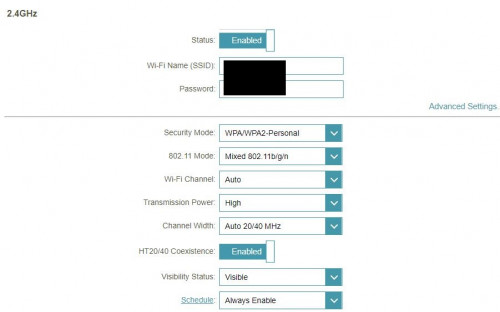
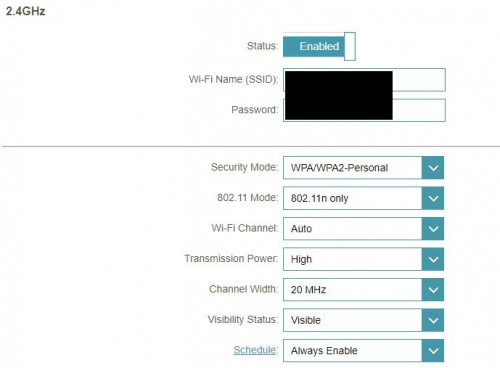
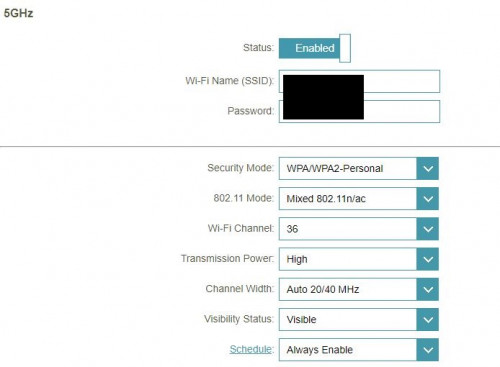
For the WiFi at first when i finish setting the router and got connected to the internet, i straight connected to the wifi on Smart Connect(Dlink) enabled, ive read some wifi configurations that 5ghz offer faster speed so i disable the smart connect the option of enabling 2.4G and 5G popped out so i just renamed them and setup the password and didnt change a thing on the advanced settings. Connected on 5G line no problem and both wifi has full signal. Today i got back my phone auto connect to 2.4G and 5G missing.

WiFi settings for 2.4G/5G (default)
» Click to show Spoiler - click again to hide... «


This post has been edited by soR: Dec 16 2018, 10:02 PM
soR
post Dec 16 2018, 11:34 PM

Regular
******
Senior Member
1,140 posts

Joined: Oct 2011
QUOTE(SilentVampire @ Dec 16 2018, 10:54 PM)
Router. Set 5GHz to Wi-Fi Channel 36, 802.11 Mode - n/ac, Channel width 40Mhz. Set 2.4GHz, 802.12 Mode - n only, Channel width 20Mhz only.
*
How do i disable ipv6 on the router?

my 5GHz magically appeared now, i didnt even key in your suggested settings yet. Your settings are the optimal for those bands is it?
I realize i went to the back room of my house i got single bar on the signal on 5ghz, while 2.4ghz probably 3-4 bar. I know 2.4Ghz are better if you are further from the router. Does the settings you provide help with combating the signals strenght? just wondering

This post has been edited by soR: Dec 17 2018, 04:59 AM
soR
post Dec 17 2018, 09:01 PM

Regular
******
Senior Member
1,140 posts

Joined: Oct 2011
QUOTE(Zephro @ Dec 16 2018, 10:14 PM)
You can disable on router.
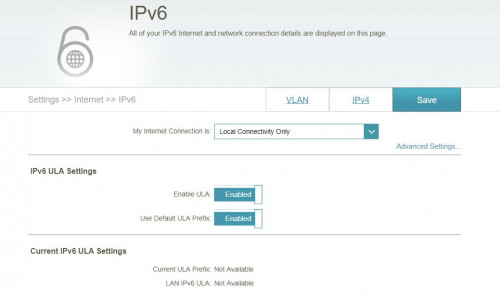
Settings > Internet > ipv6 > my Internet connection > local connectivity only
*
Thank you like this right? do i need to disable those advanced IPV6 ULA settings, its like that by default when i change to 'LOCAL CONNECTIVITY ONLY'
user posted image

QUOTE(SilentVampire @ Dec 17 2018, 07:50 AM)
I think someone replied to you earlier on how to do it? Yes, my settings are the optimal for those bands.

For 5GHz signal strength improvement, you need a better more expensive router. My suggested settings won't do it.
*
set like this right?
» Click to show Spoiler - click again to hide... «


for 5Ghz, i cant set to Channel width 40Mhz. Theres only dropdown option for
-Auto 20/40/80Mhz
-Auto 20/40Mhz
which one should i go for? So far no intermittent disconnections at all ingame or outside game even before disabling IPV6, still having that weird problem in Discord APP tho (im disabling IPV6, and see tonight if that weird problem arise again in Discord APP).

This post has been edited by soR: Dec 17 2018, 09:03 PM
soR
post Dec 24 2018, 06:40 PM

Regular
******
Senior Member
1,140 posts

Joined: Oct 2011
Hey guys, my iptv stop working showing no signals since yesterday previously it was fine (but internet/phone is working).
Im using D-Link DIR867 and follow this guide when i first set it up https://www.blacktubi.com/d-link-unifi-router-setup/ .

Called Dlink support they checked all my settings on VLAN tab seems everything is fine, even ask me to change the cable from the IPTV box to router lan port 4 still didnt solve the problem. They they ask me to use back my old unifi provided router and after set it up again my iptv is working, also internet and phone.

What could be the problem here?Should i reset the dlink router to default and set everything up again? i cant call back Dlink support since its past call support time.

This post has been edited by soR: Dec 24 2018, 07:38 PM
soR
post Dec 25 2018, 02:45 AM

Regular
******
Senior Member
1,140 posts

Joined: Oct 2011
QUOTE(soR @ Dec 24 2018, 06:40 PM)
Hey guys, my iptv stop working showing no signals since yesterday previously it was fine (but internet/phone is working).
Im using D-Link DIR867 and follow this guide when i first set it up https://www.blacktubi.com/d-link-unifi-router-setup/ .

Called Dlink support they checked all my settings on VLAN tab seems everything is fine, even ask me to change the cable from the IPTV box to router lan port 4 still didnt solve the problem. They they ask me to use back my old unifi provided router and after set it up again my iptv is working, also internet and phone.

What could be the problem here?Should i reset the dlink router to default and set everything up again? i cant call back Dlink support since its past call support time.
*
solved it after changed to unifi router and back to the dlink, everything works fine now on the D-link router.

SilentVampire

Hello again, my issues with disconnecting ingame and also weird voice problems in discord App still happens (even disabled IPv6). Yesterday night was so bad i change back to my old Innatech RG4332 router by tm and both of the problem didnt occur anymore for all my gaming hours yesterday from 8pm tilll 2am.

Did i left out any settings? or something? faulty? eversince i change my old tm router to the D-Link router its been giving me problems except that im having 300mbps speed but issues as above.

rclxub.gif rclxub.gif

This post has been edited by soR: Dec 25 2018, 02:48 AM
soR
post Jan 13 2019, 11:05 PM

Regular
******
Senior Member
1,140 posts

Joined: Oct 2011
QUOTE(ryder @ Jan 13 2019, 12:00 PM)
Hi There..Did you manage to fix your problem? I am facing the same exact issue with you and the same router
*
which issue are u experiencing.

soR
post Mar 1 2019, 04:31 PM

Regular
******
Senior Member
1,140 posts

Joined: Oct 2011
My dlink 867 can deliver the unifi turbo speed, but really not stable its actually anoying. Hypptv sometimes not working at all have to reboot every hardware (modem/router/iptv box) to fix it until it starts to work again and hope for the best. Intermittent disconnection too.

Dont know how to fix or i missed some crucial set up order. halp
soR
post Mar 4 2019, 03:37 PM

Regular
******
Senior Member
1,140 posts

Joined: Oct 2011
QUOTE(cpt7 @ Mar 4 2019, 11:06 AM)
Dear Dlink,

any solution to hypptv issue with DIR882?
*
what problem are you experiencing? mine DIR867 have issues too lol.


Change to:
| Lo-Fi Version
0.0313sec    0.33    7 queries    GZIP Disabled
Time is now: 6th December 2025 - 02:28 AM