If not mistaken, Oreo will come to the A1 by year end as announced during the product launch in India few weeks back. The key thing is not so much the upgrade to Oreo, but more importantly the security updates from Google.
For this Mi A1, let's say we are having a meeting and want to quickly mute the phone, there is no toggle for Silent or Vibrate right? What's the best way to do these?
Thanks!
For me, slide down the notification bar, and tap on DND, select Priority or Silent.
Many Many Android software download and update Google Apps too.
By the way, use original camera apps provide by this Mi A1 or an recommend good camera apps? got fisheyes capture. How to capture picture with backgroud blur blur? Telepo effect?
This post has been edited by Wolgie: Oct 5 2017, 02:20 PM
Again, anyone know of the best way to quickly Mute / Silence the phone?
Thanks in advanced!
Press either volume up/down key, when u see the volume slider just press on the bell icon, the phone will goes to silent (vibrate) mode. Of course u can only do this with the screen awake. Pressing the bell icon again will goes back to normal ringing mode.
This post has been edited by strannger: Oct 5 2017, 02:36 PM
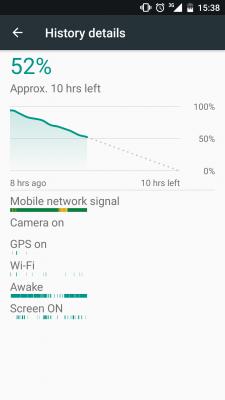
I used for a few days now. Updated to September security update, unlocked bootloader and rooted. My usual SOT is around 4hrs 30min to 5hrs 30min when it hit 50% battery. The phone is very cool even when gaming, I think this is my first phone that is very comfortable to use for gaming.
I've tried to improve things on this phone but one things are clear, there is no camera2 API on it. I tried enabling it but it made all 3rd party apps unable to use any manual feature, no ISO, no shutter speed control.
4H30M to 5H30M for 100% to 50% drain 30000mah and IPS have this performance really godlike
For me, slide down the notification bar, and tap on DND, select Priority or Silent.
I see... Many thanks for the help, was used to non-stock Android phones, haha...
QUOTE(strannger @ Oct 5 2017, 02:33 PM)
Press either volume up/down key, when u see the volume slider just press on the bell icon, the phone will goes to silent (vibrate) mode. Of course u can only do this with the screen awake. Pressing the bell icon again will goes back to normal ringing mode.
Hey! Wow! Never thought of that bell icon is clickable, stupid me... Many thanks for this quick shortcut tip.
Press either volume up/down key, when u see the volume slider just press on the bell icon, the phone will goes to silent (vibrate) mode. Of course u can only do this with the screen awake. Pressing the bell icon again will goes back to normal ringing mode.
I'm still in 2013, pressing the volume button up and down. Thanks for the tip
To fully utilise Google's services hehe. Anyway, I've found the cause of the battery drain, it is the Bluetooth. I forgot to turn it off after connecting it to my car's radio.
To fully utilise Google's services hehe. Anyway, I've found the cause of the battery drain, it is the Bluetooth. I forgot to turn it off after connecting it to my car's radio.


 Oct 5 2017, 11:59 AM


 Quote
Quote





 0.0200sec
 0.87
0.87
 6 queries
 GZIP Disabled