Welcome Guest ( Log In | Register )

54 Pages « < 16 17 18 19 20 > » Bottom

Outline · [ Standard ] · Linear+

Review ASUS RT-AC86U, Feature-packed advanced wireless router

views
     
kennykong85
post Sep 11 2018, 09:39 PM

Getting Started
**
Junior Member
268 posts

Joined: Apr 2014
From: dont harash me
QUOTE(maldini8289 @ Sep 11 2018, 09:23 PM)
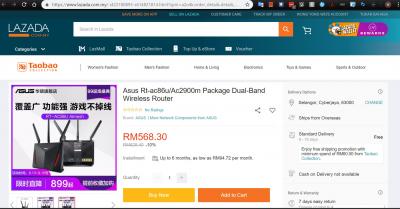
Hi May I check with you. You bought it through the same Lazada Taobao collection? How is it? Did you flash it with international firmware once you received it? Please advise. Thanks in advance.
*
I bought it from 11st. Shipped from china. I dunno about the flash, but when i received it i just update the firmware to the latest version, where u can get it from asus website. Unifi works fine for me.
x3BabyLemon
post Sep 12 2018, 01:57 PM

Getting Started
**
Junior Member
99 posts

Joined: Jul 2013


QUOTE(maldini8289 @ Sep 11 2018, 09:23 PM)
Hi May I check with you. You bought it through the same Lazada Taobao collection? How is it? Did you flash it with international firmware once you received it? Please advise. Thanks in advance.
*
no i bought it from taobao asus flagship store..asus firmware is internationally can use no need flash..
lwk523
post Sep 12 2018, 10:00 PM

Premium Q Trader
******
Senior Member
1,040 posts

Joined: Mar 2006


Does anyone here use the manual VLAN configuration for unifi fibre ?

Thank you
ppfoong
post Sep 12 2018, 11:40 PM

On my way
****
Junior Member
556 posts

Joined: Jun 2008
Getting this cooling solution. Looks cool. Hopefully can fit with AC86U as well.

user posted image
ppfoong
post Sep 13 2018, 01:43 PM

On my way
****
Junior Member
556 posts

Joined: Jun 2008

I just installed the fan. Now CPU temperature reduced from over 70 degree to 50+ degree.

It arrived in 24 hours from Lazada purchase.

Attached Image


maldini8289
post Sep 13 2018, 08:29 PM

New Member
*
Newbie
9 posts

Joined: Jan 2003


QUOTE(ppfoong @ Sep 13 2018, 01:43 PM)
I just installed the fan. Now CPU temperature reduced from over 70 degree to 50+ degree.

It arrived in 24 hours from Lazada purchase.

Attached Image
*
Hi can share the link? Thanks.
maldini8289
post Sep 13 2018, 08:34 PM

New Member
*
Newbie
9 posts

Joined: Jan 2003


I have bought it eager waiting to receive it but now got further sales. doh.gif

Attached Image Attached Image
Therezino
post Sep 13 2018, 09:19 PM

New Member
*
Newbie
11 posts

Joined: Aug 2018
From: US Frisko!


QUOTE(ppfoong @ Sep 13 2018, 01:43 PM)
I just installed the fan. Now CPU temperature reduced from over 70 degree to 50+ degree.

It arrived in 24 hours from Lazada purchase.

Attached Image
*
Wow, so much?...
ppfoong
post Sep 14 2018, 12:18 AM

On my way
****
Junior Member
556 posts

Joined: Jun 2008
QUOTE(maldini8289 @ Sep 13 2018, 08:29 PM)
Hi can share the link? Thanks.
*
https://www.lazada.com.my/products/cooling-...s597610954.html

Seems out of stock now. Need to wait or find another vendor.


Nando's
post Sep 14 2018, 09:31 AM

Casual
***
Junior Member
431 posts

Joined: Dec 2012
From: Kitchen
Currently using Cooler Master U2
llk
post Sep 14 2018, 09:31 AM

Look at all my stars!!
*******
Senior Member
4,157 posts

Joined: Jan 2003
From: KL
Not sure you guys encountered same problem like me or not? I have 2 PC, 1 laptop & 3 phones connected to the router, but sometimes occasionally my PC or phone will lost connection to 5ghz, when the PC lost connection, laptop & phones are okay, when phone lost connection but PC are connected. Can someone figure out what happened to this?
SUSstinky
post Sep 15 2018, 07:09 PM

Regular
******
Senior Member
1,436 posts

Joined: Feb 2005


QUOTE(deathninjax @ Aug 13 2018, 08:32 PM)
got this router after researching about it to replace tp link archer c7.
had to return the first unit after 5Ghz wifi became unusable after one day.
so far the 2nd unit is fine except for one problem. its hard for the hypptv stb to connect to the service.
it has the error code 108005. switching the stb off and on will get it working if lucky. already set the iptv service to unifi home in the settings using lan4.
if it does connect, hypptv is usable without any errors. just hard to connect once it is switched on from off state.
even archer c7 is better as it is instant connected. regret spending so much to buy this router with this kind of problem. the seller said to reset the router when i mentioned this problem. same problem after resetting.
wondering if anyone have any fix for this problem.
*
Hello,
I have the same problem with ASUS AC86U.
The LAN4 setup for IPTV (UNIFI-HOME) is slow to detect when I switch on my IPTV box from standby mode. It takes about 60 second for the LAN4 to connect.

When I setup the router for the first time, the LAN4 usually connect within 3 seconds. However, after placing the IPTV box on standby, subsequent switch on time takes 60 seconds. I repeated and reset to factory default and retry. The same observation where first time switch on is 3 seconds after that from standby mode is 60 seconds.

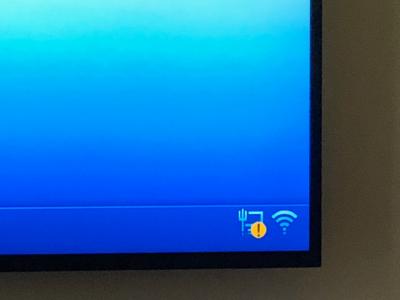
So the current work around is wait for 60seconds after powering on, and wait for the LAN4 to connect (the yellow LAN warning sign will disappear), then click into Hypptv. Works all the time. Just a bit of hassle and I feedback to ASUS.


I’m already on latest firmware dated 15 Sept 2018


Attached thumbnail(s)
Attached Image
SUSstinky
post Sep 15 2018, 07:27 PM

Regular
******
Senior Member
1,436 posts

Joined: Feb 2005


QUOTE(ppfoong @ Sep 10 2018, 10:26 AM)
To buy and use the China unit, here are some of the important thing as your checklist:

1. The current latest hardware version is R1.5. This hardware is not regionally locked and therefore you can use for Malaysia WiFi spectrum. If you get other hardware version, maybe it will work or maybe it will not work properly with WiFi devices in Malaysia.

2. For the power adapter, you just need to plug it in a universal converter, or a universal power socket. No need voltage conversion as it can be used for 240V power line.

3. Change your language to English. Download the official latest firmware from Asus support website, and flash it manually.

4. Once you flashed with the latest international firmware, it is recommended to flash with latest Merlin firmware (current version is 384.6). I found Merlin firmware to be stabler and more configurable for Malaysia environment.

5. Go to Wireless > Professional, set the Region from China to "Asia" (not Singapore). This is very important. You will see the available WiFi bands are slightly different among the regions. If your router does not have this option or unable to change it, then it is a locked hardware version.

6. Set WAN internet detection to "PPP echo". Set both MTU and MRU to 1480 (from default 1496). You will face network problem with 1496.

7. Go to LAN > IPTV, set to Unifi-Home for Unifi (set to Maxis for Maxis).

8. Go to Administration > System, set time zone to Kuala Lumpur.

*
Hi PPPFong
Can you teach me how to to setup IPv6 for UNIFI?

ppfoong
post Sep 16 2018, 01:16 PM

On my way
****
Junior Member
556 posts

Joined: Jun 2008
QUOTE(stinky @ Sep 15 2018, 07:27 PM)
Hi PPPFong
Can you teach me how to to setup IPv6 for UNIFI?
*
Here is my setting:

Connection Type: Native
Interface: PPP
DHCP-PD: Enable
Release prefix on exit: Enable

Connect to DNS Server automatically: Disable
IPv6 DNS Server 1: 2606:4700:4700::1111
IPv6 DNS Server 2: 2001:4860:4860::8888
IPv6 DNS Server 3: 2606:4700:4700::1001

Enable Router Advertisement: Enable


zarchrykl
post Sep 16 2018, 02:56 PM

Getting Started
**
Junior Member
270 posts

Joined: Nov 2010


QUOTE(stinky @ Sep 15 2018, 07:09 PM)
Hello,
I have the same problem with ASUS AC86U.
The LAN4 setup for IPTV (UNIFI-HOME) is slow to detect when I switch on my IPTV box from standby mode. It takes about 60 second for the LAN4 to connect.

When I setup the router for the first time, the LAN4 usually connect within 3 seconds. However, after placing the IPTV box on standby, subsequent switch on time takes 60 seconds. I repeated and reset to factory default and retry. The same observation where first time switch on is 3 seconds after that from standby mode  is 60 seconds.

So the current work around is wait for 60seconds after powering on, and wait for the LAN4 to connect (the yellow LAN warning sign  will disappear), then click into Hypptv. Works all the time. Just a bit of hassle and I feedback to ASUS.
I’m already on latest firmware dated 15 Sept 2018
*
same as mine. i think because the igmp/multicast disable (Due to hardware limitation, IGMP proxy cannot co-exist with IPTV function.), i am using ac58 before this and no problem,... console.gif
wakhaiha
post Sep 16 2018, 05:09 PM

New Member
*
Newbie
4 posts

Joined: Jun 2013
hi. I just bought this router few weeks ago for TM TP-link wifi router replacement. I recently got unifi turbo-ed 500mbps. When speedtest using TP-link ac1300 via LAN cable, max speed i can get is only ~200mbps. thankfully after change to rt-ac86u, my speedtest using LAN is reached 500mbps. however, I am faced with 2 problems:

1) for wifi 5G, max speed I can get is only ~200mbps. I even run the test near to router to reduce the interference, but the speed result is just the same. is there is any way to improve the wifi speed?

2) I have some problem with my unifi tv after changed to this router. unifi channel load normal at the start. no problem if switch to other channel at this time. but after watch for around 30 minutes, tried to switch to other channel, the new channel will got lag, sometime just heard the voice, no video, just blackscreen. the same happen to all channels. need to turn off stb for a while to start watch unifitv again.

at the beginning, I use the official ASUS firmware, after encounter the problems above, I flash merlin firmware. However, the same problem occurred. my head is buntu right now.
SUSstinky
post Sep 16 2018, 07:45 PM

Regular
******
Senior Member
1,436 posts

Joined: Feb 2005


QUOTE(zarchrykl @ Sep 16 2018, 02:56 PM)
same as mine. i think because the igmp/multicast disable (Due to hardware limitation, IGMP proxy cannot co-exist with IPTV function.), i am using ac58 before this and no problem,... console.gif
*
So no wat to fix this? I thought ASUS said it is compatible with UNIFI.
Also can’t be only 2 of us is having issue with 86u using with Hypptv if hardware problem


This post has been edited by stinky: Sep 16 2018, 07:56 PM
SUSstinky
post Sep 16 2018, 07:55 PM

Regular
******
Senior Member
1,436 posts

Joined: Feb 2005


QUOTE(ppfoong @ Sep 16 2018, 01:16 PM)
Here is my setting:

Connection Type: Native
Interface: PPP
DHCP-PD: Enable
Release prefix on exit: Enable

Connect to DNS Server automatically: Disable
IPv6 DNS Server 1: 2606:4700:4700::1111
IPv6 DNS Server 2: 2001:4860:4860::8888
IPv6 DNS Server 3: 2606:4700:4700::1001

Enable Router Advertisement: Enable
*
Thank you sir. Will try
ppfoong
post Sep 16 2018, 09:53 PM

On my way
****
Junior Member
556 posts

Joined: Jun 2008
QUOTE(wakhaiha @ Sep 16 2018, 05:09 PM)
hi. I just bought this router few weeks ago for TM TP-link wifi router replacement. I recently got unifi turbo-ed 500mbps. When speedtest using TP-link ac1300 via LAN cable, max speed i can get is only ~200mbps. thankfully after change to rt-ac86u, my speedtest using LAN is reached 500mbps. however, I am faced with 2 problems:

1) for wifi 5G, max speed I can get is only ~200mbps. I even run the test near to router to reduce the interference, but the speed result is just the same. is there is any way to improve the wifi speed?

2) I have some problem with my unifi tv after changed to this router.  unifi channel load normal at the start. no problem if switch to other channel at this time. but after watch for around 30 minutes, tried to switch to other channel, the new channel will got lag, sometime just heard the voice, no video, just blackscreen. the same happen to all channels. need to turn off stb for a while to start watch unifitv again.

at the beginning, I use the official ASUS firmware, after encounter the problems above, I flash merlin firmware. However, the same problem occurred. my head is buntu right now.
*
Try to turn off QoS.

Also, go to System > Wireless Log to check your connected Rx/Tx speed.


wakhaiha
post Sep 16 2018, 10:31 PM

New Member
*
Newbie
4 posts

Joined: Jun 2013
QUOTE(ppfoong @ Sep 16 2018, 09:53 PM)
Try to turn off QoS.

Also, go to System > Wireless Log to check your connected Rx/Tx speed.
*
I had turned off QoS, but it just the same. tried iperf, max can get ~230Mbps. also tried move router to other area (without wan access) for wifi testing purpose, to avoid interference. but the result just the same.

wireles log:
CODE

SSID: "xxxx@unifi"
RSSI: 0 dBm SNR: 0 dB noise: -92 dBm Channel: 4
BSSID: 4C:ED:FB:AA:3E:E0 Capability: ESS ShortSlot
Supported Rates: [ 1(b) 2(b) 5.5(b) 6 9 11(b) 12 18 24 36 48 54 ]
VHT Capable:
Chanspec: 2.4GHz channel 4 20MHz (0x1004)
Primary channel: 4
HT Capabilities:
Supported MCS : [ 0 1 2 3 4 5 6 7 8 9 10 11 12 13 14 15 16 17 18 19 20 21 22 23 ]
VHT Capabilities:
Supported VHT (tx) Rates:
 NSS: 1 MCS: 0-11
 NSS: 2 MCS: 0-11
 NSS: 3 MCS: 0-11
Supported VHT (rx) Rates:
 NSS: 1 MCS: 0-11
 NSS: 2 MCS: 0-11
 NSS: 3 MCS: 0-11

Interference Level: Acceptable
Mode : AP Only

Stations List                          
----------------------------------------
idx MAC               Associated Authorized    RSSI PSM SGI STBC MUBF Tx rate Rx rate Connect Time

SSID: "xxxx@unifi_5G"
RSSI: 0 dBm SNR: 0 dB noise: -87 dBm Channel: 44/80
BSSID: 4C:ED:FB:AA:3E:E4 Capability: ESS
Supported Rates: [ 6(b) 9 12(b) 18 24(b) 36 48 54 ]
VHT Capable:
Chanspec: 5GHz channel 42 80MHz (0xe22a)
Primary channel: 44
HT Capabilities:
Supported MCS : [ 0 1 2 3 4 5 6 7 8 9 10 11 12 13 14 15 16 17 18 19 20 21 22 23 24 25 26 27 28 29 30 31 ]
VHT Capabilities:
Supported VHT (tx) Rates:
 NSS: 1 MCS: 0-11
 NSS: 2 MCS: 0-11
 NSS: 3 MCS: 0-11
 NSS: 4 MCS: 0-11
Supported VHT (rx) Rates:
 NSS: 1 MCS: 0-11
 NSS: 2 MCS: 0-11
 NSS: 3 MCS: 0-11
 NSS: 4 MCS: 0-11

Interference Level: Acceptable
Mode : AP Only

Stations List                          
----------------------------------------
idx MAC               Associated Authorized    RSSI PSM SGI STBC MUBF Tx rate Rx rate Connect Time
   D4:25:8B:DA:0A:B6 Yes        Yes         -38dBm No  Yes Yes  No    433.3M  433.3M 00:00:41


iperf result (iperf server run from PC with Gigabit wired LAN):
CODE

C:\iperf-3.1.3-win64>iperf3 -c 192.168.50.166
Connecting to host 192.168.50.166, port 5201
[  4] local 192.168.50.146 port 57009 connected to 192.168.50.166 port 5201
[ ID] Interval           Transfer     Bandwidth
[  4]   0.00-1.00   sec  24.2 MBytes   203 Mbits/sec
[  4]   1.00-2.00   sec  26.5 MBytes   222 Mbits/sec
[  4]   2.00-3.00   sec  26.6 MBytes   223 Mbits/sec
[  4]   3.00-4.00   sec  25.6 MBytes   215 Mbits/sec
[  4]   4.00-5.00   sec  26.2 MBytes   220 Mbits/sec
[  4]   5.00-6.00   sec  26.1 MBytes   219 Mbits/sec
[  4]   6.00-7.00   sec  26.5 MBytes   222 Mbits/sec
[  4]   7.00-8.00   sec  26.5 MBytes   223 Mbits/sec
[  4]   8.00-9.00   sec  26.4 MBytes   221 Mbits/sec
[  4]   9.00-10.00  sec  26.6 MBytes   223 Mbits/sec
- - - - - - - - - - - - - - - - - - - - - - - - -
[ ID] Interval           Transfer     Bandwidth
[  4]   0.00-10.00  sec   261 MBytes   219 Mbits/sec                  sender
[  4]   0.00-10.00  sec   261 MBytes   219 Mbits/sec                  receiver

iperf Done.


54 Pages « < 16 17 18 19 20 > » Top
 

Change to:
| Lo-Fi Version
0.0255sec    0.39    6 queries    GZIP Disabled
Time is now: 4th December 2025 - 11:31 PM