Welcome Guest ( Log In | Register )

Bump Topic Topic Closed RSS Feed
9 Pages « < 3 4 5 6 7 > » Bottom

Outline · [ Standard ] · Linear+

Unifi Official TM UniFi High Speed Broadband Thread V32, Enjoy Your Speed Upgrade

views
     
voncrane
post Jan 14 2018, 01:22 AM

Noir et fier!
*******
Senior Member
7,118 posts

Joined: Oct 2011
From: Wakanda


QUOTE(stephantsen @ Jan 14 2018, 01:14 AM)
how about technical support? usually the technicians will come and solve my problem on the same day or the next day for unifi.
*
Yes, Possible to come on the same day as the report. Experienced it before. Call to complain and within a few hours, tech guy was over. Really just depends on the problem and availability in your area.

This post has been edited by voncrane: Jan 14 2018, 01:23 AM
voncrane
post Jan 14 2018, 03:40 PM

Noir et fier!
*******
Senior Member
7,118 posts

Joined: Oct 2011
From: Wakanda


QUOTE(cheekian @ Jan 14 2018, 10:29 AM)
Guys, do you all noticed that HyppTv is changed to unifi TV? tongue.gif

https://unifi.com.my/tv/index.html
*
Yeah.. Looks like they want everything under the "Unifi" banner..

QUOTE(brohsem @ Jan 14 2018, 12:42 PM)
does anyone have a problem with unifi wifi, all phones in my house couldn't connect to unifi..no problem with my desktop (ethernet cable), but some website cant such as forum cari...weird..I also can't enter "http://192.168.0.1/"
*
Using the TP-Link C1200? Try "192.168.1.1" instead.

QUOTE(sagethesausage @ Jan 14 2018, 02:55 PM)
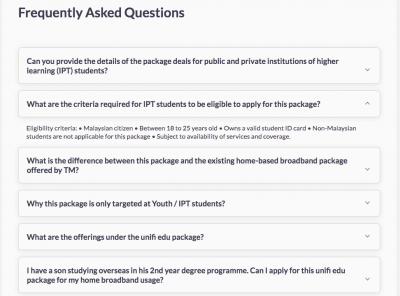
Is the unifi edu pack still available?

Need to bring what document to subscribe?
*
Yes, (Unifi Lite, Advance & Pro Plans)... They are available on the Unifi website.. See screenshot for criteria eligibility.
Attached Image

voncrane
post Jan 16 2018, 12:22 PM

Noir et fier!
*******
Senior Member
7,118 posts

Joined: Oct 2011
From: Wakanda


QUOTE(SilentVampire @ Jan 16 2018, 10:48 AM)
Hi bro, it is only for US firmware unfortunately and TP Link does have a disclaimer that if there are any warranty issues and your firmware does not correspond on what is released for your local version, it voids the warranty so I wouldn’t update the firmware yet until it is released for the Malaysian website.
*
Eh?? A few of us are already running the Australian firmware cuz of that silly permanent @unifi suffix.. Some even running beta firmware. I guess for those who bought it outright might have issues claiming warranty directly from TP-Link Malaysia..Else, me thinks TM is quite lenient on such. Or at least the staff who comes over to replace the router.
voncrane
post Jan 16 2018, 01:43 PM

Noir et fier!
*******
Senior Member
7,118 posts

Joined: Oct 2011
From: Wakanda


QUOTE(ronn77 @ Jan 16 2018, 01:01 PM)
Hi guys,

I have a noob question. For streaming movies online, does the upload speed plays important role for smooth playback? Or download speed is the important ones? As i just subscribe to 30mbps and they provide 30mbps download and only 10mbps upload.
*
During instant streaming, some up-speed is required cuz your device has to keep updating the server among other stuffs. The 10Mbps uplink is more than sufficient for normal usages. However, if you do much uploading say for p2p connections or work or even online gaming.. Then depending on server requirements, you may need more.

QUOTE(SilentVampire @ Jan 16 2018, 01:06 PM)
Just from TP Link directly bro. If you are claiming from TM, they are more lenient and don’t care that much. At the end of the day, if it is a router issue, and not a firmware issue, they still have to honour the warranty. I am just letting people know it could be a potential issue for warranty claims from TP Link directly.
*
Okay.. thumbup.gif

This post has been edited by voncrane: Jan 16 2018, 01:58 PM
voncrane
post Jan 17 2018, 11:04 PM

Noir et fier!
*******
Senior Member
7,118 posts

Joined: Oct 2011
From: Wakanda


QUOTE(mydurian @ Jan 17 2018, 12:21 PM)
Not relocation. Re-subscribe. i.e. terminate existing package and apply new one.
*
Apply for existing one first, get approval and or installation date.. Then only apply for termination of old account and return BTU. if your place has surplus ports and or the refuse the new install.. Then terminate first, return BTU and on the spot apply for new installation.. Wait days until installer comes over to install.
voncrane
post Jan 19 2018, 12:18 AM

Noir et fier!
*******
Senior Member
7,118 posts

Joined: Oct 2011
From: Wakanda


QUOTE(fruitie @ Jan 18 2018, 11:53 PM)
Need to see breakdown but I can tell you, TM hardly makes mistake unless they don't give you enough discount. laugh.gif
*
Their billing system is going haywire from adding and subtracting figures unnecessarily.. My latest bill is out and I'm still battling with them to rectify false charges... vmad.gif

This post has been edited by voncrane: Jan 19 2018, 12:19 AM
voncrane
post Jan 19 2018, 12:34 AM

Noir et fier!
*******
Senior Member
7,118 posts

Joined: Oct 2011
From: Wakanda


QUOTE(JohnLai @ Jan 19 2018, 12:26 AM)
Same here...got the free 30 --> 50, then TM added extra hypptv jumbo lite in addition to my ruby package and I am billed for it. Battling for TM to remove jumbo and getting back my RM30 and GST. vmad.gif
*
Similar situation... I had free Jumbo pack which the staff removed and gave Jumbo Lite.. Now they not only charge me for the Jumbo Lite, but also a Hypptv downgrade fee... To which I told the staff, why would I want to downgrade from a completely free full Jumbo pack to a Lite plan with extra payments. doh.gif.. Thing is, I did go complain about the Hypptv package change last month and their staff acknowledged the error and said they'll change it back.. I should wait for the next bill. Well, the next bill is here and it's even worse..
voncrane
post Jan 28 2018, 07:38 AM

Noir et fier!
*******
Senior Member
7,118 posts

Joined: Oct 2011
From: Wakanda


QUOTE(sgpdsmss @ Jan 28 2018, 05:55 AM)
the speaker beside router ...magnetic field will affect WIFI signal ?

thanks ....
*
That's no speaker.. It's a NAS device.
voncrane
post Jan 29 2018, 11:47 PM

Noir et fier!
*******
Senior Member
7,118 posts

Joined: Oct 2011
From: Wakanda


QUOTE(cyberkoh88 @ Jan 29 2018, 07:45 PM)
thanks bro for the advise, most probably stick to 50Mbps at the moment as i also worry that 10 Mbps my Ubox app streaming also affected. if 30 Mbps should be nice, but TM not allowed me to downgrade. so bohpian, stick to 50Mbps....anyway bto, u still using Himedia Q10? or you already switch to Nvidia Shield?
*
Wow... People want higher speeds, some want to downgrade speeds. As a fellow cord-cutter, let me share with you the same thing I shared with a fellow forummer.

With faster internet speeds means my PC will be on for far less time, saving me electricity bills, plus wear & tear as well. Example, assuming a constant dowload speed of 30Mbps (Sadly, is the max I can get at current location), it'll take me 3 hours and 11 minutes to download a 40GB file. The same file using 100Mbps only takes 58 minutes. That's less than an hour.. On an equally priced TIME 300Mbps speed, the same file will take me only 19 minutes to download!!.. At 1Gbps, it's just 6 minutes!!. So you see.. Regardless of what some think, More speed = less time spent waiting around for downloads/uploads and more time focusing on other stuffs. smile.gif

Plus, I telecommute often with VPN required. Fast stable internet speeds are required for high encryption of say video conferences.. To me, the only speed I actually crave and may consider as overkill is 1Gbps. Yes, its a far-fetched dream but one can hope..

voncrane
post Jan 30 2018, 01:55 PM

Noir et fier!
*******
Senior Member
7,118 posts

Joined: Oct 2011
From: Wakanda


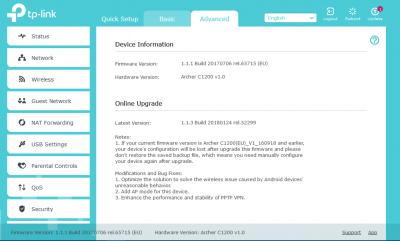
There's been an update to the TP-Link Archer C1200 Aus firmware... The router actually popped up a notification when I opened a browser on the PC, asking to update. Updated over Ethernet connection and didn't lose my settings. Backup just in case though. New firmware isn't available on their website yet. Full reboot is noticeably faster.

Update page
Attached Image

Aftermath
Attached Image
Attached Image

This post has been edited by voncrane: Jan 30 2018, 01:56 PM
voncrane
post Jan 31 2018, 02:48 AM

Noir et fier!
*******
Senior Member
7,118 posts

Joined: Oct 2011
From: Wakanda


QUOTE(Chrono-Trigger @ Jan 30 2018, 03:57 PM)
yes PS4 game at 40gig, a 100mbps line makes a lot of difference than 50mbps! half the time.
*
Exactly.... Moooarr speed is better than not enough.

QUOTE(biloxee @ Jan 30 2018, 06:35 PM)
Hmm, seems like they removed the update?
[attachmentid=9559648]
*
Hmm.. maybe as it wasn't on their website for download in the first place. Only available to download and install through the config interface. Did you try updating while connected via cable?
voncrane
post Jan 31 2018, 05:00 PM

Noir et fier!
*******
Senior Member
7,118 posts

Joined: Oct 2011
From: Wakanda


QUOTE(biloxee @ Jan 31 2018, 12:26 PM)
Seems like it's not available via both the website and through the config interface.
Yea, always a wired connection with my main PC...
*
Well now, I'm unsure if to be worried cuz seems like they pulled the update.. Anyways, it's working great so far..No complaints.

QUOTE(AHGS14 @ Jan 31 2018, 04:36 PM)
Would I be view my home CCTV with the IPV6 address as well?
*
Just stick with ipv4 until absolutely required.. Less hassles especially as ipv6 is still buggy in Malaysia.
voncrane
post Feb 1 2018, 12:28 AM

Noir et fier!
*******
Senior Member
7,118 posts

Joined: Oct 2011
From: Wakanda


QUOTE(yed @ Jan 31 2018, 10:26 PM)
NOw new registration for 100mbps only RM189?
*
Was surprised to read that too.

QUOTE(go626201 @ Jan 31 2018, 11:49 PM)
I thought it may lower the hack percentage,because many cam leak was cause be port forwarding with low security policy..haha
*
Nope.. You should be more concerned about how vulnerable your device actually is. There are places where one can easily go to and has tons of live cctv videos.. Later ppl watch you walk around in..... nod.gif
voncrane
post Feb 1 2018, 02:35 PM

Noir et fier!
*******
Senior Member
7,118 posts

Joined: Oct 2011
From: Wakanda


QUOTE(Chrono-Trigger @ Feb 1 2018, 09:26 AM)
Just offer RM189 for everyone under 100mbps - problem solved!
*
From a consumer standpoint, that would be the easiest and best. Unfortunately from a business standpoint, that is moot. It's like the Streamyx to Unifi era and even till today, still have people paying wayyy to much for 1Mbps or even less speeds. Why? cuz no choice and while some may be aware and pisssed enough to renegotiate their prices, many more just blur only. Take current 100Mbps fiasco. At most, 500 - 1000 subscribers saw this forums and or similar and made some noise to get their pricing or plans renegotiated. Probably there are tens of thousands more out there who either don't know they can get cheaper and faster and just keep paying, especially through auto-pay. After-all, since this whole thing started last year, almost every week...we have a few users who come in surprised that people are paying lower and getting faster speeds.

QUOTE(hiha123 @ Feb 1 2018, 01:38 PM)
tongue.gif Still hope there will add FOX at jumbo lite or new package,bcz my family like to watch chinese movie and eng movie,can save some money bcz astro expensive
*
I got an SMS earlier today..
"RM0 Enjoy 10 new FOX channels now on unifi tv with 2 months complimentary viewing! Watch FOX Movies, Nat Geo Wild, FOX Life and more (CH 960 – 969) now!"

voncrane
post Feb 2 2018, 02:35 PM

Noir et fier!
*******
Senior Member
7,118 posts

Joined: Oct 2011
From: Wakanda


QUOTE(punxye @ Feb 2 2018, 11:09 AM)
Anyone know the username and password to change DNS on my TPlink AC1200? username:admin and password:admin didn't give me option to change it.
*
Impossibru that administrator account doesn't allow DNS servers modification. Checked the "Advanced" tab? Unless you aren't logged in as admin and don't know the details.. Reset the router then setup from scratch.. Default router passwords as per manual or on the router itself will work.

This post has been edited by voncrane: Feb 2 2018, 02:44 PM
voncrane
post Feb 4 2018, 10:40 AM

Noir et fier!
*******
Senior Member
7,118 posts

Joined: Oct 2011
From: Wakanda


QUOTE(squall0833 @ Feb 4 2018, 10:27 AM)
Does 50Mbps still exist?

I need fast upload, 10Mbps from 30Mbps plan still not quite enough leh
*
Contact TM.
voncrane
post Feb 5 2018, 11:13 AM

Noir et fier!
*******
Senior Member
7,118 posts

Joined: Oct 2011
From: Wakanda


QUOTE(RyuGW90 @ Feb 5 2018, 10:38 AM)
I am Unifi user
I pay RM 200+ for 30mbps

Talk to the agents if I can subscribe to the new package which is a lot cheaper but they said they only allow upgrade not downgrade

So wonder if I can terminate the current Unifi and resubscribe to the new package of Unifi later
*
Wow.. Yours really takes the cake.. What plan is that and why didn't you switch to the cheaper 179 back in 2016?... You could try another TM Point and if they still refuse.. Worst case...Yes yes! Terminate and reapply a cheaper plan.. Get faster speeds too.
voncrane
post Feb 5 2018, 12:25 PM

Noir et fier!
*******
Senior Member
7,118 posts

Joined: Oct 2011
From: Wakanda


QUOTE(Eithanius @ Feb 5 2018, 11:18 AM)
If from the ancient VIP10 paying 149+ to Unifi Lite 10Mbps paying 129+ will it be considered downgrade too...?
*
It shouldn't be but we know how TM handles things.. If possible, get the 30Mbps for RM139.. It's a better deal. Get triple download speeds for RM10 less.
voncrane
post Feb 5 2018, 12:25 PM

Noir et fier!
*******
Senior Member
7,118 posts

Joined: Oct 2011
From: Wakanda


QUOTE(TLpejoy @ Feb 5 2018, 12:24 PM)
Is there any unified plan offering 300mbps download speed?
*
Nope.. TIME.
voncrane
post Feb 5 2018, 01:48 PM

Noir et fier!
*******
Senior Member
7,118 posts

Joined: Oct 2011
From: Wakanda


QUOTE(Eithanius @ Feb 5 2018, 01:37 PM)
If I get 30mbps for 139 will i be paying 139 forever or just 2 years only...?
*
If modified plan from current plan then that depends on T & C and if the discount is permanent or not. For termination and reapplication, means it's a "new" plan and so pricing should remain RM139 after the 2 years contract. So be careful and triple confirm everything before you agree to anything. Cuz once locked in and contract refreshed, can't easily back out or make free changes. Lastly, if still using older equipments, make sure to negotiate for new ones too.

9 Pages « < 3 4 5 6 7 > » Top
Topic ClosedOptions
 

Change to:
| Lo-Fi Version
0.3059sec    0.69    7 queries    GZIP Disabled
Time is now: 5th December 2025 - 04:17 AM