
Welcome Guest ( Log In | Register )

Bump Topic Topic Closed RSS Feed
9 Pages « < 5 6 7 8 9 >Bottom

Outline · [ Standard ] · Linear+

Unifi Official TM UniFi High Speed Broadband Thread V32, Enjoy Your Speed Upgrade

views
     
voncrane
post Feb 19 2018, 04:16 PM

Noir et fier!
*******
Senior Member
7,118 posts

Joined: Oct 2011
From: Wakanda


QUOTE(skylinelover @ Feb 19 2018, 03:48 PM)
Haha is the video viral now? laugh.gif hmm.gif
*


It went viral last year.. And guess what, Digi resolved his issue within a day.. Which they should have done in the first place when he calmly approached them. He even reported to CFM, etc..
Man walks into Digi’s HQ, starts throwing eggs.

QUOTE
UPDATE: Digi has replied to us with a full statement. Here’s what they said:

“We met with the customer yesterday to listen to his concerns as customer feedback is important for us to improve our overall service and experience. After further investigation, we agreed on a resolution together within the day. Our customers continue to be our priority, and while we continue to do our best to address concerns, we welcome feedback in an amicable manner as we also have a duty and responsibility to protect the interest and safety of our employees, guests and other customers across our channels.”

When asked further for more details about what the customer’s issue was exactly and how Digi resolved it, the telco’s representative declined to comment...kek  laugh.gif

voncrane
post Feb 22 2018, 09:04 AM

Noir et fier!
*******
Senior Member
7,118 posts

Joined: Oct 2011
From: Wakanda


QUOTE(FiF2 @ Feb 22 2018, 08:58 AM)
guys sorry if this has been answered before.

I'm currently using unifi 30mbps package (RM210+ per month), and from what I know there's another similar package (30mbps) with only RM130 per month?

Is it not possible to have the cheaper version? Thanks.
*
It's RM139 per month.. Need to call or visit TM Point to ask for it.. Hopefully they comply.
voncrane
post Feb 22 2018, 05:23 PM

Noir et fier!
*******
Senior Member
7,118 posts

Joined: Oct 2011
From: Wakanda


QUOTE(BreakYourLimit @ Feb 22 2018, 05:16 PM)
Called in their customer dept. and they mentioned the RM139 30Mbps is only for new user, and they cannot do shit to upgrade my current VIP5 to that package.

Want me to terminate my package and re-subscribe again only can get the package. Really super dumb TM la.

Can I file in MCMC ah if like this?
*
Yeah, that be their standard response. So if you can, do terminate and reapply.. Easiest route. If can't terminate cuz penalty. Go TM Point and flip tables multiple times. If still cannot, then try your luck with MCMC, etc.

Optional move: bring along a box of at least a dozen eggs and a pal to do a video recording. Then redecorate the place.. Post on Facebook, YouTube and links here.. I'll help viral it.. laugh.gif

This post has been edited by voncrane: Feb 22 2018, 05:54 PM
voncrane
post Feb 23 2018, 12:23 AM

Noir et fier!
*******
Senior Member
7,118 posts

Joined: Oct 2011
From: Wakanda


QUOTE(terradrgn @ Feb 22 2018, 11:44 PM)
Interesting. So yours will remain at RM139 after 2 years? 30mbps?
*
Depends if signed as perpetual discount or temporary 2 years discount only. He already mentioned it's perpetual... So will remain.. Same as mine.

This post has been edited by voncrane: Feb 23 2018, 12:24 AM
voncrane
post Feb 23 2018, 10:56 PM

Noir et fier!
*******
Senior Member
7,118 posts

Joined: Oct 2011
From: Wakanda


QUOTE(kucingfight @ Feb 23 2018, 10:53 PM)
thanks for the sharing. i'm also thinking how to 'downgrade' the bill from 169rm -> rm139rm with minimum hassle

i find it pathetic that current users (especially adopters) with good payment records have to literally beg for this offer. by right, it should be made fair and square for all.

Does it have to be TMpoint branch only? or authorized dealer able to do it to?
*
TM Point.. Authorized dealers are just that.. Dealers. Can't effect such package changes.
voncrane
post Feb 25 2018, 01:27 AM

Noir et fier!
*******
Senior Member
7,118 posts

Joined: Oct 2011
From: Wakanda


QUOTE(JohnLai @ Feb 24 2018, 01:42 PM)
About my jumbo lite package being added without my approval case....
The good news....I got my two months charges refunded
user posted image
The bad news....WTF with early termination fee?
user posted image
*
Good news is that with proper explaining at a TM Point with an accommodating agent, you can get it waived. Mine, they downgraded my Hypptv and charged a downgrade fee. Asked for it to be waived cuz I wasn't supposed to be downgraded, can.. Awaiting next bill.

QUOTE(AFcf @ Feb 24 2018, 08:57 PM)
My Unifi services (phone & internet) has been down for 13 days (as on 24Feb 2018) already.  vmad.gif
Despite follow up via messaging & tweeter, there has been No details as to what is going on and when I will get back my services.
My report no. is 1-19661307906 .

Unifi's response has been ...
1-  Upon checking your issue has still in the midst of progress. Our team will update to you accordingly. None received
2-  Upon checking, you issue still under progress. Kindly wait for and update from our team. None received
3-  As per checking, your report is still in progress. We have updated and urge our respective team for urgency regards in solving your issue. Our respective technical team will update you on the feedback. None received
4-  We are doing our best to expedite your case.
5-  Pleased be informed that our team still diagnose on your issue. We have urged our team to ensure the restoration can be completed soonest possible. Anything, our team will update you later. ...
6-  ... Our team will update you for feedback. None received
7-  You're report is still in progress. We have highlighted your issue to the team for faster action.
8-  Upon checking your issue has still in the midst of progress. Our team will update to you accordingly. None received
9-  We sincerely apologize for this issue. Fyi, your technical report status is still in progress. However, we have updated our Technical Department and urged for an urgency towards this issue.
10-  [After 13 days down]  Upon checking, your issue is still in progress. Anything, our team will update to you accordingly. None received

With No light at the end of this tunnel .... is there any hope for the state of our broadband services or rather what broadband services?.

Still Waiting  confused.gif
*
Sorry man.. Almost 2 weeks. Seems a pretty serious problem. Keep pressing and make sure you get a rebate/compensation for the downtime, especially if you've already paid ahead as per bill. console.gif
voncrane
post Feb 26 2018, 04:15 AM

Noir et fier!
*******
Senior Member
7,118 posts

Joined: Oct 2011
From: Wakanda


QUOTE(zkteh @ Feb 25 2018, 11:45 PM)
So, I got my new Archer 1200 router

WTA those who are encountering auto reboot issue, how you guys determine it has auto rebooted? Since Tplink removed the "uptime" feature from the configuration page, there is not way for user to see the WAN and system uptime. You guys 24/7 standby in front of the router is it?  blink.gif

I noticed some interesting issue, I always thought the router is rebooting itself during the night, but it turns out it is the WAN IP keep changing itself, from the log below, it is after 10hrs+

I am referring to NAT related log to determine the WAN reloaded itself
user posted image
UPDATE : the period of WAN reconnecting issue could be as less as several minutes, but what's triggering it? I think it will be the "LED CONTROLLER... [729]"

2.

In other words, to determine whether the route has rebooted, log on to the router configuration page, advanced > system tools > system log

If the data has a big gap from the old static log (which is belongs to the stock firmware), that means the router has been rebooted, it could be self rebooted or auto rebooted.
user posted image
2nd way : set the wifi client setting to manually connect if the wifi network is in range, in this way, you will know the router has auto rebooted if the client has lose connection to the wifi the next day/after long hours

etc...

Info:-
I flashed to the latest  Malaysia firmware, build 20180208
*
That there might be the problem.. Running latest Aussie firmware and haven't noticed a single random auto-reboot. Plus I get to choose the exact SSID I want and not be stuck with the @unifi suffix.
voncrane
post Feb 26 2018, 09:47 AM

Noir et fier!
*******
Senior Member
7,118 posts

Joined: Oct 2011
From: Wakanda


QUOTE(spkow @ Feb 26 2018, 09:17 AM)
Hi! friends.

Unifi Bonanza Campaign 30mbs RM139 bundled HyppTV Jumbo Lite Pack by default.

Can I switch HyppTV pack from jumbo lite pack to Ruby Pack?, any charge on it?
*
Yes and there'll be a charge.
voncrane
post Feb 27 2018, 06:27 PM

Noir et fier!
*******
Senior Member
7,118 posts

Joined: Oct 2011
From: Wakanda


Received SMS.. TV Channels numbers changing soon..
voncrane
post Feb 27 2018, 11:26 PM

Noir et fier!
*******
Senior Member
7,118 posts

Joined: Oct 2011
From: Wakanda


QUOTE(WinkyJr @ Feb 27 2018, 08:48 PM)
is it normal for 30mbps package getting 1.4MB/sec max direct download speed using IDM?
*
Yes & No.. Speeds can be less or full depending on various factors within and outside your network. Most likely IDM is downloading from a server that isn't offering full 3MBps+ speeds. In which case, Yes... It's normal.

QUOTE(nevland @ Feb 27 2018, 10:01 PM)
is it possible to register a new package using your spouse's name, using the same address?
*
Yes you can, even Unifi account transfers between spouses at the same address is totally doable.
voncrane
post Feb 28 2018, 09:52 PM

Noir et fier!
*******
Senior Member
7,118 posts

Joined: Oct 2011
From: Wakanda


QUOTE(zkteh @ Feb 28 2018, 08:48 PM)
The router has been on 24/7 from 25th to 28th (today), there is no random auto-reboot, it is just the WAN IP keep changing itself.
Does the Aussie firmware has WAN IP keep changing itself issue? Could you kindly provide the links for that?

Below is the system log I extracted from the router,  I used "..." to eliminate the unwanted logs to make it simple.
Based on the CODE below, the WAN IP has been automatically changed 8 times in just few minutes to hours.
What's triggering it is still unknown.

CODE

.....
2018-02-28 09:51:29 nat[12720]: <6> 211501 Initialization succeeded
...
2018-02-28 09:51:16 nat[11902]: <6> 211501 Initialization succeeded
....
2018-02-28 09:28:28 nat[27810]: <6> 211501 Initialization succeeded
...
2018-02-28 09:28:15 nat[26921]: <6> 211501 Initialization succeeded
....
2018-02-28 09:24:28 nat[23500]: <6> 211501 Initialization succeeded
....
2018-02-28 09:24:14 nat[22691]: <6> 211501 Initialization succeeded
...
2018-02-28 04:14:17 nat[4953]: <6> 211501 Initialization succeeded
...
2018-02-28 04:14:04 nat[4061]: <6> 211501 Initialization succeeded


Here are the full log if you wish to have a overview look.
*
I'm unsure if the WAN IP keeps changing.. Don't monitor my WAN IP that closely.. Will take note of it tonight and compare tomorrow night.

» Click to show Spoiler - click again to hide... «

voncrane
post Feb 28 2018, 10:35 PM

Noir et fier!
*******
Senior Member
7,118 posts

Joined: Oct 2011
From: Wakanda


QUOTE(Blackops981 @ Feb 28 2018, 10:32 PM)
Guys if they say the port is full is there any thing else I should do other than to wait?
*
In my experience... Nothing! Just have to wait, either new ports are provided or someone terminates and frees up a port.
voncrane
post Feb 28 2018, 10:41 PM

Noir et fier!
*******
Senior Member
7,118 posts

Joined: Oct 2011
From: Wakanda


QUOTE(Rei1437 @ Feb 28 2018, 10:37 PM)
Hi guys, I need help.
Just recently upgraded to 10mbps unifi,my wifi connection works fine but if I'm using cable to connect, the speed is only around 5Mbps.
The upload speed mostly is only 0.07Mbps and sometimes shows latency error.
Is it my setting problem or unifi problem?
*
First switch off modem and router. Wait at least 5 minutes and then power back on. Retest again. If still same, most likely service problem.. Complain come morning if still same.
voncrane
post Feb 28 2018, 10:48 PM

Noir et fier!
*******
Senior Member
7,118 posts

Joined: Oct 2011
From: Wakanda


QUOTE(Blackops981 @ Feb 28 2018, 10:43 PM)
Crappp

They have no eta and I’m stuck in the middle zzz
*
Yup, Even HQ doesn't have an ETA, much less regular TM Points. Plus, they can't know if or when the next person will cancel. Thing is, you might not be the only one waiting for this port. So you MUST keep checking regularly to grab it once available. Mine happened couple years back and it took almost a year for a port to become available.. This was a condo.. If Landed.. sweat.gif ..Pray there are enough interested neighbors for them to come expand.
voncrane
post Mar 1 2018, 05:08 PM

Noir et fier!
*******
Senior Member
7,118 posts

Joined: Oct 2011
From: Wakanda


QUOTE(chocobo7779 @ Mar 1 2018, 12:05 PM)
I tried contacting TM for their RM149 100Mbps plan and yet they say the plan does not exist  sweat.gif
*
Now, why on earth would you go and do such a thing.. So now, even if they aren't aware the plan is out there.. They do now and can decide to abandon it and or seek out the insider that leaked such.. doh.gif This is why we can't have nice things.. At least wait for further information before do anything..
QUOTE(JakzT @ Mar 1 2018, 04:54 PM)
Why my router unable to access 192.168.0.1?
It keep on turning only.

Brand TP-Link, Model C1200 provide by Unifi..
*
Using wireless? Get a PC.. Connect via cable.. Try again.
voncrane
post Mar 1 2018, 05:28 PM

Noir et fier!
*******
Senior Member
7,118 posts

Joined: Oct 2011
From: Wakanda


QUOTE(JakzT @ Mar 1 2018, 05:21 PM)
Yes, using wireless.. Because Microsoft Surface does not have LAN port. Will try on next trip with macbook.
I try and see.
But why will like this? Even I restarted the router also unable to access..
*
Hey, alternatively... Using either an Android/ios device.. Install the TP-LINK Tether app.. Try that too.
voncrane
post Mar 1 2018, 11:20 PM

Noir et fier!
*******
Senior Member
7,118 posts

Joined: Oct 2011
From: Wakanda


QUOTE(chocobo7779 @ Mar 1 2018, 06:54 PM)
I thought that the service is an opt-in discount like the RYE campaign  sweat.gif  sweat.gif
*
Not yet bruh... Fella just came to hint hint.. So those who haven't upgraded and locked in new contract can hold out a bit more for potential benefits.. icon_idea.gif

QUOTE(JakzT @ Mar 1 2018, 07:22 PM)
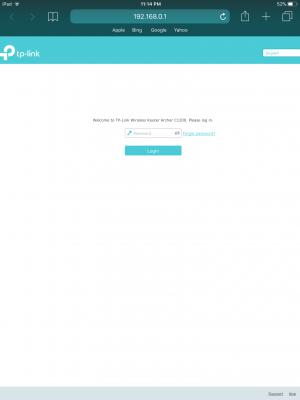
He just gave me the router's user password i think its default? admin 123456..
wifi name and password he ask me to give him the name and password he set, other than these nothing else already.
*
He's correct just to give that as only a password is needed to login.. See screenshot below. I'm able to access mine easily through Safari on an iPad. If you've got accurate account login for your TM account.. I mean the pppoe username and password AND know how to manually re-setup from scratch. Perform a factory reset. Button to press is behind on the router..
Attached Image

voncrane
post Mar 2 2018, 04:57 PM

Noir et fier!
*******
Senior Member
7,118 posts

Joined: Oct 2011
From: Wakanda


QUOTE(moonlight321 @ Mar 2 2018, 04:02 PM)
Hi, Bro and Sis
My area just installed white unifi box on telephone pole few days ago ,but not open for register yet , as I learn unifi30 promotion would end at 31 march, can I register first to ejen so I won't miss it ? Thanks. rclxms.gif  rclxms.gif  rclxms.gif  rclxms.gif
*
I don't think TM can accept registrations for such. Some freelance agent would be happy too and just keep helping you check till it's done..earn commission.
voncrane
post Mar 2 2018, 10:44 PM

Noir et fier!
*******
Senior Member
7,118 posts

Joined: Oct 2011
From: Wakanda


QUOTE(tungfunglaw @ Mar 2 2018, 09:48 PM)
Agent is super competitive now. Just like banks, keep on calling until u've installed the unifi  laugh.gif

i wonder how many percent is the comm..
*
I've wondered that myself too.. Probably a month's bill payment or less.. Don't think TM can be more generous than that.. Yeah, I've also got my own personal agent from a couple years back. So if people want number...PM.. whistling.gif laugh.gif
voncrane
post Mar 6 2018, 09:05 PM

Noir et fier!
*******
Senior Member
7,118 posts

Joined: Oct 2011
From: Wakanda


QUOTE(zkteh @ Mar 6 2018, 01:38 PM)
SilentVampire
voncrane
blacktubi
biloxee
and more to tag...
Hi, I assume some of you are still using the beta firmware, I want to gather information about WAN IP keep changing issue. Do you guys in BETA firmware facing the same issue?

I tried to contact TP-Link support but apparently they told me contact TM instated, because this Archer 1200 is provided by TM.

Your reply is much appreciated.

Thank you.
*
Before this "beta" firmware.. I could be running p2p connections (or whatever..really random) and while watching say Netflix or YouTube via TV app. Suddenly TV warns that Network cable unplugged..aka router self-rebooted. After flashing..I'm yet to experience it. I like to occasionally cold-boot the router and don't really pay much attention to WAN IP as long as connection & speeds are there for full use. After close to or more than 2 weeks, I just rebooted the router. Before this, the WAN IP remained the same.

See, most people complained that it's a poor router and so I believe there's a couple bad batches out there. So if yours does not work properly.. Request a new one or better still, just buy your own reliable third-party router, setup and be done with it.. Really save yourself the hassles and headache.

9 Pages « < 5 6 7 8 9 >Top
Topic ClosedOptions
 

Change to:
| Lo-Fi Version
0.0310sec    0.21    7 queries    GZIP Disabled
Time is now: 3rd December 2025 - 07:41 PM