Welcome Guest ( Log In | Register )

249 Pages « < 158 159 160 161 162 > » Bottom

Outline · [ Standard ] · Linear+

 TP-LINK Malaysia Official Thread, Technical Enquiries and Support

views
     
FusionXY
post Mar 30 2021, 09:51 AM

LAZZIE ON VACATION
*******
Senior Member
3,836 posts

Joined: Aug 2016

QUOTE(jackytiong @ Mar 30 2021, 09:41 AM)
No need to wait longer this time, press a few supplier, okkla , viewnet and mono co. end up the cheapest is okkla.
Though it wa only 349, got exta RM50 from Lazada i think.
*
Yes. OOKAS have the best shop vouchers so far.
alexwsk
post Mar 30 2021, 01:41 PM

Look at all my stars!!
*******
Senior Member
4,095 posts

Joined: Jan 2003
From: USJ


TP-LINK MY, any possibility of enabling the USB printer sharing on the AX20?
ONGEDWIN
post Apr 5 2021, 08:49 AM

Getting Started
**
Junior Member
257 posts

Joined: Nov 2009


[quote=FusionXY,Mar 28 2021, 11:30 PM]
Can you try in Custom Mode.
[/quote]
*

[/quote]


TP-LINK MY I just received m Tplink AX73 and done setup for my unifi 300mbps with latest unifi plus box hypptv.

For the setting TP-LINK MY recomend in custom, if I follow LAN 1 IPTV, LAN 2 to 4 Internet, and my unifi plus box using LAN cable conncected to LAN 1, it still NOT WORKING, only after I connect it to any LAN 2, 3 or 4 , then it works flawlessly.

So, I tried to change all LAN to Internet (LAN 1, 2, 3, 4 , all internet) . And then all LAN can use for unifi plus box or any other TV BOX too.

So TP-LINK MY , the default Malaysia-unifi setting definitely should change in next firmware update. And the custom settings you recommend also is not working.


aniq8676
post Apr 5 2021, 09:20 AM

Regular
******
Senior Member
1,524 posts

Joined: Dec 2020
From: Perak


[quote=ONGEDWIN,Apr 5 2021, 08:49 AM]
*

[/quote]
TP-LINK MY I just received m Tplink AX73 and done setup for my unifi 300mbps with latest unifi plus box hypptv.

For the setting TP-LINK MY recomend in custom, if I follow LAN 1 IPTV, LAN 2 to 4 Internet, and my unifi plus box using LAN cable conncected to LAN 1, it still NOT WORKING, only after I connect it to any LAN 2, 3 or 4 , then it works flawlessly.

So, I tried to change all LAN to Internet (LAN 1, 2, 3, 4 , all internet) . And then all LAN can use for unifi plus box or any other TV BOX too.

So TP-LINK MY , the default Malaysia-unifi setting definitely should change in next firmware update. And the custom settings you recommend also is not working.
*

[/quote]


.
UPB no longer needs to use VLAN600. Only Unifi TV Legacy users still need VLAN600. So there is no need to update the firmware to remove the VLAN600 on port 1, because there are still many users who use the Unifi TV Legacy.

all you have to do is custom and make LAN1-4 use VLAN500 only

This post has been edited by aniq8676: Apr 5 2021, 09:21 AM

egagah
post Apr 5 2021, 10:21 AM

New Member
*
Junior Member
39 posts

Joined: Sep 2011
Hi all, I realize my HyppTV only will turn on for 1 day. After I power down the tv box (legacy one) and power it up again the next day, HyppTV will just show black screen. I have to restart router to get the tv working again. This is so annoying, anyone know any fix?

I tried using custom and set port 4 with VLAN600, I also tried the standard profile which need to use port 1. Both also same results.

Is it because I left IPV6 disabled? Or is it because I use 1.1.1.1 for IPV4 DNS?
aniq8676
post Apr 5 2021, 12:38 PM

Regular
******
Senior Member
1,524 posts

Joined: Dec 2020
From: Perak


QUOTE(egagah @ Apr 5 2021, 10:21 AM)
Hi all, I realize my HyppTV only will turn on for 1 day. After I power down the tv box (legacy one) and power it up again the next day, HyppTV will just show black screen. I have to restart router to get the tv working again. This is so annoying, anyone know any fix?

I tried using custom and set port 4 with VLAN600, I also tried the standard profile which need to use port 1. Both also same results.

Is it because I left IPV6 disabled? Or is it because I use 1.1.1.1 for IPV4 DNS?
*
this issue was once highlighted by unifi TV users, some say the cause is due to third party DNS.

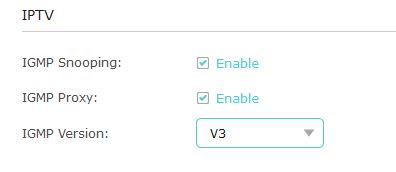
updated: in the IPTV/VLAN section, please make sure you select IGMP V3

user posted image

This post has been edited by aniq8676: Apr 5 2021, 12:42 PM
egagah
post Apr 5 2021, 08:51 PM

New Member
*
Junior Member
39 posts

Joined: Sep 2011
QUOTE(aniq8676 @ Apr 5 2021, 12:38 PM)
this issue was once highlighted by unifi TV users, some say the cause is due to third party DNS.

updated: in the IPTV/VLAN section, please make sure you select IGMP V3

user posted image
*
I tried disabling igmp totally. After awhile the TV freezes. Will try V3 now and update you. Thanks!
kokben
post Apr 5 2021, 11:21 PM

New Member
*
Junior Member
35 posts

Joined: Jan 2003


hi guys , anywhere we can set RSSI level to disconnect client when it's low? for AX73

thanks
axoloke
post Apr 6 2021, 09:33 AM

On my way
****
Senior Member
631 posts

Joined: Jan 2003
From: Pearl Of The Orient


Hi all, would like to ask for the MR600 V2, there is only a Band selection for Auto and Manual. Once set to Manual, it allows to tick for the needed bands but it only connects by itself?

For example, I tick Band 3, 7. It only locks to it sometimes?
jonsalam P
post Apr 7 2021, 08:01 AM

New Member
*
Probation
11 posts

Joined: Feb 2021
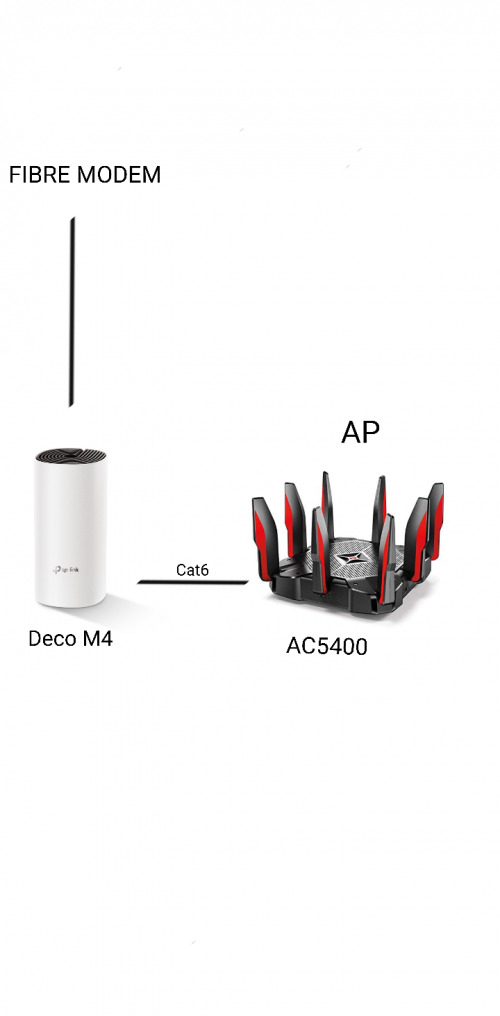
Morning n hello. I like to ask y'all opinion. Is it possible to setup like this? If yes any pro n con?

user posted image
buqiuren
post Apr 7 2021, 09:20 AM

New Member
*
Junior Member
49 posts

Joined: Nov 2020
QUOTE(LoNeLyKiRa @ Mar 28 2021, 11:41 PM)
ax50 router firmware izit end of life dy?

so long no new firmware update
*
okay la, not that old, 2020 Aug..hahahahaha.. biggrin.gif


Attached thumbnail(s)
Attached Image
FusionXY
post Apr 7 2021, 10:17 AM

LAZZIE ON VACATION
*******
Senior Member
3,836 posts

Joined: Aug 2016

QUOTE(jonsalam @ Apr 7 2021, 08:01 AM)
Morning n hello. I like to ask y'all opinion. Is it possible to setup like this? If yes any pro n con?

user posted image
*
Your setup is fine. What ISP that you are using?
If you plan to use Unifi TV, then 2nd port need to reserve for Unifi TV but not for normal usage due to different VLAN Tagging.

Thanks.
ray8426
post Apr 7 2021, 02:20 PM

Casual
***
Junior Member
334 posts

Joined: Jul 2011
QUOTE(jonsalam @ Apr 7 2021, 08:01 AM)
Morning n hello. I like to ask y'all opinion. Is it possible to setup like this? If yes any pro n con?

user posted image
*
why still need Deco M4 then only connect AP?
Reason with Deco M4? hmm.gif

This post has been edited by ray8426: Apr 7 2021, 02:20 PM
egagah
post Apr 7 2021, 10:54 PM

New Member
*
Junior Member
39 posts

Joined: Sep 2011
I want to report that switching to v3 fixed my unifi TV. Many thanks!

QUOTE(aniq8676 @ Apr 5 2021, 12:38 PM)
this issue was once highlighted by unifi TV users, some say the cause is due to third party DNS.

updated: in the IPTV/VLAN section, please make sure you select IGMP V3

user posted image
*
jonsalam P
post Apr 7 2021, 11:05 PM

New Member
*
Probation
11 posts

Joined: Feb 2021
QUOTE(FusionXY @ Apr 7 2021, 10:17 AM)
Your setup is fine. What ISP that you are using?
If you plan to use Unifi TV, then 2nd port need to reserve for Unifi TV but not for normal usage due to different VLAN Tagging.

Thanks.
*
Im using maxis. Thanks
jonsalam P
post Apr 7 2021, 11:19 PM

New Member
*
Probation
11 posts

Joined: Feb 2021
QUOTE(ray8426 @ Apr 7 2021, 02:20 PM)
why still need Deco M4 then only connect AP?
Reason with Deco M4? hmm.gif
*
So its not possible?

Deco M4 downstairs. AC5400 upstair with all lan port occupied.
So 1 lan cable to upstairs better than 5 cable i think. Correct me if I'm wrong. I'm currently planning of this. None of this setup happening yet.
TQ
FusionXY
post Apr 7 2021, 11:43 PM

LAZZIE ON VACATION
*******
Senior Member
3,836 posts

Joined: Aug 2016

QUOTE(jonsalam @ Apr 7 2021, 11:05 PM)
Im using maxis. Thanks
*
In that case, best to stick with Deco Mesh or Single Router with Separate SSID.

This might affect the performance of the wireless connection due to different SSID.

Thanks
buqiuren
post Apr 8 2021, 10:23 AM

New Member
*
Junior Member
49 posts

Joined: Nov 2020
QUOTE(jonsalam @ Apr 7 2021, 11:19 PM)
So its not possible?

Deco M4 downstairs. AC5400 upstair with all lan port occupied.
So 1 lan cable to upstairs better than 5 cable i think. Correct me if I'm wrong. I'm currently planning of this. None of this setup happening yet.
TQ
*
It can still work in your proposed setup, but it is not the best setup. Normally the better / higher performance router will be main router.

If upstairs clients are running on LAN, why not just buy 1 switch and connect them all? switch is cheap.
ray8426
post Apr 8 2021, 10:56 AM

Casual
***
Junior Member
334 posts

Joined: Jul 2011
QUOTE(jonsalam @ Apr 7 2021, 11:19 PM)
So its not possible?

Deco M4 downstairs. AC5400 upstair with all lan port occupied.
So 1 lan cable to upstairs better than 5 cable i think. Correct me if I'm wrong. I'm currently planning of this. None of this setup happening yet.
TQ
*
Logic is work on that way.
But normally recommend high end AC5400 as main router. hmm.gif

Your way may cause your wifi wont auto switch when you move from upstairs to downstairs. hmm.gif

This post has been edited by ray8426: Apr 8 2021, 10:57 AM
GuyM
post Apr 8 2021, 11:26 AM

Regular
******
Senior Member
1,787 posts

Joined: Jul 2007
Lets assume this...

My modem on 1st floor living area, one M4 placed here then another M4 placed on ground floor living area which is approx 15m apart divided by the stairway with no partition in-between.

Would M4 on ground floor gets good connection with main m4 upper floor? Reason thinking of M4 cos got old devices ie laptop/spare phones which is not WPA3 compliant etc

Kindly adv, thankS!

249 Pages « < 158 159 160 161 162 > » Top
 

Change to:
| Lo-Fi Version
0.0361sec    0.66    6 queries    GZIP Disabled
Time is now: 16th December 2025 - 11:30 AM