

QUOTE(gahkin @ Dec 13 2020, 10:49 AM)
M4 not possible to reach 800mbps on plan? how about AX20 possible to reach 800mbps speed on wifi?

AX20 possible.TP-LINK Malaysia Official Thread, Technical Enquiries and Support
|
|
 Dec 13 2020, 11:15 AM Dec 13 2020, 11:15 AM
|
 
Junior Member
864 posts Joined: May 2005 
|
QUOTE(gahkin @ Dec 13 2020, 10:49 AM) M4 not possible to reach 800mbps on plan? how about AX20 possible to reach 800mbps speed on wifi? AX20 possible. |
|
|
|
|
|
Dec 13 2020, 11:17 AM
|
|
Junior Member
864 posts Joined: May 2005
|
I noticed that my IP webcams are not compatible with Deco's band steering + fast roaming. Since both of em use 2.4 GHz band, I turn off Deco's 2.4 GHz band and turn on my old AP's 2.4 GHz just for the webcams. Works well so far.
|
|
|
Dec 13 2020, 12:07 PM
|
 
Elite
8,421 posts Joined: Jul 2008 
|
QUOTE(taqu @ Dec 13 2020, 12:49 AM) Just found out that my M5 does have web interface. Nothing much compare to mobile app. Didn't know they started logging roaming events on log now.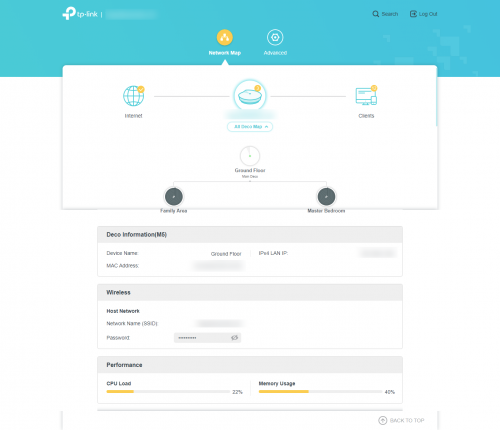 However, it allows you to view & download detail logfile. 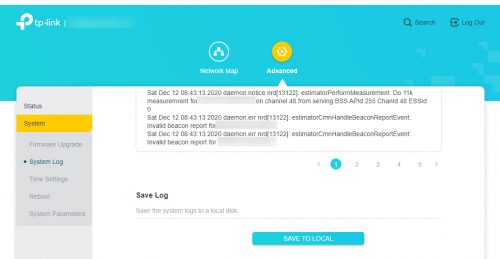 You can see how fast roaming is done in details, if that matters  Probably not as extensively logged as Ubiquity Unifi APs, but still decent job from TP-Link Probably not as extensively logged as Ubiquity Unifi APs, but still decent job from TP-Link   Great to see that they actively using 801.11k requests. |
|
|
Dec 13 2020, 12:25 PM
|

Junior Member
506 posts Joined: Feb 2005
|
QUOTE(gahkin @ Dec 13 2020, 10:49 AM) M4 not possible to reach 800mbps on plan? how about AX20 possible to reach 800mbps speed on wifi? than check what is the wifi speed coming to your device? you need a bigger tunnel a.k.a wifi speed to carry that 800mbps, typically 900mbps and above, like a pipe, small pipe less water. lol |
|
|
Dec 13 2020, 04:35 PM
|
|
Junior Member
864 posts Joined: May 2005
|
I noticed TP-Link uses same channels for all nodes, probably to improve roaming performance. The minor downside is slightly reduced Wifi performance if 2 nodes overlap more.
I'm using 2 Decos on first floor, and despite separated by 3 walls, the further Deco still has signal strength about -62 dbm. Still can reach 390-400 mbps so I'm ok with it. My previous rojak APs are 50 mbps faster but not much use if roaming sucks. Business/SOHO APs can control Wifi power to fine-tune overlapping but that's beyond consumer features. This post has been edited by taqu: Dec 13 2020, 04:37 PM |
|
|
Dec 13 2020, 04:58 PM
|
 
Forum Admin
44,415 posts Joined: Jan 2003  
|
Totally satisfied with my Deco X60.
For devices that can't communicate with WiFi6 I attached my other Linksys router to the X60 to work in bridge mode. |
|
|
|
|
|
Dec 13 2020, 07:31 PM
|
|
Junior Member
506 posts Joined: Feb 2005
|
Me too.... satisfied with my X60 and M9 plus (free from TM). lol
|
|
|
Dec 14 2020, 09:22 AM
|
|
Junior Member
363 posts Joined: Aug 2008
|
QUOTE(kitter @ Dec 7 2020, 09:42 PM) Yes 2 units, Yes. Manage to get 1 to 1 exchange within 7 days of purchase.and the problematic unit will disconnect where it is only 20 steps away from the main deco. I already did all necessary methods to find out the problem. It really is the said unit got issue. I did identical setting on both units. One works well, but on doesn't. It's truly a defect unit in the box. Now My mesh WIFI working seamlessly and no WIFI dead-zone in my house. |
|
|
Dec 14 2020, 10:24 AM
|

Senior Member
2,592 posts Joined: May 2008
|
I am using M4 and having a 500Mbps connection.
When I plug the ethernet cable that feeds my main M4 node directly to a laptop I can get 499Mbps. But wifi connection with the laptop near the main M4 node I can't get more than 400Mbps, is this normal? The firmware is the latest and I have cleared the Qos. Maxis technician said it is due to product limitation? I thought M4 spec is up to 867Mbps? |
|
|
Dec 14 2020, 12:02 PM
|
|
Junior Member
506 posts Joined: Feb 2005
|
QUOTE(ck77 @ Dec 14 2020, 10:24 AM) I am using M4 and having a 500Mbps connection. check what is the wifi link connection speed on your laptop. like mine Asus swift 3 only 866/866 (download/upload) thus i have no problem reaching that 500mbps on my laptop.When I plug the ethernet cable that feeds my main M4 node directly to a laptop I can get 499Mbps. But wifi connection with the laptop near the main M4 node I can't get more than 400Mbps, is this normal? The firmware is the latest and I have cleared the Qos. Maxis technician said it is due to product limitation? I thought M4 spec is up to 867Mbps? |
|
|
Dec 14 2020, 12:14 PM
|
|
Senior Member
2,592 posts Joined: May 2008
|
QUOTE(shahie @ Dec 14 2020, 12:02 PM) check what is the wifi link connection speed on your laptop. like mine Asus swift 3 only 866/866 (download/upload) thus i have no problem reaching that 500mbps on my laptop. Same connection speed even with my iPhone. |
|
|
Dec 14 2020, 12:57 PM
|
|
Junior Member
864 posts Joined: May 2005
|
Mine too max out at 420 mbps. It's more than fast enough for me, and my neighbor also use Decos so not 100% clean Wifi signal.
|
|
|
Dec 14 2020, 01:05 PM
|
|
Junior Member
506 posts Joined: Feb 2005
|
QUOTE(ck77 @ Dec 14 2020, 12:14 PM) Same connection speed even with my iPhone. means the unit only with 128MiB of RAM, M4 is not powerful enough for the 500mbps on wifi?. since i have M9 plus with 256MiB RAM with no problem getting close to 500Mbps on wifi.This post has been edited by shahie: Dec 14 2020, 01:06 PM |
|
|
|
|
|
Dec 14 2020, 01:19 PM
|
|
Senior Member
2,592 posts Joined: May 2008
|
QUOTE(shahie @ Dec 14 2020, 01:05 PM) means the unit only with 128MiB of RAM, M4 is not powerful enough for the 500mbps on wifi?. since i have M9 plus with 256MiB RAM with no problem getting close to 500Mbps on wifi. M4 spec stating can reached 867mpbs 😔This post has been edited by ck77: Dec 14 2020, 01:20 PM |
|
|
Dec 14 2020, 01:59 PM
|
|
Junior Member
506 posts Joined: Feb 2005
|
QUOTE(ck77 @ Dec 14 2020, 01:19 PM) M4 spec stating can reached 867mpbs 😔 that's true, to what i understand, it's guarantee only to provide a link wifi speed to your device. actual carrying capability, depend on many factor such as processing speed of the device, RAM, interference... etc... |
|
|
Dec 14 2020, 02:47 PM
|
|
Junior Member
864 posts Joined: May 2005
|
As, usual, please read this excellent thread first:
Maximum WiFi Speeds, ... or why my wifi so slow? (Home Networking) |
|
|
Dec 16 2020, 10:37 PM
|
|
Junior Member
147 posts Joined: Dec 2008
|
Hi..
I just bought 2 pcs set Deco M5 to connect to my MR200 wireless router. May I know which is the best option to set.. Should I set my main Deco M5 as router or Access Point(AP). Which is the best option. Thanks in advance for your reply. |
|
|
Dec 16 2020, 11:16 PM
Show posts by this member only | IPv6 | Post
#2958
|

Senior Member
3,836 posts Joined: Aug 2016
|
QUOTE(arkana @ Dec 16 2020, 10:37 PM) Hi.. Use Deco as Main Router. I just bought 2 pcs set Deco M5 to connect to my MR200 wireless router. May I know which is the best option to set.. Should I set my main Deco M5 as router or Access Point(AP). Which is the best option. Thanks in advance for your reply. Thanks |
|
|
Dec 17 2020, 12:05 AM
|
|
Junior Member
864 posts Joined: May 2005
|
QUOTE(arkana @ Dec 16 2020, 10:37 PM) Hi.. Set as AP.I just bought 2 pcs set Deco M5 to connect to my MR200 wireless router. May I know which is the best option to set.. Should I set my main Deco M5 as router or Access Point(AP). Which is the best option. Thanks in advance for your reply. |
|
|
Dec 17 2020, 05:36 AM
|
|
Junior Member
506 posts Joined: Feb 2005
|
QUOTE(arkana @ Dec 16 2020, 10:37 PM) Hi.. M5 have the higher spec as compare to MR200 thus can works better as a main router with PPPOE setup, not an API just bought 2 pcs set Deco M5 to connect to my MR200 wireless router. May I know which is the best option to set.. Should I set my main Deco M5 as router or Access Point(AP). Which is the best option. Thanks in advance for your reply. |
| Change to: |  0.0220sec 0.0220sec
 0.47 0.47
 6 queries 6 queries
 GZIP Disabled GZIP Disabled
Time is now: 21st December 2025 - 04:52 AM |
 Quote
Quote