Outline ·
[ Standard ] ·
Linear+
TP-LINK Malaysia Official Thread, Technical Enquiries and Support
|
cannavaro
|
 Oct 2 2020, 06:44 PM Oct 2 2020, 06:44 PM
|

|
QUOTE(asellus @ Oct 2 2020, 06:38 PM) From what I read in the tplink forums, the deco series don't support passive or even active PoE.. since this item is cheap maybe someone can try xD |
|
|
|
|
|
Kuddo Sachi P
|
Oct 3 2020, 12:59 PM
|
New Member

|
QUOTE(jacktiew @ Sep 29 2020, 01:44 PM) You're on 1.4.2 right? You can always downgrade to 1.4.x after you update. Cause the beta firmware version is 1.4.3. Hi, im already install beta firmware on my Deco M4 which is i used as AP. Unfortunately, speed drop on my internet speed still happen. It drop almost half of my speed internet. Only after reboot the Deco my speed back to normal. What of bad experience i have for my first tp link product. Im using Cat 6 cable and speed test on my router i still get my full speed. Such a bad review for me toward TP Link. |
|
|
|
|
TSTP-LINK MY
|
Oct 3 2020, 01:02 PM
|
Getting Started
|
QUOTE(Kuddo Sachi @ Oct 3 2020, 01:59 PM) Hi, im already install beta firmware on my Deco M4 which is i used as AP. Unfortunately, speed drop on my internet speed still happen. It drop almost half of my speed internet. Only after reboot the Deco my speed back to normal. What of bad experience i have for my first tp link product. Im using Cat 6 cable and speed test on my router i still get my full speed. Such a bad review for me toward TP Link. Dear Customer, Please change your Deco M4 to router mode or replace your current router with Deco M4. On AP mode, the speed is not controlled by our Deco M4 as all network related routing is handled by the router. Thank you. |
|
|
|
|
|
Kuddo Sachi P
|
Oct 3 2020, 02:09 PM
|
New Member
|
QUOTE(TP-LINK MY @ Oct 3 2020, 01:02 PM) Dear Customer, Please change your Deco M4 to router mode or replace your current router with Deco M4. On AP mode, the speed is not controlled by our Deco M4 as all network related routing is handled by the router. Thank you. Is it any effect if i change to router mode? I dont think i should replace my router since it still new one. |
|
|
|
|
|
FusionXY
|
Oct 3 2020, 02:23 PM
|
|
|
QUOTE(Kuddo Sachi @ Oct 3 2020, 02:09 PM) Is it any effect if i change to router mode? I dont think i should replace my router since it still new one. Maybe you can try to set M4 set as Router and make your router as AP instead. Exchange on the another way round. Thanks. |
|
|
|
|
|
TSTP-LINK MY
|
Oct 3 2020, 02:27 PM
|
Getting Started
|
QUOTE(Kuddo Sachi @ Oct 3 2020, 03:09 PM) Is it any effect if i change to router mode? I dont think i should replace my router since it still new one. Dear Kuddo Sachi, Good to hear back from you. We suggest to use our Deco mesh WiFi system as the main router whenever possible. By doing this, our Deco mesh WiFi will have full control over the entire performance of the network. When another router is used, there may be performance impact resulted by QoS profile or performance throttling from the fronthaul router. We cannot guarantee the performance when another fronthaul router is used as the network routing is entirely handled by the fronthaul router. |
|
|
|
|
|
Kuddo Sachi P
|
Oct 3 2020, 02:39 PM
|
New Member
|
QUOTE(FusionXY @ Oct 3 2020, 02:23 PM) Maybe you can try to set M4 set as Router and make your router as AP instead. Exchange on the another way round. Thanks. Im sorry can't do it because i need 3 lan port for many purpose. All 2 deco mesh directly to main router for now and 1 for my android box/unifi plus box. Also, i already order Deco M9 plus for complete my mesh wifi to support my 7k ft around house. Another question, if i change to mode router are theres anything that i should setting on this deco? im sorry i really dont have any knowledge since im newbie about wifi. Btw, thank you. You're always the one that i ws for help me before right. And lastly, im only can post/reply 3 times right on this forum  can't reply more. |
|
|
|
|
|
Kuddo Sachi P
|
Oct 4 2020, 06:20 PM
|
New Member
|
QUOTE(FusionXY @ Oct 3 2020, 02:23 PM) Maybe you can try to set M4 set as Router and make your router as AP instead. Exchange on the another way round. Thanks. Hi, sorry too many question asking. Already Pm Tp link on facebook but none reply since last week. May i ask did mesh system work on this diagram? 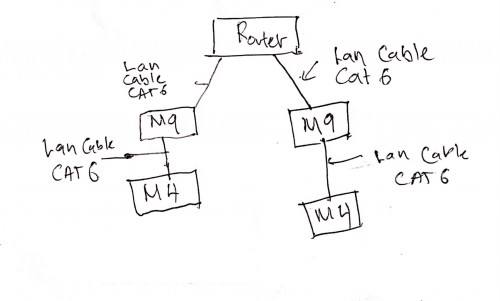 |
|
|
|
|
|
cannavaro
|
Oct 4 2020, 09:31 PM
|
|
|
QUOTE(Kuddo Sachi @ Oct 4 2020, 06:20 PM) Hi, sorry too many question asking. Already Pm Tp link on facebook but none reply since last week. May i ask did mesh system work on this diagram? Yes it will work, this method is using 'ethernet backhaul' https://www.tp-link.com/us/support/faq/1794/You will get awesome speeds |
|
|
|
|
|
Kuddo Sachi P
|
Oct 5 2020, 08:23 AM
|
New Member
|
QUOTE(cannavaro @ Oct 4 2020, 09:31 PM) Yes it will work, this method is using 'ethernet backhaul' https://www.tp-link.com/us/support/faq/1794/You will get awesome speeds Thank you, i'll try this. |
|
|
|
|
|
lokilim
|
Oct 5 2020, 12:33 PM
|
Getting Started
|
QUOTE(cannavaro @ Oct 2 2020, 06:44 PM) From what I read in the tplink forums, the deco series don't support passive or even active PoE.. since this item is cheap maybe someone can try xD Deco series itself don't support POE, but with the splitter, it has convert POE back to power source and lan cable... |
|
|
|
|
|
lokilim
|
Oct 5 2020, 12:35 PM
|
Getting Started
|
QUOTE(asellus @ Oct 2 2020, 06:38 PM) the price is so big different with the tp link injector and splitter, 1 set of 10/100/1000 is around rm160, 1 set of 10/100 cost around rm75-90. this 1 just rm6.9... don't know what is the different? |
|
|
|
|
|
asellus
|
Oct 5 2020, 01:09 PM
|
#gompusas

|
QUOTE(lokilim @ Oct 5 2020, 12:35 PM) the price is so big different with the tp link injector and splitter, 1 set of 10/100/1000 is around rm160, 1 set of 10/100 cost around rm75-90. this 1 just rm6.9... don't know what is the different? This one is only 10/100. The one that supports Gigabit Ethernet is more expensive. |
|
|
|
|
|
tachlio
|
Oct 6 2020, 12:58 PM
|
|
|
Just applied Time 100Mbs from Times, its given TpLink EC230-G1 router
I found the coverage is quite weak, looking for extender
Got few question
1. Inside EC230-G1 website, its mention support easy mesh, but does this router support OneMesh?
2. looking for extender matching the router, currently focus on RE300 or RE305, anyhow having experience for it? RE300 support OneMesh as well.
3. Any better way to extend for better coverage/stability.
|
|
|
|
|
|
the_powerbank
|
Oct 7 2020, 01:46 PM
|
New Member
|
I am using AX50 router
TM Unifi give promo wifi mesh M4 Deco add on for increased coverage
Are AX50 and M4 Deco is compatible?
|
|
|
|
|
|
FusionXY
|
Oct 7 2020, 02:39 PM
|
|
|
QUOTE(the_powerbank @ Oct 7 2020, 01:46 PM) I am using AX50 router TM Unifi give promo wifi mesh M4 Deco add on for increased coverage Are AX50 and M4 Deco is compatible? Nope for Wireless way. You can extend the coverage via LAN Cable only. Thanks. This post has been edited by FusionXY: Oct 7 2020, 02:40 PM |
|
|
|
|
|
the_powerbank
|
Oct 7 2020, 11:15 PM
|
New Member
|
QUOTE(FusionXY @ Oct 7 2020, 02:39 PM) Nope for Wireless way. You can extend the coverage via LAN Cable only. Thanks. Is that means extend coverage using Access Point? AX50 (router) > LAN > M4 (access point) > Wifi extend I read can also use normal router (not mesh) for access point? Can get 5 ghz on the access point? |
|
|
|
|
|
FusionXY
|
Oct 7 2020, 11:18 PM
|
|
|
QUOTE(the_powerbank @ Oct 7 2020, 11:15 PM) Is that means extend coverage using Access Point? AX50 (router) > LAN > M4 (access point) > Wifi extend I read can also use normal router (not mesh) for access point? Can get 5 ghz on the access point? You mean M4 > LAN > AX50? Thanks |
|
|
|
|
|
hshern95
|
Oct 8 2020, 08:46 AM
|
Getting Started
|
Hi, just bought an Deco X20 yesterday.
After setting up the network, everything goes smooth.
Until this morning, when I tried to turn off the 2.4Ghz network, all devices lost connection. But when I turned on the 2.4Ghz and 5Ghz network, all devices's connection up again.
Why is this happened?
|
|
|
|
|
|
FusionXY
|
Oct 8 2020, 11:57 AM
|
|
|
QUOTE(hshern95 @ Oct 8 2020, 08:46 AM) Hi, just bought an Deco X20 yesterday. After setting up the network, everything goes smooth. Until this morning, when I tried to turn off the 2.4Ghz network, all devices lost connection. But when I turned on the 2.4Ghz and 5Ghz network, all devices's connection up again. Why is this happened? Some of your receiving devices doesn't support 5GHz. Thanks |
|
|
|
|





 Quote
Quote




 0.2763sec
 1.07
1.07
 6 queries
 GZIP Disabled