Outline ·
[ Standard ] ·
Linear+
TP-LINK Malaysia Official Thread, Technical Enquiries and Support
|
idoblu
|
 Oct 11 2018, 10:01 AM Oct 11 2018, 10:01 AM
|

|
should I be using Tp-Link's Cloud service for remote management? worry about security....hahaha
btw is it possible to reboot router with remote management? say the router somehow not connected and i want to reboot it
thanks all
|
|
|
|
|
|
SilentVampire
|
Oct 11 2018, 10:41 AM
|
|
|
QUOTE(idoblu @ Oct 11 2018, 10:01 AM) should I be using Tp-Link's Cloud service for remote management? worry about security....hahaha btw is it possible to reboot router with remote management? say the router somehow not connected and i want to reboot it thanks all Yes, it is possible to reboot using remote management, but you need to be connected to the Internet lol, otherwise you can't do it. Just use a throwaway email for remote management. |
|
|
|
|
|
idoblu
|
Oct 11 2018, 10:46 AM
|
|
|
QUOTE(SilentVampire @ Oct 11 2018, 10:41 AM) Yes, it is possible to reboot using remote management, but you need to be connected to the Internet lol, otherwise you can't do it. Just use a throwaway email for remote management. oh so the router itself must be connected. if hang or whatever then remote wouldnt work anyway btw i have problems using the Tether app. It cant find my router. One time it found it then i was doing something else and now i cant get it.... what should i do? thanks in advance |
|
|
|
|
|
idoblu
|
Oct 11 2018, 10:51 AM
|
|
|
one thing I dont like about the Archer C2300 - the power adapter is retarded.
The plug is upside down which takes up lots of space on my power strip extension. Even you plug it in to wall socket, the wire is at the top 😫
|
|
|
|
|
|
SilentVampire
|
Oct 11 2018, 12:22 PM
|
|
|
QUOTE(idoblu @ Oct 11 2018, 10:46 AM) oh so the router itself must be connected. if hang or whatever then remote wouldnt work anyway btw i have problems using the Tether app. It cant find my router. One time it found it then i was doing something else and now i cant get it.... what should i do? thanks in advance Yes, you are right. Try to uninstall and reinstall the app. I am using Tether and have no issues. QUOTE(idoblu @ Oct 11 2018, 10:51 AM) one thing I dont like about the Archer C2300 - the power adapter is retarded. The plug is upside down which takes up lots of space on my power strip extension. Even you plug it in to wall socket, the wire is at the top 😫 Design flaw lol. |
|
|
|
|
|
idoblu
|
Oct 11 2018, 12:27 PM
|
|
|
QUOTE(SilentVampire @ Oct 11 2018, 12:22 PM) Yes, you are right. Try to uninstall and reinstall the app. I am using Tether and have no issues. Design flaw lol. 1. deleted the app. 2. logon to Tp-link Cloud Service 3. C2300 showed up on the list of "My Devices" 4. try to login but failed. Didnt ask for any password. Immediately failed must i set anything in the router itself? This post has been edited by idoblu: Oct 11 2018, 12:28 PM Attached thumbnail(s)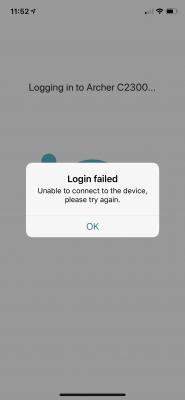
|
|
|
|
|
|
SilentVampire
|
Oct 11 2018, 12:32 PM
|
|
|
QUOTE(idoblu @ Oct 11 2018, 12:27 PM) 1. deleted the app. 2. logon to Tp-link Cloud Service 3. C2300 showed up on the list of "My Devices" 4. try to login but failed. Didnt ask for any password. Immediately failed must i set anything in the router itself? Newest firmware? Did you set up TP-Link Cloud on your router? You need to set it up on the router GUI page. |
|
|
|
|
|
idoblu
|
Oct 11 2018, 12:40 PM
|
|
|
QUOTE(SilentVampire @ Oct 11 2018, 12:32 PM) Newest firmware? Did you set up TP-Link Cloud on your router? You need to set it up on the router GUI page. yes latest firmware. yes in the router already signed in and Binded btw when i go into my router via web - now i got to use the cloud's service user email and password. previously just need to keep in password of the router's admin page |
|
|
|
|
|
SilentVampire
|
Oct 11 2018, 12:42 PM
|
|
|
QUOTE(idoblu @ Oct 11 2018, 12:40 PM) yes latest firmware. yes in the router already signed in and Binded btw when i go into my router via web - now i got to use the cloud's service user email and password. previously just need to keep in password of the router's admin page Yes, that is to be expected. When you bind the email address, you will have to use the email and password. It works smoothly for me no issues. |
|
|
|
|
|
zhenzo
|
Oct 11 2018, 12:43 PM
|
Getting Started

|
Asking, ac2300 vs ac3150 have any significant difference ?
How about coverage ? Might be connect to 5+devices and can it covered 300m2 house ?
Or waiting the ac2700 that might comeup next month ?
The price range will be around that 500-600 ?
Just want to change my tplink router that has been work around 6++yrs almost 10, and start entry level mu-mimo
|
|
|
|
|
|
SilentVampire
|
Oct 11 2018, 12:47 PM
|
|
|
QUOTE(zhenzo @ Oct 11 2018, 12:43 PM) Asking, ac2300 vs ac3150 have any significant difference ? How about coverage ? Might be connect to 5+devices and can it covered 300m2 house ? Or waiting the ac2700 that might comeup next month ? The price range will be around that 500-600 ? Just want to change my tplink router that has been work around 6++yrs almost 10, and start entry level mu-mimo AC3150 will have better coverage. Not too sure about the AC2700, as it needs to be tested and reviewed first. Suggest the AC3150 for you, or the AC2300 if you want to save some money. |
|
|
|
|
|
idoblu
|
Oct 11 2018, 12:55 PM
|
|
|
QUOTE(SilentVampire @ Oct 11 2018, 12:42 PM) Yes, that is to be expected. When you bind the email address, you will have to use the email and password. It works smoothly for me no issues. i tried using an android phone. downloaded the tether app. but i cant login to my cloud service. email and password is correct. Just says connection timed out. No other errors. Could it be TP-LINK cloud service is down? This post has been edited by idoblu: Oct 11 2018, 01:05 PM |
|
|
|
|
|
jimbet1337
|
Oct 11 2018, 12:58 PM
|
|
|
Where can get AC3150 official set? Quite hard to find.
|
|
|
|
|
|
SilentVampire
|
Oct 11 2018, 01:19 PM
|
|
|
QUOTE(idoblu @ Oct 11 2018, 12:55 PM) i tried using an android phone. downloaded the tether app. but i cant login to my cloud service. email and password is correct. Just says connection timed out. No other errors. Could it be TP-LINK cloud service is down? Nope. It is working for me. That is weird. QUOTE(jimbet1337 @ Oct 11 2018, 12:58 PM) Where can get AC3150 official set? Quite hard to find. TP-Link out of stock at the moment. Will restock soon. It have been very popular. |
|
|
|
|
|
idoblu
|
Oct 11 2018, 01:34 PM
|
|
|
QUOTE(SilentVampire @ Oct 11 2018, 01:19 PM) Nope. It is working for me. That is weird. TP-Link out of stock at the moment. Will restock soon. It have been very popular. do i need to enable this Remote Management?  Attached thumbnail(s) Attached thumbnail(s)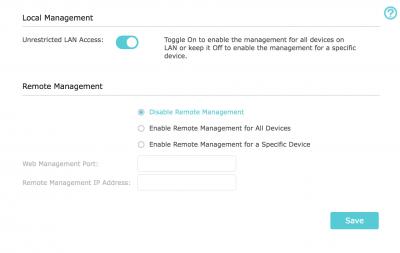
|
|
|
|
|
|
kevin916587
|
Oct 11 2018, 02:10 PM
|
Getting Started
|
TM came after multiple complaints lodged, with a new wifi router replacement, Dlink DIR842. However, when i was using the 5Ghz, the wifi speed i can get when i am near the wifi router only went up to around 450Mbps. (My package is 800Mbps). My laptop gets about 65Mbps on 5Ghz with using TPLINK AC600 dongle. should i upgrade my wifi adapter to newer version of adapter? if yes, TPlink T4U or TPlink T9UH? please advice
|
|
|
|
|
|
SilentVampire
|
Oct 11 2018, 02:13 PM
|
|
|
QUOTE(idoblu @ Oct 11 2018, 01:34 PM) do i need to enable this Remote Management? Nope. You don’t have to and ideally not. QUOTE(kevin916587 @ Oct 11 2018, 02:10 PM) TM came after multiple complaints lodged, with a new wifi router replacement, Dlink DIR842. However, when i was using the 5Ghz, the wifi speed i can get when i am near the wifi router only went up to around 450Mbps. (My package is 800Mbps). My laptop gets about 65Mbps on 5Ghz with using TPLINK AC600 dongle. should i upgrade my wifi adapter to newer version of adapter? if yes, TPlink T4U or TPlink T9UH? please advice Click the link on my signature and read green text to see list of compatible routers plus other general info. Your router and adapter both does not support 800Mbps. You need a more pricey router as well as a pricey wireless adapter. |
|
|
|
|
|
poh880
|
Oct 11 2018, 04:49 PM
|
|
|
Anyone get VR600v VOIP working? What's the setting you used?
Provider: Maxis
Error: register fail, response code(500)
This post has been edited by poh880: Oct 11 2018, 05:03 PM
|
|
|
|
|
|
jjj2
|
Oct 11 2018, 06:49 PM
|
|
|
QUOTE(idoblu @ Oct 11 2018, 01:34 PM) do i need to enable this Remote Management? No need. |
|
|
|
|
|
idoblu
|
Oct 11 2018, 08:36 PM
|
|
|
.
This post has been edited by idoblu: Oct 13 2018, 08:13 AM
|
|
|
|
|



 Quote
Quote


 0.0169sec
 0.33
0.33
 6 queries
 GZIP Disabled