

QUOTE(blacktubi @ Jun 4 2018, 07:06 PM)
TP-Link only cover the return shipping unfortunately.

when can you get your hands on this? - TP-Link Deco M9 Plus 
now with tri-band like lyra (use for backhaul)
TP-LINK Malaysia Official Thread, Technical Enquiries and Support
|
|
 Jul 14 2018, 10:59 AM Jul 14 2018, 10:59 AM
Return to original view | Post
#1
|
 
All Stars
11,308 posts Joined: Feb 2008 
|
QUOTE(blacktubi @ Jun 4 2018, 07:06 PM) TP-Link only cover the return shipping unfortunately. when can you get your hands on this? - TP-Link Deco M9 Plus now with tri-band like lyra (use for backhaul) |
|
|
|
|
|
Jul 14 2018, 04:35 PM
Return to original view | Post
#2
|
|
All Stars
11,308 posts Joined: Feb 2008
|
QUOTE(blacktubi @ Jul 14 2018, 04:03 PM) Not really sure if it is coming to Malaysia. Even Thailand sudah ada wor  |
|
|
Oct 2 2018, 08:45 AM
Return to original view | Post
#3
|
|
All Stars
11,308 posts Joined: Feb 2008
|
What is this Range Boost Technology that is in the Archer C2300? gimmick or can really boost signal strength?
|
|
|
Oct 2 2018, 09:11 AM
Return to original view | Post
#4
|
|
All Stars
11,308 posts Joined: Feb 2008
|
QUOTE(SilentVampire @ Oct 2 2018, 09:02 AM) Yes, it really does boost signal strength. thank you sirbtw how come i dont see this "range boost" in other models like c3150 ? thanks again  my Time upgraded to 500Mbps, I hope to be able to get 500Mbps Wifi with this  This post has been edited by idoblu: Oct 2 2018, 09:12 AM |
|
|
Oct 2 2018, 10:52 AM
Return to original view | Post
#5
|
|
All Stars
11,308 posts Joined: Feb 2008
|
QUOTE(blacktubi @ Oct 2 2018, 10:36 AM) It is essentially wha TP-Link call their beamforming technology. huh? aiyah means same thing? 😅 |
|
|
Oct 2 2018, 11:53 AM
Return to original view | Post
#6
|
|
All Stars
11,308 posts Joined: Feb 2008
|
QUOTE(SilentVampire @ Oct 2 2018, 11:50 AM) Different name for the same thing as Blacktubi has answered you. Thanks 🙏🏻 |
|
|
|
|
|
Oct 7 2018, 10:36 PM
Return to original view | Post
#7
|
|
All Stars
11,308 posts Joined: Feb 2008
|
QUOTE(Wii_hunter @ Oct 7 2018, 09:40 PM) yeah same here. i went to lowyat on saturday the major stores didnt have them in stock. Lol where did you see 3 for Rm320?the deco m5 3 pack seems pretty cheap on 11street. rm320 for 3 is quite a steal i must say. decisions decisions... Link please. I think you need to select the drop down menu |
|
|
Oct 7 2018, 10:38 PM
Return to original view | Post
#8
|
|
All Stars
11,308 posts Joined: Feb 2008
|
QUOTE(blacktubi @ Oct 7 2018, 02:36 PM) I try to check out Lowyat plaza yesterday. Can’t seem to found any. How cheap is cheap? Decided to get M5 due to how cheap it is and performance is actually quite good after the latest update.  |
|
|
Oct 7 2018, 11:20 PM
Return to original view | Post
#9
|
|
All Stars
11,308 posts Joined: Feb 2008
|
QUOTE(Wii_hunter @ Oct 7 2018, 11:17 PM) oh my bad you are right. the price in the drop down menu is different. guess ill wait for the m9 then I got tricked a few times myself with 11street prices |
|
|
Oct 11 2018, 10:01 AM
Return to original view | Post
#10
|
|
All Stars
11,308 posts Joined: Feb 2008
|
should I be using Tp-Link's Cloud service for remote management? worry about security....hahaha
btw is it possible to reboot router with remote management? say the router somehow not connected and i want to reboot it thanks all |
|
|
Oct 11 2018, 10:46 AM
Return to original view | Post
#11
|
|
All Stars
11,308 posts Joined: Feb 2008
|
QUOTE(SilentVampire @ Oct 11 2018, 10:41 AM) Yes, it is possible to reboot using remote management, but you need to be connected to the Internet lol, otherwise you can't do it. oh so the router itself must be connected. if hang or whatever then remote wouldnt work anywayJust use a throwaway email for remote management. btw i have problems using the Tether app. It cant find my router. One time it found it then i was doing something else and now i cant get it.... what should i do? thanks in advance |
|
|
Oct 11 2018, 10:51 AM
Return to original view | Post
#12
|
|
All Stars
11,308 posts Joined: Feb 2008
|
one thing I dont like about the Archer C2300 - the power adapter is retarded.
The plug is upside down which takes up lots of space on my power strip extension. Even you plug it in to wall socket, the wire is at the top 😫 |
|
|
Oct 11 2018, 12:27 PM
Return to original view | Post
#13
|
|
All Stars
11,308 posts Joined: Feb 2008
|
QUOTE(SilentVampire @ Oct 11 2018, 12:22 PM) Yes, you are right. Try to uninstall and reinstall the app. I am using Tether and have no issues. 1. deleted the app.Design flaw lol. 2. logon to Tp-link Cloud Service 3. C2300 showed up on the list of "My Devices" 4. try to login but failed. Didnt ask for any password. Immediately failed must i set anything in the router itself? This post has been edited by idoblu: Oct 11 2018, 12:28 PM Attached thumbnail(s) 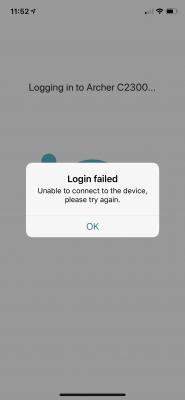
|
|
|
|
|
|
Oct 11 2018, 12:40 PM
Return to original view | Post
#14
|
|
All Stars
11,308 posts Joined: Feb 2008
|
QUOTE(SilentVampire @ Oct 11 2018, 12:32 PM) Newest firmware? Did you set up TP-Link Cloud on your router? You need to set it up on the router GUI page. yes latest firmware.yes in the router already signed in and Binded btw when i go into my router via web - now i got to use the cloud's service user email and password. previously just need to keep in password of the router's admin page |
|
|
Oct 11 2018, 12:55 PM
Return to original view | Post
#15
|
|
All Stars
11,308 posts Joined: Feb 2008
|
QUOTE(SilentVampire @ Oct 11 2018, 12:42 PM) Yes, that is to be expected. When you bind the email address, you will have to use the email and password. It works smoothly for me no issues. i tried using an android phone. downloaded the tether app. but i cant login to my cloud service.email and password is correct. Just says connection timed out. No other errors. Could it be TP-LINK cloud service is down? This post has been edited by idoblu: Oct 11 2018, 01:05 PM |
|
|
Oct 11 2018, 01:34 PM
Return to original view | Post
#16
|
|
All Stars
11,308 posts Joined: Feb 2008
|
QUOTE(SilentVampire @ Oct 11 2018, 01:19 PM) Nope. It is working for me. That is weird. do i need to enable this Remote Management? TP-Link out of stock at the moment. Will restock soon. It have been very popular.  Attached thumbnail(s) 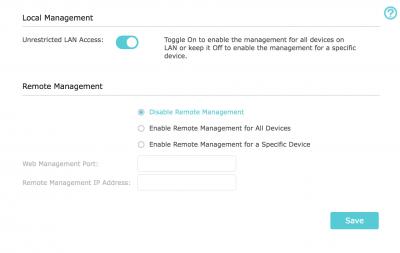
|
|
|
Oct 11 2018, 08:36 PM
Return to original view | Post
#17
|
|
All Stars
11,308 posts Joined: Feb 2008
|
.
This post has been edited by idoblu: Oct 13 2018, 08:13 AM |
|
|
Oct 13 2018, 08:16 AM
Return to original view | Post
#18
|
|
All Stars
11,308 posts Joined: Feb 2008
|
Looks like similar Tether App problem faced by others - https://forum.tp-link.com/showthread.php?92...ing-Archer-3200
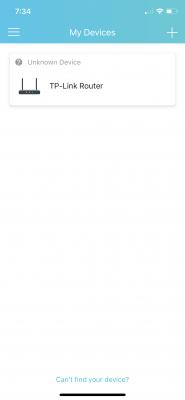
mine is the same too. once i reboot the router, it will detect my router as a local device (connected via Wifi). Then i tried login but it says something about unstable connection. Then the local device will show as "Unknown Device" and login wont be allow until you reboot and power refresh the router. Is there a way to rollback firmware? If this is Deco Mesh means cannot even set up the router already.....hahaha Lucky mine still can setup everything using web browser This post has been edited by idoblu: Oct 13 2018, 09:43 AM Attached thumbnail(s) 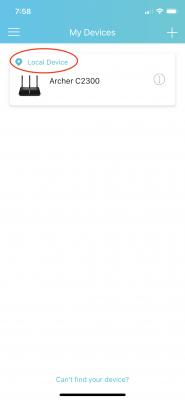

|
|
|
Oct 18 2018, 11:38 AM
Return to original view | Post
#19
|
|
All Stars
11,308 posts Joined: Feb 2008
|
TPLINK's support is really non-existent
You can call the 1-800 number Email them PM them via Facebook all no answer |
|
|
Oct 18 2018, 11:49 AM
Return to original view | Post
#20
|
|
All Stars
11,308 posts Joined: Feb 2008
|
QUOTE(TP-LINK MY @ Oct 18 2018, 11:46 AM) Hi idoblu, Thank you!May I know what issue are you facing with our products? We are here to help. Bought a new C2300. Everything works except I can’t login to the Tether app. Already posted this problem here and a few sifu had help but problem still remain Thanks in advance |
| Change to: |  0.2616sec 0.2616sec
 0.27 0.27
 7 queries 7 queries
 GZIP Disabled GZIP Disabled
Time is now: 5th December 2025 - 10:20 PM |
 Quote
Quote