

guys we cannot change the DNS server? how to bypass those blocked sites? using c1200 from tm
UniFi's TP-Link Routers C5, C7 & C1200, Newer is not better.
UniFi's TP-Link Routers C5, C7 & C1200, Newer is not better.
|
|
 Oct 25 2018, 07:45 PM Oct 25 2018, 07:45 PM
|
 
Junior Member
438 posts Joined: Apr 2007 From: Petaling Jaya   
|
guys we cannot change the DNS server? how to bypass those blocked sites? using c1200 from tm
|
|
|
|
|
|
Oct 26 2018, 07:51 AM
|

Senior Member
5,714 posts Joined: Mar 2007
|
QUOTE(mekboyz @ Oct 25 2018, 07:45 PM) guys we cannot change the DNS server? how to bypass those blocked sites? using c1200 from tm Upgrade to latest firmware and see. If you still can't access those blocked sites, time to upgrade router |
|
|
Oct 26 2018, 10:39 AM
|
|
Junior Member
438 posts Joined: Apr 2007 From: Petaling Jaya
|
QUOTE(SilentVampire @ Oct 26 2018, 07:51 AM) Upgrade to latest firmware and see. If you still can't access those blocked sites, time to upgrade router what is the latest firmware version? I can download from TPLINK right? |
|
|
Oct 26 2018, 02:21 PM
|
|
Senior Member
5,714 posts Joined: Mar 2007
|
QUOTE(mekboyz @ Oct 26 2018, 10:39 AM) what is the latest firmware version? I can download from TPLINK right? See here: https://www.tp-link.com/my/download/Archer-...1.html#FirmwareJust be aware that you might need your PPPoE username and password for setup again. |
|
|
Dec 17 2018, 04:51 PM
|

Senior Member
719 posts Joined: Dec 2006
|
Hi,
I have the C1200 V1.0 Would like to install DD-WRT on this. Have download DD-WRT - TP-Link Archer C5 (AC1200) 1.x file from DD-WRT.com download page. Firmware upgrade failed. Any help is much appreciated. Thanks. |
|
|
Dec 17 2018, 06:54 PM
|

Senior Member
4,094 posts Joined: Jan 2003 From: USJ
|
QUOTE(jackdon @ Dec 17 2018, 04:51 PM) Hi, no custom firmware for C1200 V1.0, end of storyI have the C1200 V1.0 Would like to install DD-WRT on this. Have download DD-WRT - TP-Link Archer C5 (AC1200) 1.x file from DD-WRT.com download page. Firmware upgrade failed. Any help is much appreciated. Thanks. |
|
|
|
|
|
Dec 20 2018, 01:35 PM
|

Senior Member
2,348 posts Joined: Apr 2008
|
QUOTE(jackdon @ Dec 17 2018, 04:51 PM) Hi, I am looking for C1200 v1.0 firmware too, like you too was downloaded the custom firmware from dd-wrt but fortunately I did not flash the custom firmware in the end. I have the C1200 V1.0 Would like to install DD-WRT on this. Have download DD-WRT - TP-Link Archer C5 (AC1200) 1.x file from DD-WRT.com download page. Firmware upgrade failed. Any help is much appreciated. Thanks. My office was recently installed a firewall router, so have to replace the TM Archer C1200 router. So I was deciding to make the router as AP but don't have "operation mode" inside that router because the firmware is too old provided by TM. So I was visited TP-Link and download the latest firmware version. There got Unifi and Time edition, so I was downloaded the Unifi edition. So another problem is came out, router is working well but firmware is still remaining the old interface. Another problem is I can't remove that annoying "@unifi" behind the SSID. So later I was found another official firmware from here. https://forum.lowyat.net/topic/4497511/all Has to thanks to JohnLai for his post. You can refers to the links at below Edit2. Click on anyone of the two links below there to download the Global firmware. The interface is totally different from TM Unifi version. So now I can switch to AP mode with my own SSID without the annoying keyword "@unifi" at behind. This post has been edited by junclj: Dec 20 2018, 01:40 PM |
|
|
Dec 20 2018, 03:09 PM
Show posts by this member only | IPv6 | Post
#588
|

Senior Member
2,281 posts Joined: Feb 2012
|
QUOTE(mekboyz @ Oct 25 2018, 07:45 PM) guys we cannot change the DNS server? how to bypass those blocked sites? using c1200 from tm VPN |
|
|
May 16 2019, 11:34 AM
|
|
Junior Member
671 posts Joined: Dec 2011
|
QUOTE(Ckmwpy0370 @ Jan 10 2018, 09:53 AM) By the way, any experts here have use Parental Control features in TP Link AC1200? hi, let me know if you have good news on this.I have tested restricted by time access. for example from 11pm to 6am restricted access internet. but when on the gadgets in the morning at 8am, browser is black page display any ideal? I try parental control on my kids hp but failed. Or any sifus can advice? |
|
|
Dec 22 2019, 09:39 PM
Show posts by this member only | IPv6 | Post
#590
|

Senior Member
2,955 posts Joined: Sep 2009
|
Hi guys so I seriously need everyone’s help.
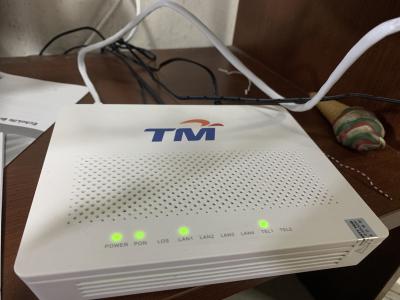
TM changed my modem and router several months ago and my Unifi was all good. However, recently, I’ve been facing issues with my router in which the “UFO” shaped light as seen in the picture attached here is red. Called up TM several times regarding the said issue and they often come over to my place the next day and get it solved. However, the problem persist often as in after every 3 days or so, the “UFO’ shaped light turns red. The technicians from TM suggested me to use a cooler for my router and the problem still persist. I’m planning to change my router to solve this issue as I can’t afford to be without internet coverage. Any suggestion on what’s a good router ? Model and brand please. Got to get this solved by tomorrow. #requirement for the router: 1. Something reliable 2. Strong WiFi coverage 3. Fast 4. Budget around 1k 
This post has been edited by shankar_dass93: Dec 22 2019, 09:43 PM |
|
|
Dec 22 2019, 09:54 PM
Show posts by this member only | IPv6 | Post
#591
|

Senior Member
3,669 posts Joined: Apr 2006
|
QUOTE(shankar_dass93 @ Dec 22 2019, 09:39 PM) Hi guys so I seriously need everyone’s help. Ah, the legendary C1200. Just disable IPv6 in the router if you find that amber colored LED annoying.TM changed my modem and router several months ago and my Unifi was all good. However, recently, I’ve been facing issues with my router in which the “UFO” shaped light as seen in the picture attached here is red. Called up TM several times regarding the said issue and they often come over to my place the next day and get it solved. However, the problem persist often as in after every 3 days or so, the “UFO’ shaped light turns red. The technicians from TM suggested me to use a cooler for my router and the problem still persist. I’m planning to change my router to solve this issue as I can’t afford to be without internet coverage. Any suggestion on what’s a good router ? Model and brand please. Got to get this solved by tomorrow. #requirement for the router: 1. Something reliable 2. Strong WiFi coverage 3. Fast 4. Budget around 1k
3 days or so eh? I guess you don't even realize the router randomly reboot itself..... The IPv6 connectivity takes 5 - 15 minutes to work for that legendary router why is why that LED staying in amber color. |
|
|
Dec 22 2019, 11:23 PM
Show posts by this member only | IPv6 | Post
#592
|
|
Senior Member
2,955 posts Joined: Sep 2009
|
QUOTE(JohnLai @ Dec 22 2019, 09:54 PM) Ah, the legendary C1200. Just disable IPv6 in the router if you find that amber colored LED annoying. So buying a new router should be the solution right ? 3 days or so eh? I guess you don't even realize the router randomly reboot itself..... The IPv6 connectivity takes 5 - 15 minutes to work for that legendary router why is why that LED staying in amber color. Any suggestions as to which model that I should look into? Thanks in advance |
|
|
Dec 22 2019, 11:27 PM
Show posts by this member only | IPv6 | Post
#593
|
|
Senior Member
3,669 posts Joined: Apr 2006
|
QUOTE(shankar_dass93 @ Dec 22 2019, 11:23 PM) So buying a new router should be the solution right ? No need to purchase new router, just continue to use current router.Any suggestions as to which model that I should look into? Thanks in advance Remember to update the router firmware to its latest version. The latest firmware will reduce the frequency of random reboot by large margin...... |
|
|
|
|
|
Dec 22 2019, 11:31 PM
|
|
Senior Member
5,714 posts Joined: Mar 2007
|
QUOTE(shankar_dass93 @ Dec 22 2019, 11:23 PM) So buying a new router should be the solution right ? Yes. Get the Asus RT-AC86U if possible. That's the best one out there if you don't include the AX routers which are quite pricey.Any suggestions as to which model that I should look into? Thanks in advance |
|
|
Dec 23 2019, 08:40 AM
Show posts by this member only | IPv6 | Post
#595
|
|
Senior Member
2,955 posts Joined: Sep 2009
|
QUOTE(SilentVampire @ Dec 22 2019, 11:31 PM) Yes. Get the Asus RT-AC86U if possible. That's the best one out there if you don't include the AX routers which are quite pricey. just checked out the Asus RT AC86u and It goes around 800++ on Lazada.Is that what you are using ? How is it so far ? |
|
|
Dec 23 2019, 08:41 AM
Show posts by this member only | IPv6 | Post
#596
|
|
Senior Member
2,955 posts Joined: Sep 2009
|
QUOTE(JohnLai @ Dec 22 2019, 11:27 PM) No need to purchase new router, just continue to use current router. The latest software on TP link Malaysia's website for archer c1200 is v3 right ?Remember to update the router firmware to its latest version. The latest firmware will reduce the frequency of random reboot by large margin...... That is what my router is on and it is facing issues. |
|
|
Dec 23 2019, 09:28 AM
Show posts by this member only | IPv6 | Post
#597
|
|
Senior Member
3,669 posts Joined: Apr 2006
|
QUOTE(shankar_dass93 @ Dec 23 2019, 08:41 AM) The latest software on TP link Malaysia's website for archer c1200 is v3 right ? Check the sticker on the C1200 bottom.That is what my router is on and it is facing issues. TM sometimes provide US V1 - V3 or EU V1 hardware model. The latest firmware will alleviate the random reboot.  If you have EU v1 model, then there are two types of poison you have to choose. EU firmware with limited 5Ghz channel but more feature and stable VS Malaysia customised old firmware with extra 5Ghz but less feature. |
|
|
Dec 23 2019, 10:01 AM
|
|
Senior Member
5,714 posts Joined: Mar 2007
|
QUOTE(shankar_dass93 @ Dec 23 2019, 08:40 AM) just checked out the Asus RT AC86u and It goes around 800++ on Lazada. Very good. My aunt is using that in her house, and it is very stable so far.Is that what you are using ? How is it so far ? |
|
|
Dec 24 2019, 12:16 PM
|
|
Junior Member
864 posts Joined: May 2005
|
Since using my own router, the C1200 is relegated as first floor AP now. Works very well as AP, even when using stock Malaysia firmware.
|
|
|
Jan 3 2020, 07:57 AM
Show posts by this member only | IPv6 | Post
#600
|
|
Senior Member
2,955 posts Joined: Sep 2009
|
QUOTE(SilentVampire @ Dec 23 2019, 10:01 AM) Very good. My aunt is using that in her house, and it is very stable so far. tried looking for this model and couldn't find anyone at lowyat selling itThis post has been edited by shankar_dass93: Jan 3 2020, 08:06 AM |
| Change to: |  0.0411sec 0.0411sec
 0.46 0.46
 6 queries 6 queries
 GZIP Disabled GZIP Disabled
Time is now: 9th December 2025 - 03:12 AM |
 Quote
Quote