Outline ·
[ Standard ] ·
Linear+
UniFi's TP-Link Routers C5, C7 & C1200, Newer is not better.
|
yiemszx
|
 Aug 3 2018, 10:11 AM Aug 3 2018, 10:11 AM
|
Getting Started


|
QUOTE(SilentVampire @ Aug 2 2018, 10:16 PM) Nothing to do with US firmware. What version of the router is yours? What do you mean by drop? Other devices ok? Wireless or wired? If wireless, try 5GHz. Hardware version is V3. Connected to wifi but frequently lost connection to the internet. Ping also always time out/unreachable Other devices also facing the same problem. Wired seems more stable but the intermittent is more obvious when connected to either 2.4Ghz / 5Ghz wireless. |
|
|
|
|
|
SilentVampire
|
Aug 3 2018, 11:02 AM
|
|
|
QUOTE(yiemszx @ Aug 3 2018, 10:11 AM) Hardware version is V3. Connected to wifi but frequently lost connection to the internet. Ping also always time out/unreachable Other devices also facing the same problem. Wired seems more stable but the intermittent is more obvious when connected to either 2.4Ghz / 5Ghz wireless. Did you try to analyze the wireless signals in your area? Could be very congested. Try to download the WiFi analyzer on your phone or computer, and change the wireless channel on your device. |
|
|
|
|
|
yiemszx
|
Aug 3 2018, 11:59 AM
|
Getting Started
|
QUOTE(SilentVampire @ Aug 3 2018, 11:02 AM) Did you try to analyze the wireless signals in your area? Could be very congested. Try to download the WiFi analyzer on your phone or computer, and change the wireless channel on your device. But connection is stable when using the old router  Alright. Will try once I get home |
|
|
|
|
|
yiemszx
|
Aug 3 2018, 06:54 PM
|
Getting Started
|
The channel seems ok. Got another 1 wifi sharing the same channel with my 2.4Ghz. No overlapping channel with my 5Ghz but the connection still intermittent.   Hmmm. Any other recommendation? Or should I request for replacement unit? If so, do I need to go to the service center @ Low Yat? |
|
|
|
|
|
SilentVampire
|
Aug 3 2018, 08:09 PM
|
|
|
QUOTE(yiemszx @ Aug 3 2018, 06:54 PM) The channel seems ok. Got another 1 wifi sharing the same channel with my 2.4Ghz. No overlapping channel with my 5Ghz but the connection still intermittent. Hmmm. Any other recommendation? Or should I request for replacement unit? If so, do I need to go to the service center @ Low Yat? Try changing cables from the BTU to the router. If problem still persists, it could be a problem with the new router. Are you on the latest firmware? See here: https://www.tp-link.com/my/download/Archer-...0.html#Firmware |
|
|
|
|
|
fantasy1989
|
Aug 3 2018, 09:15 PM
|
|
|
QUOTE(SilentVampire @ Aug 3 2018, 08:53 AM) Just get your PPPoE username and password just in case, but configuration will still be there usually. i tried to check hardware version. but seems like i unable to see it at the back of router Attached thumbnail(s)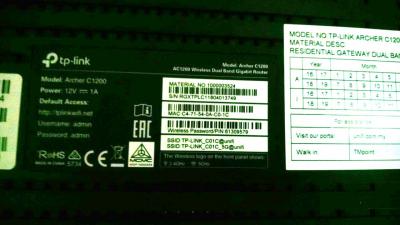
|
|
|
|
|
|
TSsoonwai
|
Aug 3 2018, 09:18 PM
|
|
|
QUOTE(fantasy1989 @ Aug 3 2018, 09:15 PM) i tried to check hardware version. but seems like i unable to see it at the back of router Login to the router and look at the footer of the page. |
|
|
|
|
|
nuel92
|
Aug 3 2018, 09:21 PM
|
|
|
I bought a Rm176 tp link router to replace d link router that tm gave me, it works like a charm!!! From 300kb/s to 1mb/s!!
|
|
|
|
|
|
fantasy1989
|
Aug 3 2018, 09:23 PM
|
|
|
QUOTE(soonwai @ Aug 3 2018, 09:18 PM) Login to the router and look at the footer of the page. ahh..thanks  |
|
|
|
|
|
yiemszx
|
Aug 4 2018, 02:15 PM
|
Getting Started
|
QUOTE(SilentVampire @ Aug 3 2018, 08:09 PM) Try changing cables from the BTU to the router. If problem still persists, it could be a problem with the new router. Are you on the latest firmware? See here: https://www.tp-link.com/my/download/Archer-...0.html#FirmwareDid changed the cables but still persists. Ya already updated to the latest firmware. Seems like I need to go to the service center Thanks for helping anyway  |
|
|
|
|
|
stasio
|
Aug 10 2018, 11:59 PM
|
|
|
Anybody with latest Archer C7v5 ?
|
|
|
|
|
|
SilentVampire
|
Aug 11 2018, 12:31 AM
|
|
|
QUOTE(stasio @ Aug 10 2018, 11:59 PM) Anybody with latest Archer C7v5 ? Only C7 v4 available now. |
|
|
|
|
|
fantasy1989
|
Aug 12 2018, 05:37 PM
|
|
|
Hi all,
my AC1200 router on unifi 50mbps..
sometime when i left my router overnight and tomorrow morning. my internet will down
i need reboot everything 1 to 2 times in order to get working
what is the potential issue? is there any misconfiguration?
|
|
|
|
|
|
SilentVampire
|
Aug 12 2018, 05:51 PM
|
|
|
QUOTE(fantasy1989 @ Aug 12 2018, 05:37 PM) Hi all, my AC1200 router on unifi 50mbps.. sometime when i left my router overnight and tomorrow morning. my internet will down i need reboot everything 1 to 2 times in order to get working what is the potential issue? is there any misconfiguration? Nope. It is a well-known problem with the C1200. I would recommend switching router. Get the TP Link c7 v4, and the problem will disappear. |
|
|
|
|
|
fantasy1989
|
Aug 12 2018, 07:46 PM
|
|
|
anyone know how to decrypt AC1200 backup file ? mine all setting missing after upgrade to latest FW. contacted unifi and still waiting for them to provide password
tried routerpassview seems no luck
|
|
|
|
|
|
JohnLai
|
Aug 12 2018, 07:52 PM
|
|
|
QUOTE(fantasy1989 @ Aug 12 2018, 07:46 PM) anyone know how to decrypt AC1200 backup file ? mine all setting missing after upgrade to latest FW. contacted unifi and still waiting for them to provide password tried routerpassview seems no luck ~.~ Me? Edit: PM me the backup file? This post has been edited by JohnLai: Aug 12 2018, 07:55 PM |
|
|
|
|
|
fantasy1989
|
Aug 12 2018, 09:02 PM
|
|
|
QUOTE(JohnLai @ Aug 12 2018, 07:52 PM) ~.~ Me? Edit: PM me the backup file? done boss |
|
|
|
|
|
JohnLai
|
Aug 12 2018, 09:09 PM
|
|
|
QUOTE(fantasy1989 @ Aug 12 2018, 09:02 PM) done boss Done. Check your inbox. Open it using notepad. Line 702 and 708 for the username and pass for unifi. EDIT: SETUP the VLAN first (the iptv part), otherwise you will not be able to start PPPoE login session. This post has been edited by JohnLai: Aug 12 2018, 09:09 PM |
|
|
|
|
|
fantasy1989
|
Aug 12 2018, 10:10 PM
|
|
|
QUOTE(SilentVampire @ Jul 13 2018, 07:04 PM) They will send the V4 to you, although they mentioned that it is V2. RT-AC1300UHP what is the previous price before hike? |
|
|
|
|
|
SilentVampire
|
Aug 12 2018, 10:15 PM
|
|
|
QUOTE(fantasy1989 @ Aug 12 2018, 10:10 PM) RT-AC1300UHP what is the previous price before hike? It has been RM569 on Lazada for some quite some time. It only goes down in price, when there is a sale. |
|
|
|
|



 Quote
Quote


 0.0238sec
 0.40
0.40
 6 queries
 GZIP Disabled