

Won't will it be a bit too much fuss?
Guide How to make Windows XP be like Windows Vista, [Now with even MORE visual mods]
Guide How to make Windows XP be like Windows Vista, [Now with even MORE visual mods]
|
|
 Dec 21 2007, 02:54 PM Dec 21 2007, 02:54 PM
|
 
Senior Member
9,257 posts Joined: Aug 2005 From: Not so sure myself Status: 1+3+3=7   
|
Won't will it be a bit too much fuss?
|
|
|
|
|
|
Dec 21 2007, 08:14 PM
|

Junior Member
169 posts Joined: May 2006 From: Liverpool, Merseyside, UK 
|
this another link of vista-like xp sources i found...
check it out!... http://fediafedia.deviantart.com/art/Windo...torial-59987691 http://lee-soft.com/?cat=12 Among others: Vista screensaver for XP http://www.winmatrix.com/forums/index.php?showtopic=12202 http://www.winmatrix.com/forums/index.php?showtopic=11553 Windows Photo Gallery BETA http://1337mobile.deviantart.com/art/Windo...h+age_scale%3A5 Welcome Center http://fediafedia.deviantart.com/art/Welco...ADABLE-59194875 http://www.deviantart.com/deviation/574822...h+age_scale%3A5 http://thoosje.deviantart.com/art/Vista-We...Center-32822844 However probably THE BEST GUIDE IS HERE http://fediafedia.deviantart.com/art/XP-to...Beta-2-70965821 This post has been edited by al_aajily: Dec 22 2007, 03:36 PM |
|
|
Dec 27 2007, 12:03 PM
|

Senior Member
2,919 posts Joined: Feb 2006 From: tanah melayu
|
wahhh....nice tip....thx man
|
|
|
Dec 28 2007, 02:38 PM
|

Senior Member
2,823 posts Joined: Jun 2006 From: West Malaysia
|
@ al_aajily
His guide is same as mine here just that he compiled it with a software that is user friendly...  |
|
|
Dec 30 2007, 11:28 PM
|

Senior Member
2,933 posts Joined: Nov 2007 From: Kuala lumpur
|
i installed Vista Transformation Pack 8.01.
i like all the thing,but i want the theme look like glass. anyway know how to do that ?? this is my vista look like 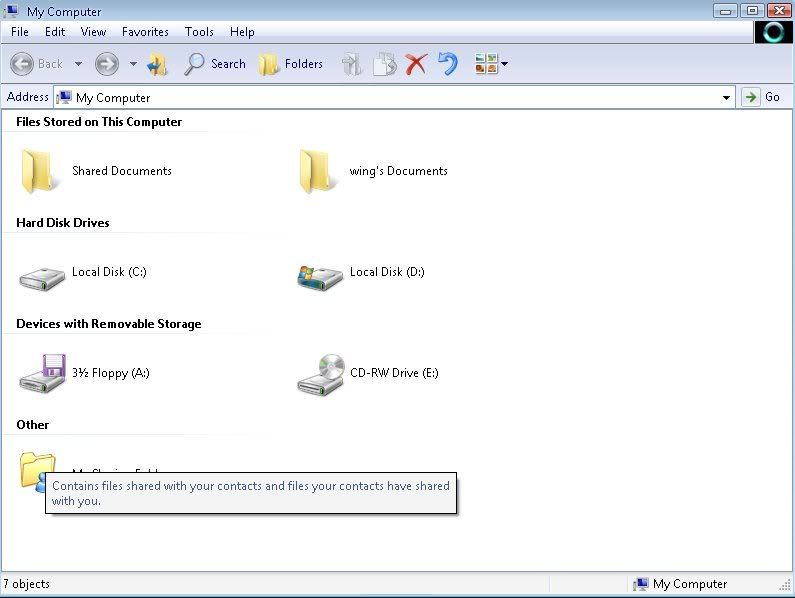 and i hope can change it to this 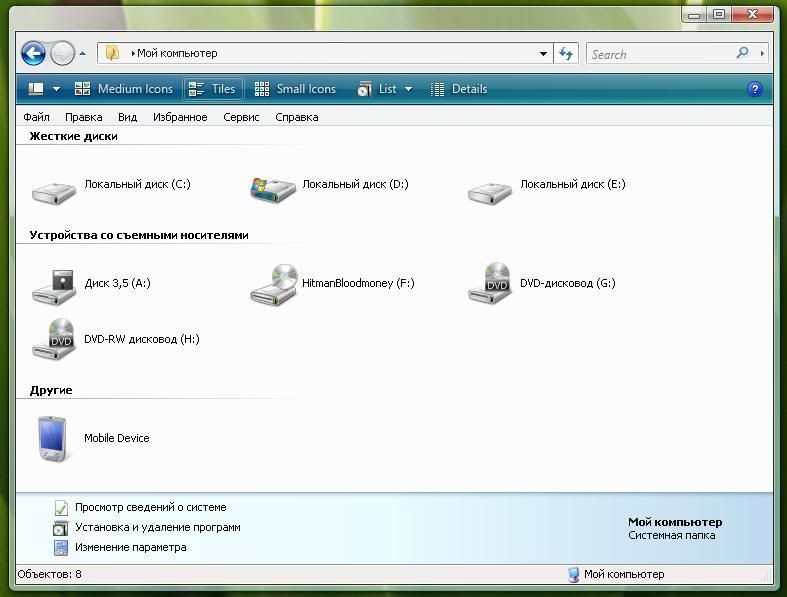 This post has been edited by wen9x88: Dec 30 2007, 11:38 PM |
|
|
Dec 31 2007, 02:21 AM
|

Senior Member
4,251 posts Joined: Aug 2006
|
install TrueTransparency that is bundled together with the pack
|
|
|
|
|
|
Dec 31 2007, 04:31 PM
|
|
Senior Member
2,933 posts Joined: Nov 2007 From: Kuala lumpur
|
i will try it at my home,anyway thx for reply my question
thx thx |
|
|
Dec 31 2007, 04:35 PM
|
|
Senior Member
4,251 posts Joined: Aug 2006
|
and u will nit Styler (Vista Perfection theme) to make the toolbar looks as good as vista too, like the 1 u posted up there
|
|
|
Dec 31 2007, 11:21 PM
|
|
Senior Member
2,933 posts Joined: Nov 2007 From: Kuala lumpur
|
i uninstall Vista Transformation Pack 8.01.
and download Vista Icons Pack 3.0,but i dono how to use it. i just saw a lot icon inside that folder. |
|
|
Jan 2 2008, 05:33 PM
|

Junior Member
196 posts Joined: Apr 2006 From: Kuching, Sarawak
|
Hi guy, don't know if anyone post this program website yet, it is a very interesting program, freeware, need your email address to register, will enhance your vista/xp greatly....
http://www.docs.kr/ you can use shock aero 3d to emulate vista flip 3d. personally i like the shock 4 way 3d, it included the flip 3d. |
|
|
Jan 2 2008, 10:26 PM
|

Senior Member
633 posts Joined: Nov 2007 From: Kuala Lumpur
|
Hei guys...i am totally new here and i would like to ask which is the best vista sidebar to be used? Btw, What is the difference between objeckdock and sidebar ? Im currently using objeckdock plus and i would like to add a vista sidebar to my window Xp...im currently using alienware themes which i downloaded from alienware website and everthing is cool but just lack of the vista sidebar which contain those cool gadgets like big digital clock, stickynote, calendar, weather forecast and so on...can u guys help me out ? thx alot =) and one more thing..if i want to change my alienware icon to vista look alike icon which is the best program to be used ? Thx again
This post has been edited by OMGGED: Jan 3 2008, 06:56 AM |
|
|
Jan 2 2008, 10:57 PM
|

All Stars
10,479 posts Joined: Jan 2003 From: Sarawak
|
for icon change, get the Vista Icon Pack (system patch) VIP3, NOT the normal VIP with many ico files.
for sidebar, just get the real sidebar with vista system files hack. with that, u can add many new gadgets (like the airsia one) |
|
|
Jan 6 2008, 04:50 PM
|

Junior Member
8 posts Joined: Jul 2006
|
i hav jz installed de vtp 8.0.1..can i make my menu bar transparent without installing de TrueTransparency??
|
|
|
|
|
|
Jan 7 2008, 02:57 PM
|
|
Senior Member
4,251 posts Joined: Aug 2006
|
then u have to install WindowBlinds instead
|
|
|
Jan 16 2008, 05:45 PM
|

Junior Member
398 posts Joined: Nov 2005 From: Seremban/Puchong 
|
Can anyone tell me where can i install my vista side bar?because i have untick the categories that come with the vtp6.0.
|
|
|
Feb 1 2008, 10:07 AM
|

Junior Member
61 posts Joined: Jan 2008
|
QUOTE(eujin @ Jan 16 2008, 05:45 PM) Can anyone tell me where can i install my vista side bar?because i have untick the categories that come with the vtp6.0. now already vtp 8 so u can have a try vtp6 u will get the blur skin so no nice vtp 8 was improve in the visual now u can install the windowblinds 1st then vtp8 N u will get ur vista |
|
|
Feb 24 2008, 03:46 AM
|
 
Staff
72,936 posts Joined: Sep 2005 From: KUL 
|
I hope somebody can answer my question here since it seems this thread is inactive currently and apology if this has been asked before.
 I am a VTP 6.0 user and plan to reformat PC since it gives me a lot of problems and will update to VTP 8.0.1 after that. In my VTP 6.0, I noticed the start button I am having is not a proper circle, it looks like it is chopped a little on the top... I hope you guys can get what I mean else I'll try to print screen later. So, is VTP 8.0.1 fixes this problem and gives a proper circle?  |
|
|
Feb 24 2008, 04:41 PM
|
|
Senior Member
4,251 posts Joined: Aug 2006
|
by default winxp start button cannot be circle, however, u can use the VisOrb to make it circle (bundled with VTP) or use WindowBlinds Vista theme, which would give u transparent effect as well as circle start button
 |
|
|
Feb 24 2008, 04:56 PM
|

Senior Member
2,746 posts Joined: Mar 2006 From: 21st century
|
wow...
why so difficult? buy a Win Vista then. |
|
|
Feb 24 2008, 08:04 PM
|
|
Staff
72,936 posts Joined: Sep 2005 From: KUL
|
QUOTE(cyew86 @ Feb 24 2008, 04:41 PM) by default winxp start button cannot be circle, however, u can use the VisOrb to make it circle (bundled with VTP) or use WindowBlinds Vista theme, which would give u transparent effect as well as circle start button Thanks for the reply. QUOTE(munak991 @ Feb 24 2008, 04:56 PM) wow... Yeah, why are you in this thread? Made yourself into the wrong thread? why so difficult? buy a Win Vista then.  By the way, just reminding you are at Desktop Customization sub-forum. This post has been edited by fruitie: Feb 24 2008, 08:05 PM |
| Change to: |  0.0335sec 0.0335sec
 0.86 0.86
 6 queries 6 queries
 GZIP Disabled GZIP Disabled
Time is now: 25th December 2025 - 12:20 AM |
 Quote
Quote