Welcome Guest ( Log In | Register )

17 Pages « < 13 14 15 16 17 >Bottom

Outline · [ Standard ] · Linear+

 AMD Ryzen, AM4 / AM5 Platform

views
     
nrw
post Jan 2 2021, 06:00 PM

Casual
***
Junior Member
398 posts

Joined: Jul 2014


QUOTE(llk @ Jan 2 2021, 04:00 PM)
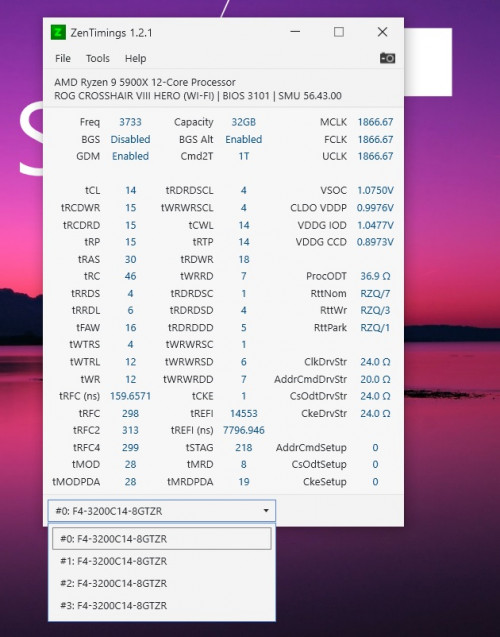
I guess this is the best i can squeeze from my 4x8GB Samsung 3200mhz CL14 kits. Do u think it is worth if i get a 4000mhz CL18 kit considering the new Agesa could do 2000mhz IF.

user posted image
*
If there is any way to get 4000 working with your board/agesa/cpu then you should be able to run your existing kit on 4000c16. Would be surprised if that doesn't work.

cstkl1 need to rely on TristanX or possibly llk for that; I'm on a 5600x for now.

This post has been edited by nrw: Jan 2 2021, 06:01 PM
nrw
post Jan 4 2021, 04:06 PM

Casual
***
Junior Member
398 posts

Joined: Jul 2014


boards imho I'd rather get B550 over x570 unless you need those extra pcie4.0 lanes.
ram yeah... b-die or rev. e kits as mentioned. the rev e got to be imported.

currently I am still testing a cheap hynix djr kit. will share once I am done. this one works well after tweaking, not so sure though if it will work well out of the box with all boards.
nrw
post Jan 4 2021, 04:58 PM

Casual
***
Junior Member
398 posts

Joined: Jul 2014


beast921 what are your requirements for the board in terms of connectivity and do you plan to OC?
nrw
post Jan 4 2021, 06:16 PM

Casual
***
Junior Member
398 posts

Joined: Jul 2014


consider the b550 tomahawk (or the gaming edge wifi if you need wifi 6) or a step up the b550 gaming carbon wifi for the best vrm (excluding some boards that cost RM1.2k+)

all perfectly capable of powering your 5900x. even cheaper boards would be able to do that comfortably btw. it's just that the temps on those gonna be higher yet far from throttling.
nrw
post Jan 5 2021, 06:45 PM

Casual
***
Junior Member
398 posts

Joined: Jul 2014


irangan tag for DJR results.
https://forum.lowyat.net/index.php?showtopi...40&p=99504597&#
nrw
post Jan 7 2021, 11:41 AM

Casual
***
Junior Member
398 posts

Joined: Jul 2014


QUOTE(irangan @ Jan 7 2021, 01:58 AM)
Thanks alot for sharing it. I will buy this set then. Cheap and nice. Was considering a very expensive set from Amazon.

Do you want to sell yours since you finished playing with it? Hehe
*
Just buy new 😅
I'll be keeping it n sell the rev e kit I was using. Easier to OC hence easier to assist ppl setting that up.

Just working on the second DJR kit I got, that one is a bit different. Will update my post in OC thread with results of that one by tomorrow night.
nrw
post Jan 7 2021, 03:07 PM

Casual
***
Junior Member
398 posts

Joined: Jul 2014


QUOTE(absolut_zero @ Jan 7 2021, 11:49 AM)
What 64GB (2x32GB) memory kit/s is/are recommended for Zen 3? Currently, Corsair Vengeance LPX, Corsair Vengeance RGB Pro, and Gigabyte Designare are available in Shopee. Corsair Dominator Platinum is also available but at a higher price.
*
follow what Tristan said.

Technically the situation for DIMM's with 16Gbit IC's (which wiill be on 32GB DIMM's) is pretty easy.

There is
1) Hynix CMR
2) Micron Rev.B
3) Samsung A-Die
4) (SpecTek which is relabeled Micron Rev. B)

All of them are having little issues reaching speeds until 3800 on Ryzen. After that Hynix and Micron ones separate themselves from the Samsung ones.

If you wanna run XMP. Proceed like TristanX proposed.

If you wanna OC you can save a lot money by buying 2400/2666MT/s rated sticks and overclocking them. In that case however you want to make sure to have the same IC's on both sticks you buy.

nrw
post Jan 7 2021, 04:24 PM

Casual
***
Junior Member
398 posts

Joined: Jul 2014


QUOTE(Bonchi @ Jan 7 2021, 04:18 PM)
personally using micron rev B sticks. it doesnt like to go on low latencies but speed wise it can go quite high.. like 4000Mhz high.
*
Yup, cmr will behave similarly. Thanks for confirming.

DR 16Gbit (in 2x32GB or especially 4x32GB config) with CMR and Rev. B will hit the limit of the FCLK and even IMC first afaik.
nrw
post Jan 8 2021, 12:29 AM

Casual
***
Junior Member
398 posts

Joined: Jul 2014


QUOTE(Lagoo00 @ Jan 7 2021, 08:09 PM)
try once , and gotta reset cmos to startup again then gave up lol , sound too complicated to me 
also dunno y , thaipoon burner cant show what die my ram is
*
Take a photo of the side of your ram sticks that has the sticker on it n post here
nrw
post Jan 11 2021, 02:04 PM

Casual
***
Junior Member
398 posts

Joined: Jul 2014


the first crashes u'll see from doing pbo2 wrong will be those in idle/low loads.

This post has been edited by nrw: Jan 11 2021, 02:04 PM
nrw
post Jan 11 2021, 03:20 PM

Casual
***
Junior Member
398 posts

Joined: Jul 2014


QUOTE(beast921 @ Jan 11 2021, 03:13 PM)
Hi bro, mind checking my ram, just got it today via delivery below are the snap shot of the mention ram. (corsair cmw32gx4m2c3200c16w version 4.32)
*
4.32 is Samsung C-Die
nrw
post Jan 18 2021, 02:06 PM

Casual
***
Junior Member
398 posts

Joined: Jul 2014


QUOTE(Bonchi @ Jan 17 2021, 01:52 AM)
zen4 wont be available till nov or looking at current situation with zen3, maybe havt to wait till even 2022 bro...
*
kx221005 shouldn't start dreaming.
last info in this by AMD's VP was by end of 2022
nrw
post Jan 20 2021, 08:48 AM

Casual
***
Junior Member
398 posts

Joined: Jul 2014


QUOTE(nyunyu @ Jan 19 2021, 11:53 PM)
Yeah, his -30 is not realistic at all. I'm on -20 right now, hopefully that is stable. Tried with 25 and 30, occasionally random reboots.
Just curious though, even with undervolt, I still clocked 4850Mhz, I thought the clock would be reduced?
*
I think it's like that:
For regular vCore undervolting you supply less V(oltage) and the F(requency) of the V/F curve drops with it. It also applies the same offset to all frequencies.
For PBO2 you adjust the V of the V/F curve. The F stays where it is. Temps then drop and the chip can boost higher momentarily. It sets different offsets to frequencies.
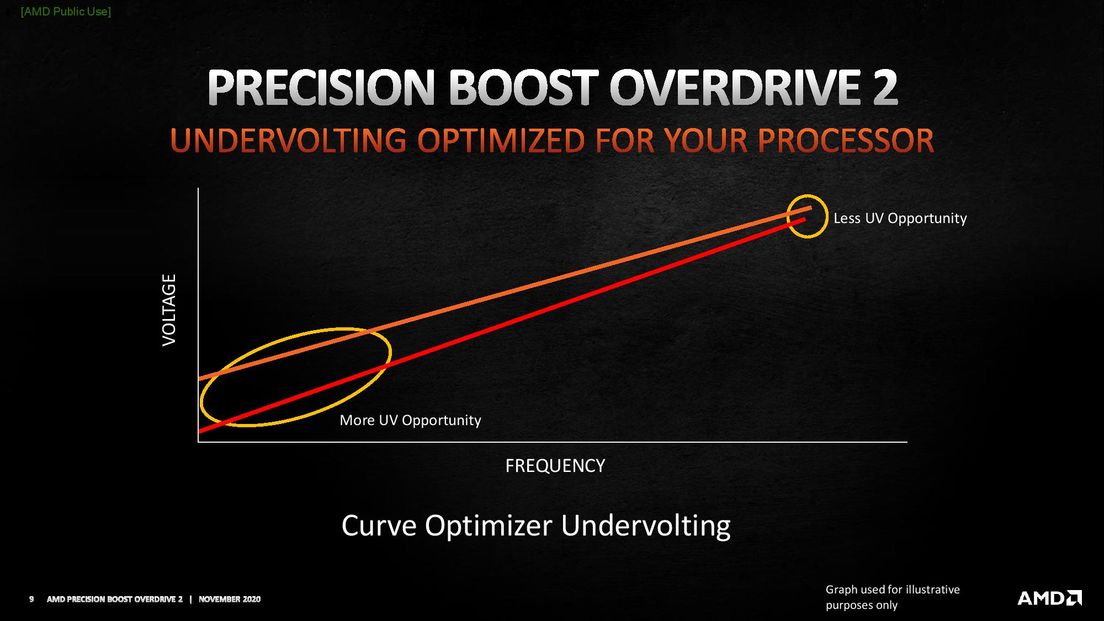
user posted image

You can also set different limits for all cores after having tested which core performs how well.
Fairly easy to do on an 5600x, but you might spend weeks on an 5950x until it's stable, haha.

That's because the annoying thing is that the offset you set is applied for ALL loads, lesser for high loads and more for low loads.
And for idle or low loads it's just too much. Which is where you probably saw your reboots as well.
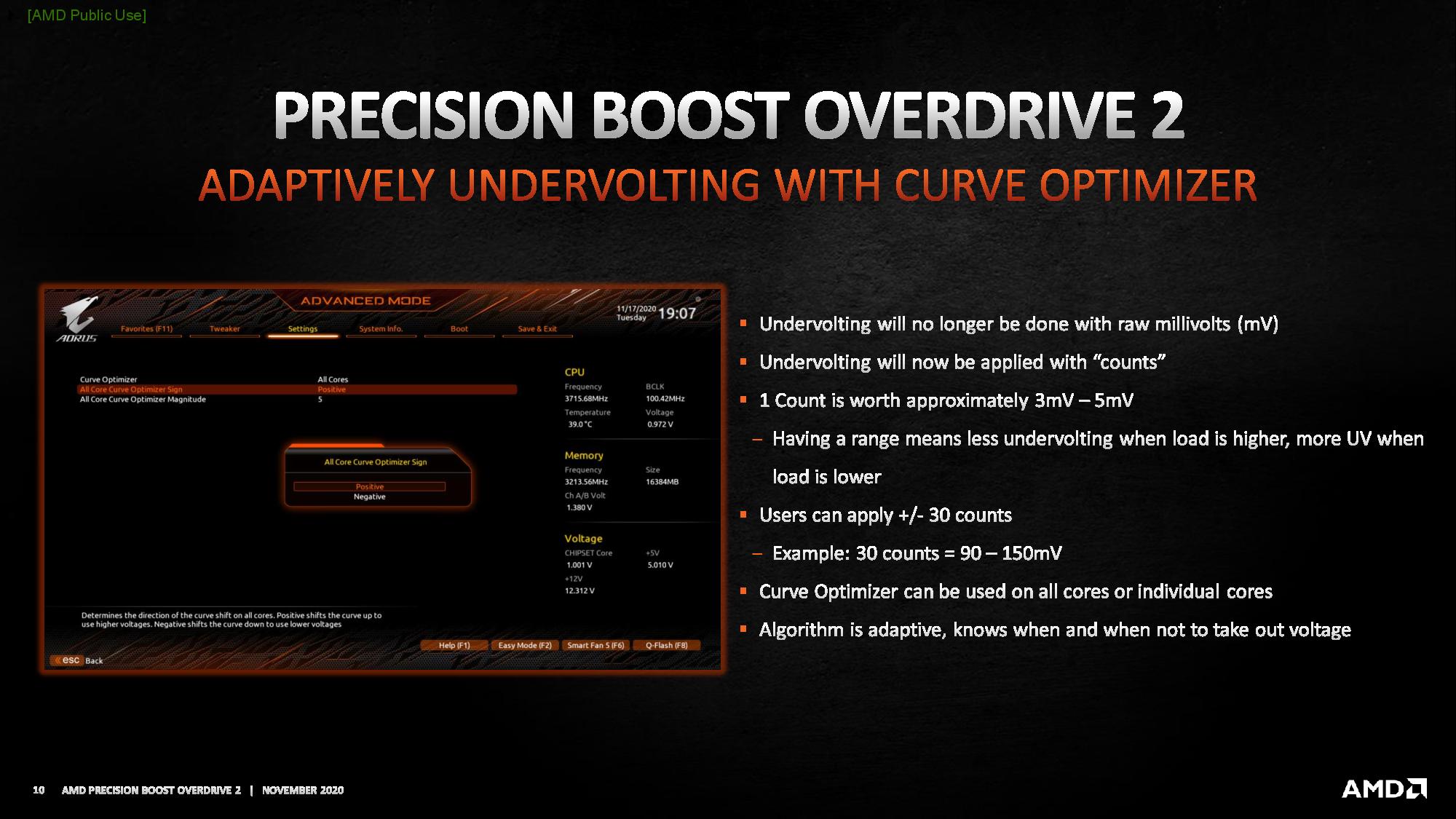
Example: -1 equals to ~ -3 to -5 mV. Probably -3 on high frequencies and -5mV on lower frequencies. If you set -10 in the PBO2 menu it'll be -30 to -50mV.
user posted image

If you have a golden chip maybe you can make it to -30 (90/150) and be fine throughout curve...
but chances are at some place of the curve it's not enough Voltage supplied and hence you get a reboot.

-30 for all cores is utopian anyways, most chips won't even boot into windows with that, let alone be all time stable.
He surely has a nice binned chip supplied by AMD (why do most reviewers just don't get that?) but likely it's not even stable for him on all steps of the V/F curve.

Like SSJBen pointed out, this guy does too many mistakes in his 'guides' cuz he doesn't really get into stuff before recording his videos.

Edited*: added AMD's public use graphs.
Edit2*: actually the boost clock override (up to +200MHz by AMD, up to +500MHz based on OEM) makes it much harder to have a stable system (with override of +200 or more) in combination with a PBO2 curve.
I bet everyone having a 5600x and having played with +200 & PBO2 or above can relate. It just doesn't work all that well.
If you want both, you have to settle for +50 or something much lower than +200MHz.

This post has been edited by nrw: Jan 20 2021, 01:47 PM

nrw
post Jan 26 2021, 03:24 PM

Casual
***
Junior Member
398 posts

Joined: Jul 2014


Bonchi if u r on b550/x570 u can also set pcie of ur gpu to 3.0.
that can fix quite some issues you've been describing as well.
nrw
post Jan 27 2021, 09:39 AM

Casual
***
Junior Member
398 posts

Joined: Jul 2014


QUOTE(cstkl1 @ Jan 27 2021, 04:30 AM)
Cod. Warzone is crazy on “stability”
Coldwar because of dlss/rtx reduces this but
Have u noticed how “rt” or “dlss” type games seem to behave like javascript??

Bomchi you da code guy right. Have u noticed this on dlss2.0??

Infact was talking to owikh84 the other day and we both had our rig before rtx 3080.. alot of ram issue etc all happened after we put ampere on the mobo.
Coincidence??

nrw did u notice anything coinciding with ampere on the system ??
*
AMD not the environment to confirm these kind of issues as zen3 launch came along with Ampere sweat.gif
On 3800 everything was OK though, no issues after a stable profile was made.
But I also play(ed) a very limited amount of games, so I wouldn't dare to say 100% no issues to be had.
nrw
post Mar 9 2021, 02:46 PM

Casual
***
Junior Member
398 posts

Joined: Jul 2014


QUOTE(oldKyoo @ Mar 4 2021, 07:04 PM)
user posted image

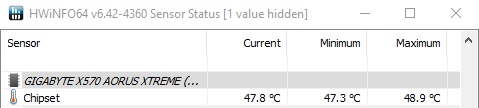
The chipset temps for me is manageable. Its the 5900x idling temps i have a problem with (unless i disable pbo, it never idles below 40c....)
*
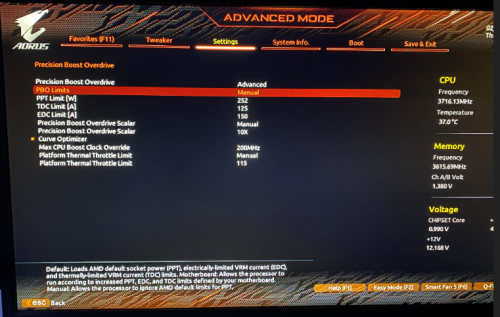
very late reply... but did you set the scalar to any value? what exactly are the settings you set in the pbo menu in general?
nrw
post Mar 9 2021, 04:59 PM

Casual
***
Junior Member
398 posts

Joined: Jul 2014


QUOTE(oldKyoo @ Mar 9 2021, 04:05 PM)
user posted image

CO at -15 all core, too lazy to do slowly set each core (given minimal returns)

edit: tweaks aren't remotely the best, but i am looking forward to degrading this chip and moving back to intel.
*
tongue.gif
If you want lower temps and better performance:

1) Set Scalar to Auto (which will hopefully be OFF with Gigabyte nowadays)
2) Consider setting the power limits to stock, not that you gain much performance there anyways
3) Consider to use CoreCycler to do a curve. But before you start with that, test without it to make sure your boost clock override is actually stable
https://github.com/sp00n/corecycler
nrw
post Mar 9 2021, 08:59 PM

Casual
***
Junior Member
398 posts

Joined: Jul 2014


QUOTE(oldKyoo @ Mar 9 2021, 06:29 PM)
Thank you for the feedback, will try that out!
*
maybe you wait until coming weekend though, still quite some bugs in that corecycler script. just read up on it. (don't have a vermeer myself at this time)
nrw
post Mar 10 2021, 05:00 PM

Casual
***
Junior Member
398 posts

Joined: Jul 2014


attached one other 4200 with DR. not mine but actually since early days there are already some being able to do 4200 synched. I even heard from dr b-dies doing this.


funny thing though is that this is not just a cpu issue apparently. I know ppl testing the same chip on different boards where on one board it maxes out on 1900 or before that and spews errors on >=1933 while just by changing the board n keeping other stuff it'll do 2000.

guess this needs some more testing of users to zero in on it as AMD doesn't seem to bother, at all.
nrw
post Mar 13 2021, 11:31 AM

Casual
***
Junior Member
398 posts

Joined: Jul 2014


as long as it drops to .9V thats fine. This is specified in the power plans. You could tune that down but you'd gain nothing as cores go to sleep anyways and a lower voltage would just decrease performance without any further benefits.

Make sure you run the windows default plan for zen3, got bios properly set up and got no tool controlling power plans and/or voltages like some infamous motherboard manufacturers tools love doing.

This post has been edited by nrw: Mar 13 2021, 11:32 AM

17 Pages « < 13 14 15 16 17 >Top
 

Change to:
| Lo-Fi Version
0.0315sec    0.31    7 queries    GZIP Disabled
Time is now: 15th December 2025 - 02:51 AM