

QUOTE(sonyfanzz @ Nov 12 2020, 02:20 PM)
wow 4.85ghz on 5600x 

could be asus using the +200MHz as per default though.will be confirming this on an x570 unify this weekend.
AMD Ryzen, AM4 / AM5 Platform
|
|
 Nov 12 2020, 02:25 PM Nov 12 2020, 02:25 PM
Return to original view | Post
#241
|
 
Junior Member
398 posts Joined: Jul 2014  
|
QUOTE(sonyfanzz @ Nov 12 2020, 02:20 PM) wow 4.85ghz on 5600x could be asus using the +200MHz as per default though.will be confirming this on an x570 unify this weekend. |
|
|
|
|
|
Nov 12 2020, 03:26 PM
Return to original view | Post
#242
|
|
Junior Member
398 posts Joined: Jul 2014
|
QUOTE(SSJBen @ Nov 12 2020, 03:18 PM) The +200mhz is PBO FMAX. yes my point being is the 5600x boosting to 4.85 without it.There are some 5900x on the Crosshair 8 that's already doing 5.15ghz.  Btw, you almost got a perfect ccd1 there, the core5 will screw you over for regular ccd oc though  This post has been edited by nrw: Nov 12 2020, 03:28 PM SSJBen liked this post
|
|
|
Nov 12 2020, 06:00 PM
Return to original view | Post
#243
|
|
Junior Member
398 posts Joined: Jul 2014
|
QUOTE(SSJBen @ Nov 12 2020, 03:38 PM) I'm skeptical of the 5600x can indeed boost to 4.85 without a PBO FMAX/OC... that seems a little far fetch I think. Let us know your result later. 1 BIOS Flasback later with same settings: 4650 with Boost Clock Override disabled. 4850 with Boost Clock Override on +200. Working as per values in the AGESA now then Yeah core 5 on CCD1 and core 10 and CCD2 are the weak links. But it is what it is with dual chiplets, I think the best bins are reserved for the 5950x. EDIT - there is also a new beta firmware I've yet to try, 2501.  2501 will have Curve Optimizer; perfect feature for your chip. Gave that a try already... very nice to see this being added. |
|
|
Nov 12 2020, 07:01 PM
Return to original view | Post
#244
|
|
Junior Member
398 posts Joined: Jul 2014
|
QUOTE(xxboxx @ Nov 12 2020, 06:47 PM) nrw Thaiphoon Burner famous for false detections This RAM is good? Right now put on XMP and all settings auto You can try to set TRFC to 288 n see if it posts. If it does those are B-Die's. But probably it won't cuz there's Samsung C-Dies on it so be prepared for a CMOS reset |
|
|
Nov 12 2020, 07:31 PM
Return to original view | Post
#245
|
|
Junior Member
398 posts Joined: Jul 2014
|
xxboxx nope thaiphoon burner is the only one.
If the readout is correct, yes that's dual rank then. But that one is super easy to check visually anyways: 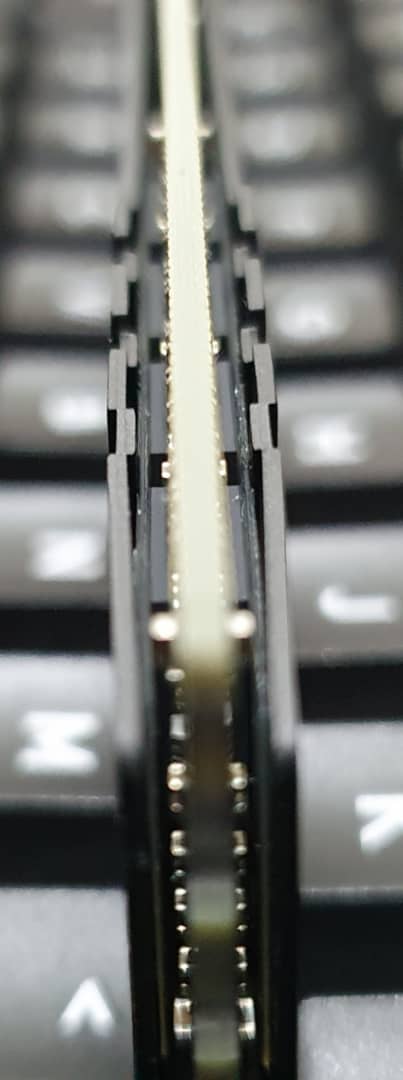 This is DR (Dual Rank). 8 chiplets with 8Gbit/s=1GB on each side of the PCB. If one side had those chiplets and the other a foam or thermal pad -> SR (Single Rank). N before someones coming around n telling me there can be 8x4bit IC's on both side still making it SR or even 16x8bit IC's on each side making it quad rank, yes I know but let stick to whats generally found on the market right now.  This post has been edited by nrw: Nov 12 2020, 07:39 PM |
|
|
Nov 12 2020, 11:12 PM
Return to original view | Post
#246
|
|
Junior Member
398 posts Joined: Jul 2014
|
QUOTE(llk @ Nov 12 2020, 10:23 PM) (...) Old list 😅Ver4.23 = Samsung 4Gbit D-die Ver4.24 = Samsung 4Gbit E-die Ver4.31 = Samsung 8GBit B-Die (...) 4.31 B-Die 4.32 C-Die Thanks for pointing this out! Totally read over the Corsair (LPX) QUOTE(xxboxx @ Nov 12 2020, 08:56 PM) Didn't POST. C-Dies possibly then. They can do 3600 reasonably well. If you want I can drop you some timings.Man, this RAM is a real b1tch. Change a bit timing and it won't POST. Touch anything and it won't POST. My ex CJR will POST with almost any setting albeit fail mem test. Only change I manage to do is tighten timing to 16-17-17 Now running mem test But the thing is they've got quite some variance so they are annoying to OC. This post has been edited by nrw: Nov 12 2020, 11:25 PM |
|
|
|
|
|
Nov 13 2020, 12:14 AM
Return to original view | Post
#247
|
|
Junior Member
398 posts Joined: Jul 2014
|
Btw: if anybody still searching for 5600x/5950x: Asukaexpress still seems to have some. A520M-K + 5600x X570 Gaming Plus + 5600x/5950x B550i Aorus Pro AX + 5600x/5950x X570 Aorus Elite + 5600x/5950x This post has been edited by nrw: Nov 13 2020, 12:15 AM edmund_yung and TristanX liked this post
|
|
|
Nov 14 2020, 02:02 AM
Return to original view | Post
#248
|
|
Junior Member
398 posts Joined: Jul 2014
|
QUOTE(Fizzy-Fiz @ Nov 14 2020, 01:54 AM) saw that youre using the b550i aorus. comparable to the asus or nah? for now I only have the b550i strix and a x570 unify.the aorus b550i is not with me just yet, waiting for it to arrive. |
|
|
Nov 16 2020, 08:27 PM
Return to original view | Post
#249
|
|
Junior Member
398 posts Joined: Jul 2014
|
u can claim and add to your amd rewards account, the game itself u can only get when it's launched or the preload started
|
|
|
Nov 16 2020, 10:34 PM
Return to original view | Post
#250
|
|
Junior Member
398 posts Joined: Jul 2014
|
QUOTE(Andrewtst @ Nov 16 2020, 09:24 PM) May I know what games you all talk about, where to claim? Thanks. https://www.amd.com/en/gaming/equipped-to-win |
|
|
Nov 16 2020, 11:51 PM
Return to original view | Post
#251
|
|
Junior Member
398 posts Joined: Jul 2014
|
QUOTE(Andrewtst @ Nov 16 2020, 11:21 PM) Oh thanks, this need buy from AMD mentioned site right. In this case it wasn't useful for me anymore as I already using it now. no. just go to amd malaysia facebook msg them about the code. they will ask for your invoice. provide that n u'll get it a code to follow up with. |
|
|
Nov 17 2020, 09:01 AM
Return to original view | Post
#252
|
|
Junior Member
398 posts Joined: Jul 2014
|
QUOTE(llk @ Nov 17 2020, 02:08 AM) i already got the coupon code, need to claim at Ubisoft? I think the furthest you can go is having it saved in your AMD Rewards account. |
|
|
Nov 20 2020, 01:04 AM
Return to original view | Post
#253
|
|
Junior Member
398 posts Joined: Jul 2014
|
probably they were like if there's no stock we might as well release it now n get the publicity
wonder how ram oc is on these boards if its like  on b550/x570 already on b550/x570 alreadyThis post has been edited by nrw: Nov 20 2020, 01:05 AM |
|
|
|
|
|
Nov 20 2020, 10:03 PM
Return to original view | Post
#254
|
|
Junior Member
398 posts Joined: Jul 2014
|
have had a 5600x, 5800x, 5900 n all idle within 3 degrees of ambient with custom loop, even on air you shouldn't be more than 10 degrees off that. some stock setting with ur board or even a tool in your windows is causing that.
|
|
|
Nov 20 2020, 10:30 PM
Return to original view | Post
#255
|
|
Junior Member
398 posts Joined: Jul 2014
|
QUOTE(targon @ Nov 20 2020, 08:35 PM) My experience with Amd ryzen since last year is a mix bag. just dont do any ram oc for now.Got a 3900x first, went dead barely one month of use ( it's not even oc yet). Luckily I have a spare unused 3700x to test. No issues with the 3700x and the mobo. Then got the 3950x when launched last year. Works well. Then have high hopes on zen 3. Bought a 5950x . But it's a disappointment. It can't work stable on the aorus Xtreme with random windows Bsod due to Whea errors. No issues with the old 3950x. Went back to the shop, got the chip into another customer dark hero mobo with the same result, Bsod. So shop refunded back via credit note. Could be a faulty chip, no one can really answer. Cos I pose the question to giga support, they can't really give me an answer. Putting the blame on windows and driver s instead. Been checking on other international sites as well, found out that 5000 series is a hit and miss affair. If it works with your configuration, u re ok. If it doesn't, it will be a nightmare. The current agessa and 5000 series support is crap. Wish Amd has done extensive testing on it. According to shop technician, they're having most compatibility issues with giga boards. Morale of the story, cutting edge tech but the hype exceeds the reality. AMD boleh. 6800 experience anyone ? Frame rates aside, overall experience is important. Drivers stability ? Wish Amd would deliver more with it's products. Overall customer satisfaction and experience counts and not the high frames, high benchmark scores and the marketing hype. you can't even blame gigabyte. at some point every board will run into issues. I have boards from every major manufacturer other than asrock here n its all the same. so rather blame AMD for supplying such a shitty agesa to board makers. there are boards running into stability issues with >1600fclk/3200mt/s memory. others do fine until 3800. above that no matter which board... you'll run either into whea or some other sort of random instabilities. some bad enough to corrupt your windows in minutes. the only thing you could blame board makers for is applying silly voltages mostly on vsoc, that's about it. alfiejr liked this post
|
|
|
Nov 21 2020, 11:02 AM
Return to original view | Post
#256
|
|
Junior Member
398 posts Joined: Jul 2014
|
QUOTE(iZuDeeN @ Nov 21 2020, 10:24 AM) bottom 2 fans is intake I'd test bottom as exhaust, compare GPU and system temps. like this pushing air towards the side of the gpu which is exhausting.Edit:* perhaps change top as intake together n confirm temp changes. This post has been edited by nrw: Nov 21 2020, 11:15 AM |
|
|
Nov 23 2020, 03:15 PM
Return to original view | Post
#257
|
|
Junior Member
398 posts Joined: Jul 2014
|
QUOTE(Current Events guy @ Nov 23 2020, 03:09 PM) Is there anything else besides the mobo bios updates causing issues at the moment? It's AMD's AGESA making the 99% of the issues.Most boards are fine if you don't load xmp for ram. Some are even fine with higher ram frequencies or proper ram oc. The only board makers mistake is that some (including giga for what I can see, love to apply too much voltage on io die components. My giga board applied 1.25V soc stock voltage for 3600 memory and as other voltages such as the imc or if are derived from this they end up being too high as well. |
|
|
Nov 23 2020, 04:53 PM
Return to original view | Post
#258
|
|
Junior Member
398 posts Joined: Jul 2014
|
QUOTE(yimingwuzere @ Nov 23 2020, 03:33 PM) What's the current go-to ITX/DTX board for X570/B550? All of them seem to come with different limitations, so currently looking for what's the best option I can get. Forget X570 for ITX, no benefit other than the second m.2 being PCIE4.0.These are the cons for all of those I noticed so far: Crosshair Impact: seems to be RM2000++ everywhere I looked, need to import Strix X570: no USB-C front header, need to import Strix B550: lousy USB rear port selection Gigabyte + MSI: can't use my NH-C14S with these boards well Asrock B550 Phantom Gaming: right angled SATA ports might be an issue with the ITX case I'm thinking of buying Asrock X570: horrible USB rear port selection if you're not using Thunderbolt ... Select B550 among the ASUS (with me), ASRock (Phantom) or Gigabyte B550(with me). Gigabyte/ASRock both got great VRM but no USB-C for the Giga and a lousy BIOS on both. ASRock and ASUS have Intel 2.5Gbe which is a bonus. The ASUS (short of a USB ports as you noticed) on paper is inferior but the BIOS n tuning makes up for it. On Zen2 I liked this most. It however remains to be seen how much love ASUS will give to it regarding Zen3. They have a pretty bad history of maintaining older AM4 boards. If you like to tinker with your CPU/RAM, the ASUS would be my favorite. If you don't do that take the ASRock for USB-C + Intel Ethernet or the Gigabyte for the cheaper price tag. This post has been edited by nrw: Nov 23 2020, 04:53 PM sonyfanzz and yimingwuzere liked this post
|
|
|
Nov 24 2020, 12:09 PM
Return to original view | Post
#259
|
|
Junior Member
398 posts Joined: Jul 2014
|
QUOTE(pcbuilder420 @ Nov 24 2020, 11:44 AM) Sorry, actually has 2x3pin and 2x4pin rgb headers, was super blur yesterday and misread some information on their website lol With the 5600x being rated at 65W I won't expect a 5600.I think only difference is it has Bluetooth5.0 enabled and maybe slightly better VRM cooling compared to the ASUS board. Simply came up with a username to discuss my pc build hahah Found one selling at RM869 basically MSRP. I'm leaning towards buying the 3600 first, then if the 5600 (non-x) releases at good price, I'll just upgrade and sell the 3600 at slight loss early next year. Good idea or should I still get the 5600x (@RM1399)? Also pairing it with RTX3070 and gaming @1440p 144Hz If ur gaming at 1080p get the 5600x, at 4k 3600 will do. sonyfanzz liked this post
|
|
|
Nov 25 2020, 02:51 PM
Return to original view | Post
#260
|
|
Junior Member
398 posts Joined: Jul 2014
|
QUOTE(Someonesim @ Nov 25 2020, 02:19 PM) Havent research yet on zen 3, but you hint that ryzen not too compatible with xmp ? No you got that wrong. XMP itself is not the issue.I know Ryzen 1000 series have really bad memory compatibility, but thought much better at 3rd gen onward ? I'm using A-XMP now with TridentZ Neo 3600 ( was told neo have better Ryzen compatibility ) but not stable at gaming ( random ) and video conversion @ 100% CPU load ( likely crash after 10-20 minutes ) They changed the physical layout on the CCD moving the GMI down (from center on zen2) so the cores now are closer to each other (no more CCX groups). Then they went ahead and allowed for a higher Infinity Fabric clock, with optimizations I am not aware of what they are. Ultimately they didn't put the necessary verification and testing work into their AGESA to make sure there are no issues with these and more changes they have done to Zen3. The result is a fundamentally flawed experience for the vast majority of chips and boards when just running your memory at higher speeds (as the Infinity Fabric (flck) and Memory Controller (uclk) will automatically will follow 1:1:1 until 3600 which for some combinations is already enough to create issues). If you go above 3600 1:1:1 manually that's just going to get worse. I can run 4000/4133 bench stable but the voltages applied will still cause crashes in daily usage and I have ZERO motivation to invest hours/days to adjust these knowing all that is gonna change with the next AGESA, yet again. So at the end of the day it's just AMD messing up another launch without actually having to as I don't see why they didn't have the time to deliver a smooth launch with Intel being in hibernation mode. alfiejr liked this post
|
| Change to: |  0.2277sec 0.2277sec
 0.43 0.43
 7 queries 7 queries
 GZIP Disabled GZIP Disabled
Time is now: 16th December 2025 - 08:29 AM |
 Quote
Quote