Welcome Guest ( Log In | Register )

22 Pages « < 12 13 14 15 16 > » Bottom

Outline · [ Standard ] · Linear+

 AMD Ryzen, AM4 / AM5 Platform

views
     
Bonchi
post Mar 3 2021, 03:13 PM

KittehPowah
******
Senior Member
1,649 posts

Joined: Sep 2008
QUOTE(SSJBen @ Mar 3 2021, 02:57 PM)
My bro in law lives in Texas. The recent snow storm he had to use his system to heat up the room. Water block ain't gonna do shit.  laugh.gif
*

If can heat up the room in a -18C cold snap in texas... our lovely 34C malaysia weather can become fat burning sauna room laugh.gif

but damn.. if the room is really -10C, imagine the liquid inside the loop all froze up shocking.gif

This post has been edited by Bonchi: Mar 3 2021, 03:15 PM
Bonchi
post Mar 3 2021, 03:42 PM

KittehPowah
******
Senior Member
1,649 posts

Joined: Sep 2008
QUOTE(Current Events guy @ Mar 3 2021, 03:21 PM)
I haven't seen this in the community before. Care to share some examples of x570i chipsets melting?
*
QUOTE
X570 chipsets are HOT AF.

On my CH8, idle is 58c lmao in a room where ambient is 21c. And yes my case is well optimized for positive air flow and I do have air passing over the chipset areas.

And no, it doesn't get much cooler than that no matter what you do.
*
https://www.reddit.com/r/Amd/comments/cd6ze...t_temperatures/
https://forums.tomshardware.com/threads/saf...rature.3531213/
https://hardforum.com/threads/safe-x570-chi...oncern.2000597/

basically it will always be above 50C even on ATX in cold ountries. on ITX, easily 70-90C at load depending on airflow... sandwich one more gen4 nvme under the shared heatsink then 100C brows.gif. That's why x570i only got gigabyte, asrock and asus which are all not being recommended. MSI didnt even bother to make an ITX version.. and ASUS created the DTX form factor just to beef up the cooling even more.

You rarely see it in the itx community because majority knows of this problem and got the X470i/B450i instead for ITX builds... and now use B550...especially some B550i model have even beefier vrm than the x570.

This post has been edited by Bonchi: Mar 3 2021, 03:51 PM
Bonchi
post Mar 3 2021, 05:12 PM

KittehPowah
******
Senior Member
1,649 posts

Joined: Sep 2008
QUOTE(Current Events guy @ Mar 3 2021, 04:18 PM)
Im unsure of the mobo models ITX users have but I'm sure that there hasn't been a case of the chipsets melting, just as I'm sure that there are more than a handful of X570i users. If there was such as issue, it would have been highlighted in the community like the SF PSUs being faulty around 2q2020 or H1 potentially catching on fire.

I looked through the links and saw that they're on ATX but the thermals matched my experience on the ITX. I've got a couple giga X570is around and if we're going by anecdotes, the one in the smallest case I have (k39) gets to about 70°C during extended gaming. This isn't much of a problem as stated in the links given, unless I'm missing something.

Yes the chipset gets hot but it doesn't seem to be an issue.
*
Melting is just an expression of it running really hot.. and by means anything above 60C is considered hot, 70-80 is really hot. Melting does not mean breaking down but literally means higher than comfort.

It's the same as to any electric components as we all want to keep it lower than 60C vrms included.


Bonchi
post Mar 3 2021, 06:20 PM

KittehPowah
******
Senior Member
1,649 posts

Joined: Sep 2008
QUOTE(Current Events guy @ Mar 3 2021, 05:19 PM)
Yep, got the OS on it.
As hot as it is, and as much as we'd like for it to be lower, it's not noticeably affecting performance at least in my case.

Is there a temp limit from AMD somewhere stating the thermal limits of the X570 chipset?
*
affecting performance of course not. But yeah, according to AMD X570 limit is 105C so it is already expected to run very hot.
Put in the same perspective of overclocked 10900K running at 95C or the rtx3090 vram at 100C. These numbers are below max operating temps and are not throttling yet, but of course you wont sleep comfortable knowing the chips are constantly running at such temps, especially when it comes to parts longevity.


Bonchi
post Mar 5 2021, 11:37 AM

KittehPowah
******
Senior Member
1,649 posts

Joined: Sep 2008
QUOTE(cawan @ Mar 4 2021, 11:35 PM)
Asking, was mobo b550 overkill for low-mid gaming setup?

Or enough with b450? How about Long term or future proof for this board?
*
also the chipset bios may have some bug as B450 was designed with ryzen 2nd gen 20 pcie lanes in mind as compared to 3rd gen’s 24. So some motheboards will detect as 20cpu lanes and drop the 16x pcieE gen3 down to 8x when the m.2 slot is used... I had this problem with MSI B450i gaming plus AC.

And somehow for B450, AIB seldom publish the detailed info online or in the manual regarding how the pcie lanes are assigned.. so hardware pairing like using multiple m.2/pcie devices/sata devices together might cause either one to not be detected. B550 onwards tend to have a better info.

B450 and x470 actually reached end of line last year. It doesnt officially support the latest 5000 series but is made possible with a beta bios instead. While B550 will be last AM4 motherboard. So either way, there is no future proofing for both so just buy whatever that fits your budget and requirement.

This post has been edited by Bonchi: Mar 5 2021, 11:42 AM
Bonchi
post Mar 10 2021, 04:10 PM

KittehPowah
******
Senior Member
1,649 posts

Joined: Sep 2008
QUOTE(yimingwuzere @ Mar 10 2021, 02:28 PM)
4200 RAM in coupled mode - is this a golden sample for IMC?

https://www.reddit.com/r/overclocking/comme...x_micron_rev_e/
*
although the trfc is pretty loose for a rev E but not bad... but it's a 16GB single rank kit so I guess that helps too.
Bonchi
post Mar 10 2021, 06:11 PM

KittehPowah
******
Senior Member
1,649 posts

Joined: Sep 2008
QUOTE(SSJBen @ Mar 10 2021, 05:06 PM)
It could be bandwidth related, but as far as I've experienced - doesn't seem to be the only reason for connectivity issues. I have 3 external drives connected all the time too, so coupled that with the DACs I test and when gaming in VR/fighting/racing, the bandwidth load on the I/O should be very high. This is reflected in the ridiculous heat output on the X570 chipset specifically on the CH8, which goes up to 69c for me.

So what Bonchi experienced goes deeper than just I/O bandwidth IMO.

VR has been broken for months with nvidia drivers. 461.09 improved things, but still far from perfect. I'm still getting the odd judder here and there, doesn't make it unplayable like before where there are over 200ms frame spikes every few seconds. The last properly working driver was 446.14, but fucking 3080 doesn't work on that driver now does it? Dumbass nvidia. sweat.gif
*
yeap.. it is down to many things ... like chipset drivers, device drivers, windows version, software compatibility, and also RAM compatibility which plays a very BIG role .. and not to mention their crappy thing called AGESA.

This problem i dont think is something new, if you look back.. there's already such feedback since zen2 and Im one of them on a B450 board sweat.gif, as you know I have been having this problem since 2019...... I guess because more people using AMD now so there's more of such issue being reported and it has been over a year yet AMD still havent have a full fix for this. On one AGESA 6 months after I had my system running, they did make my USB hub work but not 100%... And later, took more than a year for them to officially acknowledge this problem and start to collect system configs that are affected, while before that they never entertain or reply any of my feedbacks.

So I dont have confidence that AMD will solve this anytime soon and so I made the leap back to intel.

Bonchi
post Mar 12 2021, 11:59 AM

KittehPowah
******
Senior Member
1,649 posts

Joined: Sep 2008
QUOTE(JohnLai @ Mar 11 2021, 03:23 PM)
Strange, recently my 5950X start to randomly blue screen with WHEA.

But there is nothing at event viewer on which WHEA code (18 nor 19).

Just a bugcheck and a large Memory.DUMP

The random blue screen with WHEA (no error code) seems to happen on idle only.
*
Could be due to die deterioration too. my ryzen also start to show signs weeks after use and then it's just an endless troubleshoot.

your ram will be the first suspect in this whole case. just run them at 2444mhz for a few months and see. Remove most components, set pcie to gen3, use only 1 hdd drive and monitor. reformat your PC.

Or just go with intel if youre tired of AMD's reliability issues.

as for the idle voltage and temps... Just forget about it and let the cpu bake itself. it's a ryzen behavior and not a bug. If you want it to truly idle then you just check your task manager and close everything that is running, especially afterburner and all monitoring apps.
Bonchi
post Mar 12 2021, 12:15 PM

KittehPowah
******
Senior Member
1,649 posts

Joined: Sep 2008
QUOTE(TristanX @ Mar 12 2021, 12:35 AM)
Took them more than 1 whole gen to acknowledge it is an AGESA issue and i wonder what those dufus who kept defending AMD would say about this. Thankfully i dont have to face all this crap anymore.
Bonchi
post Mar 12 2021, 01:36 PM

KittehPowah
******
Senior Member
1,649 posts

Joined: Sep 2008
QUOTE(TristanX @ Mar 12 2021, 12:21 PM)
Currently using Ugreen USB 3.0 switch for both AMD and Intel rig on USB 3.0 port and its powered by Anker Powerport.

https://shopee.com.my/UGREEN-USB-Switch-Sel...3440.1133224526

Got Sound Blaster X3, Corsair K70 Mk.2 and Logitech G502 Hero plugged into it. No issue so far.
*
Lavry da11 doesnt work at all, smsl m3 random disconnects.

Hub is some cheap one, also doesnt work at all. Need to use one with additional external power. especially for racing rig

The first ducky keyboard 1008 doesnt work, need ps/2 adapter. g304 mouse random disconnect. taobao mech keyboard only works on USB3.0 ports.
Bonchi
post Mar 12 2021, 03:01 PM

KittehPowah
******
Senior Member
1,649 posts

Joined: Sep 2008
QUOTE(TristanX @ Mar 12 2021, 01:58 PM)
High end and power sucking devices may need USB 3.0 or powered hub. Even my USB 3.1 HDD enclosure will not work on some of the USB 3.0 port. I had to use powered USB 3.0 hub for it or USB 3.1 ports.
*
But my z490 board doesnt show these behaviors. while both b450 and B550 have.

Had to leave some USB ports empty on my AMD else all the ports will go haywire. using a powered hub tends to work better than plugging into multiple usb port on the rear i/o.

MSI b450i gaming plus AC, Gigabyte B550i pro AX

Ryzen 3600, corsair SF750.

This post has been edited by Bonchi: Mar 12 2021, 03:15 PM
Bonchi
post Mar 12 2021, 03:27 PM

KittehPowah
******
Senior Member
1,649 posts

Joined: Sep 2008
QUOTE(TristanX @ Mar 12 2021, 03:17 PM)
Depends on age as well. I had to buy new cable for some of my stuffs too. Been looking for quality USB cables these days.

Yeah, powered usb hub takes power requirements off your USB port.
*
Changed alot of USB cables and very high quality shielded ones as well primarily because of my audio hobby.

Amd just epic fail here. Powered USB hubs tend to be noisy too, that's why i try to avoid that and only use them for my sim racing rig.

anyways, in the end, the best solution for me is switching to intel laugh.gif dont have to wait till April to know the AGESA fix works or not.
Bonchi
post Mar 12 2021, 03:41 PM

KittehPowah
******
Senior Member
1,649 posts

Joined: Sep 2008
QUOTE(SSJBen @ Mar 12 2021, 03:34 PM)
To be frank, it's a toss up.

Back on Intel system, whenenver I connected an external HDD my wireless logitech K400 would go insane and have a massive amount of lag/drop connection although funny enough other wireless devices like the Xbox controller and Logitech GPro mice is fine.
Connecting an external HDD will also cause DPC latency to spike to insane levels, so audio data streams crackles due to loss in data packets. This hasn't happen on AMD IME.

Both platforms has issues.
*
Agreed. just this time on my AMD, it's gotten too ridiculous... to the point that i might as well just not use my pc at all, as you can recall at the nvidia tered, After swapping to the 3080, my pc gotten even more unstable that i just left it off for 2 months. Changed to B550i and then left it off again.

This post has been edited by Bonchi: Mar 12 2021, 03:42 PM
Bonchi
post Mar 12 2021, 04:05 PM

KittehPowah
******
Senior Member
1,649 posts

Joined: Sep 2008
QUOTE(SSJBen @ Mar 12 2021, 03:43 PM)
A lot of it has also gotta do with wintrash. These issues seldom happen over on Linux or Mac, no matter the hardware used.
*
Janji my problem all solved with intel so I not gonna have faith with AMD anymore in terms of reliability, plus this USB is not my only issue with them.

QUOTE(yimingwuzere @ Mar 12 2021, 04:01 PM)
https://www.tomshardware.com/news/amd-issui...-in-early-april

AMD says a BIOS fix for the USB issue is coming in April... I wonder what the "fix" really entails?
*
Or maybe it fixes nothing, as usual laugh.gif

Bonchi
post Mar 12 2021, 05:02 PM

KittehPowah
******
Senior Member
1,649 posts

Joined: Sep 2008
QUOTE(yimingwuzere @ Mar 12 2021, 04:54 PM)
Mine is hovering around 1.3V, rare drops to 1.0-1.2V. It's not truly idle though, HWInfo, MSI Afterburner, couple other apps are still running. No WHEAs reported since I was tuning Curve Optimizer early last month.

GTX 970 is a 150+W TDP card, it would be rather poor for the PSU if it's already overloading from that.
*
5950x 200w + 150w = 350w, should be still within the safe zone. Perhaps the eco mode is what preventing the whea errors. afterall it seems it was running fine until recently.
Bonchi
post Mar 12 2021, 06:11 PM

KittehPowah
******
Senior Member
1,649 posts

Joined: Sep 2008
QUOTE(JohnLai @ Mar 12 2021, 05:57 PM)
Hmm......guess I am the only one with this voltage issue. This is really strange. I can only hope that constant 1.45v cpu core voltage (SVI2 TFN) will not kill the cpu..... sad.gif

There is nothing running on my 5950x PC, yet the voltage stay at 1.45V.
Selecting Power Saver will drop the voltage to 1.0V.
But I thought ZEN 3 doesn't need special power plan? :confused:
*
No, it is a must to set the special ryzen powerplan. Zen2 and Zen3 behavior is the same as afterall the IOD used is exactly the same. The only difference of zen3 is the rearrangement of the cores and the L3 cache in the CCX that increases the IPC. Apart from that, most symptoms such as crashing, high idle boosting behavior, ram compatibility is the same between both.

The high idle voltage is also another of my major complain about ryzen and one of the reason i sold it. my 3600 never go below 1.3v unless i shut off everything then it will be 0.9v.. with the balance ryzen powerplan

This post has been edited by Bonchi: Mar 12 2021, 06:14 PM
Bonchi
post Mar 12 2021, 09:44 PM

KittehPowah
******
Senior Member
1,649 posts

Joined: Sep 2008
QUOTE(JohnLai @ Mar 12 2021, 08:49 PM)
hmm.gif
Perhaps my ancient psu is showing its age instead.
It is close to 10 years of usage after all.  laugh.gif
*
Best to borrow one bigger psu to try, or disabling your gpu OC and some HDDs and try again.

dont end up like me, upgraded a few weeks old SF600 to a SF750 which helps with absolutely nothing. (So i ended up with upgrading my 2080 to 3080 because i dont want to waste the PSU)

This post has been edited by Bonchi: Mar 12 2021, 09:45 PM
Bonchi
post Mar 13 2021, 02:13 AM

KittehPowah
******
Senior Member
1,649 posts

Joined: Sep 2008
QUOTE(Ebony & Ivory @ Mar 13 2021, 01:19 AM)
After reading all these posts about the idle voltage,  just checked my 3700x with ryzen master, it is around 0.2 - 0.5v during idle. hmm.gif

[attachmentid=10809572]
*
It depends on what is running on the background as well. We have doing nothing idle or playing music in the background idle or YouTube/video playing in the background idle.

Doing nothing idle with no running apps, definitely temps and voltage will be lower as the ccx will enter sleep state like yours. If that’s the case, might as well just shut down the PC.

But the other 2 then will be a different case. for my case, I have a music player running and the voltage will be locked to 1.3 to 1.4v... I think john also. anything light at the background will affect the sleep state such as rgb software, monitoring tools, afterburner, i torrent etc.

user posted image
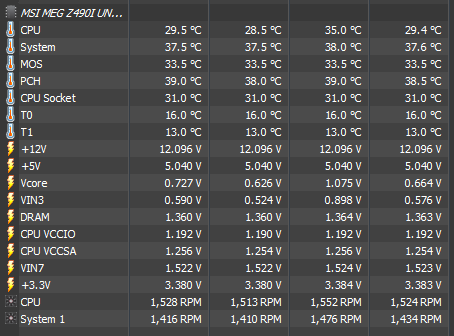
Meanwhile this is my 10400F temps when youtube is running. room temp is 28C~ no aircond lolol.

This post has been edited by Bonchi: Mar 13 2021, 02:33 AM
Bonchi
post Mar 13 2021, 02:21 AM

KittehPowah
******
Senior Member
1,649 posts

Joined: Sep 2008
QUOTE(- JaY - @ Mar 13 2021, 02:14 AM)
where to choose? my power plans no AMD specific, using 5600x here.
*
Install the board chipset drivers then the ryzen power plan should be there in the windows power setting for zen2. But yours is zen3 so I guess you won’t see it and you should use the balanced power plan.

But no matter what, it wont really help much. This is just the behavior or ryzen cpu so just live with it. the 40-60C numbers might not look nice when just doing light browsing or watching a video, but it wont destroy your cpu.. it’ll just make your room slightly warmer and fans slightly louder

This post has been edited by Bonchi: Mar 13 2021, 02:21 AM
Bonchi
post Mar 13 2021, 10:13 AM

KittehPowah
******
Senior Member
1,649 posts

Joined: Sep 2008
QUOTE(JohnLai @ Mar 13 2021, 09:16 AM)
Indeed, I posted the issue at reddit, but most people wrote, "ignore the high voltage, the cpu core is properly gated off when entering CC6".
But the temperature tells another story.

Both 3950x and 5950x systems chassis side are open and not closed. (In the same room)
3950x = deepcool gammaxx 400 pro (dual fan)
5950x = coolermaster 212 hyper turbo (dual fan)

3950x = temp idle at 43'C
5950x = temp idle at 52'C
Can verify this. 3950x will max the CPU Core Voltage SVI2 TFN reading and stay at there constantly until the music playback is paused. Just starting qbittorrent without any active torrent and let it there also causes the voltage reading to stay at max.

Uncertain on 5950x since the CCV SVI TFN seems to stuck at 1.45v
*
That’s the answer I got and they all say don’t trust hwmonitor and only look at ryzen master.... but ryzen master also shows the same thing lolol.

You may want to check your c-state and cool n quiet settings in the bios. these will affect the idle states as well. however if they’re all set correctly then I guess just accept the cpu runs hot at idle. I had this problem since I bought the 3600 in 2019 and nothing have changed after so many agesa and chipset updates.


22 Pages « < 12 13 14 15 16 > » Top
 

Change to:
| Lo-Fi Version
0.3939sec    0.44    7 queries    GZIP Disabled
Time is now: 13th December 2025 - 03:53 AM