Welcome Guest ( Log In | Register )

4 Pages < 1 2 3 4 >Bottom

Outline · [ Standard ] · Linear+

 AMD Ryzen, AM4 / AM5 Platform

views
     
raydenex
post Jul 3 2018, 06:18 PM

"Updated my journal."
****
Senior Member
588 posts

Joined: Jan 2003
From: Penang | Puchong | Malacca


Not all Samsung b-die chips are made equal. That aside, would like to see the thaiphoon burner result to help you confirm. It's not exactly easy to get 3200-rated that are b-dies these days unless its the 3200 gskill flare-x or the cl14 tridentz 3200 and a select few others. During the time I was sourcing for a b-die kit, I found that going for above 3200 usually yielded you a b-die kit.

QUOTE(ctw88 @ Jul 3 2018, 09:58 AM)
I ran windows mem test too, but I guess it was too brief and couldn't detect the error. Memtest is much more rigorous and it picked up 1 error. Not sure how much more it will pick up if I let it run the remaining test
The D40 model is in the QVL list, while the D41 isnt. But spec wise it looks the same, both are using samsung b-die with different heat spreader design

Btw this b-die isnt the regular one i guess. It doesnt like low CAS latency.
*
This one from my corsair vengeance rgb 3466 is samsung b-die
Attached Image

This post has been edited by raydenex: Jul 3 2018, 06:24 PM
raydenex
post Jul 4 2018, 11:08 AM

"Updated my journal."
****
Senior Member
588 posts

Joined: Jan 2003
From: Penang | Puchong | Malacca


QUOTE(ctw88 @ Jul 3 2018, 08:12 PM)
It's samsung B-Die, but the part number is definitely different from the low CL ones. The timing is 16-18-18-36. So it probably means there's also different variants of B-die's.
Here you go

[attachmentid=9895517]
*
Your b-die's manufacturing location also states suzhou, china as opposed to the usual taiwan i see on every b-die thaiphoon burner output result when i was checking forums/threads on the memory compatibility with ryzen issues last year.
raydenex
post Jul 4 2018, 01:59 PM

"Updated my journal."
****
Senior Member
588 posts

Joined: Jan 2003
From: Penang | Puchong | Malacca


QUOTE(ctw88 @ Jul 4 2018, 11:44 AM)
I think it's the ADATA module that's made in china. The IC itself is from Samsung Korea. I just did a google check on the IC part number. It seems the one on mine is meant for 2400mhz, while the low CL ones are meant for 2133mhz. Weird huh?
Load XMP profile it wont even POST. No matter XMP profile 1 or 2. It will just keep falling back to 2666mhz. I have to set manually with values I get from Ryzen RAM calculator, then set to 3200mhz for it to boot. Even then there's 1 error in memtest86. Have to fall back to 3000mhz for 0 error doh.gif. Not sure its the motherboard or the RAM
*
you're right the manufacturer info is likely the adata module itself not the IC. and yes that's rather weird. maybe just sell off your modules bro and get new ones biggrin.gif
raydenex
post Nov 7 2018, 03:47 PM

"Updated my journal."
****
Senior Member
588 posts

Joined: Jan 2003
From: Penang | Puchong | Malacca


As what Shiro said above, I would be more concern about your msi b350m pro vd plus VRMs holding up with higher vcore than 1.35
raydenex
post Nov 24 2018, 07:21 AM

"Updated my journal."
****
Senior Member
588 posts

Joined: Jan 2003
From: Penang | Puchong | Malacca


QUOTE(xxboxx @ Nov 24 2018, 12:43 AM)
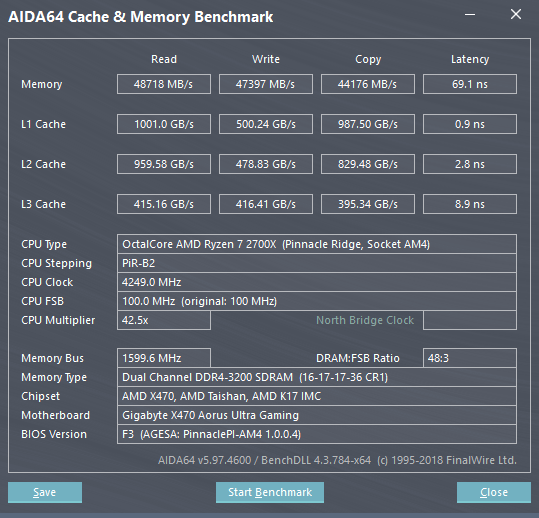
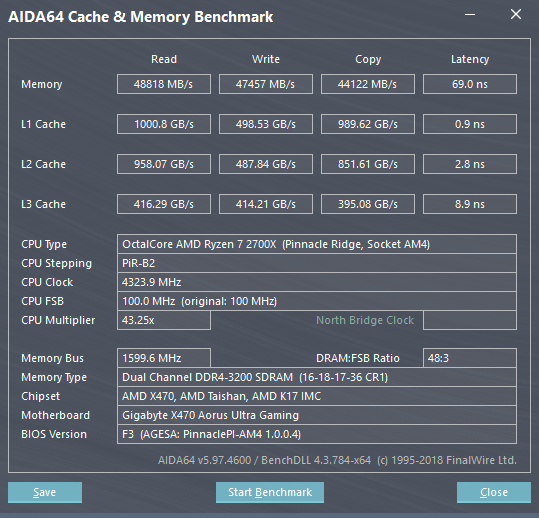
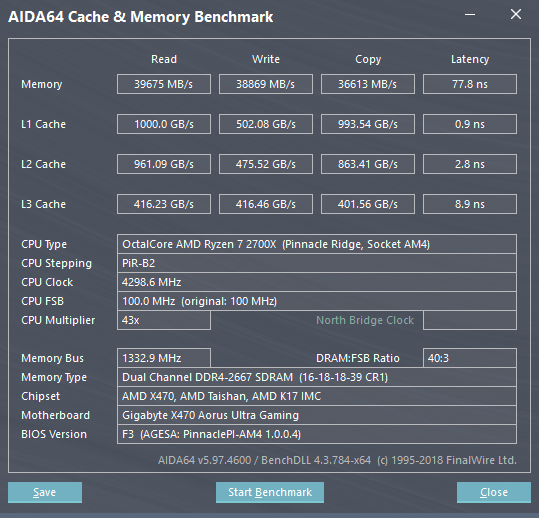
I use Aida64 since it's like very famous for RAM benchmark

1. follow the spec 2666mhz speed
2. 3200mhz with 16-17-17-36
3. 3200mhz with 16-18-17-36 (I set 16-18-18-36 on bios, but when run Windows it became 16-18-17-36. Trying this because sometimes blue screen after back from sleep when use 16-17-17-36)

user posted image user posted image user posted image
Massive difference 2666mhz compare to 3200mhz shocking.gif
I think this speed is not bad for a hynix c-die cheap RAM?

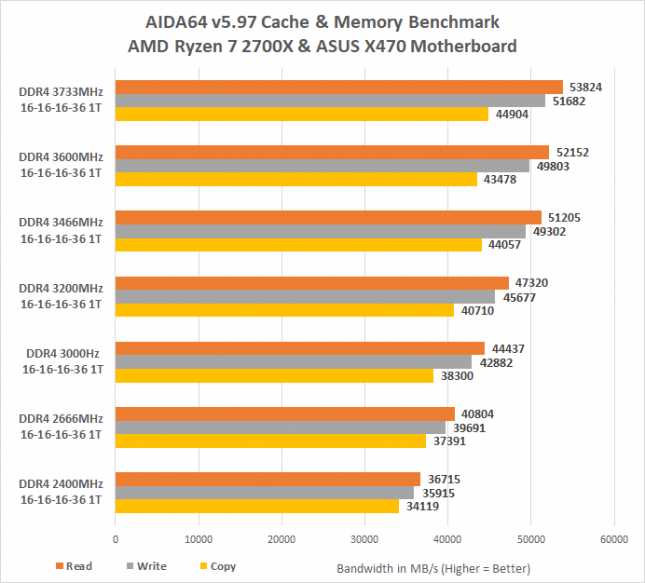
Compare to this  G.SKILL Sniper X Series 16GB (2 x 8GB) DDR4 3400 with Samsung b-die, seems not much difference
user posted image
http://www.legitreviews.com/ddr4-memory-sc...platform_205154

Tried 16-16-16-36 3200mhz, can't POST
Tried 3333mhz, blue screen just after windows finish load tongue.gif
*
Your third config is decent, for a kit of Hynix C-die 2666mhz.
Do also consider the fact that the G.Skill Sniper X 3466 Samsung B-die could very possibly do 3200 CL14 which I've found to be the sweet spot for speed+latency.
raydenex
post Apr 2 2019, 03:59 PM

"Updated my journal."
****
Senior Member
588 posts

Joined: Jan 2003
From: Penang | Puchong | Malacca


QUOTE(aba9785 @ Apr 2 2019, 01:08 PM)
Hi all sifus,
Would like to ask some opinions…

Planned usage - some e-sports gaming and work. Work involves browser/web application, light software development (Android studio, SDK, VSTS, DevOps tool), running single/multiple Virtual Machine/emulations.

Budget around RM4k, currently using company notebook with single DP out to power 3 screens (2x Dell U2414H that support MST/daisy chain and another WQHD monitor).
Guess its time to get my own rig.

temporary shortlisted the followings:
Mobo ASUS PRIME B450M-K - RM350
GPU ZOTAC GTX 1660 Twin Fan - RM999 | ASUS 1050GTX-TI CERBERUS - RM800
(More incline to GTX 1660 because 3 x DP out and 1 HDMI out, GTX 1050 only 1 DP out and 1 HDMI out)
PSU C/MASTER MASTERWATT 650W PSU - RM300
SSD 480/500gb - RM250
DDR RAM KINGSTON HX432C18FB 16GB -  RM460
Casing C/MASTER MASTERBOX E500L -  RM180
Still undecided on the processor and would like to ask for opinions.
2700X (8C/16T) - RM 1,420.99
2600X (6C/12T) - RM 969
2400G (4C/8T) - RM679 (and wait for Ryzen 3)

Please help to advice on my parts selection and advice on which CPU to buy.
Thank you.
*
Definitely the 1660 over the 1050ti. No doubt there.
As for CPU, if you're not able to wait for Ryzen 3000-series, then my personal recommendation is the R5 2600, no X.
raydenex
post Apr 2 2019, 07:00 PM

"Updated my journal."
****
Senior Member
588 posts

Joined: Jan 2003
From: Penang | Puchong | Malacca


QUOTE(edmund_yung @ Apr 2 2019, 04:25 PM)
Definitely get the 2400G and wait for Ryzen 3.
*
He's already getting a GPU, why would he need a 4c/8t 2400G with integrated Vega graphics?
For roughly the same price of a 2400G, can get a Ryzen 5 2600 (no X) with 6c/12t which is really imo the favourite choice for bang-for-buck price-to-performance Ryzen system builders.

If aba9785 wants to build the system first and wait for Ryzen 3000-series, then a more logical CPU to opt for is either a second-hand 2200G or just get an Athlon 200GE.
raydenex
post Jun 12 2019, 12:47 AM

"Updated my journal."
****
Senior Member
588 posts

Joined: Jan 2003
From: Penang | Puchong | Malacca


QUOTE(edmund_yung @ Jun 11 2019, 08:14 PM)
Do you guys plan to run the 6 - 8 cores Ryzen 3 with last gen X470/B450 motherboard? The new X570 seem to be very expensive.
*
Unless I decide I absolutely need to have PCIE 4.0 and extra m.2 slots, I'll drop a 3800x into my X370 (Crosshair VI Hero). Pretty sure my board's VRM's could handle the 12-core 3850x as well, less certain if it can handle the 16-core 3950x.
raydenex
post Jul 4 2019, 05:40 PM

"Updated my journal."
****
Senior Member
588 posts

Joined: Jan 2003
From: Penang | Puchong | Malacca


QUOTE(chocobo7779 @ Jul 4 2019, 03:34 PM)
Also, those who are buying an AM4 board may want to look at this guide for picking a board with decent VRMs:

https://www.reddit.com/r/Amd/comments/c7qj5...ou_decide_on_a/

The spreadsheet:
https://docs.google.com/spreadsheets/d/1d9_...t#gid=639584818
*
Surprising to see from all the X370 and B350 boards;
(Not including the *orange-marked/borderline)
1. MSI and Gigabyte have no boards which are deemed good enough to support the 3950x OC-ed
2. MSI and Gigabyte each only have 2 boards that are deemed good enough to support the 3950x stock
3. Asus has 3 boards that appear to be good enough for the 3950x OC-ed, Asrock has 2, Biostar has 1
4. Asus has 6 boards that appear to be good enough for the 3900x stock, Asrock has 2, Biostar has 1

In retrospect, no regrets getting the Crosshair VI Hero now. I remember being in a bit of a dilemma back in 2017 whether to drop the money on the C6H or save some cash and get one of the cheaper X370 boards.
raydenex
post Jul 12 2019, 07:22 PM

"Updated my journal."
****
Senior Member
588 posts

Joined: Jan 2003
From: Penang | Puchong | Malacca


QUOTE(llk @ Jul 12 2019, 04:10 PM)
Usually today posted next day should arrived. I checked the tracking system the last update was showing item dispatched out at 5pm yesterday, i called Penang Poslaju to check the status the lady told me my parcel still at their branch  doh.gif
*
So bro, you prepared to run 3000-series on our Asus C6H Bios 7106 ah? Been following the threads at rog forums and overclockers forum as well, we're probably still 1 or 2 more bios revisions away from stable.
raydenex
post Jul 17 2019, 01:07 PM

"Updated my journal."
****
Senior Member
588 posts

Joined: Jan 2003
From: Penang | Puchong | Malacca


QUOTE(jackal75 @ Jul 17 2019, 12:35 PM)
i would advise to stick with Microsoft default driver for Windows 10 instead of using the latest driver.
I faced lots of instability issue with the last Nvidia GPU Driver.
I have to uninstall the Nvidia driver then let Windows 10 get back the default driver then only OK.
*
I believe they are talking about the AMD Chipset Driver for AM4 Motherboard. Not GPU.
raydenex
post Jul 17 2019, 01:08 PM

"Updated my journal."
****
Senior Member
588 posts

Joined: Jan 2003
From: Penang | Puchong | Malacca


QUOTE(Bonchi @ Jul 17 2019, 11:57 AM)
I see... so mainly it's for that ryzen power plan thingy and if my PC is running stable, i dont really need it. Altho i do see that there's AMD PCI which is an unknown device but it doesnt seem to affect anything hmmm.

Thanks guys rclxms.gif

now cant wait for MSI to have a stable BIOS release for my mobo altho it is already running pretty stable at the moment.. did 4 hours of prime95 on R3600, 2X8GB 3000Mhz Rams and a MSI B450 ITX with PBO.

now waiting for the gigabyte GTX1070 mini to arrive to complete the build... and then i will play around with some RAM OC to make it 3200Mhz.
*
Friend, I would highly recommend installing the AM4 Chipset driver. Tristan provided the URLs

https://www.amd.com/en/support/chipsets/amd-socket-am4/b450
https://www.amd.com/en/support/chipsets/amd-socket-am4/x470
https://www.amd.com/en/support/chipsets/amd-socket-am4/x570
raydenex
post Sep 20 2019, 02:20 PM

"Updated my journal."
****
Senior Member
588 posts

Joined: Jan 2003
From: Penang | Puchong | Malacca


QUOTE(nrw @ Sep 20 2019, 12:12 AM)
November launch: 3500x
6c6t. Will be very nice option for those who really only do gaming (and are on a tight budget.)
*
If Intel's i5 wasn't already an R.I.P. case, this one is the nail in the coffin. Would make i3 not worth considering at all as well.
raydenex
post Sep 23 2019, 03:27 PM

"Updated my journal."
****
Senior Member
588 posts

Joined: Jan 2003
From: Penang | Puchong | Malacca


I guess the best thing to do with Ryzen 3000 series is not to look at your monitoring tools to eyeball the temps etc, and just enjoy the performance of it. I stopped running hwmonitor for more than a month now and pretty happy.
raydenex
post Mar 6 2020, 12:25 AM

"Updated my journal."
****
Senior Member
588 posts

Joined: Jan 2003
From: Penang | Puchong | Malacca


QUOTE(Irishcoffee @ Mar 6 2020, 12:17 AM)
hi guys, anyone can recommend me amicroatx motherboard for ryzen 5 3600?
i plan to use stock settings, currently looking at asrock b450 pro4 or steel legend. Are these board reliable? previously i got very good experience with gigabyte board as they able to survive up to 10yrs and i am impress.
*
If I was going to build in m-atx form factor, I would go with this;

https://www.msi.com/Motherboard/B450M-MORTAR-MAX

If price is your main deciding factor, then the lowest I would go is the b450m steel legend you mentioned.
raydenex
post Mar 6 2020, 12:06 PM

"Updated my journal."
****
Senior Member
588 posts

Joined: Jan 2003
From: Penang | Puchong | Malacca


QUOTE(Irishcoffee @ Mar 6 2020, 11:24 AM)
thanks for your recommendation, but my trust with msi is totally broken due to loads of bad experience
*
Maybe on other gen/platforms, but ask anyone knowledgeable on Ryzen and they will tell you the best B450 motherboards are the Tomahawk/Tomahawk Max and Mortar/Mortar Max merely due to the VRMs. Your past experience, as well as mine, is invalid when it comes to these 2 boards at least, I had my fair share of grumbles with MSI boards in the past and swore off them too. The Steel Legend has good audio going for it and the pricing but I did have trouble getting a Corsair Vengeance RGB Pro 3200 kit to run at 3200 stable on that board, I settled for 3000 with same XMP/DOHP timings. This was only 2 weeks ago with latest BIOS firmware mind you. The same kit of RAM had no issues on my X370 Crosshair 6 Hero or my B450i Aorus. You should watch some B450 line-up youtube reviews and make your own conclusion. However if you're not planning to overclock that 3600 cpu, yeah the Steel Legend is fine. Cheers.

This post has been edited by raydenex: Mar 6 2020, 12:08 PM
raydenex
post Dec 1 2020, 03:09 AM

"Updated my journal."
****
Senior Member
588 posts

Joined: Jan 2003
From: Penang | Puchong | Malacca


After not being able to procure a 5900x to replace my 3900x, decide to F all and just get a 5600x bundle. At least I got the mobo I wanted (X570 Tomahawk).

Question to other 5000-series users.. Have you been able to get Prime95 to work? It's failing/stopping on me within 2/3 seconds. Latest version.

Aida64 as well, stability/stress test fails about 5~10 seconds in. Then again my Aida is a May 2019 build. Anyone with a recent Aida can confirm if it works fine? Memory benchmark fails at L3 cache too.
raydenex
post Dec 1 2020, 12:47 PM

"Updated my journal."
****
Senior Member
588 posts

Joined: Jan 2003
From: Penang | Puchong | Malacca


@targon - sure, will do that. Have not used an MSI board since.. KT4 Ultra. Gotta start lurking in MSI forum boards. TQ.

@izudeen - yup 5600x and x570 tomahawk for RM 2499. I can live with this price, I've seen some retailers pricing worse. Ebucket Penang is bordering daylight robbery.

@nrw - yup bro axmp in bios, 3600c18 profile. Is there a known issue on the x570 tomahawk?

@tristanx - yup memory benchmark on my old build of aida64 works until it gets to L3 then stops with error prompt 'cpu not supported' which is self explanatory. I'm guessing it works fine on a newer build. However the system stability test fails within few seconds. Red with warning.

Other than this Aida issue and prime95 not wanting to go on past few seconds (stop with error), everything else is good. Cinebench r20 no crash, cpu-z bench and stress, no crash, games no crash. Odd.
raydenex
post Dec 1 2020, 12:49 PM

"Updated my journal."
****
Senior Member
588 posts

Joined: Jan 2003
From: Penang | Puchong | Malacca


QUOTE(iZuDeeN @ Dec 1 2020, 11:25 AM)
also what power supply you are currently using.. from experience crash etc can be driver issue or lack of power (assume everything is on stock setting )

disable XMP / DOCC ;
*
Pretty sure my CM v850 Gold is good. Zero issue with my 3900x / Crosshair VI system until yesterday.

Also I need to correct you, my system is not crashing lah.

Prime95 is stopping with error few seconds in.

Aida64 system stability test is stopping with warning few seconds in.

Never said pc was crashing =)

This post has been edited by raydenex: Dec 1 2020, 12:51 PM
raydenex
post Dec 1 2020, 01:16 PM

"Updated my journal."
****
Senior Member
588 posts

Joined: Jan 2003
From: Penang | Puchong | Malacca


If xmp is the problem, I'd be quite dumbfounded. To think a 3 year old x370 Crosshair VI Hero can run my 3600 ram no problem?

4 Pages < 1 2 3 4 >Top
 

Change to:
| Lo-Fi Version
0.0345sec    0.88    7 queries    GZIP Disabled
Time is now: 19th December 2025 - 11:05 PM