Welcome Guest ( Log In | Register )

Outline · [ Standard ] · Linear+

 AMD Ryzen, AM4 / AM5 Platform

views
     
raydenex
post Mar 29 2021, 03:45 PM

"Updated my journal."
****
Senior Member
588 posts

Joined: Jan 2003
From: Penang | Puchong | Malacca


QUOTE(EBBattlefield @ Mar 29 2021, 01:22 PM)
is it just me or local retaillers are selling motherboards at 30-50USD markup as well?

MSI Tomahawk B550 at RM800, but newegg sell USD150....
if convert, should be 600+ only sweat.gif
*
If my memory recall correctly, I did see some sellers listing B550 Tomahawk for about RM 650++ on Shopee.

But checking now, several sellers have it in stock at prices - 739 (pc byte) 720 (etech) 714 (artidea) 720 (sl integrated) 719 (eggcomptech)

Boleh tahan lah, not 800! haha
raydenex
post Mar 30 2021, 02:20 PM

"Updated my journal."
****
Senior Member
588 posts

Joined: Jan 2003
From: Penang | Puchong | Malacca


QUOTE(EBBattlefield @ Mar 30 2021, 08:42 AM)
my only concern from online retailer is i dont have CPU to flash bios for 5000 series  sweat.gif  sweat.gif
unless can borrow yours? tongue.gif
*
No worries bro, some of those shopee sellers can do the flashing for you too before ship to you. Ask.
raydenex
post Apr 6 2021, 12:24 PM

"Updated my journal."
****
Senior Member
588 posts

Joined: Jan 2003
From: Penang | Puchong | Malacca


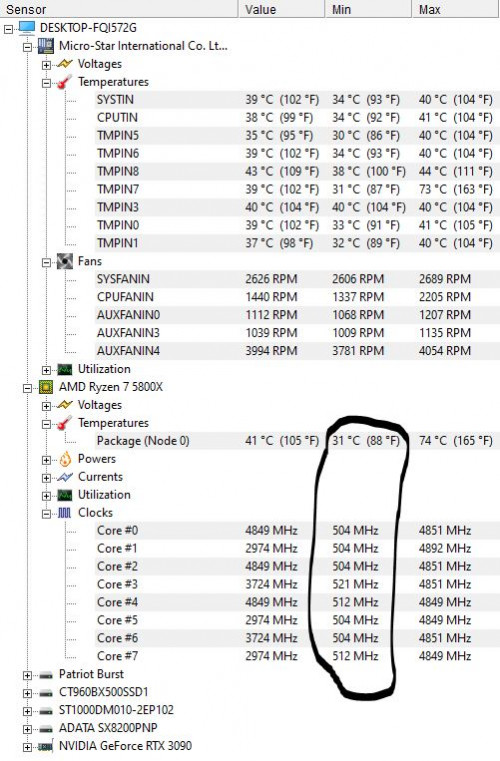
Used the Ryzen-Low-Power power plan from the recent attachment Tristan shared..

Dear Lord.. this is pretty darn good. Thanks!

user posted image
raydenex
post Apr 26 2021, 11:10 AM

"Updated my journal."
****
Senior Member
588 posts

Joined: Jan 2003
From: Penang | Puchong | Malacca


QUOTE(yimingwuzere @ Apr 26 2021, 09:52 AM)
Built another Ryzen rig:

Spec:
3700X on Wraith Prism
Gigabyte B550I Aorus Pro AX
2x8GB DDR4-3600
HP EX950
FSP 450W PSU
Radeon 6670 (ancient card used only for video output)

Set up the rig, plugged a USB drive with Windows installer to it and turned it on, but no display output is visible. The mobo RGB LEDs light up in orange, and the Wraith Prism appears to use the RGB profile from BIOS, though. No error beep codes when I plug in the speaker piece to the 4-pin header on the motherboard.

Tried the following steps, the PC still doesn't boot:
- removed SSD while leaving the Windows installer USB drive plugged in
- reseated SSD
- reseated RAM
- use only 1 stick of RAM in either slot
- removed all RAM sticks (in this case, this was expected to fail - the motherboard also failed to activate RGB LEDs too)

The CPU, RAM and GPU were tested on other machines and they worked fine. I presume I should RMA the mobo next? What else may I have missed out on testing?
*
Exact same board in my ITX rig. Same problem encountered too. It was my RAM. The board's stock BIOS rev. didn't want to play nice with my Klevv Bolt XR 3600c18 kit.

You have 2 options below;

1. Go find another ram stick, preferably something simple like a 2400/2666 generic ram etc, or just try anything lah. I had a Samsung 2666 8gb stick. That worked. Boot, enter BIOS, flash newer BIOS, use back the intended RAM, no issue already.

2. Or direct get a newer BIOS put it on a USB 2.0 stick and use the BIOS flashback.

The stock BIOS revision on that B550i Aorus Pro AX is very fussy with RAM and does not want to POST with certain ram. I sent the board back to the Shopee seller and they tested fine, wasted time only. Once I was convinced the board itself was working, I figured it out.

This post has been edited by raydenex: Apr 26 2021, 11:23 AM
raydenex
post Apr 26 2021, 05:31 PM

"Updated my journal."
****
Senior Member
588 posts

Joined: Jan 2003
From: Penang | Puchong | Malacca


QUOTE(yimingwuzere @ Apr 26 2021, 02:20 PM)
Never thought of swapping RAM sticks! I just plugged the Bolt XR in another rig, it POSTed just fine, assumed it was not a RAM issue and never considered RAM compatibility with the BIOS.

Let me see if the BIOS flashback option works. I presume it functions even without working RAM?
*
Yup, you dont need to have any ram or cpu installed. just the board connected to PSU. Turn on your PSU, plug in the USB stick to the correct USB port.

https://www.youtube.com/watch?v=35lm3L_K_pU


raydenex
post Apr 20 2022, 08:53 PM

"Updated my journal."
****
Senior Member
588 posts

Joined: Jan 2003
From: Penang | Puchong | Malacca


Would it kill you to just test with your spare PSU and eliminate 1 factor entirely?
raydenex
post May 9 2022, 12:37 PM

"Updated my journal."
****
Senior Member
588 posts

Joined: Jan 2003
From: Penang | Puchong | Malacca


QUOTE(bahjan_2000 @ May 9 2022, 10:51 AM)
So I finally jumped into SFF, with a NR200P for my new build - my son's PC one day just refused to boot no matter what I throw at it (old FX6300), thinking its not worth salvaging, so I decided to give my 2600 to him, and make a new one for myself. Yes it's nothing high end, some stuff I got at sale + local pc shops

Ryzen 5 5600
Thermalright AXP90-X47 Full copper
Asrock A520M ITX-AC
Silicon Power 8GB x2 DDR4
Superflower Silver Eco 500W
silly R5 240 gpu (temporary..)
in NR200P with 4 Sickleflows
Latest BIOS, chipset drivers
Balanced power plan

So immediately after booting and updating drivers etc.. I noticed the idle is on the bit high side (50C+, 40++ only during cooler nights/morning), and it vey quickly shot up to the 95C limit even with simple CPU-Z bench/stress test. Even running SignalRGB at the background keeps the idle temps at 60C+, hence I've deleted it and will switch to a hardware ARGB controller). Coming from my previous 1200 and 2600 that never even got above 80C on full loads, I am very surprised.

Anything I should take a look, or check, other than the usual cooler re-seat, repaste stuff (of which I read is quite decent for a low profile cooler, almost comparable to the Noctua NH-L9i). PBO, Curve Optimizer stuff that I admit haven't really dabbled before? The 5600 should be .. cooler than my previous chips, being more efficient, no?

Granted I haven't try gaming on it, waiting for my 6600xt to arrive.

Thanks for any feedback in advance, guys.
*
As Tristan said, quality of motherboard and its VRMs, that's bottom of the barrel mobo, you get what you pay for.

Since you mentioned this is in an NR200, why AXP90? Sell it off and get an ID Cooling Se-224-xt if on a budget. That will work like a charm.

raydenex
post May 9 2022, 12:55 PM

"Updated my journal."
****
Senior Member
588 posts

Joined: Jan 2003
From: Penang | Puchong | Malacca


QUOTE(bahjan_2000 @ May 9 2022, 12:47 PM)
Because I had to vertically mount my gpu, due to using an ATX PSU, and thus leaving clearance for cpu cooler at 75+mm something. And also out of curiosity, from using tower coolers all these time. This is more like an experiment build with stuff I'm not really familiar with + stuff I have lying around. Yea I don't game much these days, but seeing those temps sure scared me a bit.

Also I read AXP90 reviews are decent, here and there, too. Was thinking perhaps I'd swap the fan to maybe an Arctic 92mm or something..

Sure there's no BIOS setting I can poke around?
*
Okay understood. You could replace the AXP90's Thermalright 92mm slim fan with the Noctua NF-A9 slim but I'm uncertain how much of a difference in temp that will make.
https://shopee.com.my/Noctua-NF-A9x14-PWM-c...1d-6b49da6034fc

BIOS setting? Got. Turn off PBO smile.gif
raydenex
post May 10 2022, 02:23 PM

"Updated my journal."
****
Senior Member
588 posts

Joined: Jan 2003
From: Penang | Puchong | Malacca


QUOTE(bahjan_2000 @ May 10 2022, 02:10 PM)
Indeed, trying a few things out for testing, but probably changing to a new cooler isn't in the cards, at least for the time being. But even if I swap to a SFX psu and mount the gpu horizontally, it'll be a bigger slab of .. gpu radiating heat blocking the intake fans below. I do plan to swap to a 25mm thick fan with better pressure, and put on the vented panel, all after re-seating the cooler with AM4 stock backplate. But I do recall even removing the side panel all together not doing much, iinm. And I currently have a silly R5 240 on which I believe isn't all that hot, either.

It's just.. I can run my ol 2600 on high performance power plan w/out such a spike in temps, and I only have it on a CM 120mm AIO. And how the temps spike from 50 to 90 in just a few seconds during simple stress test is rather surprising.
*
Ryzen 5 5600x is a whole very extremely different beast from an R5 2600.

I refer back to my earlier recommendation, turn off PBO and see if those temps are more to your liking.

This post has been edited by raydenex: May 10 2022, 02:24 PM
raydenex
post Sep 28 2022, 02:46 PM

"Updated my journal."
****
Senior Member
588 posts

Joined: Jan 2003
From: Penang | Puchong | Malacca


All I've been certain of after reading and watching the Zen 4 content these past 2 days is to wait to see what Raptor Lake brings, and when AMD responds with the 7000x3d variants. Only then I'll decide.
raydenex
post Oct 25 2022, 07:13 PM

"Updated my journal."
****
Senior Member
588 posts

Joined: Jan 2003
From: Penang | Puchong | Malacca


QUOTE(SSJBen @ Oct 25 2022, 03:52 PM)
Like which RAM? Not available here doesn't mean not available everywhere.

I'm skipping both Zen 4 and Raptor Lake too, will stick with 5900x. Happy with it for now.
*
Exactly what I'm doing - sticking with 5900x and do nothing this generation.

4 Pages « < 2 3 4Top
 

Change to:
| Lo-Fi Version
0.2857sec    0.71    7 queries    GZIP Disabled
Time is now: 20th December 2025 - 05:13 AM