

QUOTE(Qash-M @ Oct 11 2017, 06:33 PM)
Can still see little black bars on both side (overscan), except the one like #120, #550 & #801

Got little black bars huh??Hmm later next week when go visit for raya deepavali, I see the channels

astro byond V13
|
|
 Oct 11 2017, 06:36 PM Oct 11 2017, 06:36 PM
|
 
All Stars
48,441 posts Joined: Sep 2014 From: REality 
|
QUOTE(Qash-M @ Oct 11 2017, 06:33 PM) Can still see little black bars on both side (overscan), except the one like #120, #550 & #801 Got little black bars huh??Hmm later next week when go visit for raya deepavali, I see the channels |
|
|
|
|
|
Oct 11 2017, 08:09 PM
|

Junior Member
193 posts Joined: Dec 2016 From: Indonesia 
|
QUOTE(nexona88 @ Oct 11 2017, 05:25 PM)  Astro is good in "fake" HD People sees 16:9 straight thinks "ahh its HD" because its full screen... Not like us where we have 'Asli HD'.  |
|
|
Oct 11 2017, 09:15 PM
|

Senior Member
1,510 posts Joined: Oct 2016 From: Celcom Internet 4G × Malaysia
|
QUOTE(XypherionID @ Oct 11 2017, 08:09 PM) Yep. Ashthrow's fakin' it to the MAX! It not fake. It just lower bitrate HD channel.Not like us where we have 'Asli HD'. We need bitrate settings in Byond HD box.  All SD 16:9 feed channel is not properly view in 21:9 or we call as "Only Scan" mode view. Only Go Shop channel 120 is view full in 21:9. Guess it take HD feed from ch118. They should broadcast same like original HD channel but in SD resolution. Only ch120 & ch801 in full view mode. Other channel still have small black bars at left & right screen. Not noticeable in 16:9 view.  Seriously, Astro should add Toonami. Then, all CN good will be back again. CN do show Dragon Ball Z Kai back then. Now it has moved to Toonami channel. Zoomoo is completely boring & not entertain at all. It just preschool channel than action cartoon. 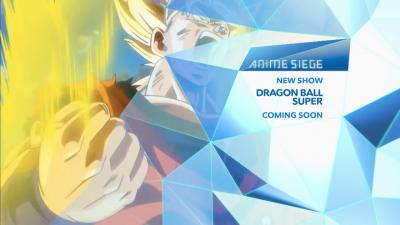

|
|
|
Oct 11 2017, 09:54 PM
|
|
All Stars
48,441 posts Joined: Sep 2014 From: REality
|
QUOTE(XypherionID @ Oct 11 2017, 08:09 PM) Yep. Ashthrow's fakin' it to the MAX! HeheheheNot like us where we have 'Asli HD'. Thanks to u know who... Many actually don't realized its low bit "HD" @ fake.. |
|
|
Oct 11 2017, 09:57 PM
|
|
All Stars
48,441 posts Joined: Sep 2014 From: REality
|
QUOTE(Anime in HD @ Oct 11 2017, 09:15 PM) It not fake. It just lower bitrate HD channel. Okay. No wonder I don't see the so called black bars at left & right..We need bitrate settings in Byond HD box. All SD 16:9 feed channel is not properly view in 21:9 or we call as "Only Scan" mode view. Only Go Shop channel 120 is view full in 21:9. Guess it take HD feed from ch118. They should broadcast same like original HD channel but in SD resolution. Only ch120 & ch801 in full view mode. Other channel still have small black bars at left & right screen. Not noticeable in 16:9 view. Maybe all because I set to 16:9 views So how to see the black bars?? What setting I needed to do?? |
|
|
Oct 11 2017, 11:11 PM
|
|
Senior Member
1,510 posts Joined: Oct 2016 From: Celcom Internet 4G × Malaysia
|
QUOTE(nexona88 @ Oct 11 2017, 09:57 PM) Okay. No wonder I don't see the so called black bars at left & right.. Change aspect ratio settings.Maybe all because I set to 16:9 views So how to see the black bars?? What setting I needed to do?? This is big hits problem when astro broadcast Dota 2 Championship on Astro Supersport Plus(ch808). It show in full 21:9 aspect ratio. This is also apply in Dota 2 computer game. All mobile & computer is showing full 21:9 view. But, only TV can choose from 4:3, 16:9 & 21:9 aspect ratio to suite your viewing experience. First, what TV brand you use? NOT RELATED! I'm watching Assassination Classroom on 8TV right now. Compare with Animax 16:9 feed on Astro. 8TV is more clear than Animax one. Is Astro downgrade Animax & all other SD channel to lowest possible bitrate for MPEG2? 8TV on Astro also use MPEG2 codec. But, the picture almost same like MPEG4...  |
|
|
|
|
|
Oct 12 2017, 12:42 AM
Show posts by this member only | IPv6 | Post
#3127
|

Senior Member
6,103 posts Joined: Apr 2009 From: Marang, Terengganu 
|
QUOTE(XypherionID @ Oct 11 2017, 08:09 PM) Yep. Ashthrow's fakin' it to the MAX! Certainly not on BiGTV. Not like us where we have 'Asli HD'.   |
|
|
Oct 12 2017, 01:26 AM
Show posts by this member only | IPv6 | Post
#3128
|
|
Senior Member
7,794 posts Joined: Dec 2014 From: Malaysia
|
QUOTE(Anime in HD @ Oct 11 2017, 09:15 PM) It not fake. It just lower bitrate HD channel. We need bitrate settings in Byond HD box. All SD 16:9 feed channel is not properly view in 21:9 or we call as "Only Scan" mode view. Only Go Shop channel 120 is view full in 21:9. Guess it take HD feed from ch118. They should broadcast same like original HD channel but in SD resolution. Only ch120 & ch801 in full view mode. Other channel still have small black bars at left & right screen. Not noticeable in 16:9 view. Seriously, Astro should add Toonami. Then, all CN good will be back again. CN do show Dragon Ball Z Kai back then. Now it has moved to Toonami channel. Zoomoo is completely boring & not entertain at all. It just preschool channel than action cartoon.
QUOTE(nexona88 @ Oct 11 2017, 09:57 PM) Okay. No wonder I don't see the so called black bars at left & right.. What 21:9 or "Only Scan" mode view are you talking about? Could you tell us where did you get such info??? 21:9 is an aspect ratio for anamorphic format TV or monitors, which is designed to give users a full screen experience when viewing anamorphic format content, or more viewing content in a single screen. Maybe all because I set to 16:9 views So how to see the black bars?? What setting I needed to do?? QUOTE All SD 16:9 feed channel is not properly view in 21:9 or we call as "Only Scan" mode view. Only Go Shop channel 120 is view full in 21:9. The small, blurry black pixels on the left/right side of the screen is known as nominal analogue blanking, and it is not mainly related to aspect ratio stuff. https://en.wikipedia.org/wiki/Nominal_analogue_blanking That one involves in very deep technical stuff involving old analogue video technologies that somewhat shaped the digital video today. As of now, I still don't fully understand the entire story behind that "blanking" in the sides of the screen that we all see in some Astro channels today. One of the example that Astro still has that "nominal analogue blanking" is MTV channel. Take a closer look at the sides of this screenshot. As you can see, there's a "blank pixels" at both left and right sides of this 4:3 video.  
If your HDTV is displaying 100% image and let say you tune to MTV channel on Astro, this is what you will see: (look at left and right side of this picture)  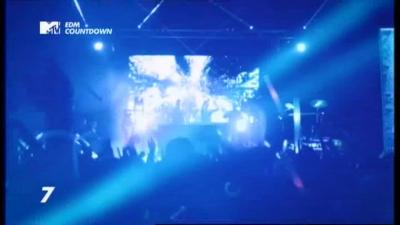
But honestly, I'm not sure why Astro wasn't aware about that, or they aware about it but they don't care? I don't know. But, this nominal analogue blanking only occurs to some SD 4:3 channels only, not all like that. But I believe this can be eliminated if Astro's broadcast technical team to properly set the video settings. I'm not so interested about that nominal analogue blanking because for me, it is something commonly seen in old tech stuffs. For example you might see that blanking in some old VCDs movies that you still keep (some DVDs also got). Cuz older TVs like CRT TVs and older LCD TVs tends to overscan the image a little bit, so very unlikely you won't be see that blanking, but if you play it on today's modern TVs where it is now commonly display 100% image, then you might see that blanking pixels on the sides. That "blanking" may not be visible if your TV overscan the overall image. Overscan is where your TV tends to zoom/crop in entire picture by 5-10%, so that means you are seeing less picture detail/information (I mean "detail" is, you tend to see lesser things compared to other people's TV that do not overscan and display 100%, not the sharpness detail ya). When it overscans, you are be actually seeing only 90-95% of the entire picture, not 100%. Newer or latest TVs usually don't overscan and displays 100%, but however some TVs do provide option to display 100% image without overscan and different TVs may indicate the setting name differently, such as turning "Overscan" as On or Off, or "Image size" as 100%, or change your TV display mode to Game mode. You may search Google to know more about overscan. Please note that this overscan/underscan is about your TV set, and it is not related to aspect ratio or even Astro. https://en.wikipedia.org/wiki/Overscan This post has been edited by joshhd: Oct 12 2017, 02:14 AM |
|
|
Oct 12 2017, 01:52 AM
Show posts by this member only | IPv6 | Post
#3129
|
|
Senior Member
7,794 posts Joined: Dec 2014 From: Malaysia
|
QUOTE(Anime in HD @ Oct 11 2017, 11:11 PM) Change aspect ratio settings. This kind of overscan/underscan thing is not something that many normal consumers will be aware or know about it, and not even every gamers knows that, until this kind of thing has brought to light on eGG Network, where many people complain why the entire picture has been "cropped off". This is big hits problem when astro broadcast Dota 2 Championship on Astro Supersport Plus(ch808). It show in full 21:9 aspect ratio. This is also apply in Dota 2 computer game. All mobile & computer is showing full 21:9 view. But, only TV can choose from 4:3, 16:9 & 21:9 aspect ratio to suite your viewing experience. First, what TV brand you use? NOT RELATED! I'm watching Assassination Classroom on 8TV right now. Compare with Animax 16:9 feed on Astro. 8TV is more clear than Animax one. Is Astro downgrade Animax & all other SD channel to lowest possible bitrate for MPEG2? 8TV on Astro also use MPEG2 codec. But, the picture almost same like MPEG4... Currently, eGG Network (ch808) will "underscan" (opposite meaning of overscan) the entire image from their side by around 5% whenever they air any game matches (as shown on picture below), regardless of live broadcasts or repeats.  
As you can see, there's about 5% black bars on the sides, cuz when you underscan, it actually zooms out the actual 100% image. So if your TV overscans it, it will zoom back in around 5%, so eventually you can see the entire image without cropping. This is what eGG Network is doing. This is after they received tons of complaints from viewers saying that their TVs set unable to see the sides of the picture (e.g. game scores, map) during the live game match. At first, many viewers bombard Astro Facebook page, and the customer service representatives also blur blur, don't know what happen. They thought is aspect ratio problem faced by viewers cuz what they heard from customers is "cannot see entire image" or "the sides were cropped off". So they advise viewers to make sure the viewing mode is set to "Fit to screen" by pressing the "aspect ratio/display mode" button (a rectangle shape with square shape inside the rectangle) on Astro remote control. Of course, that advise is not helping at all, LOL. But now you know, it was the overscan problem that occurs on many viewer's TV set, and yet many viewers complained and blamed Astro for that, and then say those not nice words like "I pay you so much money yet you give me this kind of service?". Of course Astro is being patient with that, since they are already suck a lot of money from customers already.  So, for your info, eGG Network broadcasts in 16:9 aspect ratio only. This post has been edited by joshhd: Oct 12 2017, 02:22 AM |
|
|
Oct 12 2017, 02:00 AM
Show posts by this member only | IPv6 | Post
#3130
|
|
Senior Member
7,794 posts Joined: Dec 2014 From: Malaysia
|
QUOTE(Qash-M @ Oct 12 2017, 12:42 AM) Certainly not on BiGTV. "Asli HD" is what Videocon d2h's market their HD channel offerings in Full HD 1080i quality... Nothing much, just a marketing. |
|
|
Oct 12 2017, 05:35 PM
|
|
Senior Member
1,510 posts Joined: Oct 2016 From: Celcom Internet 4G × Malaysia
|
QUOTE(joshhd @ Oct 12 2017, 01:26 AM) What 21:9 or "Only Scan" mode view are you talking about? Could you tell us where did you get such info??? 21:9 is an aspect ratio for anamorphic format TV or monitors, which is designed to give users a full screen experience when viewing anamorphic format content, or more viewing content in a single screen. There your answer.. The small, blurry black pixels on the left/right side of the screen is known as nominal analogue blanking, and it is not mainly related to aspect ratio stuff. https://en.wikipedia.org/wiki/Nominal_analogue_blanking That one involves in very deep technical stuff involving old analogue video technologies that somewhat shaped the digital video today. As of now, I still don't fully understand the entire story behind that "blanking" in the sides of the screen that we all see in some Astro channels today. One of the example that Astro still has that "nominal analogue blanking" is MTV channel. Take a closer look at the sides of this screenshot. As you can see, there's a "blank pixels" at both left and right sides of this 4:3 video.
If your HDTV is displaying 100% image and let say you tune to MTV channel on Astro, this is what you will see: (look at left and right side of this picture)
But honestly, I'm not sure why Astro wasn't aware about that, or they aware about it but they don't care? I don't know. But, this nominal analogue blanking only occurs to some SD 4:3 channels only, not all like that. But I believe this can be eliminated if Astro's broadcast technical team to properly set the video settings. I'm not so interested about that nominal analogue blanking because for me, it is something commonly seen in old tech stuffs. For example you might see that blanking in some old VCDs movies that you still keep (some DVDs also got). Cuz older TVs like CRT TVs and older LCD TVs tends to overscan the image a little bit, so very unlikely you won't be see that blanking, but if you play it on today's modern TVs where it is now commonly display 100% image, then you might see that blanking pixels on the sides. That "blanking" may not be visible if your TV overscan the overall image. Overscan is where your TV tends to zoom/crop in entire picture by 5-10%, so that means you are seeing less picture detail/information (I mean "detail" is, you tend to see lesser things compared to other people's TV that do not overscan and display 100%, not the sharpness detail ya). When it overscans, you are be actually seeing only 90-95% of the entire picture, not 100%. Newer or latest TVs usually don't overscan and displays 100%, but however some TVs do provide option to display 100% image without overscan and different TVs may indicate the setting name differently, such as turning "Overscan" as On or Off, or "Image size" as 100%, or change your TV display mode to Game mode. You may search Google to know more about overscan. Please note that this overscan/underscan is about your TV set, and it is not related to aspect ratio or even Astro. https://en.wikipedia.org/wiki/Overscan My TV have 4:3, 14:9, 16:9 & 21:9 aspect ratio option/change settings. |
|
|
Oct 12 2017, 06:27 PM
Show posts by this member only | IPv6 | Post
#3132
|
|
Senior Member
7,794 posts Joined: Dec 2014 From: Malaysia
|
QUOTE(Anime in HD @ Oct 12 2017, 05:35 PM) There your answer.. Ohh... I guess you must be using Philips's Cinema 21:9 TV, am I right? My TV have 4:3, 14:9, 16:9 & 21:9 aspect ratio option/change settings. Philips already discontinued that, and no more releasing new models due to lack of demand. |
|
|
Oct 12 2017, 06:37 PM
|
|
Senior Member
1,510 posts Joined: Oct 2016 From: Celcom Internet 4G × Malaysia
|
QUOTE(joshhd @ Oct 12 2017, 06:27 PM) Ohh... I guess you must be using Philips's Cinema 21:9 TV, am I right? Nope.Philips already discontinued that, and no more releasing new models due to lack of demand. I'm using LG Smart TV 42"inch. Actually, my old Sony TV also got this option. So, i thought that all HDTV can choose to watch HD channels in 4:3 aspect ratio. All i need to do is change aspect ratio setting on my TV remote. My new LG TV don't have 21:9 number. It only shoy "Only Scan" or in BM "Hanya Mengimbas". My old Sony TV got 21:9 numbering option & no words. Too bad, me already buang that TV because got damaged. |
|
|
|
|
|
Oct 12 2017, 10:01 PM
|
|
All Stars
48,441 posts Joined: Sep 2014 From: REality
|
Guys
Did u all watch Asia got talent on AXN HD channels today?? Seems like the picture pixelated... When change to AXN SD 701, its okay... Wonder why suddenly like that  |
|
|
Oct 12 2017, 10:23 PM
|
|
Senior Member
1,510 posts Joined: Oct 2016 From: Celcom Internet 4G × Malaysia
|
QUOTE(nexona88 @ Oct 12 2017, 10:01 PM) Guys By the time you post this.Did u all watch Asia got talent on AXN HD channels today?? Seems like the picture pixelated... When change to AXN SD 701, its okay... Wonder why suddenly like that The picture already back normal. What timing you notice this pixelated issue? |
|
|
Oct 12 2017, 11:02 PM
Show posts by this member only | IPv6 | Post
#3136
|
|
Senior Member
7,794 posts Joined: Dec 2014 From: Malaysia
|
QUOTE(nexona88 @ Oct 12 2017, 10:01 PM) Guys Really? I did watch Asia's Got Talent earlier, but I didn't notice any pixelated picture also...Did u all watch Asia got talent on AXN HD channels today?? Seems like the picture pixelated... When change to AXN SD 701, its okay... Wonder why suddenly like that |
|
|
 Oct 13 2017, 07:18 AM Oct 13 2017, 07:18 AM
|

All Stars
11,251 posts Joined: Jul 2005
|
QUOTE(joshhd @ Oct 12 2017, 01:52 AM) This kind of overscan/underscan thing is not something that many normal consumers will be aware or know about it, and not even every gamers knows that, until this kind of thing has brought to light on eGG Network, where many people complain why the entire picture has been "cropped off". hahahaha I lost touch with the up and coming DOTA e-players already since the fall of NA'VI from Ukraine in 2013 Currently, eGG Network (ch808) will "underscan" (opposite meaning of overscan) the entire image from their side by around 5% whenever they air any game matches (as shown on picture below), regardless of live broadcasts or repeats.
As you can see, there's about 5% black bars on the sides, cuz when you underscan, it actually zooms out the actual 100% image. So if your TV overscans it, it will zoom back in around 5%, so eventually you can see the entire image without cropping. This is what eGG Network is doing. This is after they received tons of complaints from viewers saying that their TVs set unable to see the sides of the picture (e.g. game scores, map) during the live game match. At first, many viewers bombard Astro Facebook page, and the customer service representatives also blur blur, don't know what happen. They thought is aspect ratio problem faced by viewers cuz what they heard from customers is "cannot see entire image" or "the sides were cropped off". So they advise viewers to make sure the viewing mode is set to "Fit to screen" by pressing the "aspect ratio/display mode" button (a rectangle shape with square shape inside the rectangle) on Astro remote control. Of course, that advise is not helping at all, LOL. But now you know, it was the overscan problem that occurs on many viewer's TV set, and yet many viewers complained and blamed Astro for that, and then say those not nice words like "I pay you so much money yet you give me this kind of service?". Of course Astro is being patient with that, since they are already suck a lot of money from customers already. So, for your info, eGG Network broadcasts in 16:9 aspect ratio only.  |
|
|
Oct 13 2017, 10:01 AM
|
|
All Stars
48,441 posts Joined: Sep 2014 From: REality
|
QUOTE(Anime in HD @ Oct 12 2017, 10:23 PM) By the time you post this. The picture already back normal. What timing you notice this pixelated issue? QUOTE(joshhd @ Oct 12 2017, 11:02 PM) Really? I did watch Asia's Got Talent earlier, but I didn't notice any pixelated picture also... I think around 9pm like that..Didn't actually watch till end... Was just browsing the channel one by one.. And notice the picture is something wrong.. Then I change to others channels like Diva, Fox etc. All okay.. Then change to 701 SD. Also okay... |
|
|
Oct 14 2017, 04:56 PM
|
|
Senior Member
1,510 posts Joined: Oct 2016 From: Celcom Internet 4G × Malaysia
|
HyppTV give free preview Varnam Pack from 14 Oct-29 Oct 2017.
Astro, what are you doing?  Someone will say. Astro don't care with that. Just stay continue suck money from customer.. inb4 HyppTV no HD india channel..  Atleast, astro has 3 HD channel for it(rojak channel). This post has been edited by Anime in HD: Oct 14 2017, 04:59 PM |
|
|
Oct 14 2017, 06:22 PM
|
|
All Stars
48,441 posts Joined: Sep 2014 From: REality
|
QUOTE(Anime in HD @ Oct 14 2017, 04:56 PM) HyppTV give free preview Varnam Pack from 14 Oct-29 Oct 2017. Astro is sleeping Astro, what are you doing? Someone will say. Astro don't care with that. Just stay continue suck money from customer.. inb4 HyppTV no HD india channel.. Atleast, astro has 3 HD channel for it(rojak channel). Happily Suckling people $$$ No real competitors |
|
Topic ClosedOptions
|
| Change to: |  0.0441sec 0.0441sec
 0.62 0.62
 6 queries 6 queries
 GZIP Disabled GZIP Disabled
Time is now: 5th December 2025 - 03:20 AM |
 Quote
Quote