Welcome Guest ( Log In | Register )

33 Pages « < 15 16 17 18 19 > » Bottom

Outline · [ Standard ] · Linear+

 ILLEGEAR Z5 & Z7 Discussion Thread V3, Now with Nvidia GeForce GTX 1060 6GB GDD

views
     
Anonymous34
post Sep 18 2017, 08:34 AM

Look at all my stars!!
*******
Senior Member
3,176 posts

Joined: May 2013
From: Petaling Jaya


Hi, I would like to ask what is the normal frame rate for Dota 2 on Z5 with 1060?
I can only get up to 100fps with no action and dips down to 50fps easily.
Can I disable optimus all together and just use 1060?
I am using single channel 8GB, could that be the cause?
Thanks for answering my questions
Smurfs
post Sep 18 2017, 09:20 AM

Regular
******
Senior Member
1,060 posts

Joined: Feb 2008


QUOTE(Anonymous34 @ Sep 18 2017, 08:34 AM)
Hi, I would like to ask what is the normal frame rate for Dota 2 on Z5 with 1060?
I can only get up to 100fps with no action and dips down to 50fps easily.
Can I disable optimus all together and just use 1060?
I am using single channel 8GB, could that be the cause?
Thanks for answering my questions
*
Whats your graphics setting? Did u turn on v-sync?
David11
post Sep 18 2017, 02:40 PM

Getting Started
**
Junior Member
81 posts

Joined: Jan 2009
From: Penang,Gelugor


QUOTE(ApostLes` @ Sep 18 2017, 01:32 AM)
unplug ur battery from AC adapter,

let it drain till 0%

plug it back, on laptop

it should charge back up to 99%... mine stuck at 97%

but my z5 already old . 2 yrs 6 months already
*
But the problem is I think my battery was drained. Whenever I unplug my AC adapter, my laptop will shut off immediately. sweat.gif
Prince J
post Sep 18 2017, 03:17 PM

Regular
******
Senior Member
1,272 posts

Joined: May 2010
From: Team ILLEGEAR


QUOTE(Anonymous34 @ Sep 18 2017, 08:34 AM)
Hi, I would like to ask what is the normal frame rate for Dota 2 on Z5 with 1060?
I can only get up to 100fps with no action and dips down to 50fps easily.
Can I disable optimus all together and just use 1060?
I am using single channel 8GB, could that be the cause?
Thanks for answering my questions
*
Hi anonymous34,

For DOTA 2, the in-game settings heavily affects your FPS, you can whatsapp us via 0186648599. Will assist once we get back to work.
David11
post Sep 18 2017, 11:17 PM

Getting Started
**
Junior Member
81 posts

Joined: Jan 2009
From: Penang,Gelugor


Is there anyway that I can check the charging board myself to see if there is any problem?
Anonymous34
post Sep 19 2017, 07:07 AM

Look at all my stars!!
*******
Senior Member
3,176 posts

Joined: May 2013
From: Petaling Jaya


QUOTE(Smurfs @ Sep 18 2017, 09:20 AM)
Whats your graphics setting? Did u turn on v-sync?
*
Pretty much everything is turned on except anti aliasing, V-sync and shadows.
from what I find on Google, Dota 2 should be up to 300 fps with 1060 6GB

QUOTE(Prince J @ Sep 18 2017, 03:17 PM)
Hi anonymous34,

For DOTA 2, the in-game settings heavily affects your FPS, you can whatsapp us via 0186648599. Will assist once we get back to work.
*
Like above, Anti-Aliasing, Shadows and V-Sync is disabled

Smurfs
post Sep 19 2017, 07:55 AM

Regular
******
Senior Member
1,060 posts

Joined: Feb 2008


QUOTE(Anonymous34 @ Sep 19 2017, 07:07 AM)
Pretty much everything is turned on except anti aliasing, V-sync and shadows.
from what I find on Google, Dota 2 should be up to 300 fps with 1060 6GB
Like above, Anti-Aliasing, Shadows and V-Sync is disabled
*
I'm using i5 + gtx 1050ti. Everything is max, shadow is ultra and V-sync turned off.

Using default terrain + default weather the FPS hovering round +-100 prior to bounty rune spawn. Heavy fight around 50-60fps, didn't really notice since busy fighting.

I'm using vulkan rendering.

Using those reef edge terrain and spring weather will slightly reduce your fps too.

Have u update ur graphic card driver?
Anonymous34
post Sep 19 2017, 09:27 AM

Look at all my stars!!
*******
Senior Member
3,176 posts

Joined: May 2013
From: Petaling Jaya


QUOTE(Smurfs @ Sep 19 2017, 07:55 AM)
I'm using i5 + gtx 1050ti. Everything is max, shadow is ultra and V-sync turned off.

Using default terrain + default weather the FPS hovering round +-100 prior to bounty rune spawn. Heavy fight around 50-60fps, didn't really notice since busy fighting.

I'm using vulkan rendering.

Using those reef edge terrain and spring weather will slightly reduce your fps too.

Have u update ur graphic card driver?
*
Was using the latest notebook 1060 drivers, i dont think its ok to install desktop drivers. How to enable Vulcan rendering?

The thing is heavy fights it dips down to 40-50 even, but GTX 950 everything is turned up to max also 100 something FPS in all condition, impossible 1060 fps so low right
Smurfs
post Sep 19 2017, 09:52 AM

Regular
******
Senior Member
1,060 posts

Joined: Feb 2008


QUOTE(Anonymous34 @ Sep 19 2017, 09:27 AM)
Was using the latest notebook 1060 drivers, i dont think its ok to install desktop drivers. How to enable Vulcan rendering?

The thing is heavy fights it dips down to 40-50 even, but GTX 950 everything is turned up to max also 100 something FPS in all condition, impossible 1060 fps so low right
*
Refer here :

http://benchspotter.com/content/dota-2-performance-guide

GTX 950 able to get around 100fps at all time?
Anonymous34
post Sep 19 2017, 10:15 AM

Look at all my stars!!
*******
Senior Member
3,176 posts

Joined: May 2013
From: Petaling Jaya


QUOTE(Smurfs @ Sep 19 2017, 09:52 AM)
Refer here :

http://benchspotter.com/content/dota-2-performance-guide

GTX 950 able to get around 100fps at all time?
*
Frames dip a bit during fights but thats about it.
Just curious why 1060 performs similarly to 950
Prince J
post Sep 19 2017, 06:52 PM

Regular
******
Senior Member
1,272 posts

Joined: May 2010
From: Team ILLEGEAR


QUOTE(Anonymous34 @ Sep 19 2017, 10:15 AM)
Frames dip a bit during fights but thats about it.
Just curious why 1060 performs similarly to 950
*
Hi anonymous34

Have you contacted our service staff? Will assist on the settings
Anonymous34
post Oct 1 2017, 10:27 PM

Look at all my stars!!
*******
Senior Member
3,176 posts

Joined: May 2013
From: Petaling Jaya


QUOTE(Prince J @ Sep 19 2017, 06:52 PM)
Hi anonymous34

Have you contacted our service staff? Will assist on the settings
*
I found out 1060 gives out about the same performance, so it's alright now with Vulkan.
I want to ask is the Creators Update easy to BSOD on Z5? Cause many people facing problem with Creators Update
wookp
post Oct 4 2017, 10:10 AM

Casual
***
Junior Member
497 posts

Joined: Sep 2005
From: PSN Home/Steam


QUOTE(David11 @ Sep 18 2017, 02:40 PM)
But the problem is I think my battery was drained. Whenever I unplug my AC adapter, my laptop will shut off immediately.  sweat.gif
*
Your battery is dead. I had the same symptoms and I got my battery to be changed out. A number of Z5 users also has the same issue. Probably due to sub standard Z5 batteries. Mine gave out just over 2 years.

This post has been edited by wookp: Oct 4 2017, 10:10 AM
adamcyr
post Oct 11 2017, 03:26 PM

Getting Started
**
Junior Member
64 posts

Joined: Nov 2012


hi guys,what software to track in-game fps other than steam and msi afterbuner?because I realize my z5 1060 not working reli well even on 2013 grid2 and other game as well and I did turn off the vsync as well.
Prince J
post Oct 11 2017, 04:11 PM

Regular
******
Senior Member
1,272 posts

Joined: May 2010
From: Team ILLEGEAR


QUOTE(adamcyr @ Oct 11 2017, 03:26 PM)
hi guys,what software to track in-game fps other than steam and msi afterbuner?because I realize my z5 1060 not working reli well even on 2013 grid2 and other game as well and I did turn off the vsync as well.
*
hello adamcyr,

You can use Fraps. Can you pm me your serial? We can assist you on the settings for improving the FPS.

This post has been edited by Prince J: Oct 14 2017, 10:48 AM
ashx
post Oct 13 2017, 02:16 AM

Getting Started
**
Junior Member
230 posts

Joined: Nov 2005


Hi,

I have a U4 bought 2 years ago. Anyway to upgrade/improve the touchpad? just recently been using the touchpad instead of mouse and it gets sticky & slipery etc.

Any option to change with other models if possible?
MrLawKH
post Oct 18 2017, 06:30 AM

Getting Started
**
Junior Member
180 posts

Joined: Oct 2007
From: malaysia


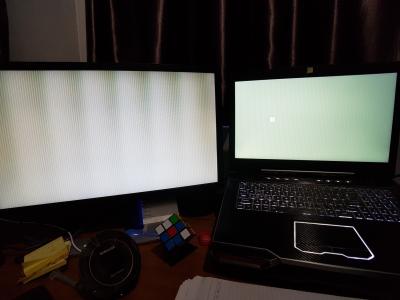
Hi,

Does anyone have this issue? It happens when z7 (with 970) woke up from sleep.

This post has been edited by MrLawKH: Oct 18 2017, 10:33 AM


Attached thumbnail(s)
Attached Image
Prince J
post Oct 18 2017, 04:31 PM

Regular
******
Senior Member
1,272 posts

Joined: May 2010
From: Team ILLEGEAR


QUOTE(ashx @ Oct 13 2017, 02:16 AM)
Hi,

I have a U4 bought 2 years ago. Anyway to upgrade/improve the touchpad? just recently been using the touchpad instead of mouse and it gets sticky & slipery etc.

Any option to change with other models if possible?
*
Hi ashx,

You are able to adjust the sensitivity of the touchpad using the touchpad driver software.

For U4 related question, you can pm me or our support team directly.

QUOTE(MrLawKH @ Oct 18 2017, 06:30 AM)
Hi,

Does anyone have this issue? It happens when z7 (with 970) woke up from sleep.
*
Hi, it seems like a windows bug, please pm me with your serial, windows edition and will assists.
Andrewtst
post Oct 19 2017, 07:34 PM

Forgiveness is Happiness
*********
All Stars
29,764 posts

Joined: Jan 2009
From: Johor, Malaysia.


Hi, Prince J AZIM@ILLEGEAR and huislaw.

My previous purchase Z5 have one HDMI and one D-sub. May I know can it output to 2 external monitor?

Currently the HDMI already connected to a monitor. I plan to connect second monitor via the D-sub output.

Beside this can this laptop change some spare part, for example change to current Z5 which came with Display Port instead of HDMI because my current HDMI only can output 95hz at 2560x1080 monitor. If it is Display Port then surely no issue output at 144hz.

This post has been edited by Andrewtst: Oct 19 2017, 07:40 PM
TShuislaw
post Oct 19 2017, 08:27 PM

Regular
******
Senior Member
1,344 posts

Joined: Jan 2013


QUOTE(Andrewtst @ Oct 19 2017, 07:34 PM)
Hi, Prince J AZIM@ILLEGEAR and huislaw.

My previous purchase Z5 have one HDMI and one D-sub. May I know can it output to 2 external monitor?

Currently the HDMI already connected to a monitor. I plan to connect second monitor via the D-sub output.

Beside this can this laptop change some spare part, for example change to current Z5 which came with Display Port instead of HDMI because my current HDMI only can output 95hz at 2560x1080 monitor. If it is Display Port then surely no issue output at 144hz.
*
I'm just the TS, bro biggrin.gif
Let's wait for Illegear team to answer your question.

33 Pages « < 15 16 17 18 19 > » Top
 

Change to:
| Lo-Fi Version
0.0312sec    0.42    6 queries    GZIP Disabled
Time is now: 5th December 2025 - 04:04 PM