Outline ·
[ Standard ] ·
Linear+
Lenovo Lenovo P2 Chat V1:Snap625 AMOLED 4GB/32GB 5100mAh , Throw away powerbanks & car chargers !!!
Chlastek
New Member
According to the VLC Player file info - I 've used 1080p- nothing has changed... (28-29 my room, dark bathroom 14 fps)This post has been edited by Chlastek : Mar 29 2017, 09:19 PM
TS azhar75
QUOTE(Chlastek @ Mar 29 2017, 09:18 PM)
According to the VLC Player file info - I 've used 1080p- nothing has changed... (28-29 my room, dark bathroom 14 fps)
We assume this is from the stock SNAPit camera app...
Any chance to see differences from Open Camera or Google Camera app...?
Chlastek
New Member
With an Open Camera app even in the complete darkness consistent 30 fps with both 1080p and 4K.This post has been edited by Chlastek : Mar 29 2017, 09:53 PM
TS azhar75
QUOTE(Chlastek @ Mar 29 2017, 09:53 PM)
With an Open Camera app even in the complete darkness consistent 30 fps with both 1080p and 4K.
Gracias....
kxj5201
Getting Started
QUOTE(azhar75 @ Mar 29 2017, 08:00 PM)
VIDEO
[attachmentid=8661098]
Follow the above YouTube until at recovery, choose "Wipe Cache Partition". Then, "reboot system now".
Well I use the normal factory reset and dun hv those prob arld... Surprisingly the reset was very fas tho.
SUS noos
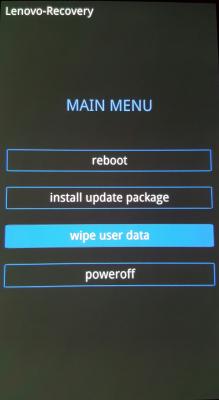
Not sure why, when i press Vol up + Power button my recovery mode menu only got
TS azhar75
QUOTE(noos @ Mar 29 2017, 10:52 PM)
Not sure why, when i press Vol up + Power button my recovery mode menu only got
rebot
install update package
wipe user data
power off
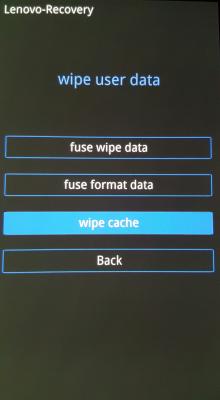
How should I wide the cache?
Select "Wipe User Data", then sub-menu "Wipe Cache"
This post has been edited by azhar75 : Mar 30 2017, 07:22 AM
ideaplus
QUOTE(droidtrix @ Mar 29 2017, 07:01 PM)
most of them after updated to Nougat, they never do factory reset. They should do factory reset after major update like from version 6 to version 7... i always do that for major update..
I thought i just want to restart and use it on the spot. Plenty of data need to backup if need to factory reset
TS azhar75
QUOTE(ideaplus @ Mar 30 2017, 08:14 AM)
I thought i just want to restart and use it on the spot. Plenty of data need to backup if need to factory reset
Take it positively...
Once we backup all data, nothing will go wrong if we lost P2...
But you can try the "Wipe Cache" method first to see any improvement...
TS azhar75
So in Nougat, split screen for two apps is available now in P2....?
solazz
New Member
QUOTE(azhar75 @ Mar 30 2017, 08:20 AM)
So in Nougat, split screen for two apps is available now in P2....?
Yes, it's now available
ideaplus
QUOTE(azhar75 @ Mar 30 2017, 08:19 AM)
Take it positively...
Once we backup all data, nothing will go wrong if we lost P2...
But you can try the "Wipe Cache" method first to see any improvement...
Bro, data is one thing, app download is another thing
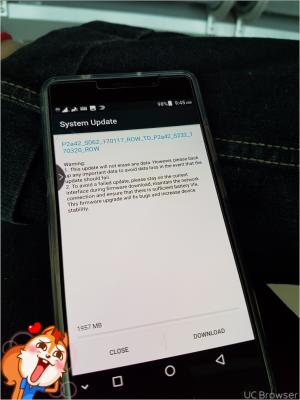
I wanna use my 2.5GB free weekend data to download this update
TS azhar75
QUOTE(solazz @ Mar 30 2017, 08:53 AM)
miloy2k
QUOTE(azhar75 @ Mar 27 2017, 10:32 AM)
More accessories...
[attachmentid=8646627] [attachmentid=8646659]
Source My fren using one for other phones, not so good based on her feedback
miloy2k
QUOTE(game4life @ Mar 27 2017, 10:15 AM)
Emart matang, x ingat kedai name
miloy2k
Uograde or not...
Attached thumbnail(s)
miloy2k
QUOTE(kxj5201 @ Mar 29 2017, 07:26 PM)
GG after update now my fb messenger is unusable.. keep on hang at th interface
Happen to my s7e, clear data for the related apps solved the issue.
SUS noos
QUOTE(azhar75 @ Mar 30 2017, 07:19 AM)
Select "Wipe User Data", then sub-menu "Wipe Cache"
Thx for the guide! I so scared to click on the wipe user data button.....
My P2 without wipe cache is running fine without any problem.
But some changes like the notification bar I not really used to it.
Another thing I see difference is the loading time to open FB apps becomes longer by 1-2 sec.....
1 more good thing is after clear recent apps, the free ram is more (~2.2GB), previously is around 1.8-2.0GB
This post has been edited by noos : Mar 30 2017, 10:35 AM
TS azhar75
QUOTE(noos @ Mar 30 2017, 10:08 AM)
Another thing I see difference is the loading time to open FB apps becomes longer by 1-2 sec.....
Since the P2 has been upgraded to Android 7.0, please goto PlayStore to update all apps.
Some apps still not fully compatible with Android 7.0. Hence, the only choice is to stay with Android 6.0.1 (like my case....LOL...)
mansooriqbal
QUOTE(azhar75 @ Mar 30 2017, 07:19 AM)
Select "Wipe User Data", then sub-menu "Wipe Cache"
Not able to go to recovery when i press vol up and power button. Any suggestions?


 Mar 29 2017, 09:18 PM


 Quote
Quote










 0.0333sec
 0.25
0.25
 6 queries
 GZIP Disabled