Hi, I just updated my old amd driver to crimson driver 17.1
Can tell me why I cannot go to that section where u can set the settings for every application? meaning i want this application to run at certain settings and I need to import the 'exe' of that software?
Hi, I just updated my old amd driver to crimson driver 17.1
Can tell me why I cannot go to that section where u can set the settings for every application? meaning i want this application to run at certain settings and I need to import the 'exe' of that software?
you should still able to set profile for each games/softwares in Crimson.
Prey® Up to 4.7% performance improvement measured on Radeon RX 580 8GB graphics when compared to Radeon Software Crimson ReLive edition 17.4.4(RS-134) Multi GPU profile support
Fixed Issues -Fixed an issue that may sometimes cause the error message "1603" during uninstall. -Radeon Settings may sometimes fail to update through the auto Radeon Software update feature. -Forza Horizon 3™ may experience minor graphics corruption in some game maps -Sid Meier's Civilization™ VI may experience an application crash when using Hybrid Graphics system configurations and windowed game mode -Radeon WattMan may fail to apply settings on some Radeon R9 390 series graphics products. -Added switchable graphics support for Unigine™ Superposition for XConnect and Hybrid Graphics.
Known Issues -The Display feature in Radeon Settings "GPU Scaling" may not function for some games. -Radeon Settings may crash on switching Windows® user after toggling AMD CrossFire™ technology mode. -A small amount of apps may still experience issues with Borderless Fullscreen mode and AMD FreeSync™ technology if other applications or game launchers are running on the primary screen in the background. -Counter-Strike™: Global Offensive and World of Warcraft™ may experience flickering or performance issues the first time the game is launched on a system boot with AMD FreeSync™ technology enabled. Workarounds include exiting and restarting the application or task switching (alt+tab) in and out of the game to fix the issue.
Known Issues for Radeon ReLive -The XBOX™ DVR application may cause conflicts with Radeon ReLive, users are suggested to disable XBOX™ DVR if Radeon ReLive is experiencing issues. -Radeon ReLive may fail to install on AMD APU Family products or experience a system hang or failure to record when using the recording feature on AMD APU Family products. -Radeon ReLive may intermittently fail to work after performing task switches of applications. A work around is to disable and then enable the feature in Radeon Software. -Radeon ReLive may exhibit corruption in recordings when capturing Microsoft Office applications. -Radeon ReLive may experience recording or streaming issues when task switching using ALT+TAB.
Package Contents The Radeon Software Crimson ReLive Edition 17.5.1 installation package contains the following: -Radeon Software Crimson ReLive Edition 17.5.1 Driver Version 17.10.2711. (Windows Driver Store Version 22.19.165.3)
Hopefully Vega will perform well. I don't hope much, but hopefully the highest end vega should perform near 1080ti.
Raja mentioned there, "if gaming is your primary reason for buying a GPU, I’d suggest waiting just a little while longer for the lower-priced, gaming-optimized Radeon RX Vega graphics card. You’ll be glad you did. " . So just wait for it, i guess..
Raja mentioned there, "if gaming is your primary reason for buying a GPU, I’d suggest waiting just a little while longer for the lower-priced, gaming-optimized Radeon RX Vega graphics card. You’ll be glad you did. " . So just wait for it, i guess..
AMD card good for bit coin mining? why heavy depend on GPU for mining rather than CPU?
Alternate coins, mostly Ethereum i think. Bitcoin or many other famous Coins difficulty is too high for consumer GPU to make good profit or any profit since there is ASIC available for the job that give good hashrate while using much less power.
Raja mentioned there, "if gaming is your primary reason for buying a GPU, I’d suggest waiting just a little while longer for the lower-priced, gaming-optimized Radeon RX Vega graphics card. You’ll be glad you did. " . So just wait for it, i guess..
In Vega Frontier Edition page they said this. "To learn more about the Radeon Vega Frontier Edition graphics card, visit http://radeon.com/frontier and we’ll be providing further details by mid-June"
Not launch but details.
Then told us to wait longer for "lower-priced" gaming optimized Vega. I interpret that as let us sell these Vega aim at professionals with high profit margin first for awhile until price for HBM2 come down considerably. Vega for gamer in 2018.
In Vega Frontier Edition page they said this. "To learn more about the Radeon Vega Frontier Edition graphics card, visit http://radeon.com/frontier and we’ll be providing further details by mid-June"
Not launch but details.
Then told us to wait longer for "lower-priced" gaming optimized Vega. I interpret that as let us sell these Vega aim at professionals with high profit margin first for awhile until price for HBM2 come down considerably. Vega for gamer in 2018.
Hi, want to ask is there any solution for PC-to-PC game stream for AMD R9 280X? Eg: stream from my bedroom gaming pc to living room weak PC. I looked around and I can only find solution for Steam specific games, as well as NVidia solutions.
I tried Splashtop, really really bad. Any other possible recommendation?
Actually on recent Reddit AMA with Raja Koduri he mentioned that they will show RX Vega on upcoming Computex 2017 late this month but it will only available on store later which i hope few more weeks after that or in July at most.
Some recap from the AMA thanks to DrawStreamRasterizer
Main goal of Vega was to create an architecture that can handle large data sets and game at 4K at 60fps.
The demo during Financial Analyst day was an air-cooled Frontier Edition, not an RX Vega card. There will be water cooled versions of Vega that will run slightly faster.
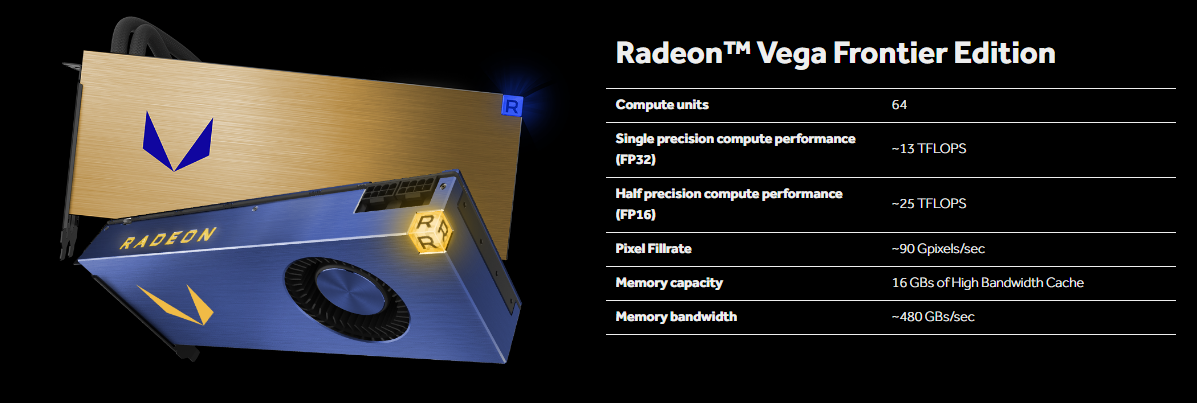
Frontier uses 2 x 8GB stacks of HBM2.
Both HBM1 and HBM2 provide plenty of bandwidth.
Raja will look into OC'ing HBM2 and a 16GB RX card.
RX Vega will be shown at Computex. It will not be available the same week but nothing else has been ruled out.
Frontier runs comfortably using 1x6-pin and 1x8-pin but RTG put 2x8-pin on the production card for more headroom.
Raja is keeping his beard until Vega launches.
Infinity fabric allows for the joining of multiple engines on a single die, and offers high bandwidth and low latency.
There has been no mention of using Infinity fabric with multiple GPUs.
Frontier was designed for an array of workload usages. RX Vega is for gaming and will be faster than Frontier.
Vega will support Tensorflow, Cafe2, Cafe, Torch7 and MxNet via MIOpen.
Pro versions support hardware virtualization. He did not state out right if this included Frontier/Vega or or not.
The High Bandwidth Cache Controller (HBCC) helps increase minimum framerates and can improve performance even more if it's specifically coded for.
Developing drivers for GPUs is really hard.
Raja expects to grow ROCm to improve machine learning and compute. Another ROCm comment.
Raja replies to a comment regarding particle physics simulation, saying this will be improved via the new cache and infinity fabric.
New geometry pipeline in Vega improves throughput per clock cycle and will require no extra work on dev's part to utilize.
Radeon Vega Frontier will be the fastest single GPU solution for compute.
Radeon Instinct will provide dramatically better performance per dollar compared to the competition
RX will have different drivers than Frontier that are optimized for gaming as well as additional goodies.
Vega is the first GPU architecture to use Infinity Fabric and is in no way a re-hash of Polaris
Radeon Chill will continue to be improved and will be updated soon.
QUOTE(digitalifelesss @ May 19 2017, 11:28 PM)
Hi, want to ask is there any solution for PC-to-PC game stream for AMD R9 280X? Eg: stream from my bedroom gaming pc to living room weak PC. I looked around and I can only find solution for Steam specific games, as well as NVidia solutions.
I tried Splashtop, really really bad. Any other possible recommendation?
I don't think there is any alternative for Nvidia gamestream other than using Steam home streaming.
Can't you add games to Steam and use it streaming feature?
This post has been edited by Acid_RuleZz: May 20 2017, 11:19 AM
Raja mentioned there, "if gaming is your primary reason for buying a GPU, I’d suggest waiting just a little while longer for the lower-priced, gaming-optimized Radeon RX Vega graphics card. You’ll be glad you did. " . So just wait for it, i guess..
QUOTE(sonyfanzz @ May 17 2017, 04:35 PM)
so vega is for professional :confused:
QUOTE(Acid_RuleZz @ May 17 2017, 06:19 PM)
The newly announced Vega Frontier Edition is for professional.
Vega for gamer coming soon™. Nova, Eclipse & Core.
QUOTE(silrave @ May 19 2017, 12:11 PM)
omg need to wait again
Sorry folks but AMD has disappoint folks that hoping they can make nvidia price cut soon
Can't you add games to Steam and use it streaming feature?
LOL that actually worked. Just for the lulz I tried to stream other softwares and they also worked... Just no desktop access isn't gonna make them very good for productivity. While there are workaround to force stream whole desktop, I find it really choppy and often crash, not sure if just wireless unstable or Steam know what trick I playing...


 May 11 2017, 04:14 PM


 Quote
Quote














 0.0288sec
 0.43
0.43
 6 queries
 GZIP Disabled