Welcome Guest ( Log In | Register )

69 Pages « < 39 40 41 42 43 > » Bottom

Outline · [ Standard ] · Linear+

 [OFFICIAL] Ubiquiti Networks, Home/SOHO/Enterprise Networking

views
     
jianming80
post Aug 7 2019, 06:08 PM

New Member
*
Junior Member
18 posts

Joined: Nov 2009


QUOTE(wanttotree @ Aug 7 2019, 06:05 PM)
Yes u can. Or better better yet on a headless server eg debian/ubuntu. Basically copy and paste 3 lines of commands and its installed ready to adopt devices.
*
Eg: Using Virtualization inside the NAS?
or raspberry pi 3?
or using their UC-CK Ubiquiti Networks Unified Controller?

Thank You
MX510
post Aug 7 2019, 06:20 PM

Love Me Sin Hate Me Sinner
*******
Senior Member
4,038 posts

Joined: Aug 2005
From: Earth


QUOTE(jianming80 @ Aug 7 2019, 05:47 PM)
Thanks.
I thought the controller can install on our PC?
Looks like Ubiquiti products split each features into standalone devices.
*
If budget is tight can use pc method ✌🏻
wanttotree
post Aug 7 2019, 08:15 PM

On my way
****
Junior Member
677 posts

Joined: Apr 2008
QUOTE(jianming80 @ Aug 7 2019, 06:08 PM)
Eg: Using Virtualization inside the NAS?
or raspberry pi 3?
or using their UC-CK Ubiquiti Networks Unified Controller?

Thank You
*
Inside nas is so easy. Install through docker is a click away. Rasp pi can install via raspbian apt. Of u got both, i recommend the nas cz its gonna run 24/7 anyway. =)
jianming80
post Aug 8 2019, 03:05 PM

New Member
*
Junior Member
18 posts

Joined: Nov 2009


Do you guys have configuration guide on how to connect USG with TM Unifi & HyppTV?
jianming80
post Aug 9 2019, 07:55 AM

New Member
*
Junior Member
18 posts

Joined: Nov 2009


QUOTE(R4yMoNd @ Apr 21 2018, 04:44 AM)
Completed my home network upgrade recently.
Ubiquiti Security Gateway, Unifi Cloudkey, Unifi Switch 8 60W x 2, UAP AC Pro x 2.

Was using Asus Router AC RT68U x 2 (1 router & 1 AP)

Performance wise: Seems like Asus better coverage and faster speedtest results.

will try to tweak the unifi AP placement and see the results later.
*
Can you share how do you connect above with TM UniFI?
I am currently having USG & AC Pro only.
I am using normal Layer 2 switch.
bernardyap
post Aug 9 2019, 12:44 PM

Getting Started
**
Junior Member
90 posts

Joined: Jan 2003
From: Seremban


I am thinking to buy a POE injector.

Connect POE powered UAP-AC-LR direct to Huawei VDSL2 HG655m.

come back next week and let you guys know does it work.
jianming80
post Aug 9 2019, 05:45 PM

New Member
*
Junior Member
18 posts

Joined: Nov 2009


QUOTE(jianming80 @ Aug 9 2019, 07:55 AM)
Can you share how do you connect above with TM UniFI?
I am currently having USG & AC Pro only.
I am using normal Layer 2 switch.
*
Internet finally connected.
This is due to USG yet update to latest firmware and we can't configure and provisioning.

After manual update the firmware and it is connected now.
bernardyap
post Aug 16 2019, 09:57 AM

Getting Started
**
Junior Member
90 posts

Joined: Jan 2003
From: Seremban


QUOTE(bernardyap @ Aug 9 2019, 12:44 PM)
I am thinking to buy a POE injector.

Connect POE powered UAP-AC-LR direct to Huawei VDSL2 HG655m.

come back next week and let you guys know does it work.
Huawei VDSL2 HG655m routing function and DHCP not working.

Need to plug UAP-AC-LR direct to Unifi Dlink router.

Disabled Dlink both wireless channel.

Now feel much better wifi speed.
Two5Kid
post Sep 2 2019, 10:50 AM

On my way
****
Senior Member
629 posts

Joined: Jan 2003
From: Kota Bharu


I recently bought a Ubiquiti AC LR Pro. Currently the setup at my place is just the default TM Unifi router.

1) How should I wire the AC LR Pro to the router?
2) I can't even see the device on the router, why is that?
3) I downloaded the UBNT iOS App and it still can't detect the AC LR Pro
4) I have downloaded the Unifi Network Controller v5.11.39 and after installing, it prompt me for a password. ubnt/ubnt doesn't work. Neither does root/ubnt or admin/admin. What is the default password to access?

Thanks for helping me out.
MX510
post Sep 2 2019, 11:01 AM

Love Me Sin Hate Me Sinner
*******
Senior Member
4,038 posts

Joined: Aug 2005
From: Earth


QUOTE(Two5Kid @ Sep 2 2019, 10:50 AM)
I recently bought a Ubiquiti AC LR Pro. Currently the setup at my place is just the default TM Unifi router.

1) How should I wire the AC LR Pro to the router?
2) I can't even see the device on the router, why is that?
3) I downloaded the UBNT iOS App and it still can't detect the AC LR Pro
4) I have downloaded the Unifi Network Controller v5.11.39 and after installing, it prompt me for a password. ubnt/ubnt doesn't work. Neither does root/ubnt or admin/admin. What is the default password to access?

Thanks for helping me out.
*
Install the unifi controller on your pc easy adoption can refer youtube how to do it or hire me πŸ‘
Garena
post Sep 4 2019, 04:25 PM

Casual
***
Junior Member
446 posts

Joined: Dec 2009
I'm planning to deploy a router for a hostel. Currently choosing between EdgeRouter 12 and RB4011iGS+5HacQ2HnD-IN. Which one is better in terms of network traffic monitoring, network traffic history record and network quality of service? Can EdgeOS features compete with RouterOS in any ways?
R4yMoNd
post Sep 5 2019, 06:01 PM

Regular
******
Senior Member
1,139 posts

Joined: Aug 2006
QUOTE(Garena @ Sep 4 2019, 04:25 PM)
I'm planning to deploy a router for a hostel. Currently choosing between EdgeRouter 12 and  RB4011iGS+5HacQ2HnD-IN. Which one is better in terms of network traffic monitoring, network traffic history record and network quality of service? Can EdgeOS features compete with RouterOS in any ways?
*
For simple setup i will use: USG, cloudkey and couple of UAP
xproc
post Sep 6 2019, 10:07 AM

free for all
*******
Senior Member
4,470 posts

Joined: Sep 2007
From: Kuala Lumpur


hi... reporting in... i now have 2 nos uap-ac-lr connect to old tm router... from old tm router have another old dlink ap and another line to pc as controller... so far it is still ok....
wanttotree
post Sep 6 2019, 01:09 PM

On my way
****
Junior Member
677 posts

Joined: Apr 2008
QUOTE(Garena @ Sep 4 2019, 04:25 PM)
I'm planning to deploy a router for a hostel. Currently choosing between EdgeRouter 12 and  RB4011iGS+5HacQ2HnD-IN. Which one is better in terms of network traffic monitoring, network traffic history record and network quality of service? Can EdgeOS features compete with RouterOS in any ways?
*
Yes it can. What specific need do u have for the setup may i ask?
Garena
post Sep 11 2019, 02:25 PM

Casual
***
Junior Member
446 posts

Joined: Dec 2009
QUOTE(wanttotree @ Sep 6 2019, 01:09 PM)
Yes it can. What specific need do u have for the setup may i ask?
*
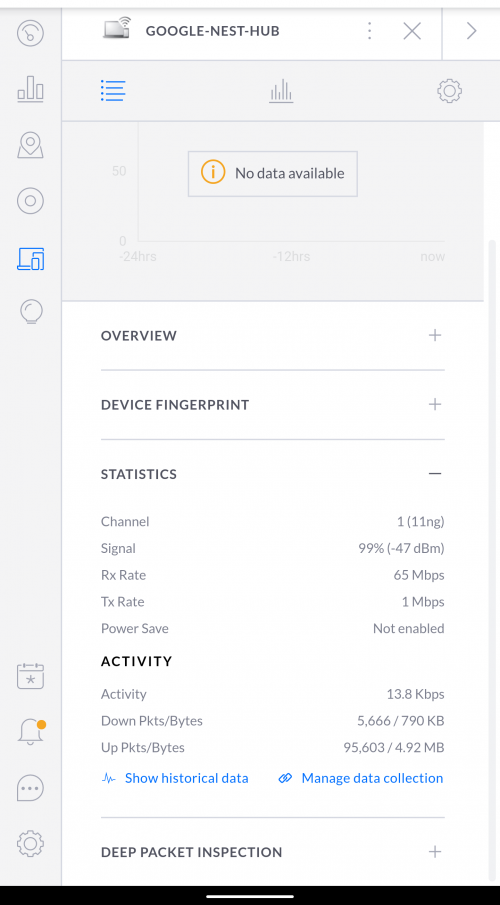
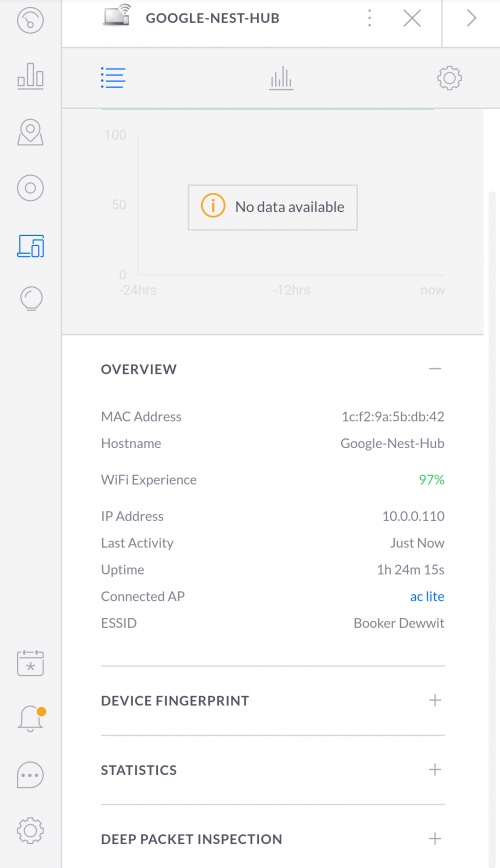
Does it have a interface that shows all connected devices via LAN and WLAN? Like a list of all IP address, MAC address, current Tx/Rx rate, total downloaded Bytes, the device connected via which UniFi AP.

This post has been edited by Garena: Sep 11 2019, 02:58 PM
wanttotree
post Sep 11 2019, 02:49 PM

On my way
****
Junior Member
677 posts

Joined: Apr 2008
QUOTE(Garena @ Sep 11 2019, 02:25 PM)
Does it have a interface that shows all connected devices via LAN and WLAN? Like a list of all IP address, MAC address, current Tx/Rx speed, total downloaded Bytes, the device connected via which UniFi AP.
*
These pictures should answer that.

user posted image
user posted image
user posted image
Garena
post Sep 11 2019, 02:55 PM

Casual
***
Junior Member
446 posts

Joined: Dec 2009
QUOTE(wanttotree @ Sep 11 2019, 02:49 PM)
These pictures should answer that.

user posted image
user posted image
user posted image
*
It's kind of similar with what i saw on demo.ui.com. Thanks for sharing.

Will the total download/upload Bytes reset back to 0 if

1. the devices disconnect and reconnect to the network?
2. restart router?

This post has been edited by Garena: Sep 12 2019, 01:48 AM
TSpandera999
post Sep 11 2019, 10:36 PM

λͺ¨λ“  κ²ƒβ€‹μ—λŠ” μ •ν•΄μ§„ λ•Œβ€‹κ°€ μžˆμœΌλ‹ˆ
*******
Senior Member
6,214 posts

Joined: Sep 2010
From: Busan, Kr | Kuching, Swk


QUOTE(Garena @ Sep 11 2019, 02:55 PM)
It's kind of similar with what i saw on demo.ui.com. Thanks for sharing.

Will the total download/upload Bytes reset back to 0 if

1. the devices reconnect to the network?
2. restart router?
*
total download and upload bytes will be reset depends with devices active time (restart) it will reset the total if i not mistaken.
Does it matter to see total download and upload? so far, what important is, it will compile on the the dashboard which device / client are most active.
Garena
post Sep 12 2019, 01:47 AM

Casual
***
Junior Member
446 posts

Joined: Dec 2009
QUOTE(pandera999 @ Sep 11 2019, 10:36 PM)
total  download and upload bytes will be reset depends with devices active time (restart) it will reset the total if i not mistaken.
Does it matter to see total download and upload? so far, what important is, it will compile on the the dashboard which device / client are most active.
*
I see, it's important for me because i need to monitor the network usage.
ntc3freak
post Sep 18 2019, 05:13 PM

Look at all my stars!!
*******
Senior Member
2,347 posts

Joined: Sep 2005


Hey guys,

I'm looking for some advices here. A little bit of a background, I am currently living in a condo with TIME Fiber 500 Mbps internet, using a Netgear Nighthawk R8500 as my main router, with a Ubiquiti AC-LR to extend the range to the farthest bedrooms. Right now, I am taping down the ethernet cable on the floor and ceiling from the router to the AP.

Two things are about to happen in the near future; moving into a new condo (renting a bigger unit, may potentially potentially pose a bigger issue for Wi-Fi), and getting married. As such, I am in search of a more aesthetically pleasing solution than my current one, as the new setup will have to be wife-approved and not the cincai solution it is now haha. This is where I need help from you guys.

I have been looking at a few of the Wi-Fi mesh systems, especially the AmplifiHD and the eeros, but both seem to have their own issues, and neither have official support in Malaysia.

So now I am back to thinking of going full Unifi (or maybe Mikrotik or Ruckus???) setup, but then comes the question of how do I hide all the ethernet cables? Any of you have experience with this, especially in rented properties? Would appreciate any help I can get biggrin.gif

69 Pages « < 39 40 41 42 43 > » Top
 

Change to:
| Lo-Fi Version
0.0348sec    0.48    6 queries    GZIP Disabled
Time is now: 7th December 2025 - 04:13 AM