

Can we set 2 LAN port to forward UNIFI IPTV VLAN with standard firmware?
Currently my Dlink dir850L able to connect to 2 STB.
Cheap Asus Wifi Router Alternative, Huawei WS880 & Others
Cheap Asus Wifi Router Alternative, Huawei WS880 & Others
|
|
 Jul 11 2016, 03:39 PM Jul 11 2016, 03:39 PM
|
 
Senior Member
782 posts Joined: Jul 2005 
|
Can we set 2 LAN port to forward UNIFI IPTV VLAN with standard firmware?
Currently my Dlink dir850L able to connect to 2 STB. |
|
|
|
|
|
Jul 11 2016, 03:41 PM
|

Senior Member
4,333 posts Joined: Jan 2003 
|
QUOTE(mintgadget @ Jul 11 2016, 03:33 PM) Are you using a paper clip to reset? I did that didn't work, try a small screwdriver. I had similar issues. Now its flashed with the Merlin firmware. It is kinda flaky to get in but eventually it does, even loading the firmware I had to perform many tries. I used a thin bamboo stick whose end just fits the reset hole snugly. Can hear the soft click of the reset button as I pressed the stick into the hole. I think there is no problem activating the reset. I can, however, use this bamboo stick to reset to factory default settings with the router powered up already. So, what do I need to do to go into recovery mode to flash the modified bootloader file I already have with me?  |
|
|
Jul 11 2016, 03:53 PM
|

Junior Member
328 posts Joined: Jun 2008
|
QUOTE(raynman @ Jul 11 2016, 03:41 PM) I used a thin bamboo stick whose end just fits the reset hole snugly. Make sure you set your IP to the same subnet ya as in boot loader mode DHCP doesn't work. Once that is done you should be able to get to there router IP. Assuming you are following the guide. Http://192.168.1.1 should bring you up to the Emengent (yes it is spelled wrong) mode. HAHAHA Chinese stuff. Then you flashed your modified WS880_trans.bin. Here I had some issues coz I was working on a MAC and PC at the same time. Anyway once successful it should get you to CPE mode then you can flash WS880_380.58_0.trx file. Reboot and you are good to go.Can hear the soft click of the reset button as I pressed the stick into the hole. I think there is no problem activating the reset. I can, however, use this bamboo stick to reset to factory default settings with the router powered up already. So, what do I need to do to go into recovery mode to flash the modified bootloader file I already have with me? |
|
|
Jul 11 2016, 03:57 PM
|
|
Junior Member
383 posts Joined: May 2005
|
QUOTE(raynman @ Jul 11 2016, 03:41 PM) I used a thin bamboo stick whose end just fits the reset hole snugly. The easier way is to unplug the power connector first. Then while pressing the reset button, plug in the power connector. The power on/off button is very unintuitive.Can hear the soft click of the reset button as I pressed the stick into the hole. I think there is no problem activating the reset. I can, however, use this bamboo stick to reset to factory default settings with the router powered up already. So, what do I need to do to go into recovery mode to flash the modified bootloader file I already have with me? You can ping the router continuously to know when to release the reset button. This post has been edited by jio: Jul 11 2016, 03:58 PM |
|
|
Jul 11 2016, 04:08 PM
|
|
Senior Member
4,333 posts Joined: Jan 2003
|
QUOTE(mintgadget @ Jul 11 2016, 03:53 PM) Make sure you set your IP to the same subnet ya as in boot loader mode DHCP doesn't work. Once that is done you should be able to get to there router IP. Assuming you are following the guide. Http://192.168.1.1 should bring you up to the Emengent (yes it is spelled wrong) mode. HAHAHA Chinese stuff. Then you flashed your modified WS880_trans.bin. Here I had some issues coz I was working on a MAC and PC at the same time. Anyway once successful it should get you to CPE mode then you can flash WS880_380.58_0.trx file. Reboot and you are good to go. The problem is, I can't go into 192.168.1.1 after performing the flash and unlock procedure.I already manually set my PC's IP address to 192.168.1.2 I have to change my PC's IP address to 192.168.3.2 to access into the router's IP address 192.168.3.1 Once I do that, it brings me to the main login page as if the reset was not done at all. |
|
|
Jul 11 2016, 04:11 PM
|
|
Senior Member
4,333 posts Joined: Jan 2003
|
QUOTE(jio @ Jul 11 2016, 03:57 PM) The easier way is to unplug the power connector first. Then while pressing the reset button, plug in the power connector. The power on/off button is very unintuitive. This is EXACTLY what I did.You can ping the router continuously to know when to release the reset button. To no avail. It just won't bring me to the emergency load modified bootloader page. |
|
|
|
|
|
Jul 11 2016, 04:15 PM
|
|
Junior Member
328 posts Joined: Jun 2008
|
QUOTE(raynman @ Jul 11 2016, 04:08 PM) The problem is, I can't go into 192.168.1.1 after performing the flash and unlock procedure. first lets try this. set your network adaptor to automatically obtain ip and use cable not WIFI. I already manually set my PC's IP address to 192.168.1.2 I have to change my PC's IP address to 192.168.3.2 to access into the router's IP address 192.168.3.1 Once I do that, it brings me to the main login page as if the reset was not done at all. you should automatically get 192.168.3.x that way you can access the router via 192.168.3.1 Right? now manually set to 192.168.1.10 or whatever you want. Try the reset, i believe you are doing it right. unfortunately there is no light indication to tell you that it has successfully booted into emergency upgrade page mode. can you ping 192.168.1.1 -t to see if you can see the router when it has booted up in emergency mode. else if still cannot try setting it back to obtain ip and if you can see via 192.168.3.1 means it didn't kick in. |
|
|
Jul 11 2016, 04:16 PM
|
|
Junior Member
202 posts Joined: Sep 2013
|
Man, I have been going through all the pages. I understand that the stock firmware will be able to support Unifi but I need to know does it work simply by plug and play?
Hopefully I don't need to configure after plugging into the new router and so forth. If I do need to configure anyone with kind soul could help? I'm too damn noob at networking. Don't even know configure my ip and stuff like that but keen at upgrading my router. Nevertheless, I'm pretty darn good at listening and following instruction, if anyone could guide; please do so.  Gonna purchase this later. |
|
|
Jul 11 2016, 04:18 PM
|
|
Senior Member
4,333 posts Joined: Jan 2003
|
I don't use wifi for this.
I am already using a direct Ethernet cable connection. |
|
|
Jul 11 2016, 04:21 PM
|
|
Senior Member
4,333 posts Joined: Jan 2003
|
QUOTE(mintgadget @ Jul 11 2016, 04:15 PM) first lets try this. set your network adaptor to automatically obtain ip and use cable not WIFI. It DIDN'T kick in.if you can see via 192.168.3.1 means it didn't kick in. I can ALWAYS see the router via 192.168.3.1 after the reset procedure. |
|
|
Jul 11 2016, 04:24 PM
|
|
Junior Member
328 posts Joined: Jun 2008
|
QUOTE(raynman @ Jul 11 2016, 04:21 PM) It DIDN'T kick in. Try another browser, try another computer.I can ALWAYS see the router via 192.168.3.1 after the reset procedure. it can't be that hard. you seem to be familiar with networking. last resort - TAKE IT BACK and CHANGE it. |
|
|
Jul 11 2016, 04:26 PM
|
|
Senior Member
6,262 posts Joined: Jul 2005 From: UEP Subang Jaya 
|
QUOTE(mintgadget @ Jul 11 2016, 04:24 PM) Try another browser, try another computer. Mana ada browser/computer can make a difference in this case it can't be that hard. you seem to be familiar with networking. last resort - TAKE IT BACK and CHANGE it.  |
|
|
Jul 11 2016, 04:27 PM
|
|
Senior Member
4,333 posts Joined: Jan 2003
|
QUOTE(LostAndFound @ Jul 11 2016, 04:26 PM) Mana ada browser/computer can make a difference in this case You are correct!  |
|
|
|
|
|
Jul 11 2016, 04:28 PM
|
|
Senior Member
1,609 posts Joined: Sep 2005 From: KL
|
QUOTE(mintgadget @ Jul 11 2016, 04:24 PM) Try another browser, try another computer. How to change?it can't be that hard. you seem to be familiar with networking. last resort - TAKE IT BACK and CHANGE it. How to proof that the router is not working? |
|
|
Jul 11 2016, 04:37 PM
|
|
Junior Member
328 posts Joined: Jun 2008
|
QUOTE(LostAndFound @ Jul 11 2016, 04:26 PM) Mana ada browser/computer can make a difference in this case didn't work on my mac (safari) couldn't see the emergency page so i tried on a PC then it worked. coincidence perhaps. the loading of the emergency page. |
|
|
Jul 11 2016, 04:40 PM
|
|
Senior Member
4,333 posts Joined: Jan 2003
|
The good thing is that the original Huawei firmware is not too bad, although its features are limited.
I can't set alternative DNS servers, for example. Have to use the default TM's DNS servers. Wifi on both bands are stable, no random dropouts or whatever. One more thing. IPv6 cannot work in the original firmware. |
|
|
Jul 11 2016, 04:54 PM
|
|
Junior Member
161 posts Joined: Jan 2003 From: KL
|
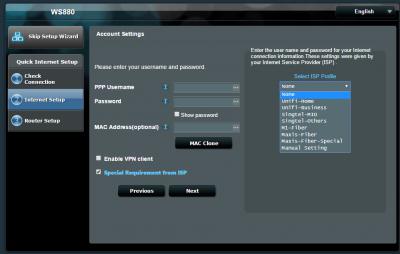
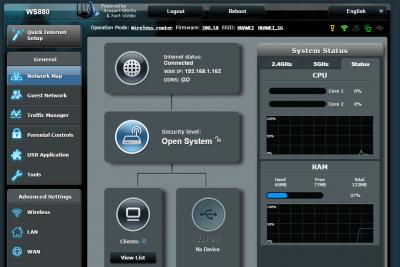
just got it from Sri com..hot hot..power on flash..
stock fw only support tm unifi. sucess flash to Xwrt-Vortex WS880_380.58_0 This post has been edited by lokwm: Jul 11 2016, 04:56 PM Attached thumbnail(s) 
|
|
|
Jul 11 2016, 04:59 PM
|
|
Senior Member
4,333 posts Joined: Jan 2003
|
How did you perform the flash?
Can please describe the process in detail for me? |
|
|
Jul 11 2016, 05:03 PM
|

Senior Member
5,221 posts Joined: Aug 2007 From: Deneb star
|
QUOTE(raynman @ Jul 11 2016, 04:40 PM) The good thing is that the original Huawei firmware is not too bad, although its features are limited. How is the wifi range for you? Good?I can't set alternative DNS servers, for example. Have to use the default TM's DNS servers. Wifi on both bands are stable, no random dropouts or whatever. One more thing. IPv6 cannot work in the original firmware. You are staying in apartment or landed houses? |
|
|
Jul 11 2016, 05:05 PM
|
|
Senior Member
4,333 posts Joined: Jan 2003
|
QUOTE(AMDAthlon @ Jul 11 2016, 05:03 PM) How is the wifi range for you? Good? I am staying in a landed house.You are staying in apartment or landed houses? 2.4GHz is powerful, can cover whole house plus across the road in front. 5Ghz, as expected, is weaker. Can only receive just outside the front gate. |
| Change to: |  0.0285sec 0.0285sec
 0.45 0.45
 6 queries 6 queries
 GZIP Disabled GZIP Disabled
Time is now: 5th December 2025 - 05:49 AM |
 Quote
Quote