

anyone tried it on Time fibre? nid any additional step?
Cheap Asus Wifi Router Alternative, Huawei WS880 & Others
Cheap Asus Wifi Router Alternative, Huawei WS880 & Others
|
|
 Jul 11 2016, 05:07 PM Jul 11 2016, 05:07 PM
|
 
Junior Member
102 posts Joined: Oct 2006 From: MMU, Cyberjaya   
|
anyone tried it on Time fibre? nid any additional step?
|
|
|
|
|
|
Jul 11 2016, 05:08 PM
|

Junior Member
204 posts Joined: Sep 2013
|
QUOTE(lokwm @ Jul 11 2016, 04:54 PM) just got it from Sri com..hot hot..power on flash.. still many units left?stock fw only support tm unifi. sucess flash to Xwrt-Vortex WS880_380.58_0  can you give a detailed guide step by step on how to flash? |
|
|
Jul 11 2016, 05:08 PM
|
|
Junior Member
328 posts Joined: Jun 2008
|
found this in a Russian forum
hope it helps it (using google translate) 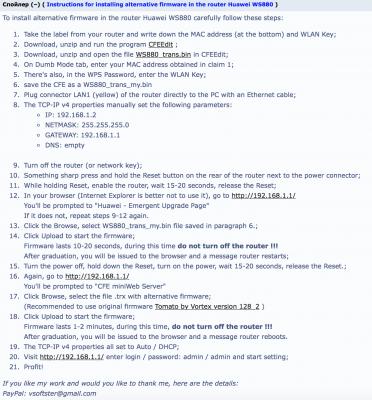
|
|
|
Jul 11 2016, 05:13 PM
|
|
Junior Member
161 posts Joined: Jan 2003 From: KL
|
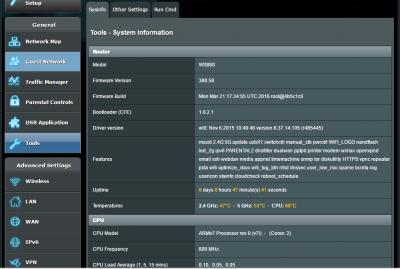
QUOTE(raynman @ Jul 11 2016, 04:59 PM) How did you perform the flash? have you edit the WS880_trans.bin? and upload?Can please describe the process in detail for me? This post has been edited by lokwm: Jul 11 2016, 05:15 PM Attached thumbnail(s) 
|
|
|
Jul 11 2016, 05:15 PM
|

Senior Member
4,333 posts Joined: Jan 2003
|
QUOTE(lokwm @ Jul 11 2016, 05:13 PM) have you edit the WS880_trans.bin? Of course I have.Only problem is I don't have the chance to upload it to the WS880. Cannot go into the emergency upload page.  |
|
|
Jul 11 2016, 05:16 PM
|
|
Senior Member
4,333 posts Joined: Jan 2003
|
The funny thing is, my router's default IP address is 192.168.3.1 not 192.168.1.1
|
|
|
|
|
|
Jul 11 2016, 05:20 PM
|
|
Junior Member
161 posts Joined: Jan 2003 From: KL
|
QUOTE(raynman @ Jul 11 2016, 05:16 PM) The funny thing is, my router's default IP address is 192.168.3.1 not 192.168.1.1 yes..fresh out from box the default IP address is 192.168.3.1.after u in huawei - Emergent upgrade page ip is 192.168.1.1 |
|
|
Jul 11 2016, 05:22 PM
|
|
Junior Member
328 posts Joined: Jun 2008
|
QUOTE(raynman @ Jul 11 2016, 05:16 PM) The funny thing is, my router's default IP address is 192.168.3.1 not 192.168.1.1 that is right. before you can upload the "unlock rom" the router is default at 192.168.3.1. As you have not gone further then that as yet. thats why the edited bin file will change it to 192.168.1.1 after is has been flashed |
|
|
Jul 11 2016, 05:26 PM
|
|
Senior Member
4,333 posts Joined: Jan 2003
|
The main problem is I CANNOT go into the Huawei Emergency Upgrade Page, using the existing TS procedure.
|
|
|
Jul 11 2016, 05:29 PM
|
|
Junior Member
328 posts Joined: Jun 2008
|
QUOTE(raynman @ Jul 11 2016, 05:26 PM) The main problem is I CANNOT go into the Huawei Emergency Upgrade Page, using the existing TS procedure. relax brother, you need to turn the bugger off. try again perhaps after dinner when you are not so frustrated. hehe  |
|
|
Jul 11 2016, 05:29 PM
|
|
Junior Member
161 posts Joined: Jan 2003 From: KL
|
QUOTE(raynman @ Jul 11 2016, 05:26 PM) The main problem is I CANNOT go into the Huawei Emergency Upgrade Page, using the existing TS procedure. do u set your pc ip address?open two command promt type in "ping 192.168.1.1 -t" [enter] and second command promt type in "ping 192.168.3.1" [enter] then 1. Unplug the power cable from router 2. Hold on the reset key while plug in the power cable, hold the reset key for 40 secs then release 3. The router will boot the emergency upgrade page 192.168.1.1 will reply one in emergency upgrade page This post has been edited by lokwm: Jul 11 2016, 05:33 PM Attached thumbnail(s) 

|
|
|
Jul 11 2016, 06:22 PM
|
|
Junior Member
91 posts Joined: Mar 2010
|
QUOTE(ryanice8888 @ Jul 11 2016, 05:08 PM) still many units left? just get the router as well..a great value for money..a lot more unit left..enough for everyone..it is placed at 3 different location in the shop..so yeah..plenty of stock to go around.. can you give a detailed guide step by step on how to flash?  |
|
|
Jul 11 2016, 06:31 PM
|

Senior Member
562 posts Joined: Feb 2009 From: klang valley 
|
The Huawei selling like hot cake. Left less than 30 units. Any one want, come fast.
|
|
|
|
|
|
Jul 11 2016, 06:56 PM
|

Senior Member
5,827 posts Joined: Jan 2003 From: Selayang, Selangor
|
QUOTE(ks1230 @ Jul 11 2016, 06:22 PM) just get the router as well..a great value for money..a lot more unit left..enough for everyone..it is placed at 3 different location in the shop..so yeah..plenty of stock to go around.. QUOTE(bsa12 @ Jul 11 2016, 06:31 PM) The Huawei selling like hot cake. Left less than 30 units. Any one want, come fast. One post say got a lot one post say got few left ... which one to believe?  |
|
|
Jul 11 2016, 07:10 PM
|

Senior Member
1,659 posts Joined: Feb 2005
|
Successfully flashed to ASUSWRT-MERLIN!
Found this one to be pretty useful (in Chinese though). This post has been edited by vincent_ng86: Jul 11 2016, 07:10 PM |
|
|
Jul 11 2016, 07:21 PM
|
|
Junior Member
91 posts Joined: Mar 2010
|
QUOTE(RViN @ Jul 11 2016, 06:56 PM) One post say got a lot one post say got few left ... which one to believe? well..I went there around 3pm and there is still plenty of them left..the stock are distributed into 3 different area..2 of them around the different networking section(one toward the middle section of the shop and the other near the exit of the shop) and one is in front of the cashier..  |
|
|
Jul 11 2016, 07:22 PM
|
|
Junior Member
383 posts Joined: May 2005
|
QUOTE(raynman @ Jul 11 2016, 04:11 PM) This is EXACTLY what I did. 1. Remember to set your ip to 192.168.1.x range.To no avail. It just won't bring me to the emergency load modified bootloader page. 2. in command prompt ping -t 192.168.1.1 3. press & hold the reset button while plugging in the power (the button should be in power on as well). 4. wait for 5 or more ping replies before releasing the reset button or else it won't work & just perform the reset. |
|
|
Jul 11 2016, 08:07 PM
|
|
Senior Member
4,333 posts Joined: Jan 2003
|
Now I managed to get into the Emergency Upgrade Page.
After choosing my modified bootloader file and press 'Upload' I didn't get the "Upload completed. System is going to reboot. Please wait a few moments." Therefore, the CFE miniweb server page didn't boot up. Could there be something wrong with my modified bootloader file? |
|
|
Jul 11 2016, 08:33 PM
Show posts by this member only | IPv6 | Post
#119
|
|
Senior Member
1,659 posts Joined: Feb 2005
|
QUOTE(raynman @ Jul 11 2016, 08:07 PM) Now I managed to get into the Emergency Upgrade Page. Restore default NVRAM values before you upload the custom firmware.After choosing my modified bootloader file and press 'Upload' I didn't get the "Upload completed. System is going to reboot. Please wait a few moments." Therefore, the CFE miniweb server page didn't boot up. Could there be something wrong with my modified bootloader file? P/S: Got my IPv6 now, yay! This post has been edited by vincent_ng86: Jul 11 2016, 08:33 PM |
|
|
Jul 11 2016, 08:38 PM
|
|
Senior Member
4,333 posts Joined: Jan 2003
|
"Restore default NVRAM values before you upload the custom firmware."
How do I do that? I didn't even manage to get to the CFE MiniWebServer page to upload the custom firmware. This post has been edited by raynman: Jul 11 2016, 08:41 PM |
| Change to: |  0.0285sec 0.0285sec
 0.77 0.77
 6 queries 6 queries
 GZIP Disabled GZIP Disabled
Time is now: 7th December 2025 - 03:15 AM |
 Quote
Quote