Welcome Guest ( Log In | Register )

5 Pages < 1 2 3 4 > » Bottom

Outline · [ Standard ] · Linear+

 Cheap Asus Wifi Router Alternative, Huawei WS880 & Others

views
     
muncheno
post Feb 7 2017, 07:47 PM

Enthusiast
*****
Senior Member
736 posts

Joined: Jun 2006
From: Ipoh
QUOTE(raynman @ Feb 7 2017, 04:17 PM)
How did you mount the cooling fan on the router?

Any pic?

My WS880 operates at a temperature range of 76C to 86C, but it is rock solid.

Never need to manually reboot the router at all. smile.gif
*
QUOTE(blacktubi @ Feb 7 2017, 06:29 PM)
Current uptime: 3 days 2 hours 7 minute(s) 13 seconds
Temps: 2.4 GHz: 51°C  -  5 GHz: 56°C  -  CPU: 73°C

After the latest update, my router is rather stable. I hope the issue is fixed. I realise the WS880 lack of ventilation hole. How you cool it?
*
I will post the picture later tonight.

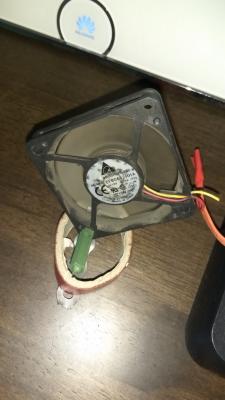
What I did is a 5cm 12Vdc , a normal PC cooling fan mount on a small 'L' bracket. The fan is put a the back of the router and blowing against casing and that enough to cool down by 10degC.

The fan is modified to connect to a usb charger, I decide not to connect to router usb as it connected with external harddisk.
Bcoz I connected the 12VDC with USB charger, therefore it is running with low speed only.
muncheno
post Feb 7 2017, 11:11 PM

Enthusiast
*****
Senior Member
736 posts

Joined: Jun 2006
From: Ipoh
QUOTE(muncheno @ Feb 7 2017, 07:47 PM)
I will post the picture later tonight.

What I did is a 5cm 12Vdc , a normal PC cooling fan mount on a small 'L' bracket. The fan is put a the back of the router and blowing against casing and that enough to cool down by 10degC.

The fan is modified to connect to a usb charger, I decide not to connect to router usb as it connected with external harddisk.
Bcoz I connected the 12VDC with USB charger, therefore it is running with low speed only.
*
@raynman , @blacktubi

Here is my DIY fan.

» Click to show Spoiler - click again to hide... «


raynman, I read from Asus forum the broadcom chipset can be operating around 80-90degC. If it temperature too high the chip will throttle the performance. If you don't have alot users, I think it is properly okay since you don't problem till now.

I only considering put a fan, bcoz I won't find another WS800 at same price therefore would want it last as long as it can and I also happen to have a spare fan to lower temperature.
muncheno
post Feb 8 2017, 06:21 AM

Enthusiast
*****
Senior Member
736 posts

Joined: Jun 2006
From: Ipoh
QUOTE(raynman @ Feb 8 2017, 04:56 AM)
Thanks, muncheno.

I am thinking of using a USB fan since I am not using the USB port on the router.

Something like this.  smile.gif
*
I had almost similar fan like which I brought in the first place to try however I find it too noisy. The pro it could cool down more than 10degC for my WS880, if not mistaken around 12degC lower.

Becoz my router is in living room, thus I found and use the noiseless fan shown in earlier picture.
muncheno
post Feb 8 2017, 08:49 AM

Enthusiast
*****
Senior Member
736 posts

Joined: Jun 2006
From: Ipoh
QUOTE(raynman @ Feb 8 2017, 07:08 AM)
You are right.

I have to take the noise generated by the USB fan into consideration.  sad.gif
*
For off the shelves solution, I would recommend you to think about putting a notebook cooling pad underneath th router.
muncheno
post Feb 8 2017, 04:09 PM

Enthusiast
*****
Senior Member
736 posts

Joined: Jun 2006
From: Ipoh
QUOTE(vios2002 @ Feb 8 2017, 01:24 PM)
Yes from spec... my CPU thermaltake fan is more stronger CFM spec is less than 60CFM can really feel the wind pressure.
*
CFM is the volume flow rate, I believe the smaller the diameter the higher the Pressure due to higher velocity generated to delivery the same amount of CFM need to deliever (volume flowrate Q = velocity V x area A).

This post has been edited by muncheno: Feb 10 2017, 10:33 AM
muncheno
post Feb 15 2017, 06:28 PM

Enthusiast
*****
Senior Member
736 posts

Joined: Jun 2006
From: Ipoh
Good, pls report back in after a months. smile.gif
muncheno
post Feb 20 2017, 08:55 PM

Enthusiast
*****
Senior Member
736 posts

Joined: Jun 2006
From: Ipoh
QUOTE(ETrader6688 @ Feb 20 2017, 06:02 PM)
Anyone here who got extra unit and want to sell it?
*
I will got it on tmr. Just brought it for RM350.
Yes, it is expensive, consider it started with rm200.

Offer me, see if I can't resist to sell it tongue.gif
muncheno
post Feb 20 2017, 09:06 PM

Enthusiast
*****
Senior Member
736 posts

Joined: Jun 2006
From: Ipoh
QUOTE(aneip @ Feb 20 2017, 08:57 PM)
Wanna let's go mine.. Offer me.
*
Ok. Start bidding at RM220 tongue.gif😝
muncheno
post Mar 11 2017, 01:11 PM

Enthusiast
*****
Senior Member
736 posts

Joined: Jun 2006
From: Ipoh
hi, may i know if anyone here got their WS880 with Xwrt running on Unifi?
If yes, may I know what is the setting?

I can't seem to get it running on unifi, I have goto IPTV and set for unifi-home and also tried manual, with Vlan tagging 500 & 600.

Thanks.
muncheno
post Mar 11 2017, 05:14 PM

Enthusiast
*****
Senior Member
736 posts

Joined: Jun 2006
From: Ipoh
QUOTE(sHawTY @ Mar 11 2017, 02:42 PM)
After you've chosen UniFi-Home in the LAN>IPTV setting
Go to WAN > Internet Connection & set it as per the screenshot below

Your UniFi username must be something like this: blabla@unifi
Your UniFi PPPoE password however, is a gibberish mix of letters & numbers. You can only get the PPPoE password from TM helpline

*
This is exactly what I did. It shown connected on status, but internet not working on lan or wifi.
I suspected Vlan tagging problem here.

Are you running with UNIFI on WS880 now?

Thanks.
muncheno
post Mar 11 2017, 05:16 PM

Enthusiast
*****
Senior Member
736 posts

Joined: Jun 2006
From: Ipoh
QUOTE(keewah @ Feb 7 2017, 11:19 PM)
Actually i did follow instruction from klseet sifu , but somehow still failed .

Maybe after CNY fever is over, will try again with the tomato firmware
*
I just flash from Xwrt to Tomato.
After flashing to Tomato, the router will not able to access webgui and seem like hanging there.

To fix, reboot the router into CFE via reset button and Reset NVRAM.
Then reboot it, you should able to login to Tomato webgui.

Regards.
muncheno
post Mar 11 2017, 06:22 PM

Enthusiast
*****
Senior Member
736 posts

Joined: Jun 2006
From: Ipoh
QUOTE(sHawTY @ Mar 11 2017, 05:29 PM)
Yes
*
May I know what Xwrt version is your Ws880 having now?
I was trying to setup Unifi on 380.65.

Now I have flashed tomato shibby, wanted to see if it is working or not with unifi. Tmr will able to feedback.

I would prefer Xwrt as it is less complicated.

muncheno
post Mar 11 2017, 10:04 PM

Enthusiast
*****
Senior Member
736 posts

Joined: Jun 2006
From: Ipoh
QUOTE(sHawTY @ Mar 11 2017, 08:38 PM)
I'm using 380.65
It's not the firmware fault, your setting or connection to the BTU might be wrong

WS880 is connected to which port on the BTU?
*
Port no. 1 on BTU.
I have no problem to setup Unifi using Xiaomi mini with padavan firmware, but WS880, can't get it working.

BTU is Alcatel i240G-P.
muncheno
post Mar 12 2017, 06:19 PM

Enthusiast
*****
Senior Member
736 posts

Joined: Jun 2006
From: Ipoh
QUOTE(sHawTY @ Mar 11 2017, 08:38 PM)
I'm using 380.65
It's not the firmware fault, your setting or connection to the BTU might be wrong

WS880 is connected to which port on the BTU?
*
Solved my problem.
Somehow everything work just by setting the LAN IP from 192.168.0.1 to 192.168.1.1 and I'm using manual IPTV with vlan 500 & 600.

Thanks.
muncheno
post May 14 2017, 04:27 PM

Enthusiast
*****
Senior Member
736 posts

Joined: Jun 2006
From: Ipoh
QUOTE(sHawTY @ May 14 2017, 02:52 PM)
XWRT-VORTEX has just released firmware version 380.66 Stable for WS880

*
Thanks for the info.
Will try to update it on next weekend.
muncheno
post May 19 2017, 04:22 AM

Enthusiast
*****
Senior Member
736 posts

Joined: Jun 2006
From: Ipoh
QUOTE(fruitie @ May 19 2017, 01:10 AM)
Switching to Digi Infinite, suits me better as I always travel.

OK, I have a problem now... After upgrading, it asks me to manually reboot my router which I did and it never come alive anymore. shocking.gif

The LED was showing for a while then went off, then came back again. doh.gif doh.gif How now? cry.gif

Damn it, I think I bricked the router. doh.gif doh.gif
I thought _2 no more issue? mad.gif
I desperately need help. Tried to reset and the Internet button keeps blinking. cry.gif Regretted, shouldn't have upgraded my firmware. cry.gif
Please help me. notworthy.gif
*
Have you see this post?
https://forum.lowyat.net/index.php?showtopi...post&p=84925051
muncheno
post May 19 2017, 12:32 PM

Enthusiast
*****
Senior Member
736 posts

Joined: Jun 2006
From: Ipoh
QUOTE(fruitie @ May 19 2017, 08:17 AM)
I have seen but it didn't go to the emergency page... No matter how I tried.
*
I have this experience with the 2nd unit of ws880 for my parents.
Sometime on trying to get into CFE the unit went like bricked, cannot power on.

So what I did was using my adc adapter from xiaomi router to connect to ws880 and it will power on the ws880. Then I use back huawei adc adapter, it run without problem.

Not sure it is similar situation.

I don't think your router is fully brick, it is likely soft brick only.
The CFE mode is quite robust.

Try set to different IP, because unifi setting nvram, the router may not running at 192.168.1.1.

Last time I set my PC to run 192.168.0.X and also 192.168.1.x
to see if the router is in 192.168.0.1 or 192.168.1.1

This post has been edited by muncheno: May 19 2017, 12:34 PM
muncheno
post May 19 2017, 01:50 PM

Enthusiast
*****
Senior Member
736 posts

Joined: Jun 2006
From: Ipoh
QUOTE(fruitie @ May 19 2017, 12:50 PM)
Guys, thanks for the advice. I shall give it another shot tonight.

OK, so the blinking is normal... But no connection how to connect to 192.168.1.1? hmm.gif

My Ethernet is showing yellow exclamation mark.
I cannot flash anything at CFE, so far it's only showing once. The rest in Asuswrt page.

I will try different adapter as well. Appreciate a lot. notworthy.gif
*
The windows for connecting, from my imagination it is like only 30sec from the moment you see `Internet` light up.

So if you can't get into CFE after few trials, you have to repeat reset by plus power up.
muncheno
post May 20 2017, 04:14 PM

Enthusiast
*****
Senior Member
736 posts

Joined: Jun 2006
From: Ipoh
QUOTE(fruitie @ May 19 2017, 10:56 PM)
Guess what? My friend came to my house to help me fixing it, after trying few options and lastly we changed the adapter... It works! Reboot few times and flashed few times to stress it, it's still running. Once we changed back to old adapter, it stopped working. doh.gif
*
Great that is working for you.

muncheno
post Aug 22 2017, 08:19 AM

Enthusiast
*****
Senior Member
736 posts

Joined: Jun 2006
From: Ipoh
QUOTE(sHawTY @ Aug 21 2017, 08:42 PM)
XWRT-VORTEX has just released firmware version 380.68 Stable for WS880
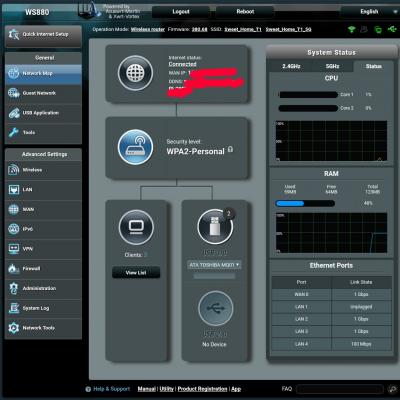
Thanks. Upgraded and no problem so far.
GUI didn't seem different alot, need to explore first.

Edited: added photo.
Attached Image

This post has been edited by muncheno: Aug 22 2017, 08:25 AM

5 Pages < 1 2 3 4 > » Top
 

Change to:
| Lo-Fi Version
0.0801sec    0.69    7 queries    GZIP Disabled
Time is now: 4th December 2025 - 10:26 PM