

yup..presario can only support up to 2GB of ram.
hp-compaq Presario V3000 series AMD & intel V2, Owners, Comments, Drivers, Support n Etc
hp-compaq Presario V3000 series AMD & intel V2, Owners, Comments, Drivers, Support n Etc
|
|
 Nov 26 2007, 02:04 PM Nov 26 2007, 02:04 PM
|
 
Senior Member
1,253 posts Joined: Jan 2007 From: Columbus, Ohio 
|
yup..presario can only support up to 2GB of ram.
|
|
|
|
|
|
Nov 26 2007, 02:46 PM
|

Senior Member
3,274 posts Joined: Mar 2005 From: Melacca ~NendoSlave~
|
haha now only the tech support replied my email
summore ask me to download V3000 cto synaptic driver  |
|
|
Nov 26 2007, 03:00 PM
|

Senior Member
836 posts Joined: Oct 2005 From: Jedi Temple, Coruscant  
|
QUOTE(ShinAsuka @ Nov 26 2007, 02:46 PM) haha now only the tech support replied my email haih..inefficient ppl working...damn...that's why i always get mad with customer services...summore ask me to download V3000 cto synaptic driver  |
|
|
Nov 26 2007, 04:17 PM
|

Junior Member
110 posts Joined: Jul 2006
|
thanks bro BOTAK_WAI for the drivers links..
|
|
|
Nov 26 2007, 06:28 PM
|
|
Senior Member
3,274 posts Joined: Mar 2005 From: Melacca ~NendoSlave~
|
woot using wireless mouse now
 it is great lol Added on November 26, 2007, 6:33 pmbut a normal mouse still cannot compare with my gaming mouse  can feel the difference haha This post has been edited by ShinAsuka: Nov 26 2007, 06:33 PM |
|
|
Nov 26 2007, 06:38 PM
|
|
Senior Member
1,253 posts Joined: Jan 2007 From: Columbus, Ohio
|
give some feedback la bro...pic ke....price how much...
|
|
|
|
|
|
Nov 26 2007, 06:41 PM
|
|
Senior Member
3,274 posts Joined: Mar 2005 From: Melacca ~NendoSlave~
|
pic dun hv lo lol
i using logitech wireless mini RM89 in my place here other place i dunno la  i tried control from 2-3meters away still working fine taken from google image  This post has been edited by ShinAsuka: Nov 26 2007, 06:43 PM |
|
|
Nov 26 2007, 06:47 PM
|
|
Senior Member
1,253 posts Joined: Jan 2007 From: Columbus, Ohio
|
the price quite resonable la...but if i have budget, prefer the M$ that have bluetooth one...
|
|
|
Nov 26 2007, 06:50 PM
|
|
Senior Member
3,274 posts Joined: Mar 2005 From: Melacca ~NendoSlave~
|
i also considered M$ b4
but see the picture liaw, quite big acually and the design not that good if want M$ small and nice design wireless can cost bomb, enuf to buy a laser mouse |
|
|
Nov 26 2007, 06:55 PM
|

Junior Member
344 posts Joined: Nov 2005 From: -Iceland- 
|
Hi,
i trying to install the Win XP for my sister's tx1005au and is it compulsory for me to install the Nvidia Forceware as stated in the 1st post? and what is mean by just add the tow line below into the inf file?  GRAPHICS: Updating to the latest NVIDIA FORCEWARE (alexus) "the latest forceware is version 93.71, you'll have to edit the nv4_disp.inf file to make it to install on geforce go 6150." just add the two line below into the inf file: %NVIDIA_C51.DEV_0244.1% = nv4_NV3x,PCI\VEN_10DE&DEV_0244 NVIDIA_C51.DEV_0244.1 = "NVIDIA Geforce Go 6150" Windows XP SP2 Setup & Installation Guide for V3119AU/V3009AU courtesy of shinjin (only for Windows XP SP2) 1. Install the OS. 2. Install the NVIDIA nForce Chipset Driver, Click here! 3. Install the NVIDIA GeForce Go 6150 Graphics Driver, Click here! 4. Install the AMD Processor Update for Microsoft Windows XP to optimized the processor for the system, Click here! 5. Install Microsoft Universal Audio Architecture (UAA) Bus Driver for High Definition Audio, Click here! 6. Install Conexant High Definition Audio (for AMD), Click here! 7. Install Conexant HDAUDIO Soft Data Fax Modem with SmartCP Driver, Click here! 8. Install Ricoh 5-in-1 Card Reader Host Controller and Driver, Click here! 9. Install Broadcom Wireless LAN Driver, Click here! 10. Install Software and Drivers for HP Integrated Module with Bluetooth Wireless (For V3119AU), Click here! 11. Install HP Wireless Assistant, Click here! 12. Install System Default Settings, Click here! |
|
|
Nov 26 2007, 07:14 PM
|
|
Senior Member
1,253 posts Joined: Jan 2007 From: Columbus, Ohio
|
QUOTE(-Mogwai- @ Nov 26 2007, 06:55 PM) Hi, i think this is not the right thread...this only for v3000 notebook...not tx1000...i trying to install the Win XP for my sister's tx1005au and is it compulsory for me to install the Nvidia Forceware as stated in the 1st post? and what is mean by just add the tow line below into the inf file? GRAPHICS: Updating to the latest NVIDIA FORCEWARE (alexus) "the latest forceware is version 93.71, you'll have to edit the nv4_disp.inf file to make it to install on geforce go 6150." just add the two line below into the inf file: %NVIDIA_C51.DEV_0244.1% = nv4_NV3x,PCI\VEN_10DE&DEV_0244 NVIDIA_C51.DEV_0244.1 = "NVIDIA Geforce Go 6150" Windows XP SP2 Setup & Installation Guide for V3119AU/V3009AU courtesy of shinjin (only for Windows XP SP2) 1. Install the OS. 2. Install the NVIDIA nForce Chipset Driver, Click here! 3. Install the NVIDIA GeForce Go 6150 Graphics Driver, Click here! 4. Install the AMD Processor Update for Microsoft Windows XP to optimized the processor for the system, Click here! 5. Install Microsoft Universal Audio Architecture (UAA) Bus Driver for High Definition Audio, Click here! 6. Install Conexant High Definition Audio (for AMD), Click here! 7. Install Conexant HDAUDIO Soft Data Fax Modem with SmartCP Driver, Click here! 8. Install Ricoh 5-in-1 Card Reader Host Controller and Driver, Click here! 9. Install Broadcom Wireless LAN Driver, Click here! 10. Install Software and Drivers for HP Integrated Module with Bluetooth Wireless (For V3119AU), Click here! 11. Install HP Wireless Assistant, Click here! 12. Install System Default Settings, Click here! BTW, shin, how to plug off the ram from the socket?? confused LOL trying to get it out... |
|
|
Nov 26 2007, 07:18 PM
|
|
Senior Member
836 posts Joined: Oct 2005 From: Jedi Temple, Coruscant
|
QUOTE(ShinAsuka @ Nov 26 2007, 06:41 PM) pic dun hv lo lol why this is cool dude...but i wont invest so much for mouse...most of the time in Uni, so later kena curi...beter use chapalang mouse...who wan to take take la..LOL...i using logitech wireless mini RM89 in my place here other place i dunno la i tried control from 2-3meters away still working fine taken from google image QUOTE(TheXxBestxX @ Nov 26 2007, 07:14 PM) i think this is not the right thread...this only for v3000 notebook...not tx1000... push it down, there's a pin at both side to lock in in place...slight the pin up anf the slot will come out already...then just pull the ram out...viola..u r out...BTW, shin, how to plug off the ram from the socket?? confused LOL trying to get it out... |
|
|
Nov 26 2007, 07:20 PM
|
|
Senior Member
3,274 posts Joined: Mar 2005 From: Melacca ~NendoSlave~
|
QUOTE(TheXxBestxX @ Nov 26 2007, 07:14 PM) i think this is not the right thread...this only for v3000 notebook...not tx1000... see below BTW, shin, how to plug off the ram from the socket?? confused LOL trying to get it out... unlock the pin |
|
|
|
|
|
Nov 26 2007, 07:25 PM
|
|
Senior Member
1,253 posts Joined: Jan 2007 From: Columbus, Ohio
|
QUOTE(jediknight7sam @ Nov 26 2007, 07:18 PM) why this is cool dude...but i wont invest so much for mouse...most of the time in Uni, so later kena curi...beter use chapalang mouse...who wan to take take la..LOL... push down what??push it down, there's a pin at both side to lock in in place...slight the pin up anf the slot will come out already...then just pull the ram out...viola..u r out... |
|
|
Nov 26 2007, 07:49 PM
|
|
Senior Member
836 posts Joined: Oct 2005 From: Jedi Temple, Coruscant
|
QUOTE(TheXxBestxX @ Nov 26 2007, 07:25 PM) push down what?? u can see 2 pins at the edge of the slots...try to unlock it...then ur ram will bump up itself... |
|
|
Nov 26 2007, 07:57 PM
|
|
Senior Member
1,253 posts Joined: Jan 2007 From: Columbus, Ohio
|
QUOTE(jediknight7sam @ Nov 26 2007, 07:49 PM) u can see 2 pins at the edge of the slots...try to unlock it...then ur ram will bump up itself... ok..let me try it..Added on November 26, 2007, 8:02 pmhow to unlock the pin?? This post has been edited by TheXxBestxX: Nov 26 2007, 08:02 PM |
|
|
Nov 26 2007, 08:32 PM
|
|
Senior Member
836 posts Joined: Oct 2005 From: Jedi Temple, Coruscant
|
QUOTE(TheXxBestxX @ Nov 26 2007, 07:57 PM) ok..let me try it.. hmmmm how to explain to u harr...pandai pandai la...just try, dont make ridiculous move and u wont spoil ur lappy..dont worry...Added on November 26, 2007, 8:02 pmhow to unlock the pin?? |
|
|
Nov 26 2007, 09:09 PM
|
|
Senior Member
1,253 posts Joined: Jan 2007 From: Columbus, Ohio
|
i mean how to unlock it?? by push, pull?? to what direction???
Added on November 26, 2007, 9:27 pmhow come burn so slow?? 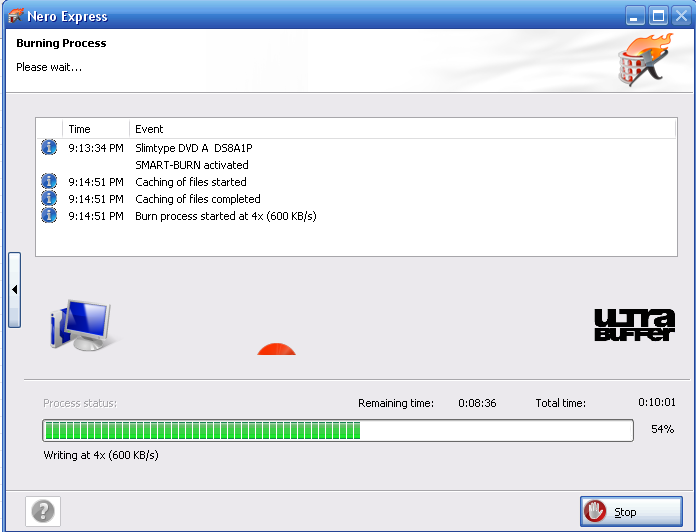 any idea ke guys? last time before i reformat my lappie, it can burn more more faster than right now...wtf is happen?? This post has been edited by TheXxBestxX: Nov 26 2007, 09:27 PM |
|
|
Nov 26 2007, 09:35 PM
|
|
Senior Member
836 posts Joined: Oct 2005 From: Jedi Temple, Coruscant
|
QUOTE(TheXxBestxX @ Nov 26 2007, 09:09 PM) i mean how to unlock it?? by push, pull?? to what direction??? check out ur lappy's heat...and report here....Added on November 26, 2007, 9:27 pmhow come burn so slow?? any idea ke guys? last time before i reformat my lappie, it can burn more more faster than right now...wtf is happen?? burning time depends on file size, file type.. i also seldom spend time n effort on burning.. |
|
|
Nov 26 2007, 09:58 PM
|
|
Senior Member
1,253 posts Joined: Jan 2007 From: Columbus, Ohio
|
laptop heat around 50-53C.....i mean the burning speed...last time more faster....few thousands of KB/s.
|
|
Topic ClosedOptions
|
| Change to: |  0.0187sec 0.0187sec
 0.73 0.73
 6 queries 6 queries
 GZIP Disabled GZIP Disabled
Time is now: 17th December 2025 - 01:15 PM |
 Quote
Quote