Hopefully the 42" C2 comes to MY. This will be a perfect monitor size imo!

LG OLED TV Discussion Thread, OLED TV
|
|
 Nov 24 2021, 11:43 AM Nov 24 2021, 11:43 AM
Return to original view | Post
#21
|
 
Junior Member
369 posts Joined: Dec 2015 
|
Hopefully the 42" C2 comes to MY. This will be a perfect monitor size imo! |
|
|
|
|
|
Dec 21 2021, 12:06 PM
Return to original view | Post
#22
|
|
Junior Member
369 posts Joined: Dec 2015
|
I have just clocked in 214 hours, (started using only since 23/10) of watching (Netflix, native youtube app and ps5) on my 65 CX. Now I see banding/darker gradient on the left side of screen (my left side).
These past few nights I have been watching a lot of SDR contents with OLED light at 45 and isf dark and switch back and forth between youtube app (the left side of the menu has darker black/gray then the content on the right side). I wonder if this causes this? I ran the greyscale test at 5% - 15% and the band is quite noticeable. The darker/thicker band is appearing exactly at where the youtube app menu changes gradient at the menu to content area. I know I shouldn't run pixel refresher manually unless I clock in like say 1500-2000 hours. The band is quite visible also especially movie panning shots. Updated: Played HDR movies for 4 hours straight and let the TV ran the compensation cycle on standby seem to reduce the banding by a bit. After looking at other panels uniformity online mine is not that bad. 😀 This post has been edited by Kahlamx: Dec 22 2021, 01:29 AM |
|
|
Dec 26 2021, 05:07 PM
Return to original view | Post
#23
|
|
Junior Member
369 posts Joined: Dec 2015
|
QUOTE(wira1979 @ Dec 26 2021, 02:43 PM) Update: Just got my panel replaced by LG FOC. Took around 3 weeks from complaint to replacement which isn't too bad. The technicians did a good job replacing but they missed 1 screw (which I thankfully stepped on and screwed it in myself, so not going to complain). Had a chat with them before they left my place and can summarise a few things: That's great to hear you got a replacement for the dead pixel. I have at least 7-10 dead sub pixels for blue and green along the edges scattered near top right and left. Reported to LG and pending technician to check my panel as well. Hopefully get mine replaced.- In relation to dead pixels, replacement depends on where the dead pixel is. Mine was quite in the middle of the screen so LG deems it interfering with the viewing experience, so even though I just had 1 dead pixel, they still deemed it worthy of replacement. However, if you have say 2 or 3 dead pixels but closer towards the edges of the screen, then you'd need maybe 4 or more before they will replace the panel because it doesn't 'hamper' viewing by their definition. In a way, I was 'lucky' that my dead pixel occurred where it did. - The whole process was very professional but it took some time mainly because of the approval process i.e. LG management has to authorise for the replacement since it was a high cost replacement. If you claim for something of a lower value (say, motherboard, remote, etc.), the process will definitely be faster. I didn't harass LG and just waited for them to get back to me so maybe that's why it was a little slower. - Suffice to say, I'm probably going to keep getting LG OLED TV's going forward based on this experience. Their washing machines are great as well, so definitely a brand I'll be loyal to going forward. On a side note, is 120 Hz enabled automatically if you play the Xbox Series X or PS5? I tried looking for some special setting on the TV but can't seem to find any on the TV.  For PS5 or Series X, you need to enable HDMI Ultra HD deep color. link This post has been edited by Kahlamx: Dec 26 2021, 05:27 PM wira1979 liked this post
|
|
|
Dec 27 2021, 06:45 PM
Return to original view | Post
#24
|
|
Junior Member
369 posts Joined: Dec 2015
|
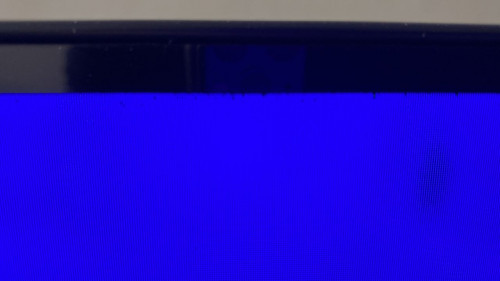
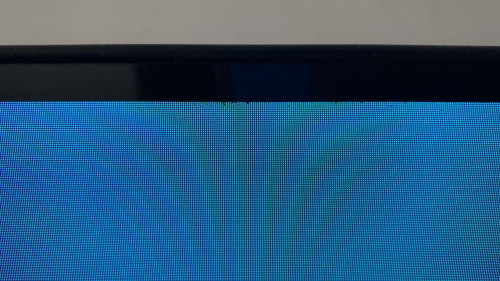
QUOTE(Convael @ Dec 27 2021, 03:25 PM) This is actually quite common among the OLED displays . Yes Convael, I totally understood what you are saying about the nature of OLED panel, banding and uniformity, it's more or less a lottery I reckon. The banding actually reduced a lot after I consistently played HDR movies only this past few days. Previously the banding was quite visible even at up to greyscale 35-40%. Now it's more or less within 15%-10% range.The Pixel composition are made of organics , which is why it is ever changing . After 200 hours of watching , there will be some changes to the pixels . Any kind of black cloudings , uneven brightness and screen uniformity should improve however slightly . In the process it will make the darker spots (which will take longer time to " fade " ) stood out a little more . Add in another 200 hours , or 2000 hours the screen should improve quite dramatically . Again because of the self emissive nature , 5% on the OLED is actually equals to roughly 1% from typical LCD . Which also explains why you tend to witness more issues in these very dim shades of gray . But they are not commonly used in movies or TV shows . I have learn to not actively look for these flaws unless it is completely blocking your vision , else you are just going to keep scratching your head , pestering LG to change panels and to what ends ? Your next panel is not guaranteed to be better and you can keep doing that but overall the process is tedious . My problem is this now, please see below. If there are only like 2-3 dead pixels around the edges, I am totally fine with it cause it will not affect my viewing for movies and even gaming with full screen. But the dead pixels are quite a lot and considering I have only used it for 200+ hours and I normally baby my stuff. » Click to show Spoiler - click again to hide... « » Click to show Spoiler - click again to hide... « » Click to show Spoiler - click again to hide... « **For new OLED buyers, I am not trying to discourage you from buying an OLED Tv. This is just part and parcel of any OLED/LED display of any brands. My next TV will still be an LG/Sony OLED. This post has been edited by Kahlamx: Dec 27 2021, 07:16 PM |
|
|
Dec 28 2021, 12:10 PM
Return to original view | Post
#25
|
|
Junior Member
369 posts Joined: Dec 2015
|
QUOTE(Convael @ Dec 28 2021, 12:56 AM) You should ask for replacement if possible , that is quite a lot of dots . QUOTE(wira1979 @ Dec 28 2021, 08:13 AM) That's 3 too many. Better lodge a complaint and at the very least get them to inspect your TV. Yes I already contacted LG, gotten a report number and they have contacted me yesterday to request for proof and serial number. Hope they can replace it.QUOTE(TongCN @ Dec 28 2021, 10:59 AM) Wow... those dots only come after using for 200 hours + ? I suspect it might have been there since day 1. It's just that I did not do RGB test back then. |
|
|
Dec 30 2021, 12:07 PM
Return to original view | Post
#26
|
|
Junior Member
369 posts Joined: Dec 2015
|
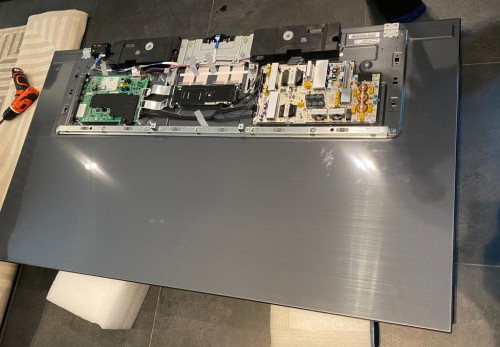
QUOTE(excaliburcombo @ Dec 29 2021, 11:36 PM) its too many. Mine change panel 2 times also having multiple dead pixel at different location for different panel. Lastly LG change new TV That’s nice to hear. Well if they can replace the panel and no more dead pixels I am happy already. But a new TV is always welcome. 😂 Update: LG responded and they will proceed to replace a new OLED panel. Part estimated to arrive next week.  This post has been edited by Kahlamx: Dec 30 2021, 03:17 PM KLKN_Views, tony_mw, and 2 others liked this post
|
|
|
|
|
|
Dec 31 2021, 07:03 PM
Return to original view | Post
#27
|
|
Junior Member
369 posts Joined: Dec 2015
|
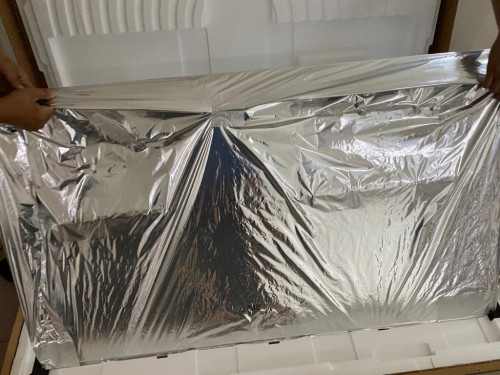
QUOTE(Kahlamx @ Dec 30 2021, 12:07 PM) That’s nice to hear. Well if they can replace the panel and no more dead pixels I am happy already. Received a surprise call this morning that the panel arrived at the SC and they came to replace at 5pm. Whole process took less than 30 mins. Both technicians are very professional. But a new TV is always welcome. 😂 Update: LG responded and they will proceed to replace a new OLED panel. Part estimated to arrive next week. So far no dead pixels for the new panel.  » Click to show Spoiler - click again to hide... « » Click to show Spoiler - click again to hide... « |
|
|
Jan 6 2022, 01:06 PM
Return to original view | Post
#28
|
|
Junior Member
369 posts Joined: Dec 2015
|
4.30.55 is out for CX. Anyone knows what's the update?
|
|
|
Jan 9 2022, 10:21 PM
Return to original view | Post
#29
|
|
Junior Member
369 posts Joined: Dec 2015
|
QUOTE(andrekua2 @ Jan 8 2022, 01:13 AM) Saw the QD OLED on YouTube and wow... I wonder if LG going to do the same. I hope they do. But either way, I suppose QD-OLED will be expensive asf.https://www.cnet.com/tech/home-entertainmen...uantum-dot-era/ » Click to show Spoiler - click again to hide... « This post has been edited by Kahlamx: Jan 9 2022, 10:28 PM |
|
|
Jan 10 2022, 12:27 PM
Return to original view | Post
#30
|
|
Junior Member
369 posts Joined: Dec 2015
|
QUOTE(TongCN @ Jan 10 2022, 09:26 AM) But the monitor that using QD OLED catches my interest, hope the price is reasonable XD Probably will rival a 42 or 48 C2 price? |
|
|
Jan 25 2022, 10:48 AM
Return to original view | Post
#31
|
|
Junior Member
369 posts Joined: Dec 2015
|
QUOTE(ben3003 @ Jan 25 2022, 10:22 AM) nanocell one? but if 4k budget recommend u go sony camp buy x90j but weird why x90j no wide color gamut but say support HDR lol. Sony X90J can run on BT2020 color primaries. It is one of the requirement for HDR10.Also HDR as the term says, High Dynamic Range is actually tied to Peak brightness / black level (lowest brightness). |
|
|
Jan 25 2022, 07:25 PM
Return to original view | Post
#32
|
|
Junior Member
369 posts Joined: Dec 2015
|
QUOTE(chtan @ Jan 25 2022, 11:31 AM) You can also turn on colorimetry BT2020 on LG C1. Just access the hidden screen by go to picture mode setting then pressing 1113111. However, this is not recommended as this overwrite the game/movie producer original intent. you are forcing HDR tone mapping signals on SDR contents or what? |
|
|
Feb 24 2022, 02:35 PM
Return to original view | Post
#33
|
|
Junior Member
369 posts Joined: Dec 2015
|
QUOTE(greyshadow @ Feb 23 2022, 03:11 PM) 55" C1 @ RM7799 with free shipping That's simply too much. The 55 C1 was going for around RM6.3 6.4k+ or so during one of those 12.12. or X.X sale for Klang Valley side. I recalled the 65" Sony A80J was on special offer during 12.12. for 7999 or 8999.good deal? to buy or not to buy  Was planning to wait for C2 This post has been edited by Kahlamx: Feb 24 2022, 02:36 PM |
|
|
|
|
|
Mar 28 2022, 08:21 PM
Return to original view | Post
#34
|
|
Junior Member
369 posts Joined: Dec 2015
|
QUOTE(clemllk @ Mar 28 2022, 08:06 PM) ok nice, I cant wait to check mine when it gets delivered tomorrow! mind to share where you get this deal?got it for 2.7k from lazada |
|
|
Mar 29 2022, 01:38 PM
Return to original view | Post
#35
|
|
Junior Member
369 posts Joined: Dec 2015
|
QUOTE(komandermaut @ Mar 29 2022, 12:18 PM) is CX so outdated already? planning to go for CX instead of C1 I would recommend to go for C1 unless you get a super deal for the CX. Plus You get additional year of future firmware support. |
|
|
Mar 30 2022, 12:24 PM
Return to original view | Post
#36
|
|
Junior Member
369 posts Joined: Dec 2015
|
QUOTE(./LXY @ Mar 30 2022, 12:04 AM) So end up buying? I managed to get myself a 48" at 3.1k wow 48 C1 at that price? How much laz bonus you got there? This post has been edited by Kahlamx: Mar 30 2022, 12:24 PM |
|
|
Apr 14 2022, 12:59 PM
Return to original view | Post
#37
|
|
Junior Member
369 posts Joined: Dec 2015
|
QUOTE(ozak @ Apr 14 2022, 12:46 PM) Brought a LG C1 65" OLED last week. Nice. Make sure to use the correct presets for HDR and SDR content.Damn, so vivid the color, clear and 4k sharpness. This post has been edited by Kahlamx: Apr 14 2022, 12:59 PM |
|
|
Apr 14 2022, 06:53 PM
Return to original view | Post
#38
|
|
Junior Member
369 posts Joined: Dec 2015
|
QUOTE(toytoy @ Apr 14 2022, 06:24 PM) Welcome to the club. I also just got my 55" end of March. Take what he says with a grain of salt. He says he is a master calibrator but never shows any calibration results like Vincent Teoh does.I follow settings from YT also. RTings and HDTVTest is a good source. Can take the summary below from QuantumTV for reference but some ppl from Reddit said he's not legit or something. Anyway just for reference. 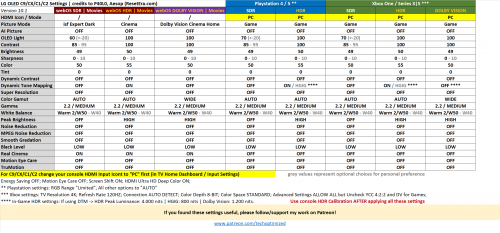 Convael liked this post
|
|
|
May 13 2022, 03:03 PM
Return to original view | Post
#39
|
|
Junior Member
369 posts Joined: Dec 2015
|
QUOTE(Puteih @ May 13 2022, 02:54 PM) Just saw the new C2 and QNED lineup in HomeDec. TBH I don't really find much difference with other OLED, or maybe my eyes not that sharp. They already have preorder for C2, but only 83" (RM26K) and 77" (RM22K). Any words for the 42 in C2? |
|
|
May 24 2022, 03:50 PM
Return to original view | Post
#40
|
|
Junior Member
369 posts Joined: Dec 2015
|
QUOTE(wira1979 @ May 24 2022, 03:43 PM) Agree and this is my main concern. Currently building a dry wall at my TV mounting place but was wondering how to 'bridge' the gap/space between the dry wall and actual solid wall. Mounting a 65" TV solely on the dry wall is something I don't want to risk. Create a 2x4 frame between the space. Make sure the bolts and screws directly into the 2x4 frame studs. |
| Change to: |  0.0384sec 0.0384sec
 0.49 0.49
 7 queries 7 queries
 GZIP Disabled GZIP Disabled
Time is now: 1st December 2025 - 01:45 PM |
 Quote
Quote