Welcome Guest ( Log In | Register )

23 Pages « < 3 4 5 6 7 > » Bottom

Outline · [ Standard ] · Linear+

Unifi Connect UniFi HyppTV Set Top Box Through WiFi

views
     
win6003
post Feb 14 2017, 11:23 AM

New Member
*
Newbie
3 posts

Joined: Feb 2017


Hi all =D

Newbie here. Just installed Unifi today.

I fail to setup the HyppTV through the SSID with WAN tagged with IPTV.

My router is D-link DIR-850L, it dont allow us to change the encryption type for the SSID.

Anyone can help me out? Thanks alot..
noobandroid
post Feb 14 2017, 12:27 PM

Audiophile
********
All Stars
11,836 posts

Joined: Mar 2011
From: Kota Kinabalu, Sabah


QUOTE(win6003 @ Feb 14 2017, 11:23 AM)
Hi all =D

Newbie here. Just installed Unifi today.

I fail to setup the HyppTV through the SSID with WAN tagged with IPTV.

My router is D-link DIR-850L, it dont allow us to change the encryption type for the SSID.

Anyone can help me out? Thanks alot..
*
if you wanna connect hyppTV wifi, you need create a guest wifi with IPTV config
win6003
post Feb 14 2017, 12:31 PM

New Member
*
Newbie
3 posts

Joined: Feb 2017


i try but it cannot connect from the set up box

win6003
post Feb 14 2017, 12:32 PM

New Member
*
Newbie
3 posts

Joined: Feb 2017


if you dont mind can you help me to do it go thought team viewer ?

mztang52
post Feb 17 2017, 06:00 AM

Before you quit, TRY
*******
Senior Member
2,807 posts

Joined: Jun 2015


QUOTE(win6003 @ Feb 14 2017, 01:31 PM)
i try but it cannot connect from the set up box
*
So did u successfully create a new SSID which is tagged with VLAN 600?

This post has been edited by mztang52: Feb 18 2017, 08:08 AM
cucubud
post Feb 17 2017, 07:52 AM

Super Moderator
*******
Senior Member
3,076 posts

Joined: Jan 2008


QUOTE(win6003 @ Feb 14 2017, 11:23 AM)
Hi all =D

Newbie here. Just installed Unifi today.

I fail to setup the HyppTV through the SSID with WAN tagged with IPTV.

My router is D-link DIR-850L, it dont allow us to change the encryption type for the SSID.

Anyone can help me out? Thanks alot..
*
Did you read page 1 of this thread?
nzuser has drawn up the steps on how to create another SSID for HyppTv.
ETrader6688
post Feb 20 2017, 04:54 PM

New Member
*
Newbie
6 posts

Joined: May 2009


Can the TP-Link Archer C5 router works as well?
gahkin
post Feb 20 2017, 05:28 PM

Enthusiast
*****
Senior Member
735 posts

Joined: Jan 2003
From: Selayang , Kepong


any idea if use 3rd party firmware (openwrt , ddwrt ) or asus router can make it works?

EDIT :

i just found this on the klseet.com, u think this method is more easy to config and work ?

soc : https://www.klseet.com/index.php/213-tm-uni...-vlans-trunking

hmm.gif hmm.gif

This post has been edited by gahkin: Feb 21 2017, 12:12 AM
soonwai
post Feb 21 2017, 03:13 PM


********
All Stars
11,458 posts

Joined: Oct 2007
From: KL


QUOTE(gahkin @ Feb 20 2017, 05:28 PM)
...
i just found this on the klseet.com, u think this method is more easy to config and work ?

soc : https://www.klseet.com/index.php/213-tm-uni...-vlans-trunking

hmm.gif  hmm.gif
*
The original for that is actually from here: https://forum.lowyat.net/topic/1733801

Cable is always more reliable than wifi. That's how it's done in my house too. VLAN600 is trunked from my main router upstairs to my switch next to the TV downstairs. The switch is actually a router but just functioning as a managed switch.

In another house, there's no cable so I use wifi to achieve the same thing. Though not quite the same as described here. Here I use a wifi WDS bridge with 2 Mikrotik APs to send vlan600 to the STB. The STB here is the old one that has no wifi. HyppTV is very sensitive to interference. Any hiccups to its stream and it will lag or even stop. To avoid that I use a 2.4GHz freq that's outside the usual wifi channels of 1-13. Technically it's illegal to do that but hey, no inteference.
SUSKaD1GO
post Feb 21 2017, 05:41 PM

Getting Started
**
Junior Member
75 posts

Joined: Nov 2016


QUOTE(calvinlaw510 @ Feb 10 2017, 06:28 PM)
TPlink didnt support Vlan over wireless...so forget about connect hypptv with wifi if you got TPlink router from TM.
*
How about Asus RT-N18U?
gahkin
post Feb 21 2017, 08:05 PM

Enthusiast
*****
Senior Member
735 posts

Joined: Jan 2003
From: Selayang , Kepong


QUOTE(soonwai @ Feb 21 2017, 03:13 PM)
The original for that is actually from here: https://forum.lowyat.net/topic/1733801

Cable is always more reliable than wifi. That's how it's done in my house too. VLAN600 is trunked from my main router upstairs to my switch next to the TV downstairs. The switch is actually a router but just functioning as a managed switch.

In another house, there's no cable so I use wifi to achieve the same thing. Though not quite the same as described here. Here I use a wifi WDS bridge with 2 Mikrotik APs to send vlan600 to the STB. The STB here is the old one that has no wifi. HyppTV is very sensitive to interference. Any hiccups to its stream and it will lag or even stop. To avoid that I use a 2.4GHz freq that's outside the usual wifi channels of 1-13. Technically it's illegal to do that but hey, no inteference.
*
so far u using this stable all the way with your hpptv and internet ? look like only mikrotik can done this settings? if using with other mikrotik trunk with other router can get this setting up or not ?

what i study as understanding is ? so must use mikrotik to act as main router to carry pppoe and other purpose also? mega_shok.gif

This post has been edited by gahkin: Feb 21 2017, 08:05 PM
soonwai
post Feb 21 2017, 08:34 PM


********
All Stars
11,458 posts

Joined: Oct 2007
From: KL


QUOTE(gahkin @ Feb 21 2017, 08:05 PM)
so far u using this stable all the way with your hpptv and internet ? look like only mikrotik can done this settings? if using with other mikrotik trunk with other router can get this setting up or not ?

what i study as understanding is ? so must use mikrotik to act as main router to carry pppoe and other purpose also? mega_shok.gif
*
Yeah, stable. No probs at all other than headaches when setting it up.

All routers can do vlans. If cannot then it won't work with UniFi in the first place. Cheaper routers might not have the feature exposed to the user because they want to keep the GUI easy. Some features may only be configurable via the command line. I would expect a high end RM1000 Asus to be able to do it.

Mikrotik's approach is a bit different. What you can do on the RM10,000 model, you can also do on the RM150 model. The OS is exactly the same. The limitations are CPU speed and RAM.

Not a must to use Mikrotik. You can use Cisco or Ubiquiti. Not sure about this but probably premium models of DLink, Asus or TPLink also can. You only need a capable router at one end and a managed switch at the other. Don't need a 2nd router. I use a 2nd router because I don't have a managed switch. If you have a spare router from UniFi you can also use that. For example, you can use the DIR-615 in place of the switch. The vlan trunk cable into ether1 and Hytpptv out ether5 as pre-configured. I haven't actually tried this but it should work.

Anyway to summarise, the main router is the most important. The user must able to configure PPPoE and VLAN access & trunk ports.

This post has been edited by soonwai: Feb 21 2017, 10:22 PM

MelancholicAnubis
post Mar 2 2017, 11:14 PM

New Member
*
Junior Member
35 posts

Joined: Mar 2017
From: Somewhere :3


Hey everyone,

Recently, got Unifi with the HyppTv. Only issue is my TV is a floor above the router and wanted to go wireless. Since I had the new TP Link router that can't do VAP, I thought, why not use my old Streamyx router(DB120-WL) as the AP. I set up it as a wireless switch/AP and connected one of the LAN ports to LAN4 of the TP-Link router. It connected the STB to the AP and it 'works'. It managed to sync the NTP time, and I got into the HyppTv app. Finally, something works on the first try.

I celebrated too soon.

Only issue is that, I can't watch channels live, and the red crossed out satellite appears. I can only watch time shift enabled channels.

Any solutions to this? I don't know whether to enable VLAN/VAP on the Streamyx router, as it is already enabled in the TP Link one.

bluebutton
post Mar 24 2017, 11:43 AM

New Member
*
Junior Member
8 posts

Joined: Mar 2009
Hi all,

Am pretty stuck at the moment. Am using 850L and it seems that there is no option for Port Binding. I've created the SSID and changed the WAN connection to IPTV. However, when I tried to connect my STB to the new SSID, I kept getting 'Authentication Failed'. Even called TM to get my IPTV password and set up the SSID user name and password according to my IPTV info but still fruitless. Anyone has the same issue?

Am already at the brink of surrendering and just buy the TM additional device to help get my Hypptv set up in another room.
dirk_diggler
post Mar 24 2017, 11:50 AM

Getting Started
**
Junior Member
148 posts

Joined: Mar 2005
QUOTE(bluebutton @ Mar 24 2017, 12:43 PM)
Hi all,

Am pretty stuck at the moment. Am using 850L and it seems that there is no option for Port Binding. I've created the SSID and changed the WAN connection to IPTV. However, when I tried to connect my STB to the new SSID, I kept getting 'Authentication Failed'. Even called TM to get my IPTV password and set up the SSID user name and password according to my IPTV info but still fruitless. Anyone has the same issue?

Am already at the brink of surrendering and just buy the TM additional device to help get my Hypptv set up in another room.
*
I have the same issue as you. Created a guest SSID on the 850L, assigned it to IPTV on the WAN page and when I connect it to the SSID, "Authentication failed". But if you assign that SSID to Internet on the WAN page, the STB will connect to the SSID and gain access to the internet.

Any sifus out here can teach us how to get the IPTV to work on the 850L? Thanks.
viqq
post Apr 7 2017, 11:46 PM

From the Eastside
******
Senior Member
1,836 posts

Joined: Oct 2005
From: Mars

Hi guys, so the easy route is to get a homeplug right?
soonwai
post Apr 8 2017, 05:11 PM


********
All Stars
11,458 posts

Joined: Oct 2007
From: KL


QUOTE(viqq @ Apr 7 2017, 11:46 PM)
Hi guys, so the easy route is to get a homeplug right?
*
Yes, homeplug is very easy to setup. Basically just plug in and play. It's also very stable. All this if your abode is single-phase electricity or if 3-phase, both power sockets are on the same phase. If different phase then YMMV.

I speak from experience as I was using 2 Aztech Homeplugs for my HyppTV, from router upstairs to living room downstairs. I used this for almost 5 yrs before I changed to vlan trunking. The homeplugs seem to be quite resilient too having survive a few thunderstorms throughout that time.
viqq
post Apr 9 2017, 10:23 PM

From the Eastside
******
Senior Member
1,836 posts

Joined: Oct 2005
From: Mars

QUOTE(soonwai @ Apr 8 2017, 05:11 PM)
Yes, homeplug is very easy to setup. Basically just plug in and play. It's also very stable. All this if your abode is single-phase electricity or if 3-phase, both power sockets are on the same phase. If different phase then YMMV.

I speak from experience as I was using 2 Aztech Homeplugs for my HyppTV, from router upstairs to living room downstairs. I used this for almost 5 yrs before I changed to vlan trunking. The homeplugs seem to be quite resilient too having survive a few thunderstorms throughout that time.
*
Hi! Thanks for the reply! I mean,how am I gonna check if my abode is single or 3 phase? Guess I'm gonna get one soon
soonwai
post Apr 9 2017, 11:02 PM


********
All Stars
11,458 posts

Joined: Oct 2007
From: KL


QUOTE(viqq @ Apr 9 2017, 10:23 PM)
Hi! Thanks for the reply! I mean,how am I gonna check if my abode is single or 3 phase? Guess I'm gonna get one soon
*
Look at the big fuses next to your TNB meter. Single got one fuse and 3-phase got 3 fuses.
zenoon2008
post Apr 10 2017, 11:57 AM

Getting Started
**
Junior Member
137 posts

Joined: Oct 2008


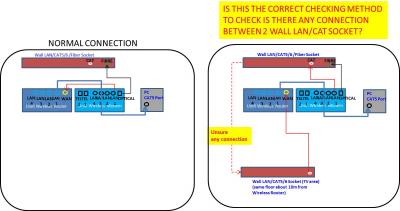
Can somebody verify that is this the correct method of checking is there any connection between 2 wall LAN/CAT socket which are at the same floor.
I do not know is there any cable inside the wall LAN/CAT socket.
Purpose is to connect the hypptv to the router which are not at the same area.

If not, what are the correct method?

Thanks!
Attached Image

23 Pages « < 3 4 5 6 7 > » Top
 

Change to:
| Lo-Fi Version
0.0209sec    0.58    6 queries    GZIP Disabled
Time is now: 11th December 2025 - 06:40 AM