Outline ·
[ Standard ] ·
Linear+
Unifi Connect UniFi HyppTV Set Top Box Through WiFi
|
cucubud
|
 Apr 10 2017, 01:06 PM Apr 10 2017, 01:06 PM
|

|
QUOTE(zenoon2008 @ Apr 10 2017, 11:57 AM) Can somebody verify that is this the correct method of checking is there any connection between 2 wall LAN/CAT socket which are at the same floor. I do not know is there any cable inside the wall LAN/CAT socket. Purpose is to connect the hypptv to the router which are not at the same area. If not, what are the correct method? Thanks! [attachmentid=8714579] Why don't you just leave the router where it is and just connect the Router Lan1 to the wall RJ45. At the other end, connect the PC Ethernet port to the wall RJ45. |
|
|
|
|
|
zenoon2008
|
Apr 10 2017, 01:27 PM
|
Getting Started

|
I try before to connect the router LAN 4 to the wall RJ45 & the other end connect to my hypptv tv Ethernet port but it won't work (no connection).
That's why i want to test is there any connection between wall RJ45 of router area & hypptv area.
|
|
|
|
|
|
soonwai
|
Apr 10 2017, 02:38 PM
|
|
|
QUOTE(zenoon2008 @ Apr 10 2017, 01:27 PM) I try before to connect the router LAN 4 to the wall RJ45 & the other end connect to my hypptv tv Ethernet port but it won't work (no connection). That's why i want to test is there any connection between wall RJ45 of router area & hypptv area. You're almost there. Do what you did. Connect one RJ45 wall socket to the router. Then connect the other wall socket to a PC, laptop, HyppTV or whatever. See if the LAN led on the router got light up or not. If lights up means got connectivity. |
|
|
|
|
|
zenoon2008
|
Apr 10 2017, 02:47 PM
|
Getting Started
|
no light on the router.
Meaning that no connection.
Call TM, need to connect LAN cable directly from router LAN 4 port to HyppTV Ethernet port.
Will it works if i connect the LAN cable through RJ45 sockets?
Thanks.
|
|
|
|
|
|
cucubud
|
Apr 10 2017, 03:12 PM
|
|
|
QUOTE(zenoon2008 @ Apr 10 2017, 02:47 PM) no light on the router. Meaning that no connection. Call TM, need to connect LAN cable directly from router LAN 4 port to HyppTV Ethernet port. Will it works if i connect the LAN cable through RJ45 sockets? Thanks. You should get someone to test out the wall RJ45 and see if the cabling were done correctly. No light means no connection. |
|
|
|
|
|
soonwai
|
Apr 10 2017, 03:17 PM
|
|
|
QUOTE(zenoon2008 @ Apr 10 2017, 02:47 PM) no light on the router. Meaning that no connection. Call TM, need to connect LAN cable directly from router LAN 4 port to HyppTV Ethernet port. Will it works if i connect the LAN cable through RJ45 sockets? Thanks. Router Lan 4 to RJ45 wall sockets to HyppTV STB, can, no problem. But sounds like your wall sockets something wrong. |
|
|
|
|
|
zenoon2008
|
Apr 10 2017, 03:24 PM
|
Getting Started
|
I suspect developer only install the RJ45 sockets without cables inside.
If true, i need to install the LAN cables between two RJ45 wall sockets.
Anyway thanks for your help.
|
|
|
|
|
|
mztang52
|
Apr 10 2017, 04:27 PM
|
|
|
QUOTE(zenoon2008 @ Apr 10 2017, 12:57 PM) Can somebody verify that is this the correct method of checking is there any connection between 2 wall LAN/CAT socket which are at the same floor. I do not know is there any cable inside the wall LAN/CAT socket. Purpose is to connect the hypptv to the router which are not at the same area. If not, what are the correct method? Thanks! [attachmentid=8714579] Yes. |
|
|
|
|
|
zenoon2008
|
Apr 10 2017, 04:44 PM
|
Getting Started
|
normally for new house, any idea during rj45 socket installation, does it included lan cables as well?
if included, then i suspect cabling were not done correctly.
there is connection for rj11 socket, but don't why no connection for rj45 socket.
|
|
|
|
|
|
mztang52
|
Apr 10 2017, 04:50 PM
|
|
|
QUOTE(zenoon2008 @ Apr 10 2017, 05:44 PM) normally for new house, any idea during rj45 socket installation, does it included lan cables as well? if included, then i suspect cabling were not done correctly. there is connection for rj11 socket, but don't why no connection for rj45 socket. Landed house? |
|
|
|
|
|
zenoon2008
|
Apr 10 2017, 04:51 PM
|
Getting Started
|
yes, mstang52
|
|
|
|
|
|
zenoon2008
|
Apr 10 2017, 04:52 PM
|
Getting Started
|
there are 2 rj45 socket, one at the modem area, another on at the tv area.
Both at the same floor with distance about 10m.
|
|
|
|
|
|
mztang52
|
Apr 10 2017, 04:52 PM
|
|
|
QUOTE(zenoon2008 @ Apr 10 2017, 05:51 PM) You have to check in the room underneath the staircase. You will find a box which has all the RJ45 ports. |
|
|
|
|
|
zenoon2008
|
Apr 10 2017, 04:56 PM
|
Getting Started
|
yes, there are 3 RJ11 sockets, 1 RJ45 sockets, 1 optical fiber sockets, all installed on the wall.
another at the tv area which consist of 1 RJ11 sockets & 1 RJ45 sockets, all installed on the wall too
|
|
|
|
|
|
mztang52
|
Apr 10 2017, 04:59 PM
|
|
|
QUOTE(zenoon2008 @ Apr 10 2017, 05:56 PM) yes, there are 3 RJ11 sockets, 1 RJ45 sockets, 1 optical fiber sockets, all installed on the wall. another at the tv area which consist of 1 RJ11 sockets & 1 RJ45 sockets, all installed on the wall too If the RJ45 ports in the room are not connected, it means there is no connection to the other RJ45 ports outside of that room. |
|
|
|
|
|
zenoon2008
|
Apr 10 2017, 05:41 PM
|
Getting Started
|
ok, i'll check tonight.
Thanks a lot!
|
|
|
|
|
|
mztang52
|
Apr 10 2017, 08:20 PM
|
|
|
QUOTE(zenoon2008 @ Apr 10 2017, 08:51 PM) There is only one rj45 port beneath the staircase. 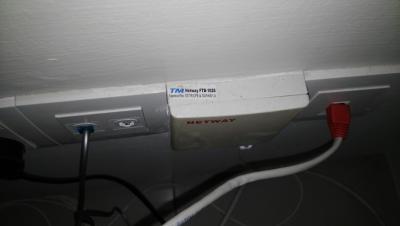
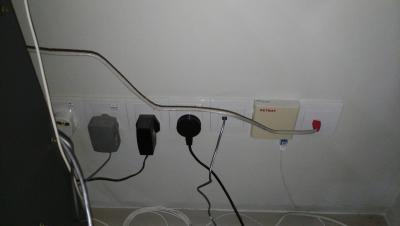
What is the red color head RJ45 cable for? Is it connected to the router? |
|
|
|
|
|
zenoon2008
|
Apr 10 2017, 08:22 PM
|
Getting Started
|
Yes,connect to router lan 4
|
|
|
|
|
|
mztang52
|
Apr 10 2017, 08:50 PM
|
|
|
QUOTE(zenoon2008 @ Apr 10 2017, 09:22 PM) Yes,connect to router lan 4 Is it working? |
|
|
|
|



 Quote
Quote




 0.0245sec
 0.87
0.87
 6 queries
 GZIP Disabled